Access denied when using the services tool

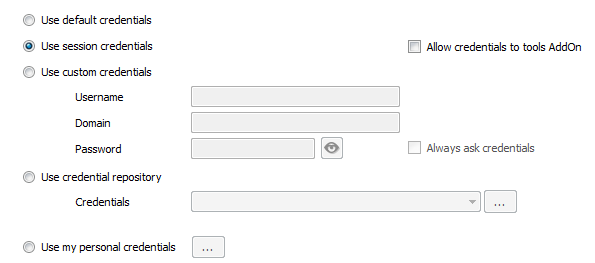
I have an RDP connection setup to a Windows Server 2008 but if I try to use the services tool I get an access denied error. I can log in with that connection and access services with no problem. I do have the tools setup to use the session credentials.
I also tried accessing the computer management tool which does come up but when I navigate to services with that it gives me the same error.
10-9-2014 8-08-10 AM.png
All Comments (23)
Hello,
From your workstation, can you use RunAs to start mmc.exe in an elevated command prompt:runas /netonly /user:_ADMINACCT_ "mmc.exe \"services.msc\""Where the _ADMINACCT_ is the full name of the account that you have set as the session credentials.
Does it allow you do connect when in mmc you use Action - Connect to another computer...
Maurice
no it gives me the error 5: Access denied
smells like a firewall is blocking you.
From http://msdn.microsoft.com/en-us/library/dd163507.aspx
Maybe you need to run this on the remote host
netsh advfirewall firewall set rule group="Remote Service Management" new enable=yes
Maurice
I've got the same issue..
When i manually connect to a other computer, with a other account (the checkbox) i can connect without any problem..
Tried it with all possible credential options, always the same result..
Tested on OS: "Windows 8.1 x64" latest updates and also on "Windows 7 x86".
On the other computer the firewall is off.
@edit: UAC is off, we want to connect to computer which are not part of the same domain!
edited by stein-it on 1/2/2015
Which tool have you tried exactly? Is it only the service? What do you mean i can connect with the checkbox?
David Hervieux
With the new Beta Version, the Inventory Report is working.
We've still issues with the "eventlog" "services" and "computer management"
We got the "Access denied (5)" error on it.
With the opionon to choose a other account the connection is working, while setting it manually..
The credentials used by this workflowis the one set in the tools tab of the session, have you set that?
Maurice
I've tried with every credential option, its always the same result.
Has anyone else this error? Would be great if there is an option to use it :)
thank you
Hello,
Using the remote host event viewer, if "Failed login attempts" are logged, you would see what account is used.
Can you have a look?
Maurice
The remote host got eventlogs from my own account, not that one which is configured.
I could connect using Gotomeeting to have a look around. Maybe there's something we're missing.
If you agree, please contact me via Private Message so I can send an invite.
Thank you
Maurice
Just for the others: the macro isnt working
but here is a workaround for those who got the same issue:
Thank you very much for the workaround. I still have no explanation why the other method (with the mmc console) does not work but I will keep you posted if we find out.
David Hervieux
We are having the same problem when attempting to use the Services/Event Viewer tools.
After testing, it seems that the problem is caused by incorrect credentials being passed. In our environment, our domain admin accounts are separate from normal user accounts, so we connect to servers using a different account than we use for our local Windows sessions.
If we open a session to a server, the stored domain admin credentials from our private vaults are applied and we can sign in. If we use the services or event viewer tools, however, it appears that the credentials used are our inherited credentials from the local windows session. If we run Remote Desktop Manager as our domain admin accounts, the tools then work fine.
Even if we use Edit Entry (User Specific Settings) and specify our private vault credential entries in the Tools tab, the application still passes our local Windows credentials instead of our domain admin credentials.
This doesn't seem to happen on Computer Management, which works correctly. It's just Event Viewer and Services which aren't working.
EDIT: Inventory Report is not working either, so I assume that's also using the local Windows session credentials instead of the override credentials.
edited by saxtell on 1/7/2015
Hi,
Thank you for the update. It seems that it's not possible to send the credentials to the event viewer. Have you tried the Remote Management instead?
David Hervieux
Hi,
the issue seems to be a other then our is.
We can't use the Event Viewer, the Services or the Computer Management.
The issue is the same with the local credentials which are passed through.
But we can use the Inventory Report, its working fine.
@Stein-it
Do you mean with the Remote Management?
David Hervieux
No over the contextmenu
Macros/Scripts/Tools
Yes, we have. Both methods fail due to access denied errors caused by the wrong credentials being passed.
We can work around it by using "run as" to launch the application using our domain accounts rather than our normal user accounts.
@saxtell, in your host's tools tab, have you set the credentials to use?
Maurice
Yes; it doesn't fix the issue.
We have to run the application as another user and input the domain account credentials, or the features don't work.
Hello,
I would like to connect and see your environment. Private message me if you are willing to do that.
Thank you,
Maurice