Web Auto fill login

Hello
The web browser (http / https) don't work
The discover is good but impossible to complete the login and password (with IE and embedded mode)
an example : https://www.ovh.com/managerv3/
i don't know how to complete the user name ID, password ID and login button ID. :(
Thanks you
Best regards
All Comments (16)
Hi,
I just tried the latest beta and it works fine for me.
username id: session_nic
password id: session_password
Regards
David Hervieux
Hi,
Can you send me a screenshoot ?
Thanks you
Hi,
No problem.
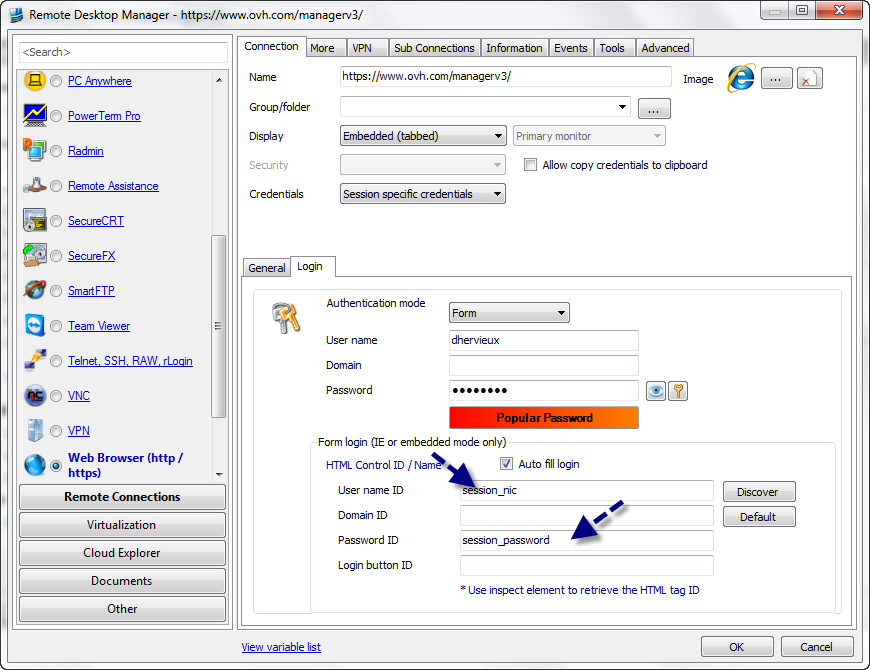
David Hervieux
OVH.png
Hi !
Thanks you !
it's good :)
One question : a macOSX version is possible in the future ?
see you soon
It's possible yes but it's a lot of work. We would really like this too.
David Hervieux
I've got an account at Logmein and I was tring to get RDM to autologin into the Logmein webpage;
https://secure.logmein.com
and i can't seem to find the settings for the auto fill login in order that it automatically inserts the proper credentials.
thanks
Could you try with this url:
https://secure.logmein.com/login.asp
It works fine for me
David Hervieux
no luck - I've tried on two different machines with the same results - no information is put into the email/password boxes. I've also tried with IE and Firefox on both.
Is the information supposed to be entered automatically or do you need to click the key button (Fill the auto login ...) on the upper left of the webpage?
In either case not pressing that key button or pressing it doesn't put any information into the page.
any other ideas?
Just to make sure, have you tried the version 7.0? In the configuration, click on Discover
David Hervieux
Almost there - I didn't understand the relation of the HTML tags needed to be inserted on the bottom as i guess the webpage presents them and that these are then connected to the User name, Domain, and Password.
So it properly fills the credentials in, one last question - Can it 'click' the 'Log Me In' button to complete the login, ie send an enter (CR) so that it logs directly into the main page without me needing to click the 'Log Me In' button?
thanks
Hi,
Just enter [submit] for the submit ID and the application will do the login for you
David Hervieux
Hi David,
I tryed a Webbrowser connection / login to the LogMeIn Portal too.
You tell that we should use [submit] for the submit iD. But what should I use to username and password ID?
Is Chrome ok or should I use IE?
regards, Pauli
Some web form does not have an id for the submit button or it's a javascript. Sometime we have a workaround with a typing macro to send an enter key. We have some that we just have no solution.
David Hervieux
OK + Thanks.
Hello David,
I have a Intranetsite where RDM detects the IDs but autofill doesnt work.
I attached the code of the login site.
Which IDs would you pick?
It doesnt work with:
usr
password
Could you help me out please?
Thanks
Steffen
Login.txt
Hi,
It seems that the whole html is dynamic. I can't see html element in the source. You might have to try the browser extension in external mode for the automatic filing.
David Hervieux