Powershell Unable to save the file:

I use only Portable installations on all machines with copied RDP folder inkl. settings. I happens with all versions.
When i open Powershell from RDM Menu, i get this error (see screenshot):[color=#000000]Unable to save the file: directory does not exist![/color]It somewhere saved this path but i cannot fid it! I tried a search in the files of RDM, Appdata and Registry for parts of the path, but nothing! When i click ok, it continues normally.
edited by Peter Cermak (POI) on 9/8/2014
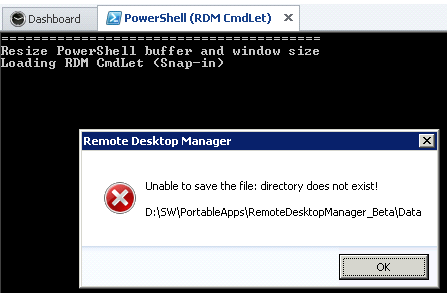
Capture_2014-09-09_08-24-13.png
All Comments (2)
Could you try to create the data folder just for a test?
David Hervieux
Thank you for this tip! I totally overlooked the possibility that this could lead me to the solution!
It was a not existing Local Datasource ;-) and since the Datasources are encrypted in the .cfg file it did not show up in search.