Unable to connect to your data source

Good afternoon.
We have two licences of RDM Enterprise and share a SQLite db on a server. Version 9.2.10 64 bits is installed
One workstation can start RDM and access the db, start sessions without problem.
On the second, we have an error message:
------------------------------------------------------------------------------------------------------------------------------------------------------------------
"Unable to connect to your data source" Please verify the connection or your credentials File is encrypted or is not a database.
System.Data.SQLite.SQLiteException: file is encrypted or is not a database
file is encrypted or is not a database
at System.Data.SQLite.SQLite3.Prepare(SQLiteConnection cnn, String strSql, SQLiteStatement previous, UInt32 timeoutMS, String& strRemain)
at System.Data.SQLite.SQLiteCommand.BuildNextCommand()
at System.Data.SQLite.SQLiteDataReader.NextResult()
at System.Data.SQLite.SQLiteDataReader..ctor(SQLiteCommand cmd, CommandBehavior behave)
at System.Data.SQLite.SQLiteCommand.ExecuteReader(CommandBehavior behavior)
at System.Data.SQLite.SQLiteCommand.ExecuteDbDataReader(CommandBehavior behavior)
at System.Data.Common.DbCommand.System.Data.IDbCommand.ExecuteReader()
at Devolutions.RemoteDesktopManager.Business.DataSources.DatabaseConnectionDataSource.ReadConnections(IDbCommand dbCommand, List`1& result, Byte[]& cacheVersion, Int32& deleteCount)
at Devolutions.RemoteDesktopManager.Business.DataSources.DatabaseConnectionDataSource.GetConnections()
at Devolutions.RemoteDesktopManager.Managers.ConnectionManager.LoadConnectionsFromDataSource(BaseConnectionDataSource connectionDataSource)
--------------------------------------------------------------------------------------------------------------------------------------------------------------------
I already uninstalled and reinstalled but no change.
What should I do ?
Thanks
Claude W.
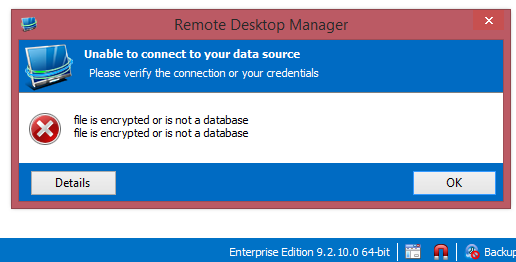
2014-09-04_165449.png
All Comments (2)
Hi,
Unfortunately SQLite does not allow multiple users or a usage on a shared drive. You should use SQLServer or an Access database instead.
David Hervieux
OK I exported the SQLite session from the working workstation and created a new MS Access connection in wich I could easily import the sessions with nothing lost.
I believe that the problem came after starting the 64bits version instead of the 32bits version wich works fine.
Thank you for the very quick answer and have a nice weekend.