Credential Manager - LastPass
If the connection is configured to use the Last Pass as the source in the credential manger it works in Windows but it will not work on a MAC. It just takes you to the logon screen and will not log you in automatically.
All Comments (26)
Hi,
We will verify if the Mac client has our latest version of our code.
David Hervieux

Hi,
In your LastPass Credential settings on MAC, do you have the "Always prompt for password" and/or "Always prompt with list" checked ?
Thank you
Sébastien Crête

Neither of those boxes are checked and checking them produces the same results. I am using RDM version 0.9.66.0.
Hi,
Some fixes have been made since 0.9.66.0 (http://mac.remotedesktopmanager.com/Home/Download)
You can download the latest version.
Please, tell us if you have the same problem after you try the latest version.
Thank you.
edited by Sebastien Crete on 8/29/2014
Sébastien Crête
Hello,
I am having a similar problem with LastPass on Mac at your latest .09 version. See attached screenshot.
No entries are retrieved from LastPass.
The way I use RDM is totally dependent on LastPass. A userid/password are stored in the local credential file for the Remote Desktop Gateway. Once there, RDM needs to pull the LastPass password for the userid on the target system.
This works perfectly in the Windows version (if a little slow because I guess you have to call LastPass every time).
This is the one thing that prevents me from using RDM on the Mac, something I would dearly love to do.
Thx.
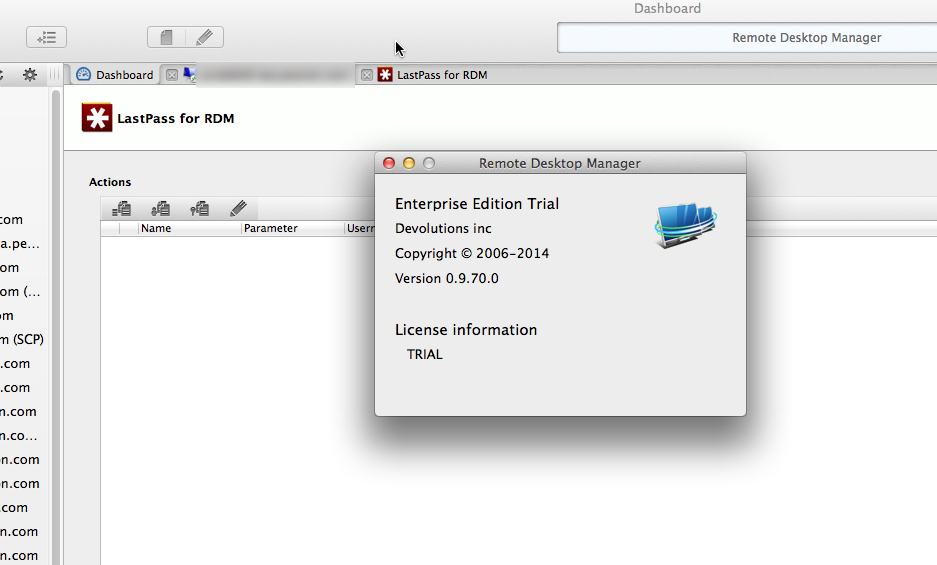
2014-09-10_10-35-45.png
Hi, we need more details.
With your screenshot, nothing is associated to your LastPass entry.
Where is your LastPass entry configured? Is it in your session entry or in your session gateway configuration?
Do you use the same datasource on windows and mac ?
Thank you,
Sébastien Crête
Yes, nothing is shown -- that same entry on Windows produces a long list of credentials sorted by LastPass group. That's the problem.
Yes, the same data source is used on Mac and Windows. These are session entries.
Hi, in your LastPass configuration in Windows, what is your mode ? Integrated or Credential redirection ?
Thank you,
Sébastien Crête
Credential redirection. See below.
edited by yobyot on 9/10/2014
2014-09-10_16-02-56_01.png
Hi,
The credential redirection isn't supported in the mac version. We are not planning to implement it because it's an old technology kept in window version only for compatibility.
For the empty list in the grid of the LastPass information, we are working on it.
Thank you,
Sébastien Crête
I just saw this -- and I have to tell you that without LastPass credential redirection, the Mac version is useless to me and, I suspect others who have complex environments.
In the 1.0+ versions, it looks like you can get the Mac version to present a list of LastPass credentials, but selecting one doesn't work.
I know you are playing catchup with the Windows version of RDM on the Mac. But there is a growing number of admins like me, who use a Mac as their main desktop and who need what RDM does to be available natively on the Mac.
Just to be sure, it's only the redirection that does not work since it's our old technology for integrating LastPass. SO if you need it it's only because the direct integration does not work. Does it work for you?
David Hervieux
Hi yobyot,
I was trying to reproduce your issue and need to ask you a few questions:
Can you edit the credential entry and try to select a last pass entry just to see if the entry changes in the text box?
The credential entry you are using, was it created on the Mac version or the Windows version?
Same question, but for the session you are trying to open?
Regards,
Benoît Sansregret
Hello.
I don't understand your first question. The answers to the second two questions are yes, both the credential and the session entries are imported from an export of all entries, including credentials, on a Windows client.
I must say I find the Mac credentials UI incomprehensible.
Hi,
I'll try to make my first question clearer.
When you edit your Last Pass credential entry, can you select an entry by clicking the browse button.
Like that:
Regards
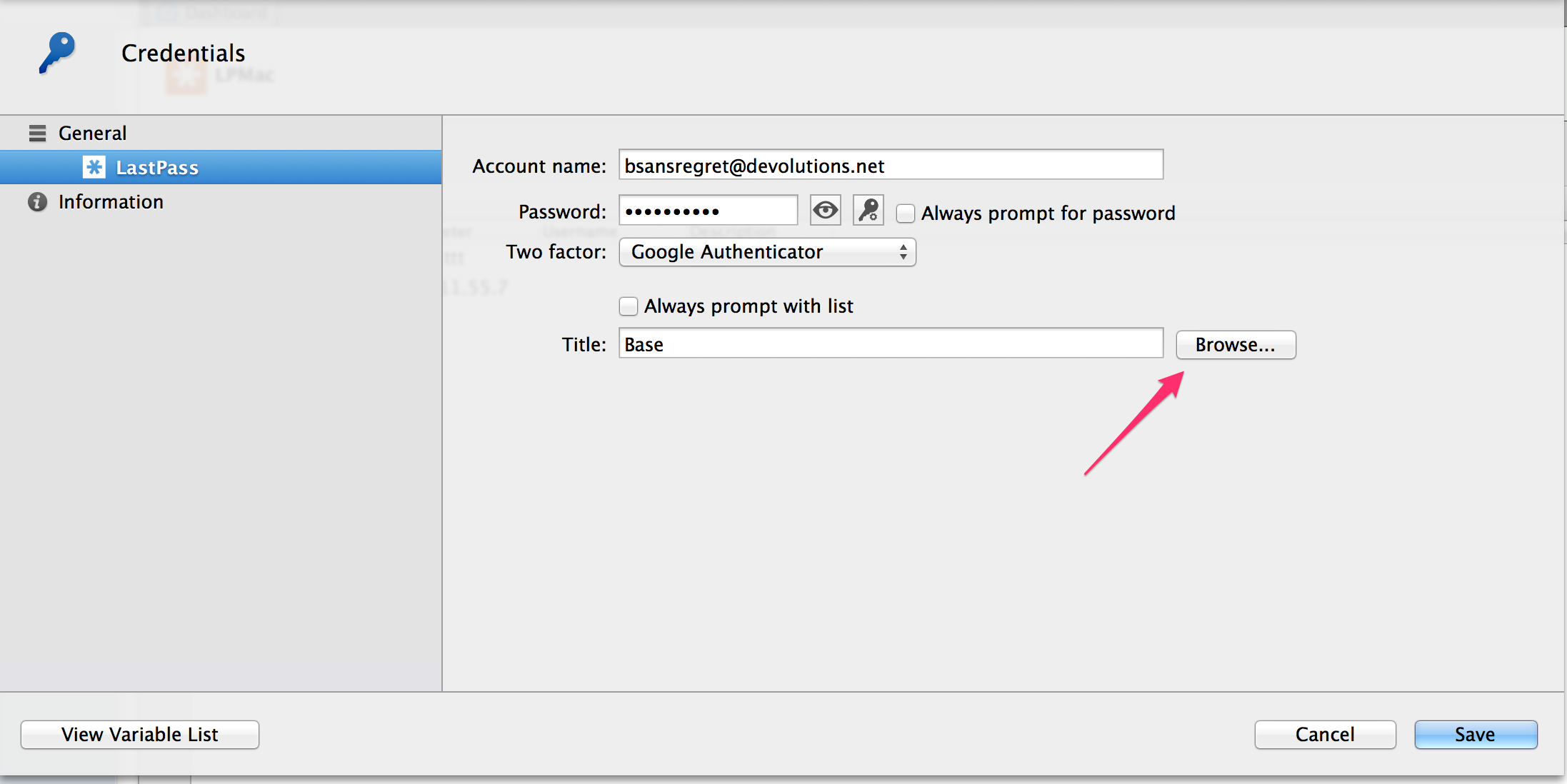
Benoît Sansregret
LastPass.png
Ah! Thx.
Yes, I get a list when editing the credential. But how do I associate a specific entry with a specific RDP session? My sessions in Windows RDM are set up so that LastPass provides the userid/password and I have a separate credential set on the Connections tab with the userid and login for the (required) RD Gateway I must use (none of my Windows machines are exposed to the Internet; all must be accessed via RDG).
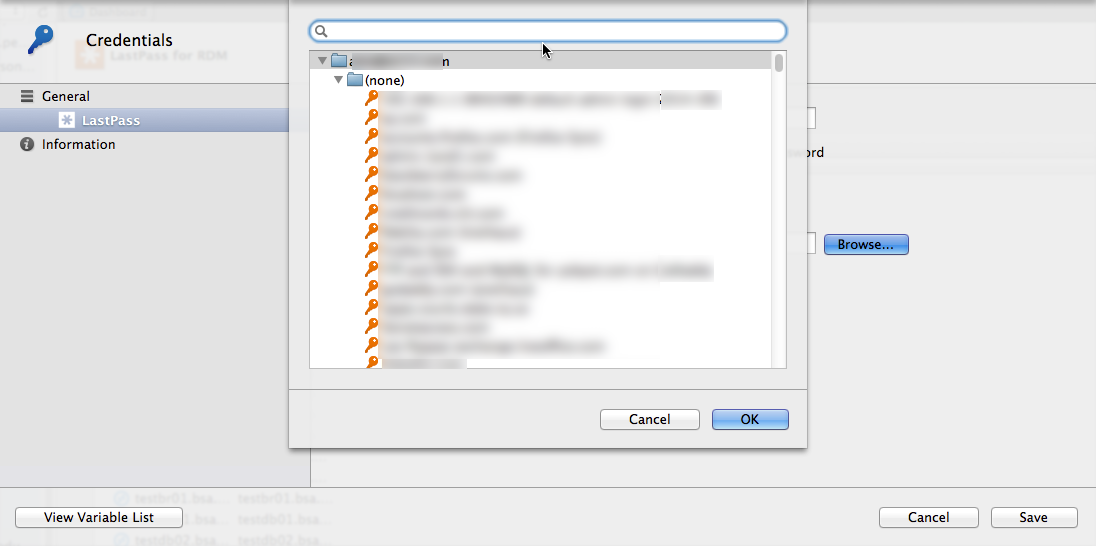
2014-10-08_14-44-06.png
Hi,
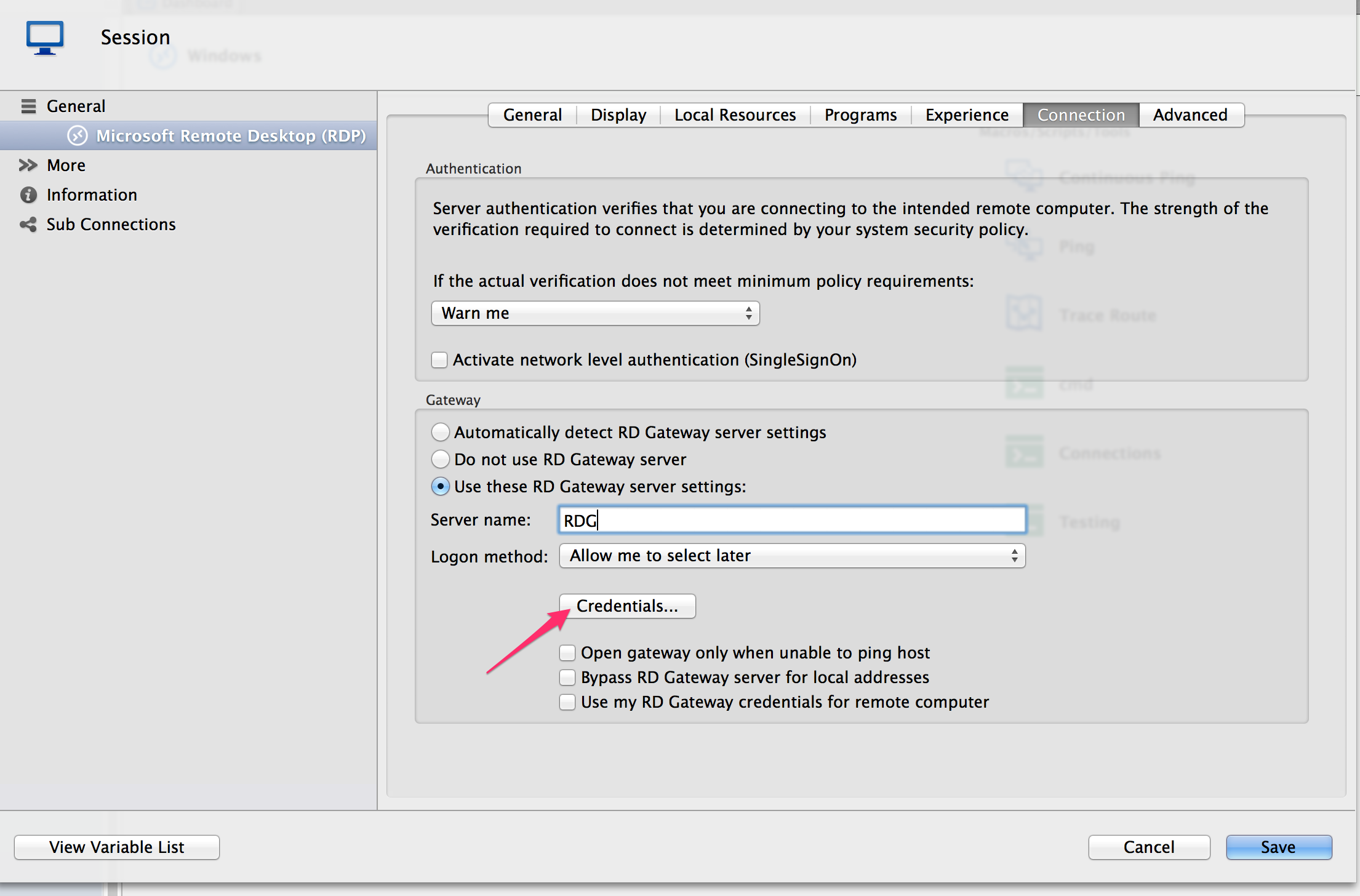
ok to associate your credential to your session you must edit your session. You then need to set the credentials fields to Credential repository and select your credential entry
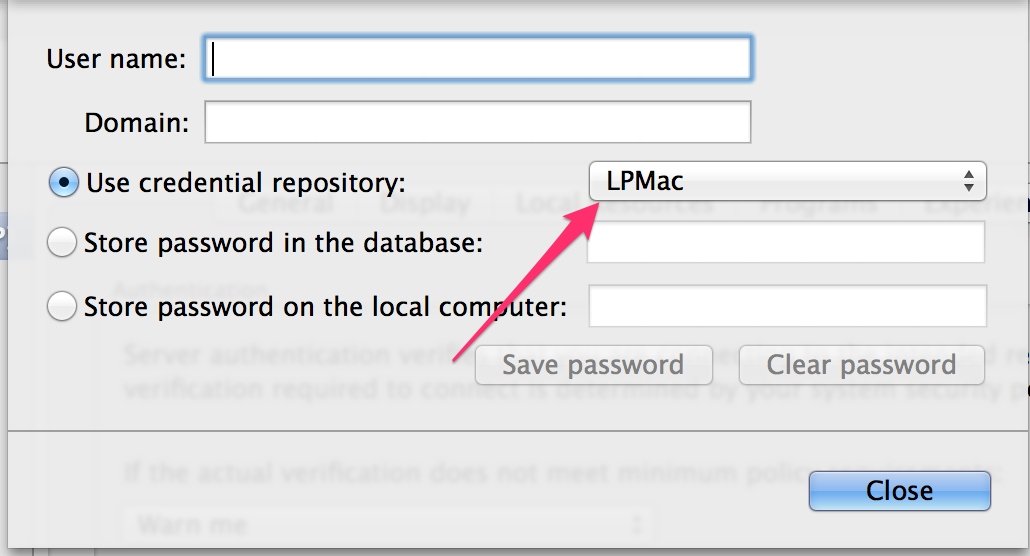
After that, to set your gateway credentials go to the connection tab and click credentials
Select use credential repository and select your gateway credential entry
Please tell me if your issue is still there after that.
Regards
edited by Benoit Sansregret on 10/9/2014
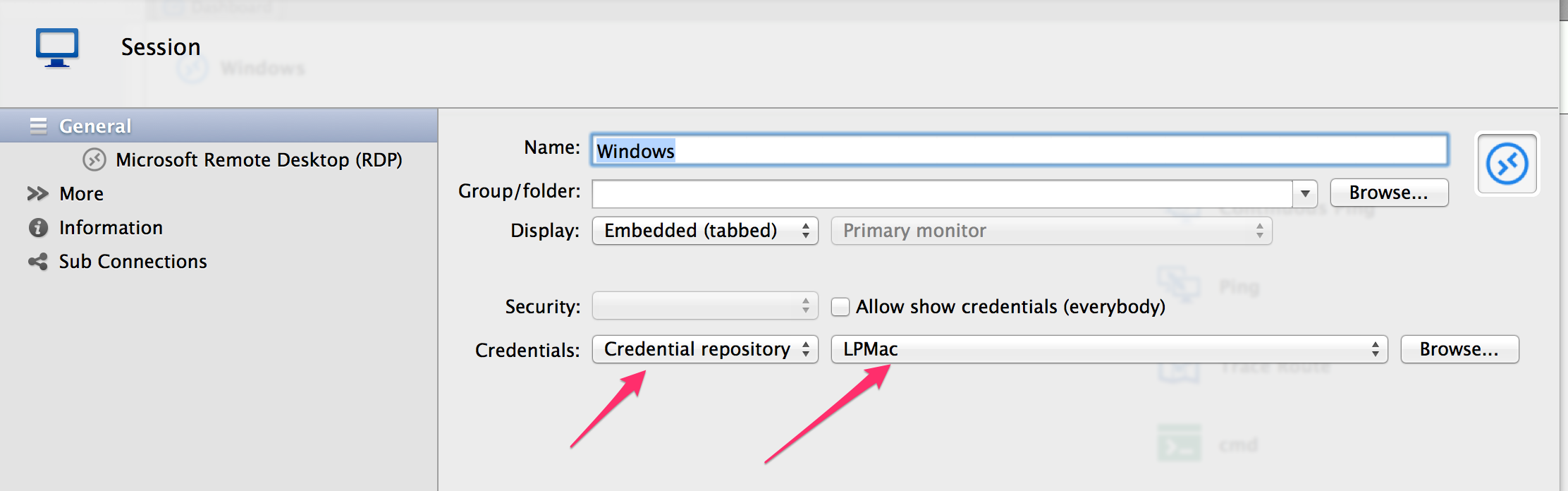
Benoît Sansregret
RDPLastPass.png
RDGatewayCred.png
GatewayCred.png
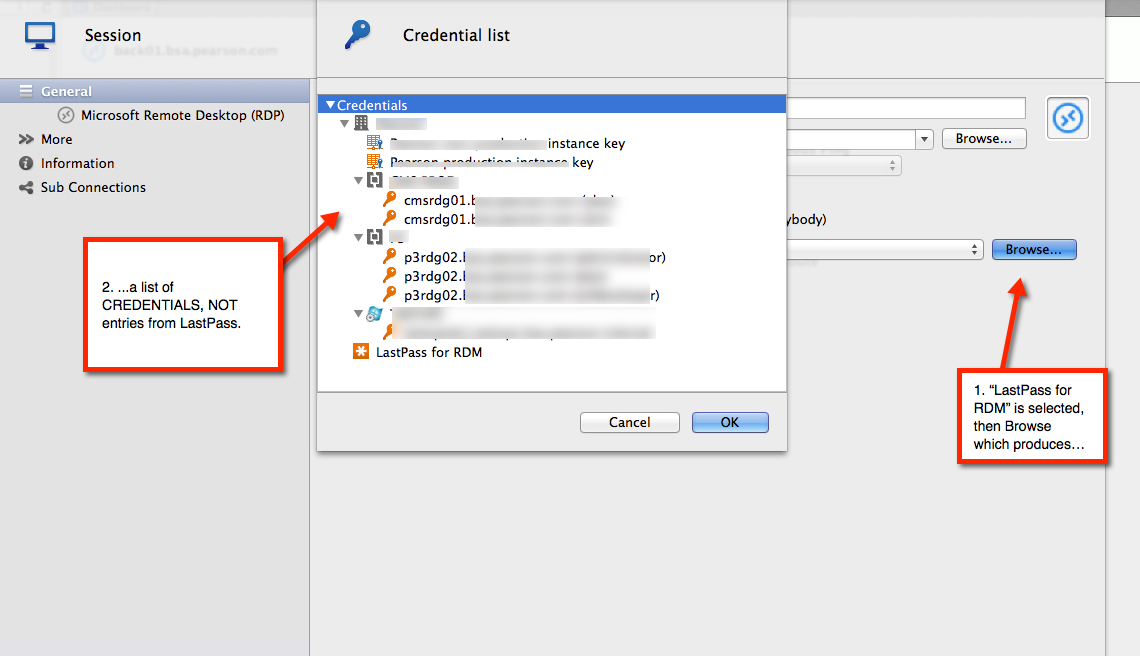
As I mentioned yesterday, a LastPass credential only produces a list of credentials when that LastPass entry is itself being edited.
When attempting to select a LP credential from the LP credential entry in a session definition, I receive...a list of credential entries.
Catch-22.
2014-10-09_11-45-24.png
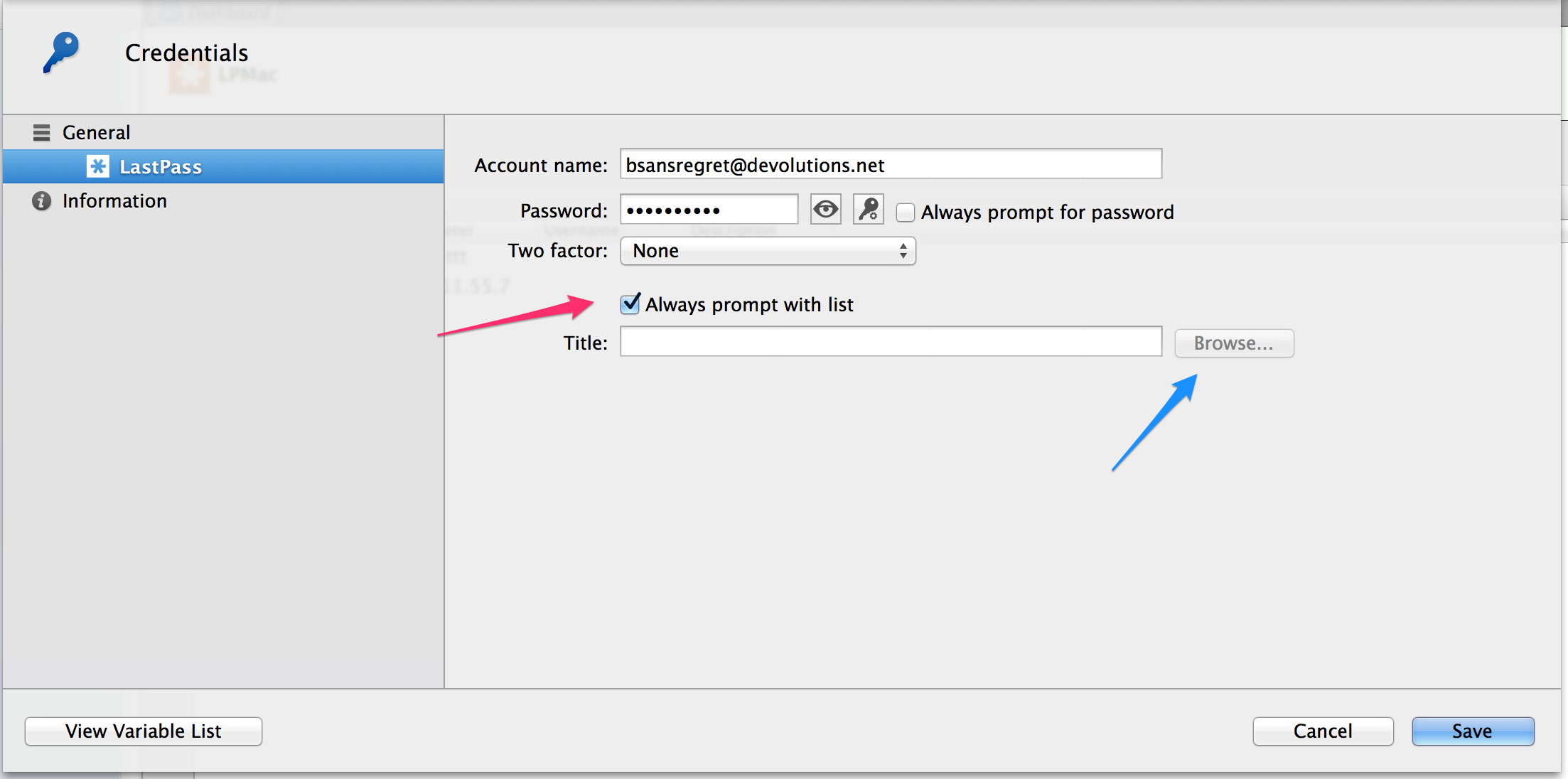
You've go two choices:
1)Create a credential entry foreach last pass entry you want to use. To do this you must uncheck the Always prompt with list check box and select your last pass entry with the browse button.
2)Have one credential entry for all of your Last Pass entries. You will be prompted with the list when the session open.
In that case in your session configuration select the credential entry that correspond to your last pass entries
Just a note when I select a Last Pass entry it takes a few seconds before the screen is refreshed. We will address this issue as soon as possible.
Regards
Benoît Sansregret
LastPassCredential.png
Thanks.
Option 1 is unworkable and defeats the whole purpose, IMO, of using a secure password store.
Option 2 produces the output in the attached screenshot. My LastPass entries are in the form of Secure Notes of type "server." I wonder if that's the issue.
Bottom line, the Mac version lacks useful integration with LastPass. I doubt my style of use (> 30 hosts, separate credentials for each RDP connection stored in a password manager and a smaller number of RDG entries stored in RDM) is uncommon.
Despite days of trying, I can't connect to a single session in the Mac product. I don't need lots of bells and whistles; I just need to be able to connect to a variety of RDP sessions using LastPass. In Windows, I can do this in a single click to open a session. In this product, even if I get it work, it will be multiple clicks.
That should tell you that whatever your development reasons for not doing it the way you did it in the Windows product, you have missed the boat for users like me in the Mac product.
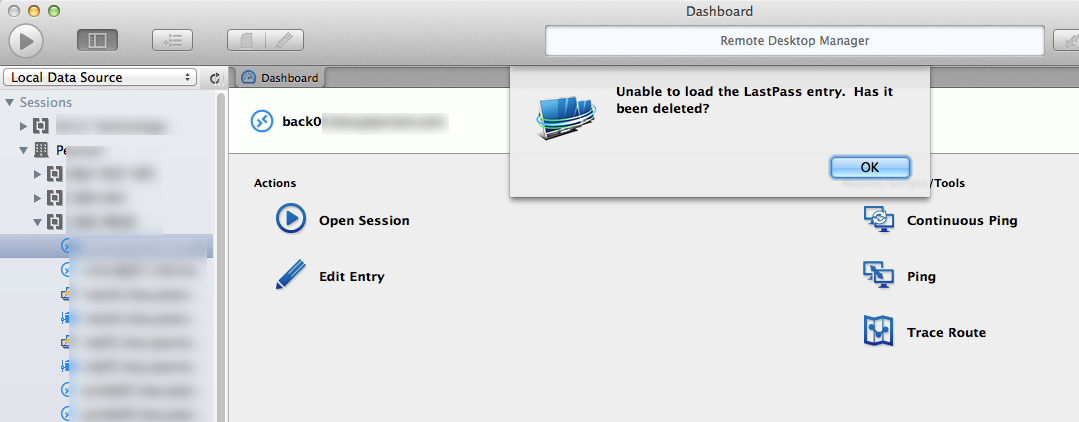
2014-10-09_12-52-27.png
Hi,
we have mode in RDM Windows that is not implemented in the mac version. It's call the dynamic entries. It allows you to create a LastPass entry without a specific entry specify. After that you can specify the entry you want directly in the session.
http://blog.devolutions.net/2013/10/new-in-remote-desktop-manager-9-dynamic.html
I think would be the best solution. I don't think it's hard to add this in the mac version. Within few weeks we could have that.
David Hervieux
Yes, this is exactly what I am using in Windows RDM and on which I've become dependent. Each RDP session in Windows RDM has a pre-selected LastPass entry from the LastPass credential entry. Then, I use local storage for RDG userids and passwords.
Works like a charm and is the bottom line reason I use RDM over Microsoft clients.
I look forward to you adding it to Mac RDM.
Thanks.
Hi,
The dynamic link described by David is now available in Remote Desktop Manager for Mac.
You can download the newest version here and give it a try http://mac.remotedesktopmanager.com/home/download
Tell me if you need anything else
Benoît Sansregret
Thanks.
I can now specify LastPass credentials.
But I am still unable to connect any of my servers because 100% of them are accessible only via RDG. When I specify the LastPass credential for the target server and use a local credential for the RDG, I get "Peer connection lost" error messages.
I was only able to generate that error after specifying "connect and don't warn me" on the Connections tab. Before that, even if I selected "connect anyway" using a self-generated cert, RDM would refuse to even try.
Things are getting better with this nice addition of LastPass integration. But months after downloading the Mac beta, I still haven't been able to connect once to any of my 30+ servers. ;-)
Woot!
Version 1.1.1.0 finally connects with using LastPass credentials for the target session via an RDG using a local credential.
Because there's no batch edit and I am using self-signed certs, I have to manually go into each entry and turn off warnings on the connections, but this is a small matter compared to being able to actually run natively on the Mac.
I'm in love...
Hi,
Happy to hear that your happy !
Thank you
Benoît Sansregret