OpenVPN add-on

We have a problem where username and password not are auto filled.
Enable automatic authentication and enable automatic key password entry are checked.
OpenVPN klient start up and username field are in focus and Im able to type manually in both fields. The window and fields have Norwegian names, that may be the problem her?
Error message from Remote desktop client:
Unable to send the credentials.
Can’t find the window name: OpenVPN – User Authentication.
Anyone seen this before?
All Comments (18)
Hi,
Yes it's a known issue.
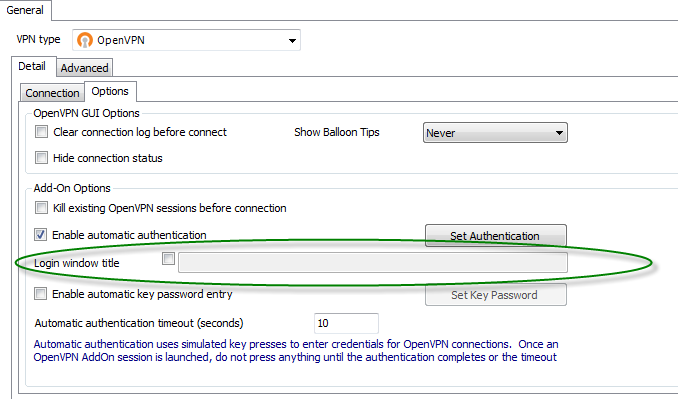
You have to fill the "Login window title" in the Add-On Options.
If you don't have this option you could have to install the beta version of RDM to be able to install the latest version of this add-on.
Best regards,
André Sanscartier
openvpn.png
Hi
We are about to deploy Remote desktop manager in our organisation.
(Just bought the Enterprise version)
When can we expect this to be fixed in a normal released client?
We need this in place before we can rollout and close our previous solution.
We will finalize the beta version in September but it's stable enough to be deployed. We have a compatibility issue with the add-on because of the .NET Framework we use.
David Hervieux
Hi,
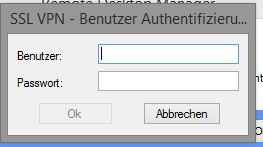
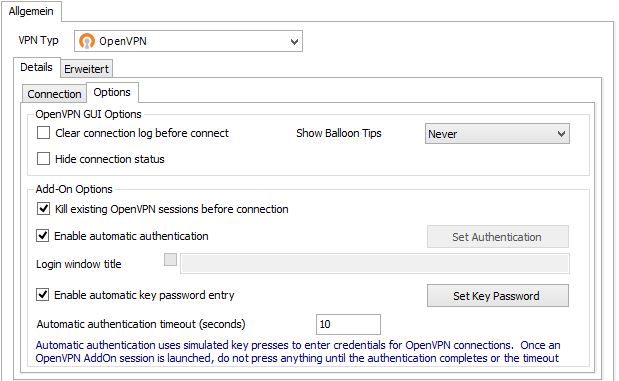
i have a problem with automatic authentication too.
I think this is because of my German OpenVPN Client.
But I am not able to fill out the section "Login window title" because it´s greyed out.
edited by Hoeppi on 11/5/2014
edited by Hoeppi on 11/5/2014
OpenVPN2.JPG
OpenVPN1.JPG
Hi,
Simply check the box at the left side of the field to unlock it.
Best regards,
André Sanscartier
Hi,
sorry, it´s not that simple. The checkbox is greyed out, too.
Greetings from Bochum, Germany
Hi,
You're right.
It's because that you use a credential repository.
I will fix that.
Best regards,
André Sanscartier
Hi,
The OpenVPN add-on V2.0.2.0 is now available.
Best regards,
André Sanscartier
Hi,
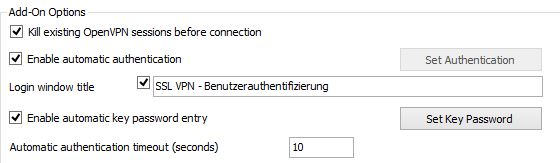
with the new OpenVPN Add-on I am able to fill the checkbox and the textfield.
However, when opening the VPN-Connection the credentials are not filled out.
I only get an error:
I am using Win8.1 and Sophos OpenVPN client
It doesn´t matter if I am loged in as User or Admin. The UAC config doesn´t matter, too.
Is the text in the textbox correct entered?
Or the filled out textbox doesn´t change anything - the error stays the same, no matter what is entered in the textbox
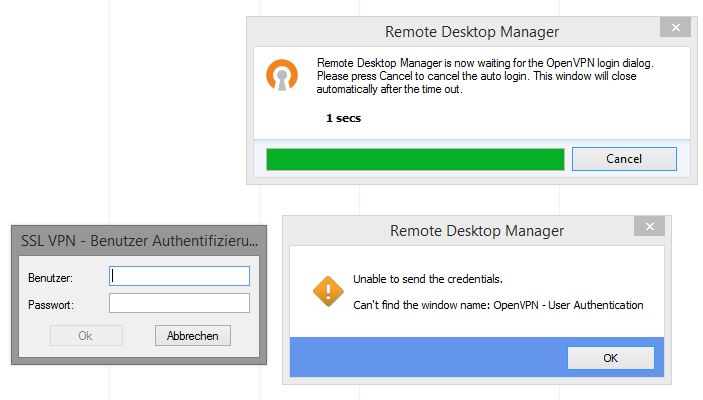
Connectinon.JPG
Fehler1.JPG
Hi,
The name given is misspelled.
To ease the match you don't have to fill the entire name of the window.
Just a specific part is required. In your case "SSL VPN - Benutzer" should be ok.
Best regards,
André Sanscartier
Oops, I need new glasses.
Thanks
Hi.
I have the similar problem with this add-on. I am using Windows 10, but I have to set OpenVPN executables to run as administrator as default to make it work correctly (to set correct routes in the OS after connection). When this option was disabled, everything worked just fine. When I set "run as administrator" option on executables, UAC starts to pop up and now I can't make it work. Even with filled option "Login windows title" it doesn't work. Thank you in advance for any suggestion.
Best regards,
Petr Oliva
Hi,
Could you try to execute RDM with the Run as administrator as well? Windows does not like when two applications does not use the same security context.
Regards
David Hervieux
Hi,
similar problem here, when running RDM as administrator, it works. Seems that the UAC prompt brakes it.
Is there a way to fix this without running RDM as administrator?
As far as I know there is no solution. Sorry about that.
Regards
David Hervieux
hello I have a problem with the OpenVpn GUI.
Automatic pasting of password to priv.key does not work... ;(
The prompt appears and when I enter the password from the keyboard, the tunnel is set up correctly
regards Janusz
Hello Janusz,
Since you have opened a support ticket as well for this case, I will take the liberty to respond in the ticket. You can expect an email from our ticketing system with my response shortly.
Best regards,
Gabriel Degrandpré