Online Data Source Security

Hello,
I'm struggling to determine if I've found a possible security issue or if I'm misunderstanding how this should work...
Currently I am testing RDM using an RDMO (pro trial) data source. I have disabled password saving for access to the data source in the hopes that users will always need to enter their passwords to gain access to the data source. When I start RDM it does indeed ask me for the password; however, if I enter the password incorrectly I can then click the "Go Offline" button (in the error window) and immediately go the File menu and select "Go Online" without ever having to enter a password. This effectively bypasses the requirement to ever enter a password. Am I doing something wrong here?
Also, if I enter the incorrect password when connecting to the data source and simply click "Ok" instead of "Go Offline", I have been unable to determine how I can attempt to reconnect to the data source without closing and reopening the application. Am I missing something here? How would one reconnect to the data source after incorrectly entering the data source password without restarting the application?
Thank you guys! Have a great day!
edited by SrtTuner on 6/24/2014
All Comments (15)
Anyone have any ideas here?
Devolutions team, any feedback?
We've implemented the "Ask for password" while going offline correctly with the RDMS (Remote Desktop Manager Server) data source. I will have a look at enabling it in the RDMO data source. Thank you for identifying the issue.
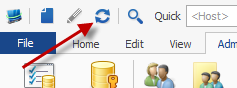
As for point #2, top right of the app you have a "refresh" button (double arrow). This will tell the data source to connect (F5 should also work).
Regards,
P.S. sorry for the delay
Stéfane Lavergne
Hi,
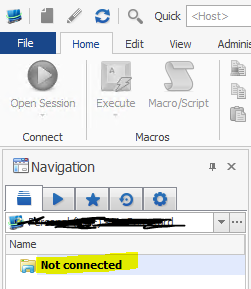
I've resolved the issue with the "incorrect password go offline no password" issue. Now if you enter the wrong password the system will notify that the credentials are bad and go into "Not connected" state. You can re-connect by clicking the refresh button.
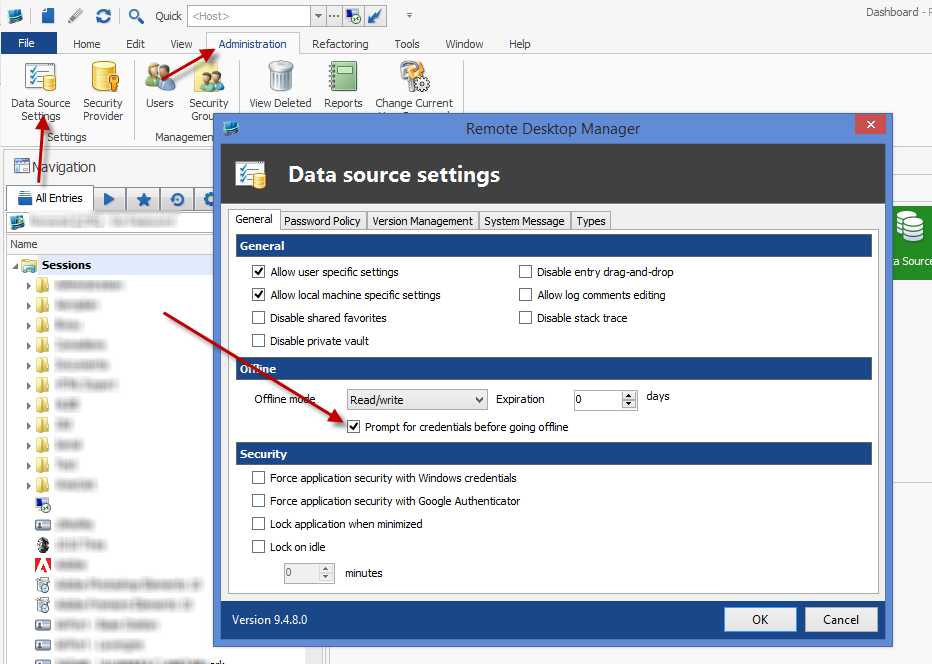
As for prompting for password when going offline. I've enabled the same behavior as RDMS into the RDMO data source. That is, you can set the data source settings to "prompt for credentials before going offline". This will require all users re-enter their passwords prior to accessing the data in offline mode. This is independent of the "allows ask password" of the data source configuration.
We have an enhancement to make this setting more flexible (ie. prompt if always ask password, prompt on first offline or prompt on first offline if always ask password). Until then your only choice is to prompt on all offline accesses.
All the above changes will be in the next beta build which should be available within the next few days.
Regards,
Stéfane Lavergne
6-25-2014 1-24-12 PM.png
6-25-2014 1-22-06 PM.png
Hello,
So I've downloaded the lastest beta and have noticed these changes but I still have some concerns. It's highly possible I'm just misunderstanding how this works...
Basically, I want all users to be forced to enter a password anytime they are transitioning from a "Not Connected" state to a connected state (whether offline or online). Currently I have the same issue as before:
1. User starts the application.
2. User is asked to enter said password.
3. User simply clicks "Cancel" and then "Refresh".
4. Said user is now online and was never prompted for a password.
Is there currently anyway to prevent this behavior? Can a user always be forced to enter a password when starting the app or toggling between online and offline states? My initial thought was that my current configuration would at least function as such:
1. User starts application.
2. User is prompted for a password.
3. If user fails to enter the correct password then the user can not enter a connected state at all (offline or online).
4. User attempts to reconnect to DB (online or offline).
5. User is prompted for a password.
6. Cycle repeats until the correct password is entered.
I hope that make sense. Thank you very much for your time and assistance! You guys really have a kick ass product here and I very much appreciate the support!
edited by SrtTuner on 7/3/2014
edited by SrtTuner on 7/3/2014
edited by SrtTuner on 7/3/2014
Did you activate the "prompt for credentials before going offline"?
Stéfane Lavergne
Indeed I did. And it does prompt when it goes offline. That being said, if you cancel out of the initial password prompt or simply enter an invalid password, clicking on the refresh button brings you immediately back online without any need to enter a password. While it is helpful to be able to require a password when going offline this particular issue isn't seemingly related to offline mode.
edited by SrtTuner on 7/3/2014
That's not good. I will have another look.
Stéfane Lavergne
I'm seeing proper behaviour on my side.
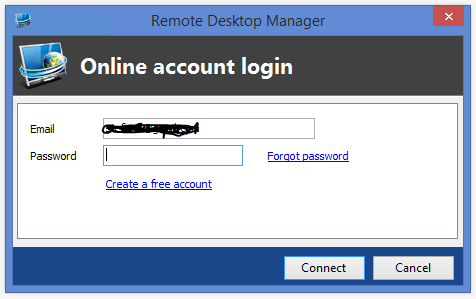
Start app, prompt for RDMO password:
Cancel the dialog
Hit refresh icon, back to enter password
How have you configured your data source?

Stéfane Lavergne
Img3.PNG
Img2.PNG
Img1.PNG
Hi Stefane,
My data source is indeed configured in that manner. Here something very interesting to note... I been doing some testing with RDM lately in hope to roll it out company wide and have installed it on a few computers at this point. My original laptop experiences this issue where when refreshed I am instantly taken online without the need to enter a password. I have since replaced this laptop and when I installed RDM on the new machine this issue did not exist. Unfortunately that laptop had to be returned due to a hardware malfunction and was replaced with a different make/model. Oddly enough enough this current laptop once again experiences this problem. This is version 9.4.9.0 and is quite literally a fresh install of RDM. I have no idea why this is happening but it from what I can gather it seems like there may be a a preference somewhere in RDM that can override this setting...? Just a wild a guess.
I'd really like to get this deployed to all of our techs but I need a way to ensure that they are forced to enter a password when connecting (online or offline) before I do...
Thank you sir! Have a good day!
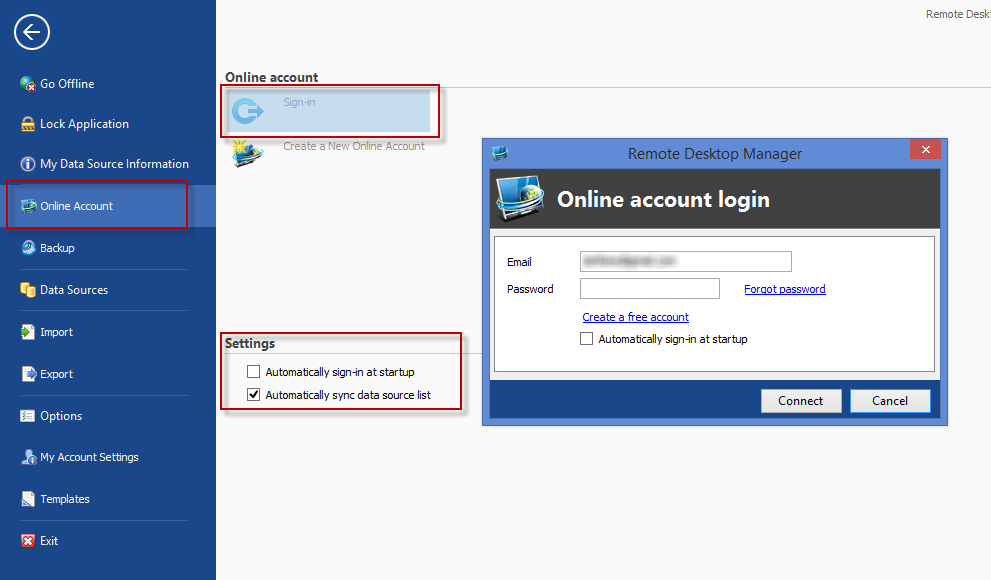
Could it be you are using "Automatically sign-in at startup"? This might be causing the issues, I will investigate further.
Stéfane Lavergne
7-17-2014 11-32-42 AM.png
Hi Stefane,
That's exactly what it is. Is that the intended behavior then? If so, how would an admin user prevent a standard user from using it to bypass the need to enter a password?
Thank you very much for your help!
Yes, it's as designed but we should provide admins a mechanism to disable the behavior.
I will be out of the office for the next week (BriForum) therefore it will take some time before I get a chance to modify this for you. I will keep you posted.
Best regards,
Stéfane Lavergne
Okay. Thank you sir!
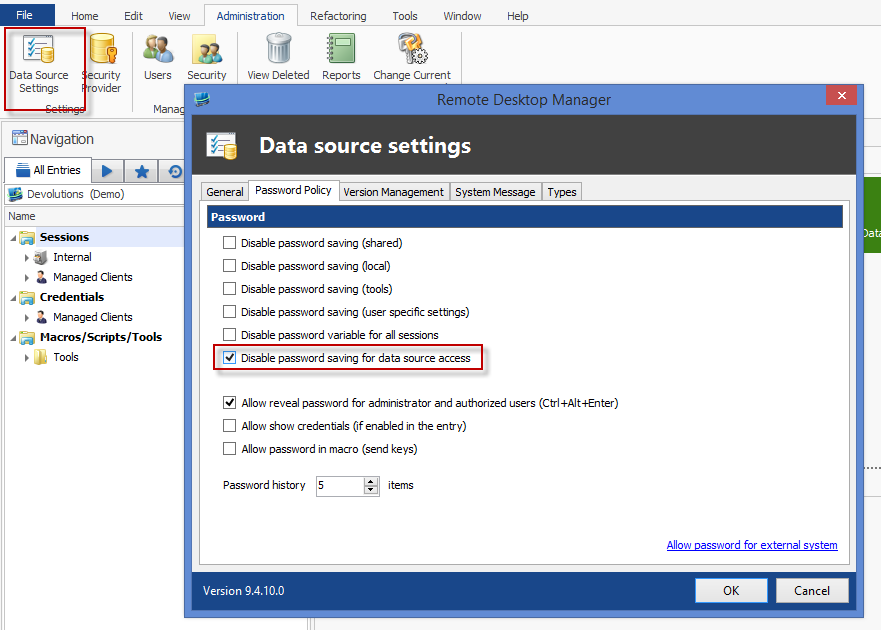
Done - in the next version, if you've set the "Disable password saving for data source access" (see image). In this case, even if you've set the "Automatically sign-in at startup" check box.
Note: There is a limitation, on the first ever load, if you have the "Automatically sign-in at startup" checked it will auto-login. This is a limitation since we've yet to connect to the data source hence we've have yet to fetch the data source settings. Therefore we don't yet know that we should force prompt for the password. On subsequent starts we will load the settings from offline and force the enter password. This limitation is not simple to resolve at this time.
The new version should be out within the next week or so. Again, sorry for the delay.
Best regards,
Stéfane Lavergne
7-24-2014 11-49-51 AM.png
FYI the new beta build is available here:
http://remotedesktopmanager.com/Home/Download#beta
Regards,
Stéfane Lavergne