Edit .rdp file in Windows 8.1

Hello,
I have a problem with DRDM in combination with Windows 8.1.
The problem is as followed,
When i create a .rdp file for one of my servers, i can right click it and select the Edit option and i will get a Windows remote configuration panel. I can here edit the adress or login etc. After i install DRDM as Custom and i set to not automatic open .rdp in DRDM i can still edit the .rdp file the Windows way. If i got to Control Panel and go to default programms and select .rdp to be openede by DRDM it will work. This will remove the function of Edit when i rightclick the .rdp shotcut. When i unbound the .rdp to DRDM and back to normal Windows mstsc the Edit will come back.
Now the strange part. When i install DRDM Typical and set .rdp automaticly to DRDM the Edit button is gone ofc... But when i try to unbound it in control panel, default programs, the Edit option is still gone.
We have on every machine in this company DRDM installed but we are slowely updating to Windows 8.1 and this is a real problem since we have to edit sometimes our .rdp connections or monitor them from remote.
My question is, is there a solution?
Regards,
Koen
All Comments (35)
Hi,
Does it happen if you choose custom and untick RDP.
David Hervieux
No, if it is unchecked i can still use the edit function. If i bind it to devolutions afterwards and unbind it again i still get the edit function. It is only when i select automatic @ install
Ok,
I have verified and the typical use only the default setup. Unfortunately you will need to use the custom install.
David Hervieux
I understand i have to use the custom installation but, this is some sort of bug in the programm? it removes the edit function and that is what i like to get back. Editing is possible but that it will be a .txt file and not easy to configure... so if it is possible fix this for a later version:)
RDM change the default extension handler in the registry and it seems to change it for both open and edit. I will do some research to see if we can specify two different applications.
David Hervieux
That is true i used regsnap to see what changes and it changes what is right but there is no registery diffrence i saw if installed typical or install custom with .rdp unchecked. it stays the same exept one rule that binds it to the .rdp. if i go to default programs and select .rdp for DRDM it works and the edit will be gone. if i uncheck it again the edit will be back. DRDM does something with editing.
okey...
Removed the DRDM on some pc's....gues what... the Edit function is still gone. My supervisor does not like this. Please get a fix asap. This is not working. We got several people not able to do things the customer asks becaus we cannot change the .rdp file. Please get a test enviroment ready and fix this.
We will need to investigate why the Edit is removed but in the meantime here are two .reg files to fix the right-click with our without RDM installed. You can actually run both without any side affects.
Stéfane Lavergne
Fix-Edit-RDM-not-installed.reg
Fix-Edit-RDM-installed.reg
I thank you for this work around! Unfortunatly it does not work on every machine. For example my windows 8.1 upgraded version will not work but a clean install of 8.1 will work. Pretty strange. I am sure Windows 8(.1) has something to do with this malfunction.
On the machines that don't work what value do you have in: HKEY_CLASSES_ROOT\.RDP?
You should see:
RDP.File
or
Devolutions inc..Remote Desktop Manager.rdp
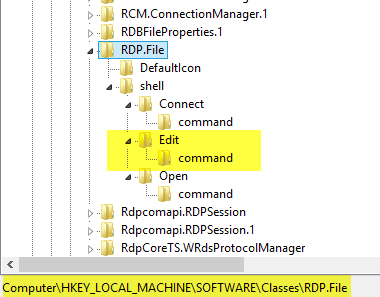
Now got to: HKEY_LOCAL_MACHINE\SOFTWARE\Classes[value from step #1]
You should see both Connect & Edit as such:
Stéfane Lavergne
6-2-2014 7-30-48 AM.png
This is what i see in my register where the edit option is gone.
http://prntscr.com/3oyag2
That looks good there but what do you see in: HKEY_CLASSES_ROOT\.RDP
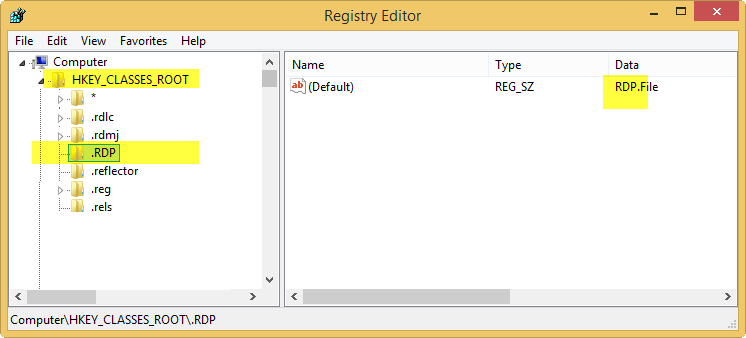
Stéfane Lavergne
6-3-2014 3-18-04 PM.png
I see something different than you do: http://prntscr.com/3pihuj
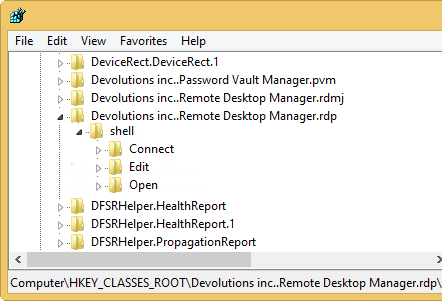
What do you see in: HKEY_CLASSES_ROOT\Devolutions inc..Remote Desktop Manager.rdp\shell
Do you see an edit node? If not run the Fix-Edit-RDM-installed.reg script
Stéfane Lavergne
6-4-2014 7-47-12 AM.png
I can see the Edit but not the Connect.
http://prntscr.com/3pk4ag
It's normal that you don't see Connect, it shouldn't be there. (I added it for testing...)
But it's not normal that Edit is there and that it doesn't show up in the right-click menu.
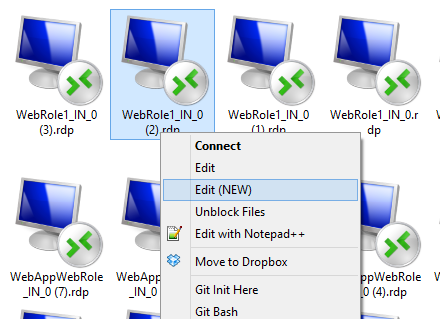
Could you try to add "Edit (NEW)" use the attached file. You should see something like this:
Stéfane Lavergne
6-4-2014 8-32-36 AM.png
Edit (NEW).reg
The reg file works! but the normal edit is still not here... Pretty strange, it works on my private pc(not in domain or using network applications) but it did not work on my work pc the one that is in domain and using DRDM. I had DRDM on my private pc to test the 9.2 before updating the server from 8.4.4.0 to 9.2.2.0. so i also had no edit on my private pc. On my work pc i still do not have edit or edit (new).
edited by Glomaster on 6/4/2014
No clue why the "Edit (NEW)" would work but not the "Edit". It's very odd. You can rename the "Edit (NEW)" back to "Edit" if you like.
As for your work PC, what do you see in HKEY_CLASSES_ROOT\.RDP?
- RDP.File
- Devolutions inc..Remote Desktop Manager.rdp
Find which one and go look at its definition:
- HKEY_CLASSES_ROOT\RDP.File\shell
- HKEY_CLASSES_ROOT\Devolutions inc..Remote Desktop Manager.rdp\shell
Do you see "Edit"?
Stéfane Lavergne
On HKEY_CLASSES_ROOT\.RDP
I see RDP.File
On HKEY_CLASSES_ROOT\RDP.File\shell
I see (Default) REG_SZ Connect
In the Edit tab of this above i can see MUIVerb REG_EXPAND_SZ @%systemroot%\system32\mstsc.exe,4003
On HKEY_CLASSES_ROOT\Devolutions inc..Remote Desktop Manager.rdp\shell
I see (Default) REG_SZ &Open
So you are set to use the system defined context menu (RDP.File).
RDP.File has an Edit entry, yet it doesn't show... If you add the "Edit (New)" does it show up?
FYI "MUIVerb REG_EXPAND_SZ @%systemroot%\system32\mstsc.exe,4003" tells the OS to use the translated string (4003) in the file mstsc.exe for the menu. If you want to rename the menu item, you must rename the (default) REG_SZ Edit and delete the MUIVerb node. That is why the "Edit (NEW)" doesn't contain a MUIVerb node.
Stéfane Lavergne
If i goto HKEY_CLASSES_ROOT\Devolutions inc..Remote Desktop Manager.rdp\shell There is a new map named EditNew in it. But yet when i right click a desktop shortgun of a remote app there is no edit or edit(new).
Since you have RDP.File in HKEY_CLASSES_ROOT\.RDP
Then you must look at HKEY_CLASSES_ROOT\RDP.File\shell
You have "Edit" there yet it is not in the right-click (context menu) of .rdp files. If you add "Edit (NEW)" does it show up?
Stéfane Lavergne
No it does not show up
Could you please export both your reg keys (in regedit.exe right-click -> Export) and post them for me to look at?
Thanks
HKEY_CLASSES_ROOT\.RDP
HKEY_CLASSES_ROOT\RDP.File
Stéfane Lavergne
In the attachment you can find both .RDP and RDP.File
RDP.reg
RDP.file.reg
Ok I've been running more tests. Could you please export the following key:
HKEY_CURRENT_USER\Software\Microsoft\Windows\CurrentVersion\Explorer\FileExts\.rdp
Stéfane Lavergne
In the attachment you can find the export.
rdp_current_user.reg
Could you try right-click on an .rdp file and select "Open with" -> Chose default program then re-select Remote Desktop Connection (MSTSC.exe), does it work now?
Stéfane Lavergne
This works...Strange i did this in the begining. Now it works. I am happy and going to try this on some other machines and hope it works there aswell!
Amazing, I had no clue what to try next. Let me know if all is good on the other machines.
Best regards,
Stéfane Lavergne
The solutions for all the machines is as followed:
As first I had to change the node in following screen:
After I change it to RDP.File, originally it was Devolutions inc..Remote Desktop Manager.rdp The Edit is not back yet.
After this I had to do what you sad as last:
Than all I had to do was exit regedit.exe and the problem was fixed!
I did this on the machines that needed the fix and it still works.
Awsome and Thank you very much for the good and fast help!
+1 to Devolutions Forum!
Thank you for the update.
We are working at getting the installer to keep the "Edit" intact when if you choose to use RDM as the default .rdp double-click action.
Stéfane Lavergne
Hi,
Just to inform you that we fixed this issue and future releases of the installer will keep mstsc.exe for Edit and Connect (Connect is usually accessible with the shift key).
Regards,
André Sanscartier
Nice! I am glad it was fixable :)
Glomaster,
This worked perfectly!! This was really bugging me after installing version 9.2.10.0 after setting up a new computer. My icon for .rdp files was a white paper with a small RDP icon on the paper, it was weird and I couldn't edit them! After changing the value of the "(default)" key from RDP_AUTO_GENERATED.File" to RDP.File and then doing the "Open with" and choosing MSTSC.exe again, bam! Icon fixed and now I have the edit button :)
Created a forum account just to say thanks!