Remote Desktop Manager Jump Beta

Emails are going out to our Jump beta testers within the next few days. Follow this topic for all your Jump beta news.
Regards,
Stéfane Lavergne
All Comments (100)
And a blog post as well:
http://blog.devolutions.net/
David Hervieux
The how to blog has been published.
http://blog.devolutions.net/2014/05/rdm-jump-how-to.html
Stéfane Lavergne
Which version of RDM did I have to install to get Jump working ?
X. Thomas.
The 9.5 beta available here (latest build is v9.4.3)
http://remotedesktopmanager.com/Home/Download#beta
You also require a Jump serial, if you've already registered for the Jump beta you will receive an email shortly, if not you can register here:
http://jump.remotedesktopmanager.com/
Regards,
Stéfane Lavergne
Jump is RDP-in-RDP made easy. If we take a few steps back, the good old solution of having RDP icons on your desktop with bunch more RDP icons on the RDS server's desktop. It work but it's not the easiest to manage.
Since RDM Jump is based on RDM you also get things like access control, logging and credential management on top of it.
That is exactly what it is.
Thank you for the link.
You can control what the session looks like, resolution and all just like you would to normally. There is however a few restrictions at the moment. For example the Jump host connection will always be an embedded session. Secondly the jump destination RDP could be an external but at the moment there is an issue with the logging and control of such session configuration. Most of the testing has been done using embedded sessions.
For the moment you will need to run embedded but undocked.
Stéfane Lavergne
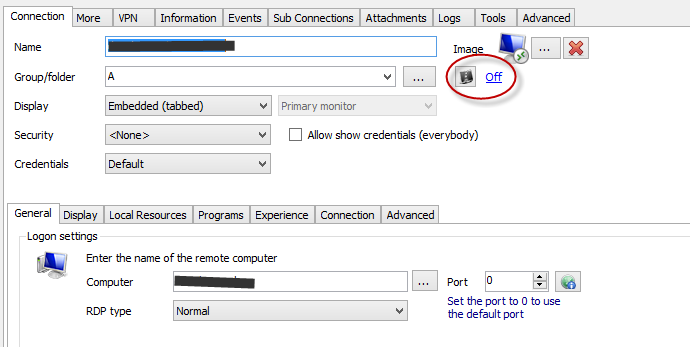
@Vincet - If you want the Jump destination RDP to be full screen, configure it as such:
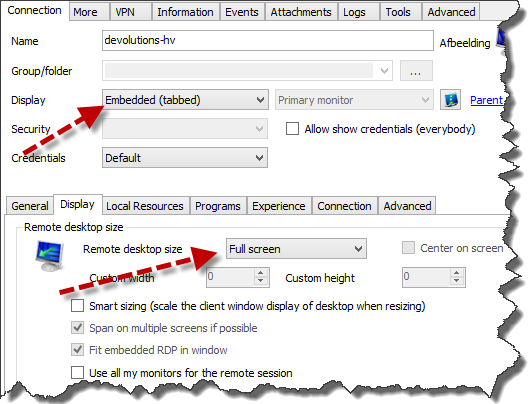
Stéfane Lavergne
5-27-2014 2-32-33 PM.png
Hey,
is it possible to install only the RDM Agent on the Jump Host?
Greetings
Martin
Will the database update have any impact on my colleagues that are not participating in the beta?
- Using a shared SQL datasource
- Colleagues are using the most recent stable version
@Gydo
There is no database schema change in this update. The only issue you could have is if you use one of the newly created types like Password Manager Pro, Wallet or Gateway. Those types were not available in the previous version so RDM 9.2 will not know how to handle them.
David Hervieux
@Martin - Yes and no
No, if you want to Jump then RDM it must be a full install.
Yes, if you only want Quick Script support
We don't yet have an Agent only installer (files required: RDMAgent.exe + Devolutions.Utils.dll about 600KB total)
Wait what is Quick Script? Well in v9.5 "Execute script via Agent" is a new feature that will allow you to run scripts remotely (quick or full). You see RDM Agent can do more than Jump it can also execute remote commands, say a powershell script. More info to come in a blog post. You can give it a try, right click on an open RDP session in the tree view and select "Execute Script Via Agent". All actions on the first tab "Quick Script" will work without having RDM installed.
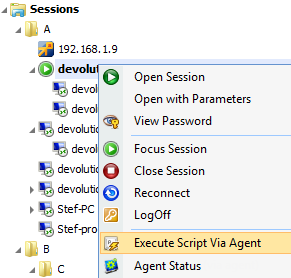
Stéfane Lavergne
5-28-2014 8-58-51 AM.png
Just a quick note about the agent. You don't need to open any port and it works through a gateway and a VPN. We use our own RDP virtual channel to execute securely the remote command. It also work when you have multiple connections opened and selected. No remote PowerShell configuration required.
edited by dhervieux on 5/28/2014
David Hervieux
Do a jump session counts as a RDP session on the Jump host? I assume yes, so the 2 concurrent RDP limit applies, if you don't have the RDP session host installed.
Yes. In essence, we are automating the process of opening the second RDP for you so all the licensing limits apply.
Stéfane Lavergne
A new beta build has just been published. (v9.4.5.0) available here:
http://remotedesktopmanager.com/Home/Download#beta
Make sure you update the Jump host RDM instance as well as your desktop instance.
A few notes with this build:
- You can now xcopy deploy (via the .zip) RDM on the Jump Host, no longer need the installer
- Jump settings now available in batch mode (RDP only, groups are not yet supported)
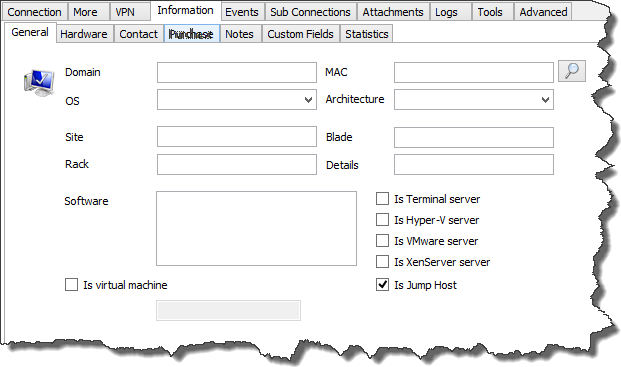
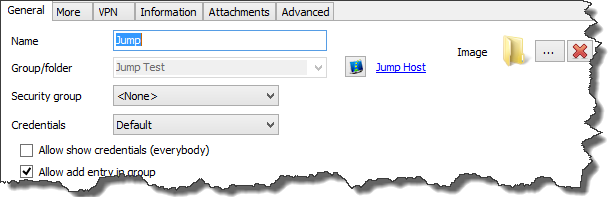
- When configuring an RDP that supports jump, set the "Is Jump Host" of Information -> General
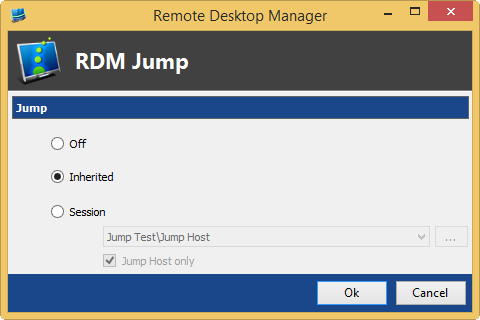
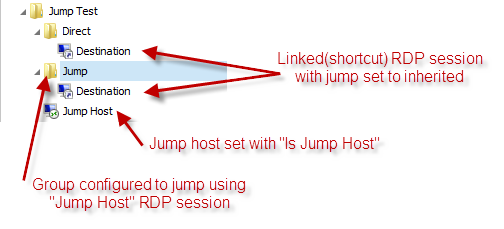
- The "Parent" jump mode is now the "Inherited" jump mode, offering a more powerful jump configuration.
- You can now specify the Jump host for a group, this will be used to resolve inherited jump settings
So how to configure Jump using inheritance?
With the above configuration you can now open "Destination" via jump or not depending on which "linked" session you double-click.
Regards,
Stéfane Lavergne
6-4-2014 8-52-55 AM.png
6-4-2014 8-50-21 AM.png
6-4-2014 8-48-39 AM.png
6-4-2014 8-47-47 AM.png
This seems like a good place to give some feedback, so I'll paste what I wrote in comments to the blog post:
And this:
@anpa - Thank you for your feedback
Comment #1 - RDM Jump can be summarized as "RDP-in-RDP made easy". That is to say RDM Jump is not an RDP Gateway nor is it a replacement for a hardware based solution (BOMGAR and the like). We have many customers that are currently doing manual RDP-in-RDP but they lose things like auditing and logging that RDM supports natively. RDM Jump allows users, with their current infrastructure limitations, a way to more easily manage RDP-in-RDP. We may one day have an RDP Gateway type solution but nothing is in the pipeline at this time. The current implementation of RDM Jump uses the virtual channels of the RDP protocol hence they are encrypted.
Comment #2 – This is the exact use case where RDM Jump will be helpful although at the moment we don’t support RDP-in-RDP-in-RDP. We do support RDSGateway-RDP-in-RDP or even VPN-RDSGateway-RDP-in-RDP.
Stéfane Lavergne
I've got RDM 9.4.6.0 (licensed for both "normal" usage as well as jump host) both on my laptop as well as on one of our terminal servers. On both servers I used the zip file so I could avoid installation (as the terminal server had issues with an earlier beta because of a 64 bit dependency?!? - can't recall exactly which one) as both have 9.2 RDM installations present.
I've created an RDP session to the terminal server with "Is Jump Host" ticked/enabled in the Information tab.
I've created an RDP session to another server using the previous session as jump host session (without the "Jump Host only" ticked - not sure what this means but it doesn't do it with the option ticked either).
On the terminal server I started the agent from within RDM (not logging in to any data source) and the icon showed up.
When using the jumphost connection to the other server it opened up the jump host byt nothing happened further.
I just tried logging into the same database on the terminal server and starting the agent however now I seem to be unable to start the agent on the terminal server.
Can you help me find the issue and/or point me in the right direction?
Perfect
"Jump Host only" check box is to filter out all other "non-Jump" RDP sessions, you could actually jump using an RDP when it's not flagged as "Is Jump Host"
Did you set RDM Agent to auto-start. It should have prompted you to auto-start.
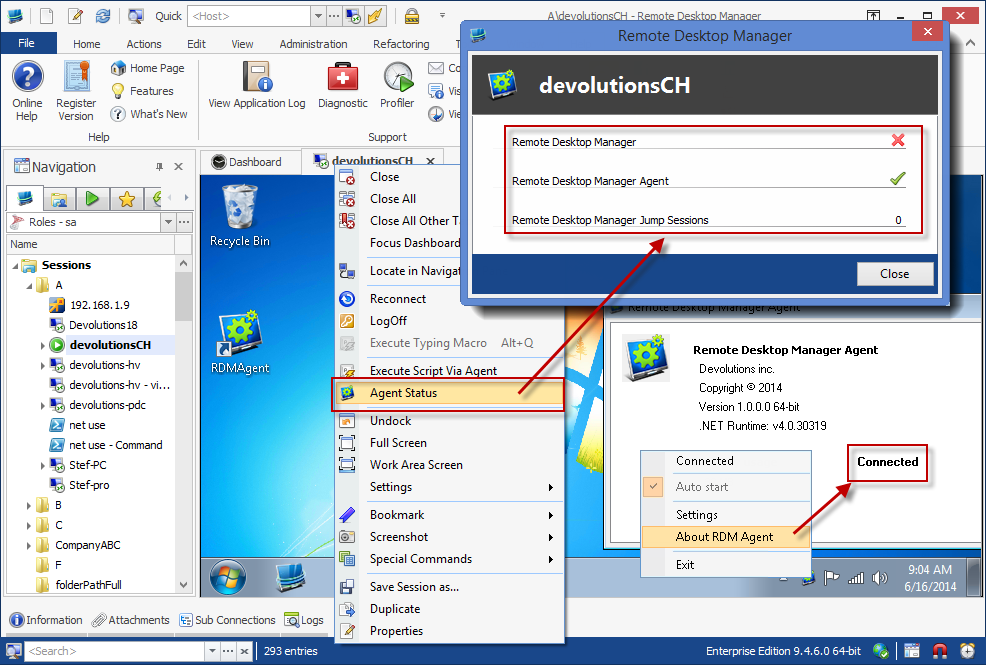
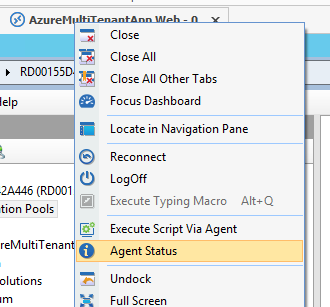
Open the Jump host (terminal server), did RDM Agent auto-start? You can right-click on the tab of the session and click on "Agent Status" this should tell you if the agent is connected or not. If agent is started you can right-click on the agent icon and click about, it will also tell you if it's connected or not.
Depending where we are at we will diagnose further.
Regards,
Stéfane Lavergne
When I connect to the terminal server (=jump host), start RDM and start the agent the icon shows up and when I right click it it says auto start and connected.
When I log off and log on again to the terminal server the agent is started (no icon shown and no RDM agent present in the processes list).
When I close the session without logging off and having started the agent and click on the destination computer I get two logins (both session having set to my private vault userid without password by altering the user specific settings) and after typing both passwords an rdp session to the terminal server opens (the one I closed and logged off from), I see the agent icon stating it's auto start and connected but no connection is made to the destination computer.
Right clicking the tab of the terminal server session RDM with a red x, RDM with a green tick/v and RDM remote sessions to 1.
@jan-pieter - Quick recap from what I understand you see the following yet the Jump doesn't actually jump.
Correct? When need to debug the Jump using the profiler. Help -> Profiler -> Debug only (tab) & set the Debug level to 1024. Stay on that tab and keep the window open.
Now open the Jump host, you should see a message (see below) in the profiler window:RDMJump: Sending Acknowledge in response to ChannelOpen [cf683d9a-d88f-473e-b476-9c77f264cff7]RDMJump: Type: Acknowledge, Size: 196bytesKeep the RDP session to the Jump Host opened. Now open the Jump session, it will re-use the already opened Jump Host session. The profiler output should look something like the following (please post what you have in your profiler output):RDMJump: Sending connection jump [bb9f55cb-933a-4bf0-b896-62258479feb4]RDMJump: Sending SessionRDMJump: Type: Session, Size: 9220bytesRDMCmd: Sending Acknowledge in response to ChannelOpen [9e9a2723-c8e5-41fb-9c05-2f07b856c6c7]RDMCmd: Type: Acknowledge, Size: 196bytesRDMLog: Sending Acknowledge in response to ChannelOpen [e9f46580-f047-43a5-bb7d-767e5ea19d5b]RDMLog: Type: Acknowledge, Size: 196bytesRDMLog: Sending Acknowledge in response to Log [f9ecc8e5-6179-44eb-80a0-0340fe03c621]RDMLog: Type: Acknowledge, Size: 196bytesRDMLog: Logging open connectionRDMLog: Sending Acknowledge in response to ChannelClose [e20b716c-ddb1-42d2-9d32-72c0899e3e8a]The output should help me diagnose further the issue.
Regards,
Had the wrong print screen
edited by stefane on 6/16/2014
Stéfane Lavergne
6-16-2014 9-04-10 AM.png
6-16-2014 9-13-55 AM.png
[16-6-2014 21:38:04]DEBUG RDMJump: Sending Acknowledge in response to ChannelOpen [de22554b-a1d1-41bd-9e64-5c1180e3f7d3]
[16-6-2014 21:38:04]DEBUG RDMJump: Type: Acknowledge, Size: 196bytes
RDMJump: Sending Focus
RDMJump: Redirect message to RDMCmd
RDMCmd: Type: Focus, Size: 284bytes
@jan-pieter - Can you send me an export of both RDP sessions (Jump host & destination) with no credentials. Private message or email (slavergne-at-devolutions-dot-net)
Thanks,
Stéfane Lavergne
@Stéfane - You mentioned in an earlier post that external display was currently a limitation of jump. In an effort to make this "seamless" for users (current sessions are set to external) do you have an ETA of when this functionality will exist within the Jump feature?
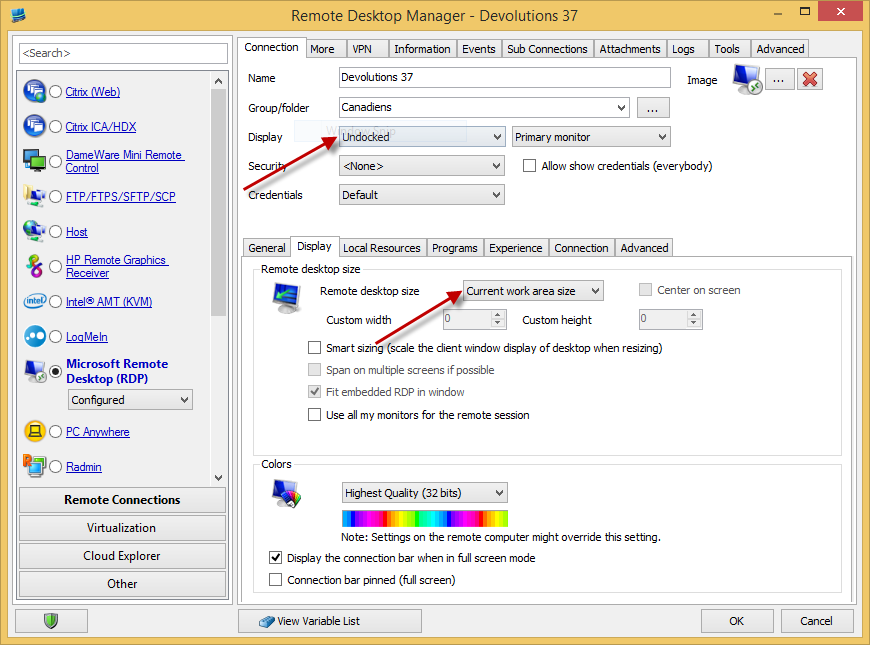
@andylapos - supporting Jump in external mode is not simple (technically speaking). We have yet to scheduled anything therefore I don't have an ETA.
But you have an option, you could use the following configuration to mimic external mode.
Let me know it that works for you.
Stéfane Lavergne
6-25-2014 1-22-06 PM[1].png
@Stéfane - Yes, configuration of the Jump Host with the settings specified above allowed it to work externally.
When I try to use my Jump host it seems to be timing out, receiving a message agent not available. Please make sure RDMAgent or Remote Desktop Manager is running. This comes up before I am fully authenticated to the Jump host. Additionally the Jump host does require two factor authentication creating additional time to log in, but if I am super fast I can almost beat the timeout, is there a configuration for that?
@JamieFisher - The connection wait time is not configurable at this time. Could you try to open the jump host, authenticate and leave it open. Now open the destination host it will use the already opened jump host. Does that work? If so you are configured properly. I will add a configurable wait time in the next beta build.
Best regards,
Stéfane Lavergne
Thanks Stefane, that does work.
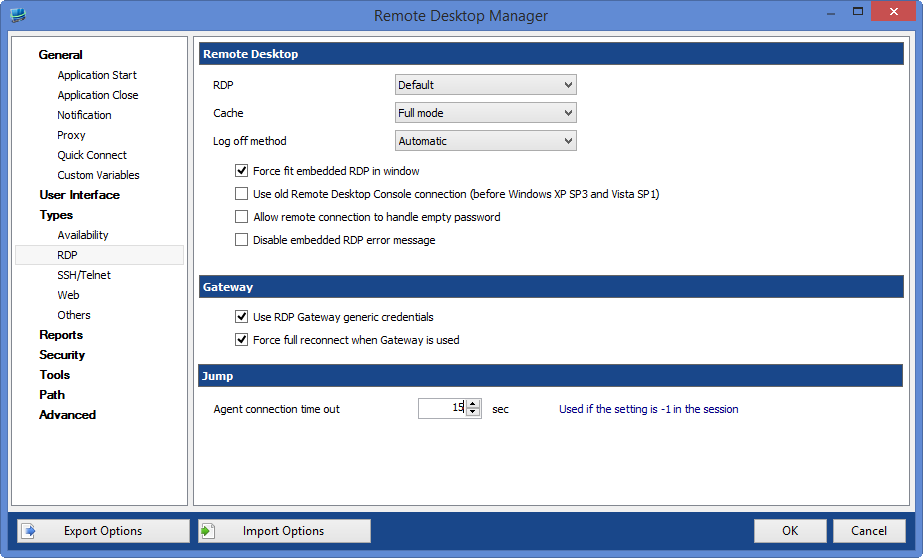
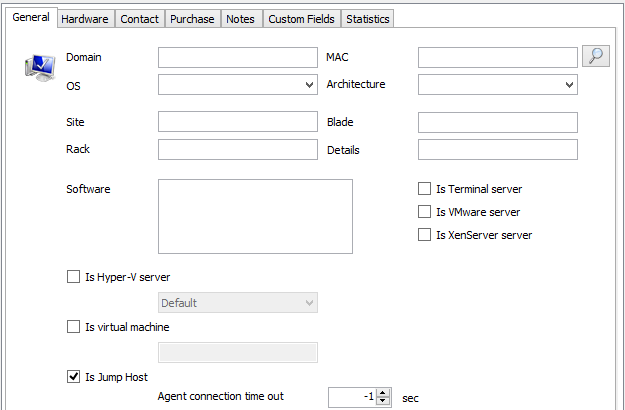
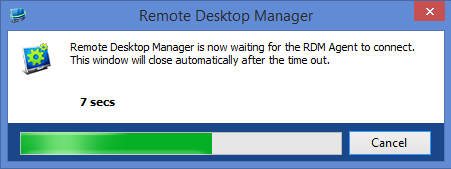
@JamieFisher - I've implemented the "configurable wait" for Jump. Here are some screen shots.
The next build you will be able to...
First you can configure the default wait for all Jump host using the system options:
Then you can override the value on any Jump session:
When you try to jump you will now see this dialog:
If ever you don't want to wait, hit Cancel to cancel the jump altogether.
Note: Will the dialog interfere with your ability to enter the two factor authentication? The dialog is not modal, so you can move it to the side if need be and perform your authentication.
Let me know how that works for you.
Regards,
Stéfane Lavergne
Session.png
Dialog.png
Options.png
I think that will work fine, our dual factor pushes a message to our cell phone so it wouldn't get in the way and if the credentials fail for some reason moving the dialog is an easy thing to do.
I seem to be struggling getting it to work as a "VPN Connection". I would like to configure where if the host I am trying to connect to is not pingable it would use the Jump Host. I have the jump host info box checked, on the system I am trying to connect to I have the jump host selected as a session and the box checked jump host only. This works, but when I add the VPN settings connect if unable to ping, type jump host I receive unable to open VPN connection do you want to continue.
@JamieFisher - Could you please post screen shots of the Jump Host settings, destination RDP settings & it's VPN connection tab.
Thanks
Stéfane Lavergne
Attached are the host and destination settings.
img5.PNG
img4.PNG
img3.PNG
img2.PNG
img1.PNG
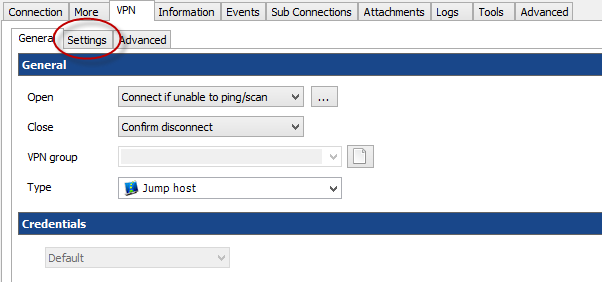
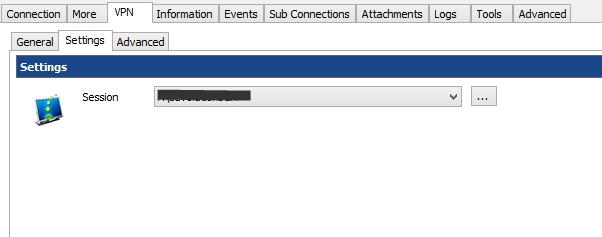
Looks like it's a configuration issue. Have a look at on the destination RDP settings:
#1 - don't specify Jump info here, it will all be done in the VPN tab
#2 - the settings you have here are all good, go to the settings tab
Here you can specify the Jump host
I've tested here by modifying my host file to make the destination un-pingable (1.1.1.1) and it works via the Jump host and if I revert my host file it connects directly.
Regards,
Stéfane Lavergne
Img3[1].png
Img2[1].png
Img1[1].png
That worked perfect, I knew I was missing something in the configuration.
Seem to be running into a couple issues, as noted before I was running into a time out with the dual factor authentication which will be resolved as you stated before. With the VPN setting I am now able to authenticate in time. Couple config notes; all my sessions are embedded and require a log entry on open. While connected to HostA through Jump1 I need to connect to HostB using Jump1. It goes through the same process of checking for ping, then opening up the authentication to Jump1, and connects merging the sessions to the Jump1 tab on my system and opening up a HostB tab on the Jump1 system.
Issue #1: The sessions get really slow, the screen refreshes very slowly and is almost unuseable.
Issue #2: Each time I connect to the Jump1 session I am prompted again for a log entry.
@JamieFisher - Issue #1 - What is slow the second RDP session? Are you running RDP 8.0 or better on all 3 machines? RDP 8.0 has improved the performance with nested sessions.
Issue #2 - I will look into it. There is no practical reason to ask for a log open entry when we simply re-use the already opened jump session.
Stéfane Lavergne
Issue 1, you are right, after some more testing, multiple RDP sessions without using RDM on the system I use to jump gets very slow.
Issue 2, thanks.
@JamieFisher - Issue #2: Each time I connect to the Jump1 session I am prompted again for a log entry.
It has been resolved, we now re-use the already opened Jump(VPN session) and hence won't prompt for a second log entry. With this change it's a much smoother experience when using the VPN Jump host mechanism. Thank you for the feedback.
Available in the next beta release.
Regards,
Stéfane Lavergne
Hi...
Installed and working great... Any chance you could add a feature in regards to jump?
I would like to be able to right click on any RDP session in my session list and have the ability to connect via a jump host (sub menu containing jump hosts - maybe by folder if there are a few jump hosts). Maybe have it in between "Open Session" and "Open session with parameters"
Sometimes I need to jump and other times I don't need to. We have multiple and separate networks. At work I would jump, but at home I VPN directly to the network I need and therefore don't need jump. I would like to avoid having to create a group of hosts that have a hard set jump host and then having the another list (of the same servers) that have no jump settings.
Thanks
Brett
@BrettRedwood - Thank you for the feedback, it's greatly appreciated.
As for the right click "Open via Jump" is a great idea. I've added the request to our todo list, it should actually be easy to add.
Regards,
Stéfane Lavergne
@BrettRedwood - done, it will be in the next beta release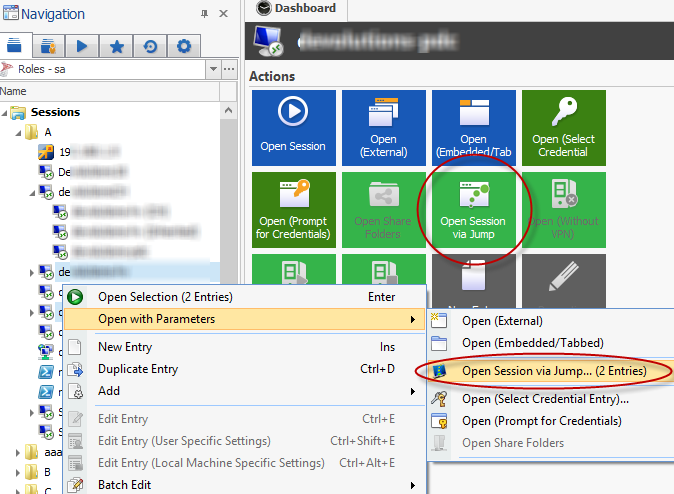
Stéfane Lavergne
7-15-2014 2-28-28 PM.png
Great Thanks... I will look forward to it...
@Devolutions:
will Remote Desktop Manager Jump - License be included in RDMS-UN ?
Kind Regards
Markus
======================
@BrettRedwood - is should be possible I will have a look
Stéfane Lavergne
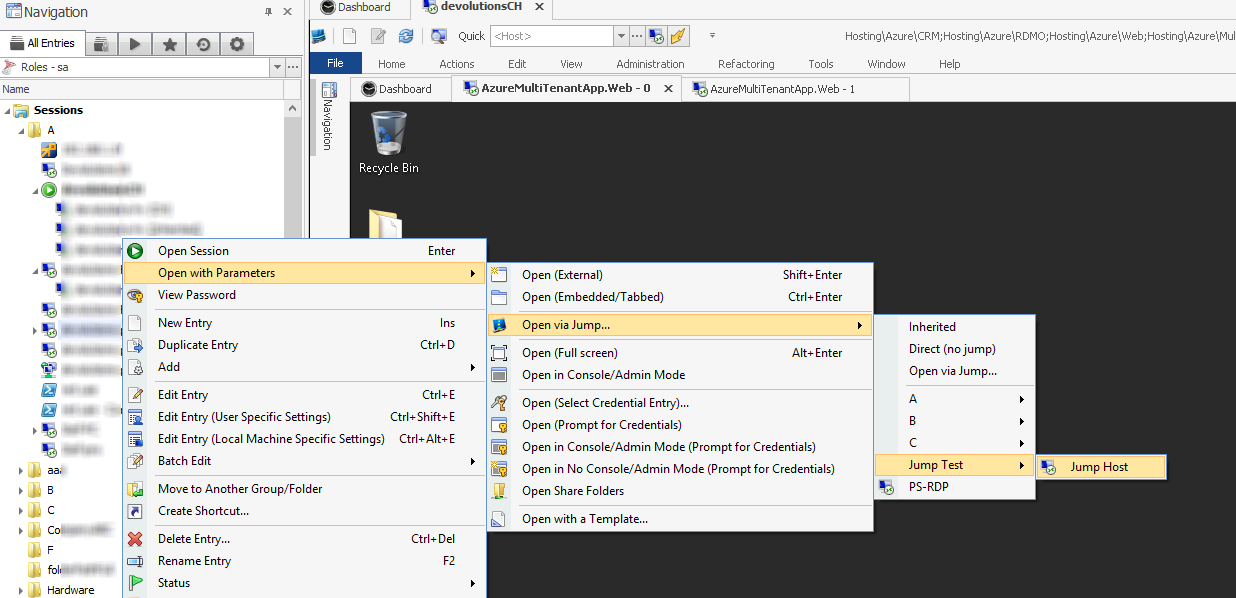
@Brett - it's done and will be in the next beta build.
The right-click menu now looks something like this:
"Inherited" - open with inherited jump settings
"Direct (no jump) - open the connection locally, don't jump
"Open via Jump..." - open the jump form (like before)
Every thing underneath that is dynamic depending your folder structure. It will display all "Is Jump Host" RDP sessions.
Regards,
Stéfane Lavergne
7-28-2014 11-42-58 AM.png
@slavergne - Thank you...
This is one of the reasons why I don't mind paying for software.
Thanks
Brett
Not sure if there is a bug area for the beta or if this is the best place.
If you already have an RDP session open to a jump box in one tab, and have another tab open so that the jump box isn't the active session on the screen, then open a jump session, it opens the session but doesn't bring that jump box session to the front.
This isn't really an issue, more cosmetic and would help us keep our sanity if we have a bunch of tabs open.
Hi,
Stefane is currently on vacation but I will forward it to him. Thank you
David Hervieux
Hi,
We have several destinations, where the connections requires different vpn clients. Therefore we have installed separated servers with the necessary vpn clients installed. Is it possible to use jump connections using this scenario?
Just to clarify your request. Do you want to replace your VPN with jump? If the answer is yes, it's not possible. Jump is RDP into RDP made easy.
What you could do is configure the VPN to access the host and use jump to access the sub-connections related to this host.
David Hervieux
Hi David,
Thanks for your quick response. Let me give you an example: Assume we have RDP configured to customer 1 on Server B, which is configured to use Cisco VPN client before a connection can be established. Can we use jump from our Server A to establish the RDP to customer 1 directly? Hope the request is clear.
Hi,
I've never tested this scenario but I think the answer is yes. However I don't understand why you will like to do that. Why not open the VPN directly from where you are?
David Hervieux
Hi David,
The problem is, that it is rather difficult or impossible to install multiple different vpn clients on one server. On our Server A we have already 2 other vpn client software installed (Sonicwall and Checkpoint).
Resolved, will be in the next beta build.
Regards,
Stéfane Lavergne
Hi,
I want to tryout jump as well. How do I join? This features was asked so often by our guys... ;)
cheers
Alex
Simply request a trial: http://jump.remotedesktopmanager.com/
Have a look a these two blogs. It will help you get started.
What is Jump: http://blog.devolutions.net/2014/04/remote-desktop-manager-jump-beta.html
Jump How To: http://blog.devolutions.net/2014/05/rdm-jump-how-to.html
Regards,
Stéfane Lavergne
Ah, overlooked that URL, thanks Stefane
Well:
RDM Jump Serial: 012WN-......
Valid until: August 31st 2014
@Alexander Gran - i've sent you a new serial via private message.
Stéfane Lavergne
@all - Here is a new RDM Jump beta serial, it's good until end of September.
0142H-5JDGW-GLX90-L8BPJ-5UAT3
RDM Jump should be released by then.
Regards,
Stéfane Lavergne
Hi,
generally working fine.
2 issues:
-When closing the session, the jump session and the RDM on the jump host is not closed. I think this should be transparent.
- Ideally, every jump session should be a speerate tab, not all in one.
regards
Aelx
@Alexander Gran
#1 - Great suggestion, we will add an option for that.
#2 - How would suggest we go about doing this?
Stéfane Lavergne
@Stefane:
Well, I know this requires quite a bit of state logic, but:
I open the first jump session. RDM on my host opens the rdp to the jump host, within there opens the RDM and the connection to the destination
I open the second jump session. RDM on my host now opens a new tab that reusus the same RDP session to the jump host. But it minimizes the connection on the jump host to the destination and opens the new one.
When I now switch between tabs, RDM actually "just" minimizes/restores the sessions on the jump host.
For the user this should be transparent, so it looks like there are actually 2 sessions open.
@Alexander Gran - Ah now I get what you are looking for. Very interesting concept, it would make jump sessions much more seamless to the user. The implementation of such a behavior isn't trivial but I love good challenge :-) I will keep it in mind and hopefully I find an ingenious solution in my sleep.
Stéfane Lavergne
Can Jump be used for initiating SSH sessions ?
Like RDP'ing to a (jump) host and initiating an SSH session from that host?
Or is Jump RDP only?
Yes the second session can be anything configured in RDM. The first step need to RDP since we use our own RDP channel to establish the jump.
David Hervieux
Hi,
I just tried that on another host and it doesn't work.
I have RDM installed (custom installer 10.0) and the agent is enabled and connected.
When I double click my target session, the Rdp connection to the jump host is opened, and both connections in my local RDM show the "connected" icon.
However on the jump host nohting happens. Also no error message whatsoever?
1 - Set the Debug Level to 1024 RDMAgent (Jump) (File -> Options -> Advanced -> Debug Level)
2 - Start the profiler (Help -> Profiler)
3 - open your Jump session
4 - post the output of the Profiler here (use [ code ]...[ /code ] tags) or email it Support (attn: Stefane)
Regards,
Stéfane Lavergne
Hey,
this is the log on the jump host:[26.09.2014 02:25:42]DEBUG RDMCmd: Sleeping 150ms[26.09.2014 02:25:42]DEBUG RDMCmd: Sleeping 220ms[26.09.2014 02:25:42]DEBUG RDMCmd: Sleeping 330ms[26.09.2014 02:25:42]DEBUG RDMCmd: Sleeping 490ms[26.09.2014 02:25:43]DEBUG RDMCmd: Sleeping 730ms[26.09.2014 02:25:44]DEBUG RDMCmd: Sleeping 1090ms[26.09.2014 02:25:45]DEBUG RDMCmd: Sleeping 1630ms[26.09.2014 02:25:46]DEBUG RDMCmd: Sleeping 2440ms[26.09.2014 02:25:49]DEBUG RDMCmd: Sleeping 3660ms[26.09.2014 02:25:53]DEBUG RDMCmd: Sleeping 5490ms[26.09.2014 02:25:53]DEBUG RDMCmd: Acknowledge timeout[26.09.2014 02:25:53]DEBUG RDMCmd: Sleeping 150ms[26.09.2014 02:25:53]DEBUG RDMCmd: Sleeping 220ms[26.09.2014 02:25:53]DEBUG RDMCmd: Sleeping 330ms[26.09.2014 02:25:53]DEBUG RDMCmd: Sleeping 490ms[26.09.2014 02:25:54]DEBUG RDMCmd: Sleeping 730ms[26.09.2014 02:25:55]DEBUG RDMCmd: Sleeping 1090ms[26.09.2014 02:25:56]DEBUG RDMCmd: Sleeping 1630ms[26.09.2014 02:25:57]DEBUG RDMCmd: Sleeping 2440ms[26.09.2014 02:26:00]DEBUG RDMCmd: Sleeping 3660ms[26.09.2014 02:26:04]DEBUG RDMCmd: Sleeping 5490ms[26.09.2014 02:26:04]DEBUG RDMCmd: Acknowledge timeout[26.09.2014 02:26:04]DEBUG RDMCmd: Closed[26.09.2014 02:26:41]DEBUG RDMCmd: Connected[26.09.2014 02:27:39]DEBUG RDMCmd: Closed
and this is mine:[26.09.2014 02:24:32]DEBUG RDMCmd: Closed[26.09.2014 02:24:55]DEBUG RDMJump: Sending Acknowledge in response to ChannelOpen [87bb41d5-faae-41cf-ae07-b10b89ffa258][26.09.2014 02:24:55]DEBUG RDMJump: Type: Acknowledge, Size: 196bytes[26.09.2014 02:24:55]DEBUG RDMJump: Sending Acknowledge in response to ChannelOpen [87bb41d5-faae-41cf-ae07-b10b89ffa258][26.09.2014 02:24:55]DEBUG RDMJump: Type: Acknowledge, Size: 196bytes[26.09.2014 02:24:55]DEBUG RDMCmd: Sending Acknowledge in response to ChannelOpen [fef10f63-578c-4da6-9ec5-40ea0089b618][26.09.2014 02:24:55]DEBUG RDMCmd: Type: Acknowledge, Size: 196bytes[26.09.2014 02:26:04]DEBUG RDMCmd: Sending Acknowledge in response to ChannelClose [005c6bfe-3b1d-4dc4-b9d5-fc1482e91398][26.09.2014 02:26:06]DEBUG RDMJump: Sending Acknowledge in response to ChannelClose [ea1671c0-c8b5-4f2d-9fdc-d817395e1f80][26.09.2014 02:26:42]DEBUG RDMCmd: Sending Acknowledge in response to ChannelOpen [44796d61-d64b-46d7-8530-f90d26244544][26.09.2014 02:26:42]DEBUG RDMCmd: Type: Acknowledge, Size: 196bytes[26.09.2014 02:27:36]DEBUG RDMJump: Sending Acknowledge in response to ChannelOpen [bfc7929c-b4a9-47f3-9e6a-f7ded3d18c4c][26.09.2014 02:27:36]DEBUG RDMJump: Type: Acknowledge, Size: 196bytes[26.09.2014 02:27:40]DEBUG RDMCmd: Sending Acknowledge in response to ChannelClose [018975bb-9b65-46bc-b329-711834cf10c6][26.09.2014 02:27:47]DEBUG RDMJump: Sending connection jump [880ef605-2613-4a89-ac03-f5140d95ba28][26.09.2014 02:27:47]DEBUG RDMJump: Sending Session[26.09.2014 02:27:49]DEBUG RDMJump: Sending Acknowledge in response to ChannelOpen [8c8b0317-a95c-4ee4-af8a-b13351eb4df4][26.09.2014 02:27:49]DEBUG RDMJump: Type: Acknowledge, Size: 196bytes[26.09.2014 02:27:49]DEBUG RDMJump: Type: Session, Size: 7516bytes
- Connect to the server via RDP (tabbed)
- Right click on the tab header and select Agent Status
What do you get? Are they both "checked"?
Have you tried, re-starting the RDMAgent? Is RDM on the jump host already running?
Stéfane Lavergne
9-25-2014 8-48-04 PM.png
Hi,
I had the agent running and showing "connected", RDM not running. Agent status showed both not available.
Stopped the agent, started rdm, started agent. Agent shows "connected", now agent status gives both checked.
Left RDM open, left session open.
Tried to start a jump session->Nothing.
Closed RDM.
Now agent status give: Agent green, RDM red. Lists one open jump session (but nothing visible)
I can't close the jump session - nothing happens, have to close the session to the jump host.
BTW: Any info about pricing / aquiring a license?
We will release all the official details for jump next week. We are finishing the update to our store to support the jump product. The regular price will be 99.99 per user but we have special discount for the product launch. We will offer 50% discount for the first month. Stefane will continue with you for the technical part.
David Hervieux
Well, we got an RDMS global license, so I guess there will be a chance to have that upgraded to include jump, and not licenese that single feature on a per user license?
You're right.
David Hervieux
@Alexander Gran - correct we will have Jump packages for 1, 5, 10, 15, Site & Global licenses just like RDM.
Stéfane Lavergne
ok, how do we proceed in debugging this here?
I'm running test here at this very moment.
Are you running the same version of RDM on both the client and Jump Host machines?
Stéfane Lavergne
@Alexander Gran - if you...
- open the jump host RDP
- start Profiler
- right-click on the tab, select "Execute Script Via Agent"
- select "Run"
- type in "notepad"
- "Execute"
Do you get notepad to start on the Jump Host? This will at least confirm that the communication is getting from the client to the Jump Host or not...
You should get a profiler log of:RDMJump: Sending QuickScriptRDMJump: Redirect message to RDMCmdRDMCmd: Type: QuickScript, Size: 476bytes
Stéfane Lavergne
@Alexander Gran - odd I'm able to Jump but I'm seeing issues with the close, the close confirm messages are not returning to the client causing RDM to think the session is still open ("running icon" in the tree view remains). It's not the exact same issue as what you are seeing but I think it symptomatic of an overall issue with the underlying messaging system.
Unfortunately I'm not in the office today and debugging this from home isn't possible. I will have a look on Monday. Sorry for the inconvenience this is causing you.
Best regards,
Stéfane Lavergne
starting notepad works.
When I want to open a session I get
Error on channel: RDMCmd
in the jump host profiler and
RDMJump: Sending connection jump [880ef605-2613-4a89-ac03-f5140d95ba28]
RDMJump: Sending Session
RDMJump: Redirect message to RDMCmd
RDMCmd: Type: Session, Size: 7516bytes
on my RDM
Oh that's good. With the message "Error on channel: RDMCmd" you should have something more informative in the application logs (Help -> View Application Logs). Could you please post it here.
Regards,
Stéfane Lavergne
[26.09.2014 12:26 - 10.0.0.0 - 32-bit] Error Silent: System.IO.IOException: Der an einen Systemaufruf übergebene Datenbereich ist zu klein.
bei System.IO.__Error.WinIOError(Int32 errorCode, String maybeFullPath)
bei System.IO.FileStream.BeginReadCore(Byte[] bytes, Int32 offset, Int32 numBytes, AsyncCallback userCallback, Object stateObject, Int32 numBufferedBytesRead)
bei System.IO.FileStream.BeginRead(Byte[] array, Int32 offset, Int32 numBytes, AsyncCallback userCallback, Object stateObject)
bei Devolutions.RemoteDesktopManager.Managers.VirtualChannelManager.CallBack(IAsyncResult asyncResult)
[26.09.2014 16:19 - 10.0.0.0 - 32-bit] Error Silent: System.IO.IOException: Der an einen Systemaufruf übergebene Datenbereich ist zu klein.
bei System.IO.__Error.WinIOError(Int32 errorCode, String maybeFullPath)
bei System.IO.FileStream.BeginReadCore(Byte[] bytes, Int32 offset, Int32 numBytes, AsyncCallback userCallback, Object stateObject, Int32 numBufferedBytesRead)
bei System.IO.FileStream.BeginRead(Byte[] array, Int32 offset, Int32 numBytes, AsyncCallback userCallback, Object stateObject)
bei Devolutions.RemoteDesktopManager.Managers.VirtualChannelManager.CallBack(IAsyncResult asyncResult)
[26.09.2014 16:21 - 10.0.0.0 - 32-bit] Error Silent: System.IO.IOException: Unzulässige Funktion.
at System.IO.__Error.WinIOError(Int32 errorCode, String maybeFullPath)
at System.IO.FileStream.BeginWriteCore(Byte[] bytes, Int32 offset, Int32 numBytes, AsyncCallback userCallback, Object stateObject)
at System.IO.FileStream.Flush(Boolean flushToDisk)
at System.IO.FileStream.Flush()
at Devolutions.RemoteDesktopManager.Managers.VirtualChannelManager.SendMessage(JumpMessage message)
[26.09.2014 21:30 - 10.0.0.0 - 32-bit] Error Silent: System.IO.IOException: Der an einen Systemaufruf übergebene Datenbereich ist zu klein.
bei System.IO.__Error.WinIOError(Int32 errorCode, String maybeFullPath)
bei System.IO.FileStream.BeginReadCore(Byte[] bytes, Int32 offset, Int32 numBytes, AsyncCallback userCallback, Object stateObject, Int32 numBufferedBytesRead)
bei System.IO.FileStream.BeginRead(Byte[] array, Int32 offset, Int32 numBytes, AsyncCallback userCallback, Object stateObject)
bei Devolutions.RemoteDesktopManager.Managers.VirtualChannelManager.CallBack(IAsyncResult asyncResult)
@Alexander Gran - I've spent a good part of the day yesterday trying to reproduce your issue. Unfortunately I was unable to do so.
We will have a private build for you available soon that has more debugging information that should help us diagnose the issue further.
I will let you know when the build is available.
Best regards,
Stéfane Lavergne
@Alexander Gran - v10.0.2.0 is out you can download here: http://remotedesktopmanager.com/Home/Download
Please follow these steps:
- Install on both client and sever.
- On server, start the RDM Agent, right-click on the RDM Agent icon, Settings & check "Log debug messages".
- on the client start the profiler (debug 1024)
- launch a jump session
- on the server, right-click RDMAgent "View Logs"
send/post both logs (RDMAgent & Profiler)
Best regards,
Stéfane Lavergne
will try as soon as I got a new serial
ou can either
Register for a 30-day trial
http://jump.remotedesktopmanager.com/
or
Purchase a license (currently discounted)
https://store.devolutions.net/List
With the release of RDM Jump I would like to take the time and thank each and every one of you who participate in the Jump Beta. By keeping an open mind, playing with the product and having honest open discussions you have all aided in make RDM Jump a better product. Keep the suggestions coming, we are always looking at improving the product feature set.
The thread is now closed, please log bugs/requests in either:
http://forum.devolutions.net/forum16-remote-desktop-manager--bug-report.aspx
or
http://forum.devolutions.net/forum17-remote-desktop-manager--feature-request.aspx
Best regards,
Stéfane Lavergne
Alright:
- Install on both client and sever.
Done.
- On server, start the RDM Agent, right-click on the RDM Agent icon, Settings & check "Log debug messages".
Done.
- on the client start the profiler (debug 1024)
done.
- launch a jump session
done.
- on the server, right-click RDMAgent "View Logs"
[02.10.2014 22:04:27] c0000000
[02.10.2014 22:04:27] 6952573558737a3535454d423471344756786b6733562f4355374765354230515a5a364b52326269735368594d7433354...
[02.10.2014 22:04:27] RDMJump: Ready
[02.10.2014 22:04:27] Started
[02.10.2014 22:05:38] Close Connect
[02.10.2014 22:05:38] Unzulässige Funktion.
[02.10.2014 22:05:38] bei System.IO.__Error.WinIOError(Int32 errorCode, String maybeFullPath)
bei System.IO.FileStream.BeginWriteCore(Byte[] bytes, Int32 offset, Int32 numBytes, AsyncCallback userCallback, Object stateObject)
bei System.IO.FileStream.Flush(Boolean flushToDisk)
bei System.IO.FileStream.Flush()
bei Devolutions.RemoteDesktopManager.Managers.VirtualChannelManager.SendMessage(JumpMessage message)
[02.10.2014 22:05:49] Remote connect
[02.10.2014 22:05:49] c0000000
[02.10.2014 22:05:49] Auf eine geschlossene Datei kann nicht zugegriffen werden.
[02.10.2014 22:05:49] bei System.IO.__Error.FileNotOpen()
bei System.IO.FileStream.BeginRead(Byte[] array, Int32 offset, Int32 numBytes, AsyncCallback userCallback, Object stateObject)
bei Devolutions.RemoteDesktopManager.Managers.VirtualChannelManager.CallBack(IAsyncResult asyncResult)
[02.10.2014 22:05:49] RDMJump: Sleeping 150ms
[02.10.2014 22:05:49] RDMJump: Sleeping 220ms
[02.10.2014 22:05:49] RDMJump: Sleeping 330ms
[02.10.2014 22:05:50] RDMJump: Sleeping 490ms
[02.10.2014 22:05:50] RDMJump: Sleeping 730ms
[02.10.2014 22:05:51] RDMJump: Sleeping 1090ms
[02.10.2014 22:05:52] RDMJump: Sleeping 1630ms
[02.10.2014 22:05:54] RDMJump: Sleeping 2440ms
[02.10.2014 22:05:56] RDMJump: Sleeping 3660ms
[02.10.2014 22:06:00] RDMJump: Sleeping 5490ms
[02.10.2014 22:06:00] RDMJump: Acknowledge timeout
Client:
[02.10.2014 22:05:45]DEBUG RDMJump: Sending connection jump [f17c49ba-4066-412c-bee7-ceaeaea825d6]
[02.10.2014 22:05:45]DEBUG RDMJump: Sending Session
[02.10.2014 22:05:49]DEBUG RDMCmd: Sending Acknowledge in response to ChannelOpen [6c686d3f-d480-4a63-8593-99924213634c]
[02.10.2014 22:05:49]DEBUG Channel RDMCmd offset : -00:00:00.4368010
[02.10.2014 22:05:49]DEBUG RDMCmd: Type: Acknowledge, Size: 196bytes
[02.10.2014 22:05:49]DEBUG RDMJump: Sending Acknowledge in response to ChannelOpen [45ac322e-8bf7-4404-98c3-e989487759a6]
[02.10.2014 22:05:49]DEBUG Channel RDMJump offset : -00:00:00.4478021
[02.10.2014 22:05:49]DEBUG RDMJump: Type: Acknowledge, Size: 196bytes
[02.10.2014 22:05:49]DEBUG RDMJump: Redirect message to RDMCmd
[02.10.2014 22:05:49]DEBUG Channel RDMCmd offset : -00:00:00.4368010
[02.10.2014 22:05:49]DEBUG RDMCmd: Type: Session, Size: 7280bytes
@Alexander Gran - I still can't figure out what the issue is, some more questions for you.
- Is your Jump host running in a terminal services environment?
- On the Jump host if you start an RDP session to the "jump destination" manually (configured on the jump host) does it work?
- On the Jump host if you close RDM Agent, but keep RDM open, does the Jump work (please run profiler on the jump host & post the log)?
- Is jump working on any other jump hosts?
Stéfane Lavergne
Hi,
thanks for the effort.
- Is your Jump host running in a terminal services environment?
No.
- On the Jump host if you start an RDP session to the "jump destination" manually (configured on the jump host) does it work?
yes
- On the Jump host if you close RDM Agent, but keep RDM open, does the Jump work (please run profiler on the jump host & post the log)?
No. I get the 15s timeout waiting to connect to the agent, then an error that my client couldn't connect. Nothing in the profiler window.
- Is jump working on any other jump hosts?
I have a colleagure who managed to set it up, but on different hosts, and I don't have the credentials for that atm.
regards
Alex
We can do some remote support excersise if you want to debug on your own!
@Alexander Gran - when would you be available, you can private message me or email slavergne-at-devolutions-dot-net
Thanks
Stéfane Lavergne
Same problem here. We support multiple client sites, all with their own infra provider and different VPN's. For example, Cisco, Sonicwall, Fortinet... Most of these VPN solutions you can't install together on 1 device.
So I was thinking about using Jump as a solution.
- Terminal Server per VPN client
- All those TS'es are Jump hosts
When initiating a connectio, first an RDP is made to the TS host. This host connects the VPN and then connects the RDP connection to the target server.
Now the problem with this solution is:
- The Jump connection to the target server makes the connection before the Jump. So he makes the VPN on your local client and tries to connect to the Jump host.
- When setting the VPN to ask for confirmation, then you can click no. Then the Jump happens and the Jump Host makes the connection (asks for VPN connection first). But the problem here is that the connection with Jump Host over RDP stops working.
If that could be resolved that would make RDM the perfect tool
@Thomas Baetens - There is no technical reason why this shouldn't work, your workflow and logic is correct. It must be a bug, I will investigate.
Stéfane Lavergne
@Thomas Baetens - This has been implemented available here:
http://remotedesktopmanager.com/Home/Download
Regards,
Stéfane Lavergne
I am trying to find a way to uninstall/deactivate the RDM Agent. The "Autostart" option is checked and greyed out so I can no longer uncheck it. I can always force remove it from wherever it is in the registry but there should be a way to gracefully shut it down.
It must be started with "run as Admin" for the check box to work. shot it down, start it with run-as-admin and the "auto-start" check will be enabled.
I will change it in the next release to allow un checking when not as-admin which will in fact the the steps for you (close, start as-admin, unregistered from start-up)
Regards,
Stéfane Lavergne
That worked, thanks!