Dashboard use of Colum instead of scrolling
0 vote

Hello !
I am an happy helpdesk boy and I get a big screen. It is not only the height that's big but also the width. When I am on the dashboard on the right side I have a white area that is not used, but I have plenty of macro and whern I want to use the latest macro, I have to use the scrolling.
Is this a lot of work to add a colum alsof I can access to all my macro in one clic ?
X. Thomas.
Remote Desktop Manager [Dashboard]_2014-05-14_14-36-03.png
All Comments (5)
Hi,
We are about to redesign the dashboard, this is an excellent idea
David Hervieux
Hello,
Is it possible to add in the Dashboard some information like the phone number of the contact of the computer ? It will avoid me the opening of the details to find the phone number of the user. I use it very often.
X. Thomas.
Hi Xavier,
I have entered a feature request to add some information in the dashboard.
David Hervieux
Hi,
I like the new look with icon. Is it possible to make a group of icon, like in Android and IOS ? I wil be easier to find them back.
PS:If you have a lack of idee, just ask !! ;-) ;-)
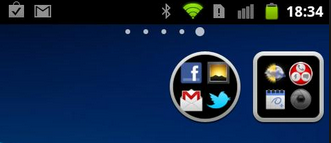
X. Thomas.
group of icon android - Recherche Google_2014-06-17_09-24-06.png
Hi Xavier,
I'm not sure if our UI framework support that but I will take a look at it.
David Hervieux