How to get rid of annoying messages and more

I have set up an SQL Azure datasource and when I connect to a VPN RDM nags me every minute or two that it can't connect to the SQL datasource. How can I make it so that it never bothers me?
The other problem I have is that it now appears to be waiting for a timeout to occur before proceeding to the next step of the connection whenever it involves a VPN. How can I eliminate this?
All Comments (2)
Hi,
I'm note sure what could is the problem exactly but I suspect that the VPN route the Azure link and this cause the connection issue. This is known issue and we recommend to switch to offline mode. You could also disable the Auto Refresh in the data source configuration.
David Hervieux
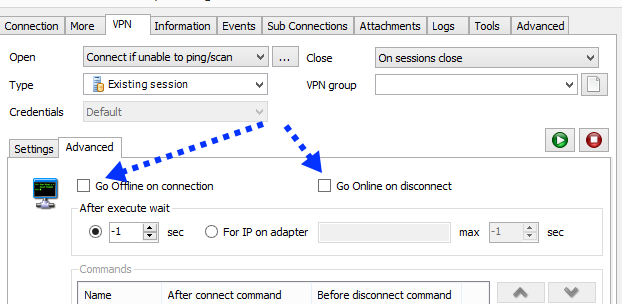
There's a nice feature if you are using the VPN tab of a session to launch the vpn, select the VPN tab, then the inner advanced tab, you can check "Go offline on connection" and "Go online on disconnect".
Your entry will automatically manage the datasource online status.
Maurice
2014-04-04_10-01-27.png