IE Embedded - Failed to open a pop-up

Failed to open a popup window that is required by SonicWall.
You can ensure that popup is not blocked?
edited by matheus.melo on 4/3/2014
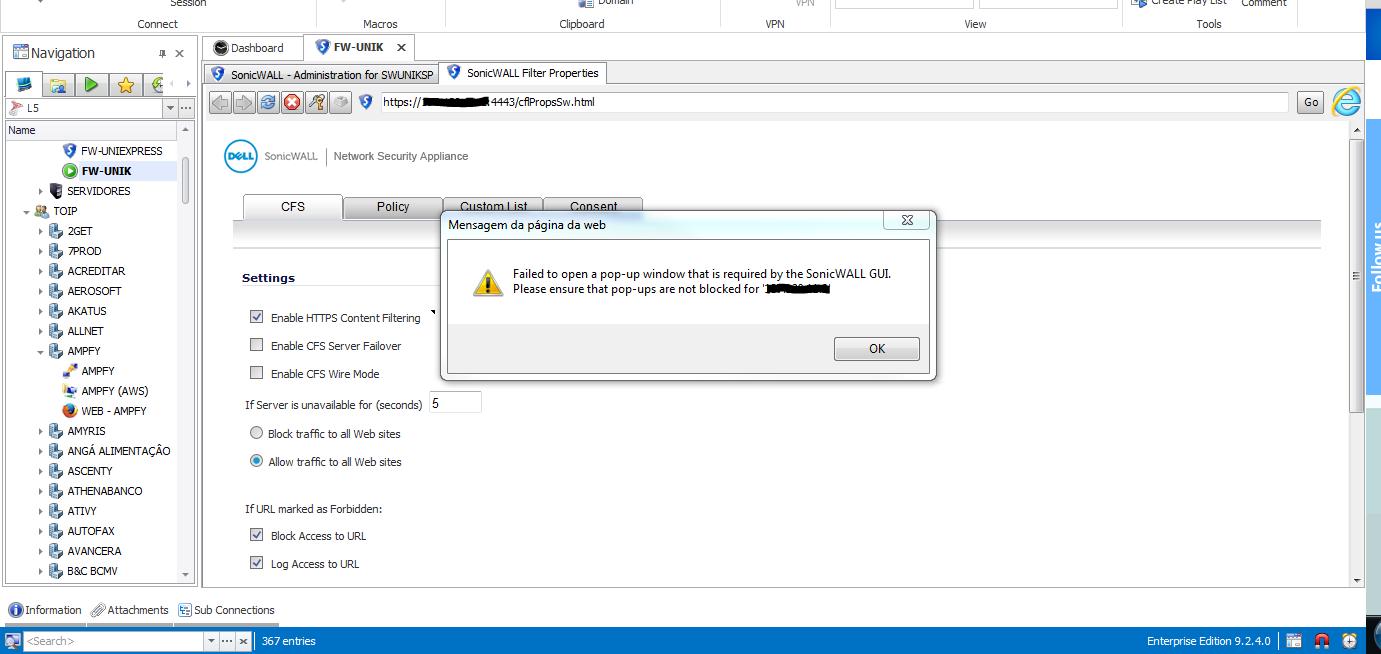
popupie.PNG
All Comments (29)
Hi,
I'm not sure that we can do anything for that. We will need a test site to verify because we have no specific code to block the popup.
David Hervieux
I know this is old, but this is still a problem. Are there any work arounds to manage SonicWALL embedded?
Have you tried embedded Chrome? We did many updates many it works now.
David Hervieux
Unfortunately getting the same error message with Chrome.
It seems the popups open in a new tab but the linkage is broken. The popups open but some of the data is not populated.
Hello,
As per your print screen, you are using RDM 9.2.4. Would you like to test the latest release of RDM?
I can send you a trial license via private message if you want.
The other workaround is to launch your session in external mode.
Best regards,
Jeff Dagenais
We have multiple licenses and installs. Not worth the trouble currently. Running external mode works but not as convenient.
Hi Devolutions
Is this still not solved?
Br
Henrik
@Henrik
What version of RDM are you running?
What type of web browser are you using?
Is this a public URL? If yes, could you provide us the link please.
Best regards,
Jeff Dagenais
Hi Jeff
I am using the free edition 3.0.11.0 (just upgraded from 3.0.10.0 and same problem).
I have tried with IE, Firefox and Crome.
It is a public URL, but is is a VPN link an you have connect before you have this problem.
Br
Henrik
@Henrik,
We use third party software to be able to use Google Chrome and Firefox in embedde mode. For IE, it's an ActiveX from Microsoft that we use. It's not the external browser window that it's fit in the tab.
That being said, if you are not able to open the website in embedde mode with the 3 different browsers, you would need to open it in external mode and use our browser extension to send the credential to the website - https://devolutions.net/Home/BrowserExtensions
Best regards,
Jeff Dagenais
Hi Jeff
I can open the website in embedded mode, but it is when I have logged in and then click on "Connect", then the website is trying to popup another window, then I get this:
But I don't block popups. It is something in RDM that blocks for popups.
Br
Henrik
Hi,
I'm not sure we can do anything embedded. We are limited by the ActiveX. Have you tried embedded Chrome? The third party we use gives us more flexibility
Regards
David Hervieux
Yes I have also tried Chrome, same issue.
Br
Henrik
Do you think it could be possible for your to setup a test environment and send us the .rdm file to reproduce your issue?
Regards
David Hervieux
Hi David
No it is not possible, it is a connection to one of my customers. I can't make at test setup
Br
Henrik
Ok,
I understand.
Regards
David Hervieux
We use external browser for sites like SonicWALL that require popups to get around this issue. However we constantly have failures of the RDM password add-in in both IE and Firefox. (don't ask me about Chrome, It is banned at my company)
I have also given up on the add-ins and have reverted to using another password manager.
Either the browser add-ins or the pop-up issues needs to get fixed.
@Gary Herbstman
Are you using Devolutions Web Login for IE and Firefox?
What version of RDM are you running?
What is the error message that you receive when it's failed? Could you post a print screen.
Best regards,
Jeff Dagenais
I do not know what agents I have installed and it has been very confusing with your different agents. Installation has been another issue like the Edge documentation link going to another browser's documentation.
For IE I had to remove the agent as it was causing IE lockups.
In the extension manager it says the Firefox extension is not installed. We do use the Firefox Developer edition. RDM shows Firefox is ready in the installation paths config.
In Firefox currently our agents are frequently disconnected from RDM. When re-connecting and selecting fill... it does nothing. After playing with it for some time I have given up.
We are on the latest Beta of RDM. We update frequently.
In Firefox the add-in is "Devolutions Web Login" 4.0.2.0
I am currently getting the error in the FF add-in "Encryption key is not recognized" I get this all the time.
I hit reconnect and it does but still seems to not work. My status is now "Devolutions Web Login has been configured and is successfully connected."
@Gary
Every time that you select another data source or close and reopen RDM, the Devolutions Web Login needs to reconnect to be link to RDM again.
This is why you see this message. Our engineering department is working on that reconnection issue. Eventually, the web browser will re-establish the connection automatically to avoid this kind of message.
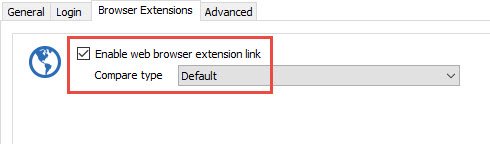
To make work the Web browser extension properly, you need to check the Enable web browser extension link option in the Browser extension tab of your session.
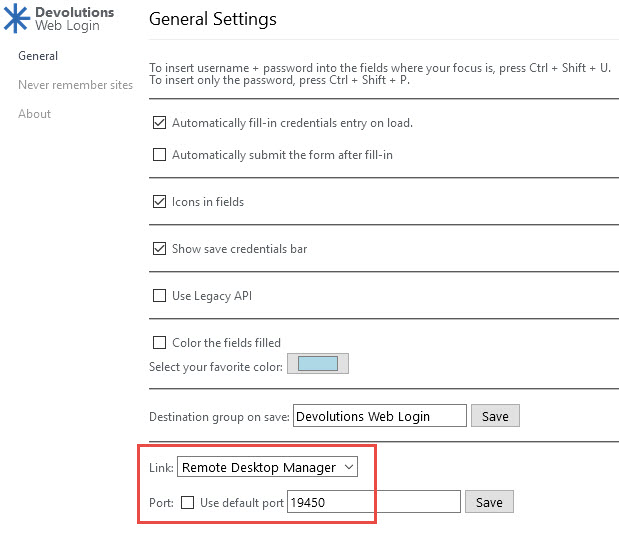
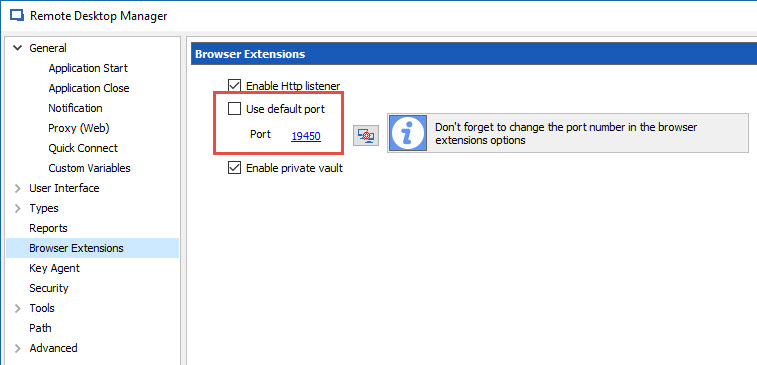
The other thing to verify is that you have configured the same port in the Browser extension (link with the appropriate application) and in the application.
In the application, you need to go in File -> Options -> Browser Extension
Best regards,
Jeff Dagenais
2017-03-14_11-07-41.jpg
2017-03-14_11-05-33.jpg
2017-03-14_11-03-14.jpg
Ok, I understand the reconnect issue.
In RDM when selecting FF for the browser it says the extension is not installed. Actually it says that for all browsers. I did get it to work however. I will test it and see if it stays stable. I do have one issue already. It will not fill the login for FreePBX sites. RoboForm works fine. It does show an available login but when selected it does not fill the fields.
The add-in in Edge is not usable. Edge blocks it because it is not signed. The How to install link goes to a Chrome page.
Hi,
We have a blog about Edge:
https://blog.devolutions.net/2017/03/devolutions-web-login-for-edge.html
It's complicated since Microsoft does not have a real official store.
Regards
David Hervieux
Hello
I have the same problem with the pop up on sonicwall appliance.
If you want to see the problem, you can go to the web site :
https://tz300w.demo.sonicwall.com/main.html
Then Dashboad > Packet Monitor > Configure, and you will the pop up in a new windows.
I have RDM 3.0.13.0
I have tried IE, Firefox and chrome, i have the same problem
I have to open external browser to access to the pop-up
if it's impossible to open pop up in an embedded windows, could you add a menu with the right clic to open in an external browser ?
Thank you.
Thank you for the sample. I will ask Hubert to take a look at it.
Regards
David Hervieux
Hello,
Thank you for giving us a way to test the pop up issue, this is helping out a lot. I've checked and we should be able to do something as far as the embedded Chrome browser goes. I can't promise anything for the other two since they are less flexible.
I'll keep you updated on the progress.
Regards,
Hubert Mireault
Thank you.
Sorry for the delay. We have made a few changes for the embedded Google Chrome browser, and now the test site Martin provided works properly. I think it should help the other similar situations too. The change will be available in the next build of RDM enterprise and RDM free.
For the other embedded browsers we currently do not have a solution.
Regards,
Hubert Mireault
It's great, thank you.
Regards.