Keyboard layout translation

On my mac I have a Canadian CSA keyboard layout and on the remote sessions I'm used to use the Canadian french layout [Français (Canada)]. With RDM-Mac in my Windows sessions, the key left of the 1 (above [Tab]) should give the following characters (no modifiers, shift, AltGr): #,|,\. Instead I get «,»,°
So to get the backslash (\), I have to hit the key between [left shift] and Z.
So if I refer to the correct French Canadian (ftp://ftp.software.ibm.com/software/globalization/keyboards/KBD058.pdf), it seems that the two keys are inverted.
edited by blanalex on 3/5/2014
All Comments (9)
Hi,
We have a fix coming for this but in version 0.9.51.0 there is a partial fix.
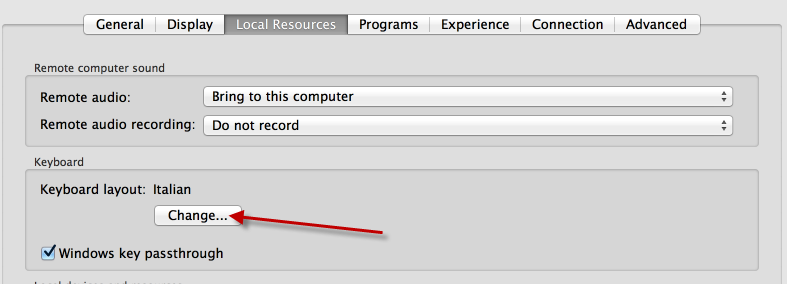
Go to your session configuration and look for the Local resources tab.
Change the keyboard layout to French (Canada).
Hope this helps
Benoît Sansregret
Keyboard Config.png
I tried that a while ago and it did not do anything then but it works now. Thanks!
I see the problem now; for some entries I can't change the keyboard. I go to the keyboard layout dialog, choose one, click OK, but the new setting does not show in the entry property window.
Hi,
Ok let me try to find out what is going on there.
Are you always selecting French (Canada) for the value?
Do you see the value change on the screen and then after you save the value changed back?
The entries were the change doesn't work, are they entries created with the mac version or entries from a Windows datasource ?
If you go back to them can you change the value or the value can't be changed at all on certain entries
Thank you
edited by Benoit Sansregret on 3/7/2014
Benoît Sansregret
My datasourcewas created with the Windows version of RDM. By default all the entries have the "invariant language - invariant country" keyboard layout. For most entries when I select French (Canada) (0x0c0c) keyboard layout and hit OK, the keyboard layout window closes, but the property page hangs for 1-2 seconds and the layout stays the same.
The entries that I can't change were created on Windows; I can change the keyboard on the entries created with the mac version.
Maybe this thread should be transferred to the bug report section ;-)
The thread has been moved to the Bug Report section.
If you go back to an entry were you couldn't change the value and try again is it working?
If it doesn't work could you export one of them and send it to me. I will see if I am to reproduce the behaviour.
You can attach it to this thread or send it directly to me at bsansregret at devolutions dot net
Thank you
Benoît Sansregret
Update 0.9.53 seems to have fixed the bug. Thank you
EDIT:Forget that, it worked for a few entries, I closed the app when I came back it wouldn't work anymore.
And when trying to export one of the entries, it doesn't seem to be able to export a single entry, only all the entries.
edited by blanalex on 3/11/2014
Hi,
To export 1 entry you need to:
-Select this entry
-right click on it
-In Export sub menu click Export Selection (.rdm)...
Is it the way you were doing it?
Otherwise maybe you could try to export it from the Windows version ?
I really wish to find what is causing the behaviour you are describing.
But good news, in the next version (0.9.54.0) will contain a fix on keyboard problem, you will no longer need to fix the keyboard layout in your sessions configuration. This version should be available by the end the week or at the beginning of next week.
Thank you for your feedback
Benoît Sansregret
Hi! Sorry to wake an old thread. Around version 0.9.54.0 the keyboard issue ('\' vs '°') was fixed but it came back later in my case. At first I thought my connection data source was corrupt, but then I refreshed the OS on my mac and reinstalled everything from scratch. I created a new data source and the issue is still there.