Session gone?

We have version 9.1.4.0 Enterprise edition, sometimes some sesisons entries are gone? when we add them again and restart rdm there are 2 entries with the same name?
is there a fix for it?
All Comments (11)
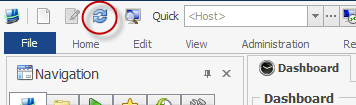
What type of data source do you use? This is really strange but what you could try the next time this happen is a Ctrl+Click on the Refresh button in the Quick Action Toolbar
David Hervieux
We use MS sql database as source ctrl + refrexh doesn't work
If you restart RDM it come back even when you do recreate it?
David Hervieux
if i restart rdm and and recreate it, i have a double entry.. so i think it is not deleted but not visible.
Yes but if you just restart, does it reappear?
David Hervieux
nope only if i recreate the entry, but then it is double, if i restart again, i still have 2 entries
This is very odd. Could you please follow the steps outlined below to help us diagnose the issue.
- Do you have any logs in Help -> View Application Logs? If so please post it here.
- In File- > Options -> Advanced -> Debug Level set it to 256
- Help -> Diagnostics -> Launch Profiler
- CTRL+click the refresh button
- in the profiler window click the "Send Trace To" button and add my name (Stéfane) to message.
That should help us figure out what is going on with the "missing" session.
Regards,
Stéfane Lavergne
3-5-2014 9-55-30 AM.png
just send you the logging, i can't see anything, so i don't think it will help..
for the record we are using RDM with 3 people all connected to the sql instance.
is there some kind of recycle bin option, with history logging so we can see if someone accidental removed it?
Never mind looking, i found the "problem" it was my collegue, sorry for the troubles..
Yes you can go in Administration->View Deleted
David Hervieux