remote name could not be resolved

version 9.1.2.0
At a customer site, I could not go into offline mode - the dialog box that says "The remote name could not be resolved: {myrdmservername}" repeatedly shows in an infinite loop.
All Comments (11)
What type of data source do you use? Are you sure that you have enabled the offline mode? Could you go in File->My Data Source Information?
Don't forget that you need to enable it in the user, in the data source settings and also in the data source configuration.
David Hervieux
David,
I'm using the remote desktop manager server data source. Yes, the offline mode is configured correctly, as it seems to work fine most of the time. However, I was at a customer site yesterday where I had a network connection (intranet only), but not back to my server - and I wanted to go offline, but I was unable to because the dialog box (that I noted above) kept repeatedly being shown - and it would not go into offline mode. This essentially rendered the RDM client entirely unusable. Literally, every time I selected "Go Offline" - the dialog would go away, and then immediately come back. Not sure why it would do that.
Thanks,
Ryan
Hi,
Could you take a look at the log. I want to see if I can find a pattern.
David Hervieux
David,
Where can I find this log file?
Thanks,
Ryan
Help -> View application log
Regards,
Stéfane Lavergne
David / Stefane,
This is all I have in the log... what's odd is, the entry only shows up once in the log, but the dialog was repeatedly shown as I described...
[2/20/2014 10:18:59 AM - 9.1.2.0]ERROR System.Net.WebException: The remote name could not be resolved: 'myrdmsserver.local'
at System.Net.HttpWebRequest.GetRequestStream(TransportContext& context)
at System.Net.HttpWebRequest.GetRequestStream()
at System.Web.Services.Protocols.SoapHttpClientProtocol.Invoke(String methodName, Object[] parameters)
at Devolutions.RemoteDesktopManager.RDMSProxy.RDMSServices.Login2(String userName, String password, RDMOLoginParameters parameters)
at Devolutions.RemoteDesktopManager.Business.DataSources.RDMSConnectionDataSource.DoLogin(String userName, String password)
at Devolutions.RemoteDesktopManager.Business.DataSources.RDMSConnectionDataSource.Login(Boolean useCredentials)
at Devolutions.RemoteDesktopManager.Business.DataSources.RDMSConnectionDataSource.get_Proxy()
at Devolutions.RemoteDesktopManager.Business.DataSources.RDMSConnectionDataSource.ExecuteAction[T](ExecuteActionDelegate`1 action)
at Devolutions.RemoteDesktopManager.Business.DataSources.RDMSConnectionDataSource.ProxyGetData(String proxyConnectionCacheID, Byte[] version)
at Devolutions.RemoteDesktopManager.Business.DataSources.RDMSConnectionDataSource.GetDataSourceSettings()
at Devolutions.RemoteDesktopManager.Managers.ConnectionManager.LoadDataSourceSettingsFromDataSource(BaseConnectionDataSource newDataSource)
Could you try to set the debug level to 1 (File -> Options -> Advanced -> Debug Level). Now, assuming you are no longer at the client site, unplug the network and see what gets logged.
I'm thinking there is a dashboard that is trying to refresh itself without first testing to see if it's offline. With a proper log we should be able to resolve the issue.
Regards,
Stéfane Lavergne
Stefane,
I'm having this happen here locally as well with your test. Here is the debug log after trying to select Go Offline multiple times.
[2/24/2014 5:45:36 PM]DEBUG Form load was not called
[2/24/2014 5:45:36 PM]DEBUG Starting main form Load
[2/24/2014 5:45:37 PM]DEBUG Showing main form...
[2/24/2014 5:45:37 PM]ERROR SILENT System.Net.WebException: The remote name could not be resolved: 'devolutions.net'
at System.Net.HttpWebRequest.GetResponse()
at Devolutions.RemoteDesktopManager.Managers.UpdateManager.DoCheckForUpdate()
at Devolutions.RemoteDesktopManager.Managers.UpdateManager.CheckForUpdateAsync()
[2/24/2014 5:45:39 PM]ERROR SILENT System.Data.SQLite.SQLiteException: database disk image is malformed
database disk image is malformed
at System.Data.SQLite.SQLite3.Reset(SQLiteStatement stmt)
at System.Data.SQLite.SQLite3.Step(SQLiteStatement stmt)
at System.Data.SQLite.SQLiteDataReader.NextResult()
at System.Data.SQLite.SQLiteDataReader..ctor(SQLiteCommand cmd, CommandBehavior behave)
at System.Data.SQLite.SQLiteCommand.ExecuteReader(CommandBehavior behavior)
at System.Data.SQLite.SQLiteCommand.ExecuteScalar()
at Devolutions.RemoteDesktopManager.Business.SQLiteHelper.ExecuteScalar[T](String connectionString, String sql, SQLiteParameter[] parameters)
[2/24/2014 5:45:41 PM]ERROR SILENT System.Net.WebException: The remote name could not be resolved: 'myrdmserver.local'
at System.Net.HttpWebRequest.GetRequestStream(TransportContext& context)
at System.Net.HttpWebRequest.GetRequestStream()
at System.Web.Services.Protocols.SoapHttpClientProtocol.Invoke(String methodName, Object[] parameters)
at Devolutions.RemoteDesktopManager.RDMSProxy.RDMSServices.Login2(String userName, String password, RDMOLoginParameters parameters)
at Devolutions.RemoteDesktopManager.Business.DataSources.RDMSConnectionDataSource.DoLogin(String userName, String password)
at Devolutions.RemoteDesktopManager.Business.DataSources.RDMSConnectionDataSource.Login(Boolean useCredentials)
at Devolutions.RemoteDesktopManager.Business.DataSources.RDMSConnectionDataSource.get_Proxy()
at Devolutions.RemoteDesktopManager.Business.DataSources.RDMSConnectionDataSource.ExecuteAction[T](ExecuteActionDelegate`1 action)
at Devolutions.RemoteDesktopManager.Business.DataSources.RDMSConnectionDataSource.ProxyGetData(String proxyConnectionCacheID, Byte[] version)
at Devolutions.RemoteDesktopManager.Business.DataSources.RDMSConnectionDataSource.GetDataSourceSettings()
at Devolutions.RemoteDesktopManager.Managers.ConnectionManager.LoadDataSourceSettingsFromDataSource(BaseConnectionDataSource newDataSource)
[2/24/2014 5:45:41 PM]ERROR SILENT System.Data.SQLite.SQLiteException: database disk image is malformed
database disk image is malformed
at System.Data.SQLite.SQLite3.Reset(SQLiteStatement stmt)
at System.Data.SQLite.SQLite3.Step(SQLiteStatement stmt)
at System.Data.SQLite.SQLiteDataReader.NextResult()
at System.Data.SQLite.SQLiteDataReader..ctor(SQLiteCommand cmd, CommandBehavior behave)
at System.Data.SQLite.SQLiteCommand.ExecuteReader(CommandBehavior behavior)
at System.Data.SQLite.SQLiteCommand.ExecuteScalar()
at Devolutions.RemoteDesktopManager.Business.SQLiteHelper.ExecuteScalar[T](String connectionString, String sql, SQLiteParameter[] parameters)
[2/24/2014 5:45:41 PM]ERROR SILENT System.Data.SQLite.SQLiteException: database disk image is malformed
database disk image is malformed
at System.Data.SQLite.SQLite3.Reset(SQLiteStatement stmt)
at System.Data.SQLite.SQLite3.Step(SQLiteStatement stmt)
at System.Data.SQLite.SQLiteDataReader.NextResult()
at System.Data.SQLite.SQLiteDataReader..ctor(SQLiteCommand cmd, CommandBehavior behave)
at System.Data.SQLite.SQLiteCommand.ExecuteReader(CommandBehavior behavior)
at System.Data.SQLite.SQLiteCommand.ExecuteScalar()
at Devolutions.RemoteDesktopManager.Business.SQLiteHelper.ExecuteScalar[T](String connectionString, String sql, SQLiteParameter[] parameters)
[2/24/2014 5:45:42 PM]ERROR SILENT System.Net.WebException: The remote name could not be resolved: 'myrdmserver.local'
at System.Net.HttpWebRequest.GetRequestStream(TransportContext& context)
at System.Net.HttpWebRequest.GetRequestStream()
at System.Web.Services.Protocols.SoapHttpClientProtocol.Invoke(String methodName, Object[] parameters)
at Devolutions.RemoteDesktopManager.RDMSProxy.RDMSServices.Login2(String userName, String password, RDMOLoginParameters parameters)
at Devolutions.RemoteDesktopManager.Business.DataSources.RDMSConnectionDataSource.DoLogin(String userName, String password)
at Devolutions.RemoteDesktopManager.Business.DataSources.RDMSConnectionDataSource.Login(Boolean useCredentials)
at Devolutions.RemoteDesktopManager.Business.DataSources.RDMSConnectionDataSource.get_Proxy()
at Devolutions.RemoteDesktopManager.Business.DataSources.RDMSConnectionDataSource.ExecuteAction[T](ExecuteActionDelegate`1 action)
at Devolutions.RemoteDesktopManager.Business.DataSources.RDMSConnectionDataSource.ProxyGetData(String proxyConnectionCacheID, Byte[] version)
at Devolutions.RemoteDesktopManager.Business.DataSources.RDMSConnectionDataSource.GetDataSourceSettings()
at Devolutions.RemoteDesktopManager.Managers.ConnectionManager.LoadDataSourceSettingsFromDataSource(BaseConnectionDataSource newDataSource)
Thanks, now we got what we wanted.
The error: "System.Data.SQLite.SQLiteException: database disk image is malformed" is the issue. You have a bad offline data file. Unfortunately the app won't (yet) fix the issue on it's own. For now you can delete the file manually.
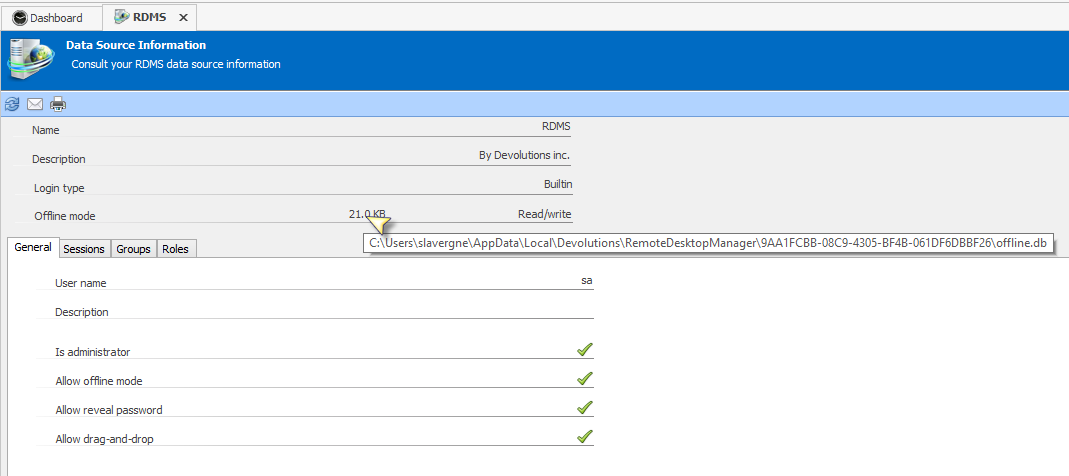
File -> My Data Source Information, now hover over the file size (see image) this will give you the full file path.
something like %LocalAppData%\Devolutions\RemoteDesktopManager[GUID-DataSourceID]\offline.db
close RDM, delete the file, start RDM. This will force RDM to recreate the offline file. If you reproduce the test all should be good.
We have an issue logged to resolve the bad offline issue automatically I will add a note to make sure we bump it up in priority.
Regards,
Stéfane Lavergne
2-24-2014 7-06-23 PM.png
Stefane,
The steps that you provided resolved my issue. Thank you for the walkthrough to get this resolved.
Ryan
Ryan,
Thank you for the update.
Regards,
Stéfane Lavergne