UI Layout broken

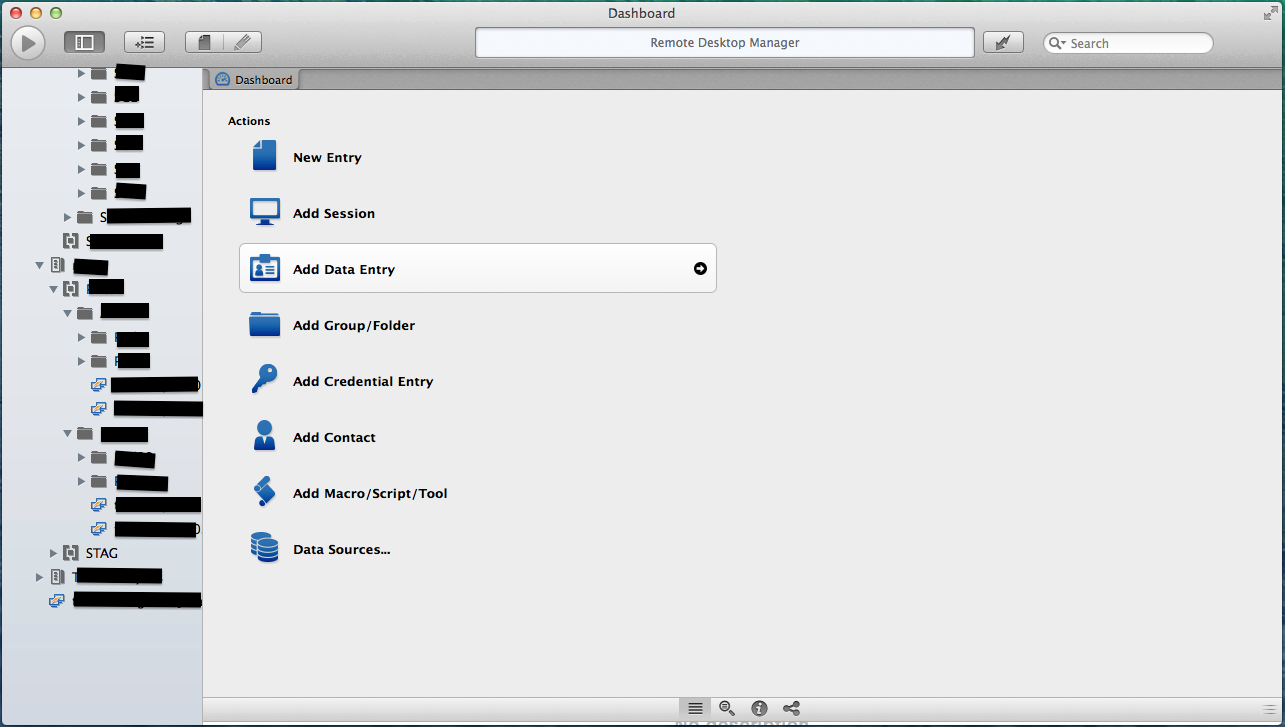
RDM's UI layout is somehow really broken on my Retina MacBook Pro Late 2013 running 10.9.2 (13C44) - see attached screenshot.
Screen Shot 2014-01-28 at 19.16.25.png
All Comments (5)
Hi,
Is the layout still broken after you restart the application ?
If it's still broken the layout file containing your preference might be corrupted.
-Close the app
-Delete this file /Library/Application Support/com.devolutions.remotedesktopmanager/RemoteDesktopManager.lyt
-Restart the app
Thank you for your feedback
Benoît Sansregret
Seems fine after deleting the layout file. I'll watch it over the next few days.
This broken UI I also have sometimes. I have a long list of connections, sometimes I see only the lower half. The upper half of the connection list is looking like they es outside of the screen.
after quit and restart the App it's working correct. But it happens every 2 or 3 times when I start it. This problem I have since the beta versions and also with the actual 1.0.2.0
Hi,
We are aware of the situations and we are trying hard to fix it. The problem is that it don't happen every time and I didn't manage to reproduce it as often as you are reproduce it.
May I ask you a few questions:
How many connections do you have?
What kind of computer and OS are you using?
Thank you
Benoît Sansregret
I have 170 configured connections - all to Windows Server 2012
and 56 configured connections to RedHat Linux Servers
RDM is running on a Macbook Pro Late 2013 with 16 GB RAM and OSX 10.9.5
Here a screenshot, as you see the left window looks like scrolled down, but it's not possible to scroll up. (the black bars are only because i don't want to post my servernames.)
edited by garfield2003 on 10/7/2014
Screenshot 2014-10-07 15.08.18.png