Offline mode in MSSQL not working

Dear Devolutions Team,
We're currently evaluating RDM and I have issues with the offline mode.
When starting up RDM with a working connection to the MSSQL-DB it works fine and I can also go offline then and see my entries.
However when starting RDM with no connection to the MSSQL-DB the Sessions folder is empty.
Do I need to consider anything else besides Data Source Settings.../General/Offline mode: Read-only ?
I use RDM Enterprise Version 9.0.12.0 with TRIAL License
Thank you for your help
All Comments (15)
Hi
When you launch RDM without access to the DB, do you get a dialog asking you to confirm going offline?
Maurice
yes, I tried both ways. Either waiting until the timeout expires and the dialog is showing up or by editing the datasource and enabling "Prompt for offline mode on startup"
With both ways the Datasource has the "(offline)" tag after the name but has only an empty sessions folder.
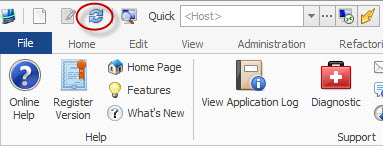
Do you have access to the DB at this time, if so, when online press CTRL+F5 to force a full reload of the database, it will recreate the offline cache as well.
You could then go offline to see if that fixed it.
Has it been more then 7 days since you went online? To confirm that there is indeed an offline file, go in the data source settings dialog, you will see a GUID at the bottom, thats the data source ID.
Then open %localappdata%\Devolutions\RemoteDesktopManager (if you installed using the default settings...), there should be a folder named with that GUID. In that folder, there should be a file called offline.db.
Maurice
hmmm....
I hit refresh a few times, also there is a file offline.db there about 100kb in size (which seems possible).
But still the same problem.
I also just discovered that when I'm connected to the datasource then edit the datasource and have selected the option "prompt for offline mode on startup" and I close the edit window (OK) I get already I dialog which asks if I want to go in offline mode. If I hit yes then my entries instantly disappear.
did you use CTRL+F5 to refresh?
Maurice
Not before but now - no change - still empty when start RDM in offline mode
Hi,
Have you tried the latest beta. I think that Stefane did a fix for that few weeks ago.
David Hervieux
Hi David,
sorry for my late answer. I just tried the new beta (9.0.17.0).
Unfortunately without any success the problem still remains.
Do you need some config information from my side to further analyze the problem?
Simon,
This is strange, I would like some more information. Please follow the steps outlined below:
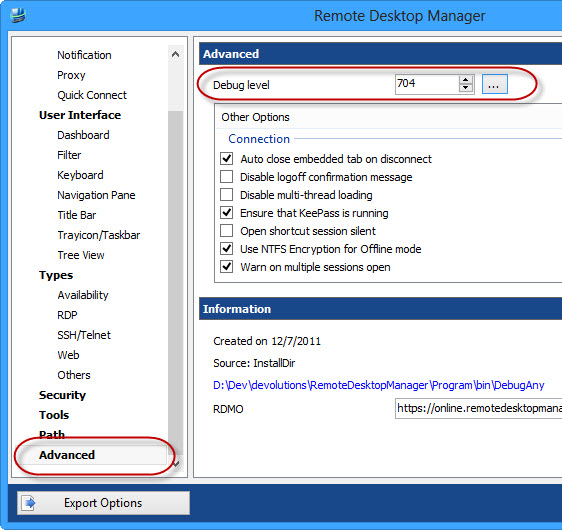
- In RDM set debug level to 704 (File -> Options -> Advanced)
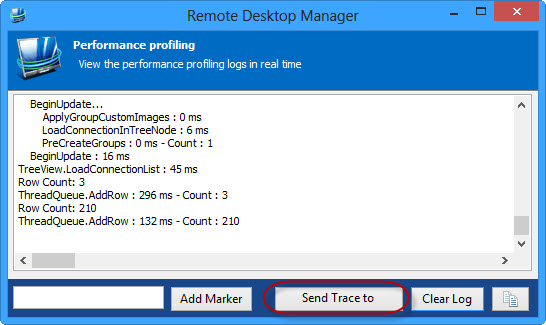
- Start the Proflier (Help -> Diagnostics -> Launch Profiler)
- CTRL + refresh the data source
- send us the result of the trace
- close RDM
- start RDM with the /Profiler (RemoteDesktopManager.exe /Profiler)
- send us the result of the startup trace
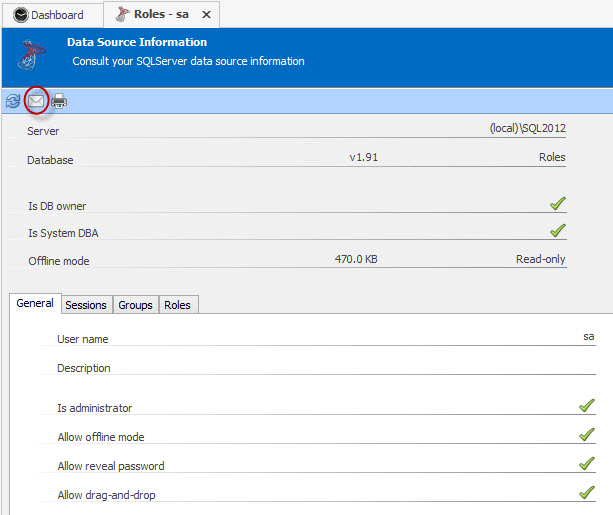
- File -> My Data Source Information, click the envelope to send us the data source information
This should help me shed some light on the issue.
Regards,
Stéfane Lavergne
1-20-2014 9-53-30 AM.jpg
1-20-2014 9-51-06 AM.jpg
1-20-2014 9-50-18 AM.jpg
1-20-2014 9-49-11 AM.jpg
Hi Stéfane,
I sent you the traces as requested. However, based on the output I could see that my offline datasource was corrupted, apparently a refresh did not do the trick.
However I have moved the %localappdata%\Devolutions\RemoteDesktopManager\<id> folder away and restarted RDM and now all works nicely. When I start RDP in offline mode I see my entries and the stacktrace shows no errors.
It is up to you if you like to further investigate the issue, from my side this is solved.
Still, if you can spare the time I have another related question:
I have configured my datasource as "Offline mode: Read/write" but when I go to File -> My Datasource Information i see that its read-only "Offline mode: Read-only"
is this due to a setting in RDM or do I need to change something on my MSSQL Database?
Thank you
br
Simon
hi
Please have a look at the table in http://help.remotedesktopmanager.com/datasource_offline.htm there are multiple settings that affect the final mode.
As for the corrupted offline file, we'll definitely keep an eye out for that.
[Stefane - fixed link]
edited by stefane on 1/20/2014
Maurice
Simon,
Thank you for the trace outputs. Great observation on the corrupt offline file. I will definitely add a system check so that RDM can recover if ever it happens again.
Regards,
Stéfane Lavergne
Hi Stéfane,
thank you for your support. Everything works now like clockwork.
(offline-db read/write: I forgot to set it in user-settings.)
have a great day.
br
Simon
[Fixed] I just wanted to add my issue to this forum and say Offline was working fine until one day it wasn't. I could not figure out where to push CTRL+F5 to refresh. I am running RDM 9.2.5.0 on Win8.1 and i tried in a few places but no luck. Finally (while datasource was online) clicking File --> The holding CTRL while pushing the refresh button did the trick. RDM looked frozen for about 10 seconds then responded again. I closed RDM and re-opened selecting Offline Mode and all my sessions were back. So yes this did fix my issue. Thanks for the help all who suggested it.
@stéfane:
we had this problems too, it happens random
i always adviced people with that prob to delete %localappdata%\Devolutions\RemoteDesktopManager
after that it works -> good to know, i only need to delete the offline-db.
this prob cannot be reproduced by me, all users are using rdm in normal way (most of them are not admin in rdm),
and sometimes offline-db gets corrupt....
a check & auto-repair will be a gr8 advantage
btw we use RDMS 2.2.12 and RDM 9.2.2+
edited by SMG on 4/24/2014
Kind Regards
Markus
======================