Can something be done ?

Hi,
I have been using trail version and i am in the process of getting an approval for Enterprise edition from my supervisor.
Long story short, out of curiosity i was exploring various options, and i ended up entering a password for connections.db file via RDP software to make it more secure, now when i am trying with the password to open default profile , the password is not working.. what are my options ?
Fortunately i do have a backup of data.rdm file. Is there a way to recover password for default connections.db ?
I am using Win 7 Enterprise edition sp 1, and Remote Desktop Manager 9.0.12.0
-Neeraj Vasudeva
All Comments (7)
Unfortunately it's not possible to remove the SQLite password if you don't have the original password. However sometime it just because it's not the right password saved in the datasource configuration (File->Data Source). Perhaps you could configure it to prompt you for the password and you could type it.
David Hervieux
\
Thanks for the quick response, that was really very quick. When i click the software shortcut, it comes up with this prompt , on entering password, it says Invalid. Refer to attached screenshot. Is there no way to recover ?
How about if i uninstall the software and install it again and then import rdm file ? I took a backup of rdm file just before setting password for connection.db file
Regards
Neeraj
login.png
that will solve it, but no need to uninstall
simply create a new data source and set it as the active one, then import your rdm file.
You can then delete the unusable data source.
Maurice
Hi,
I tried following your instruction, but looks like it's not working . Can you point out what's the mistake that i might be doing.
Here's what i did
If u refer to below screenshot, Data Source "Local Data Source" was original, so i created new one with the name "New Data Source NV" . and now when i try to use that , it still pops up with a dialog box to enter password. Why is it throwing me a password entry screen, when on new DataSource , i haven't password protected it ? Do you think i have to get rid of Original Data source to get rid of this issue ?
-Neeraj Vasudeva
good_ds.png
bad_ds.png
Issshhh, i dont know .... it doesnt make sense, after posting my last post containing 2 screenshots, i went back and right clicked on original Data source and selected option "Edit Data Source", then i got a popup, i just unselected both check boxes "Secure with password" and " Always ask password" and saved the original Data Source and now i am back in business & everything is working as expected.
honestly i am clueless, is it a bug that i stumbled across, since i was expecting it wouldn't let me modify the original Data Source since that's password protected. What's the point of then specifying password, when this option can be taken off without entering password ???
Refer to below screenshot
-Neeraj
ds_work.png
I think I know what happened.
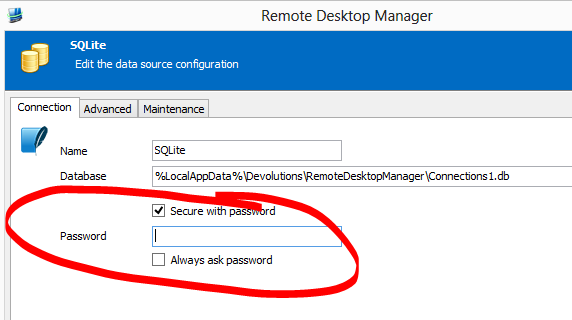
My guess is you set the password in the data source information screen after the data source was created. (see image)
This does not in fact set the password but rather specify that a password is required for the connection. In your case it didn't since it was never set.
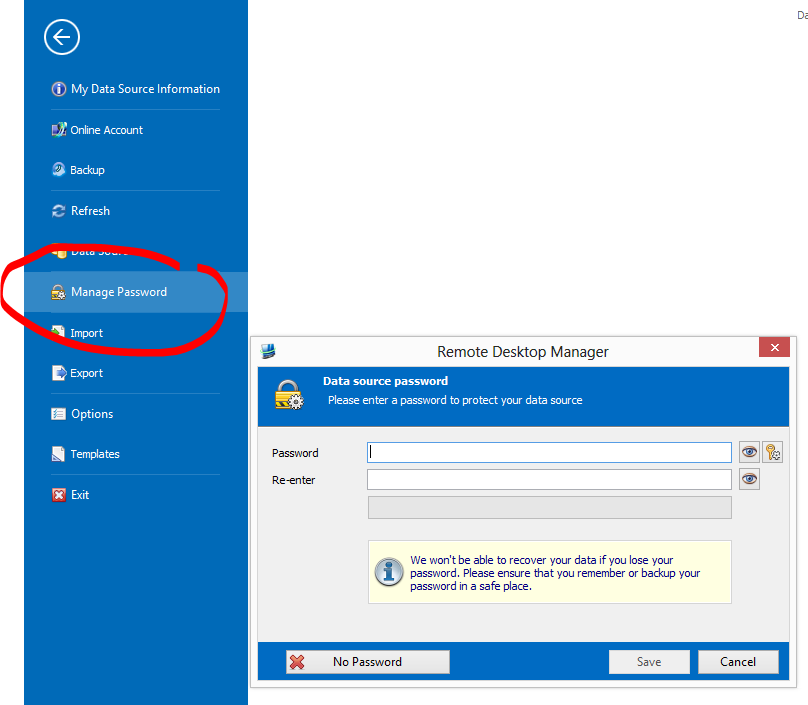
So the questions is How do you set the password? File -> Manage Password (see image)
This is where you manage (set/change/clear) the password of the SQLite DB.
Note: setting the "Secure with password" and setting a password prior to the SQLite DB existing will work since we will create the DB with the password right from the start, once created you must use the Manage Password functionality.
Regards,
Stéfane Lavergne
Capture[1].PNG
Capture0.PNG
Thanks.
You are right, as per screenshot that u posted, i specified password only in 1st screen and i never specified password for SQLlite db.
I will read the documentation, but correct me i am wrong, Is it to safe to say , if a user want to execute this software and he expects a password prompt to appear first then 1st screen is the place that user is expected to maintain a password ?
2nd screen comes into picture when u r trying to secure ur connection db so that nobody can do any connection related modifications like deletion of any telnet, rdp connections ??
-Neeraj