Use Cisco AnyConnect Secure Mobility Client

Do your Cisco anyconnect plug-in support this version above. It can't seem to make a connection. I have the VPN address in the host line, but it never asks me my for my group or anything else. It initially asked me to map to the cisco anyconnect directory, but how can I check or change that reference afterwards?
Thanks
All Comments (23)
Could you verify what is the name of the executable for this Cisco VPN? Perhaps the command line is different.
David Hervieux
It is:
vpnui.exe
Thanks
I will ask André to verify that next week (Monday). Could you verify in the meantime if you can get the command line arguments for this executable
David Hervieux
I'm a end user, so not sure about the command line stuff. I can get the administrators manual on line. Are they usually in there?
Yes sometime it is. You can send me the manual by private email.
David Hervieux
Did you ever get this working? I too would like to use Cisco AnyConnect Secure Mobility Client but can't figure out to make it work.
Thanks
Was there ever a solution for this? We have many customers that require we select a group before we enter the credentials for the anyconnect VPN.
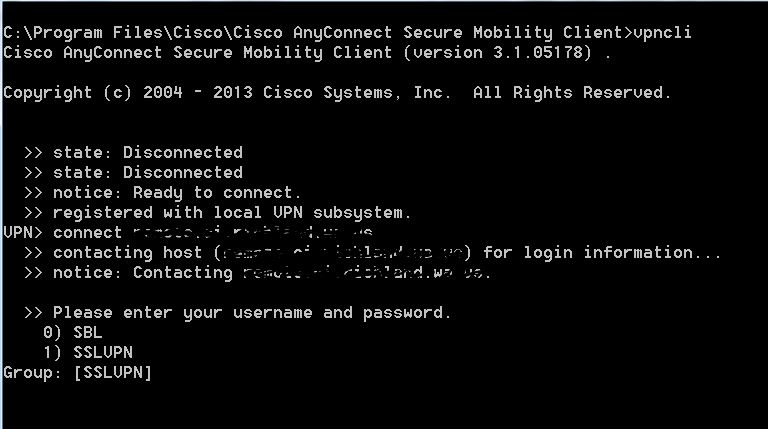
Capture.JPG
Have you tried the latest beta with the new AnyConnect add-on?
David Hervieux
I have also an issue with Cisco VPN. If I use Cisco Anny Connect Secure Mobile Client "C:\Program Files (x86)\Cisco\Cisco AnyConnect Secure Mobility Client" I can connect to the system. If I use (Yes I have the new version) Remote Desktop manager and Cisco AnyConnect VPN Client, I always get logon fail with the same credentials.
edited by banfield on 11/8/2014
replace wrongly formatted text
edited by slavergne on 11/8/2014
cisco[1].jpg
cisco.jpg
LOL good forum... when choose edit the text changes :)
Here is the text:
I have also an issue with Cisco VPN. If I use Cisco Anny Connect Secure Mobile Client "C:\Program Files (x86)\Cisco\Cisco AnyConnect Secure Mobility Client" I can connect to the system. If I use (Yes I have the new version) Remote Desktop manager and Cisco AnyConnect VPN Client, I always get logon fail with the same credentials.
Stéfane Lavergne
Hi,
Did you try the "Specify group number" new option ?
Best regards,
André Sanscartier
hi all,
we use a lot of anyconnect-vpns and i tried to reproduce this problem, but for me the anyconnect-plugin is working.
biggest problem in anyconnect-plugin is that you cannot get the handle on vpncli and the vpn-entry gets not highlighted.
our solution on this:
create web browser session, embedded mode
url https://your.anyconnect.com
web browser IE
Login-TAB:
Authentication mode: Form
Auto fill login: yes
Auto submit: yes
Form ID: unicorn_form
Username ID: username
Password ID: password_input
Login button ID: Login
(all done by Discover)
Events-TAB:
After Disconnect: Command line
Command: "%ProgramFiles(x86)%\Cisco\Cisco AnyConnect Secure Mobility Client\vpncli.exe" disconnect
It's not fully automatized because of "Connect Anyway"-Confirmations but after that there is an open session and you know where you are ;-)
maybe this description can help you to build an anyconnect-webbased-plugin.
best regards,
markus
Kind Regards
Markus
======================
Is it possible to get help on this? Othervice I don´t se the point of renew the subscription of the software. BR Daniel
@banfield
Could it be possible that you have some special chars in your password?
David Hervieux
@Markus
Thank you for the post. I have entered an enhancement request to create Web AnyConnect VPN. This could simplify a lot of thing
David Hervieux
@Banfield could you try the AnyConnect web solution? Perhaps Markus could export and post it on the forum without is real credentials :)
David Hervieux
All of my Anyconnect issues have been resolved with the new version 10. I did have to do a couple things to get it to work, not sure if its because I tinkered with 9 and anyconnect so much or if it just needed a fresh install. Here is what I did on a windows 7 VM:
1. Upgrade to RDMS v10
2. Close RDMS
3. uninstall Cisco anyconnect
-Delete "C:\ProgramData\Cisco\Cisco AnyConnect Secure Mobility Client"
-Delete "%User%\AppData\Local\Cisco\Cisco AnyConnect Secure Mobility Client"
4. Delete "%User%\AppData\Local\Devolutions\RemoteDesktopManager\VPNAddOn.dll"
5. Reinstall Anyconnect (can be done by using a web vpn login manually)
6. Restart RDMS 10. It prompted me to reinstall the vpn add on.
After that all of my issues were gone. Its finicky but once it works, its so slick.
Hope this helps someone. gl
Hi David,
i attached a anonymized version of our entry.
plz feel free to use and improve.
best regards
markus
Kind Regards
Markus
======================
Test-AnyconnectWeb.xml
Excellent! Thank you very much
David Hervieux
Since André updated the new VPN addon for me to use VPN groups than I have not had any issues with the addon my only issue is that the RDM says often it could not connect to VPN but if I then click Yes on continue I get in.
That issue came with the newest update of Cisco Anyconnect.
*not bugging me at all I created Macro that clicks this Yes for me without I will notice that.
Regards,
Ingvar Orn Ingolfsson
System Engineer
Axdata AS - Norway
How do you specify a text VPN group? For example in the Group list on the VPN web page I see San Francisco, Chicago, Washington DC, etc. In RDM I only see options for a numeric value.
ckelso,
In the dialog, you will see that they list the list of VPN connections, you specify the number.