Windows 8.1 local Hyper-V entry

How do I set up an entry on my local Windows 8.1 laptop to a Hyper-V virtual machine I created on that same laptop?
I looked around and wasn't sure of using 'Hyper-V Console' because I want a full-screen "normal UI" experience, not a "console" view of my Hyper-V VM.
There is no IP address, just a name, like WinSrv2008R2 on my local host laptop PC. Normally, for other non-Hyper-V VM's, I just give the IP address, but in this case, there is no IP address.
edited by fmorriso on 1/8/2014
edited by fmorriso on 1/8/2014
All Comments (3)
Hi
It works only with embedded sessions
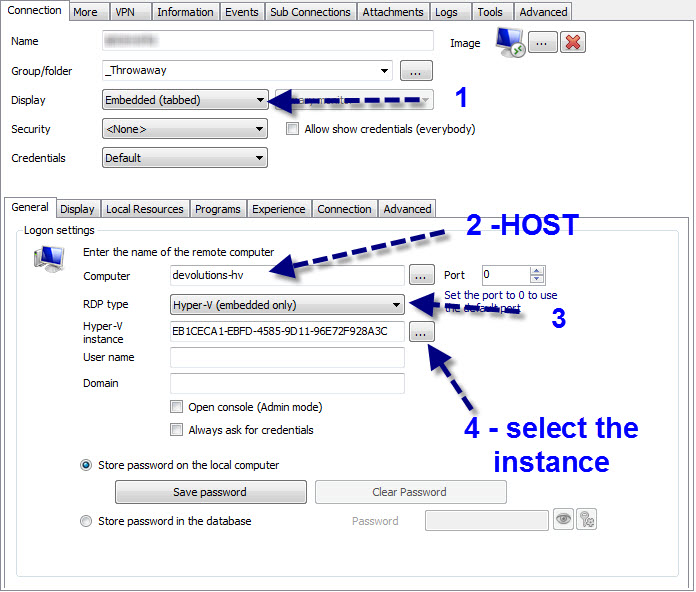
Maurice
hyperv.jpg
Maurice: I'm still confused. You skipped a step (I think).
When I click 'New Entry', when the 'Add a new entry' dialog comes up, what type should I choose?
If I pick Session, Virtualization, Hyper-V Console, I don't see the picture you show in your initial reply.
Its a RDP session, sorry about that.
Maurice