SSH not workingy anymore (no common host key)

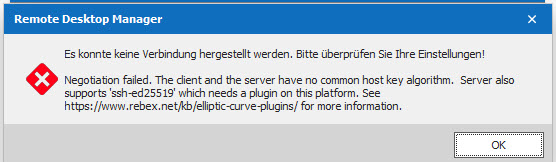
We can't connect to any fortigate Firewall anymore. We get a message that there is no common host algorithm and need to install a plugin.
Whad do we need to do, change something with the algorithm or install something?
Version. 2019.2.24
ssh.jpg
All Comments (12)
Hello,
Are you able to authenticate with an application like Putty as example?
Best regards,
Jeff Dagenais
Hi
Yes it works without problems in putty.
It also worked in RDM before. It must be since an update.
Best regards.
Patrick
Hello,
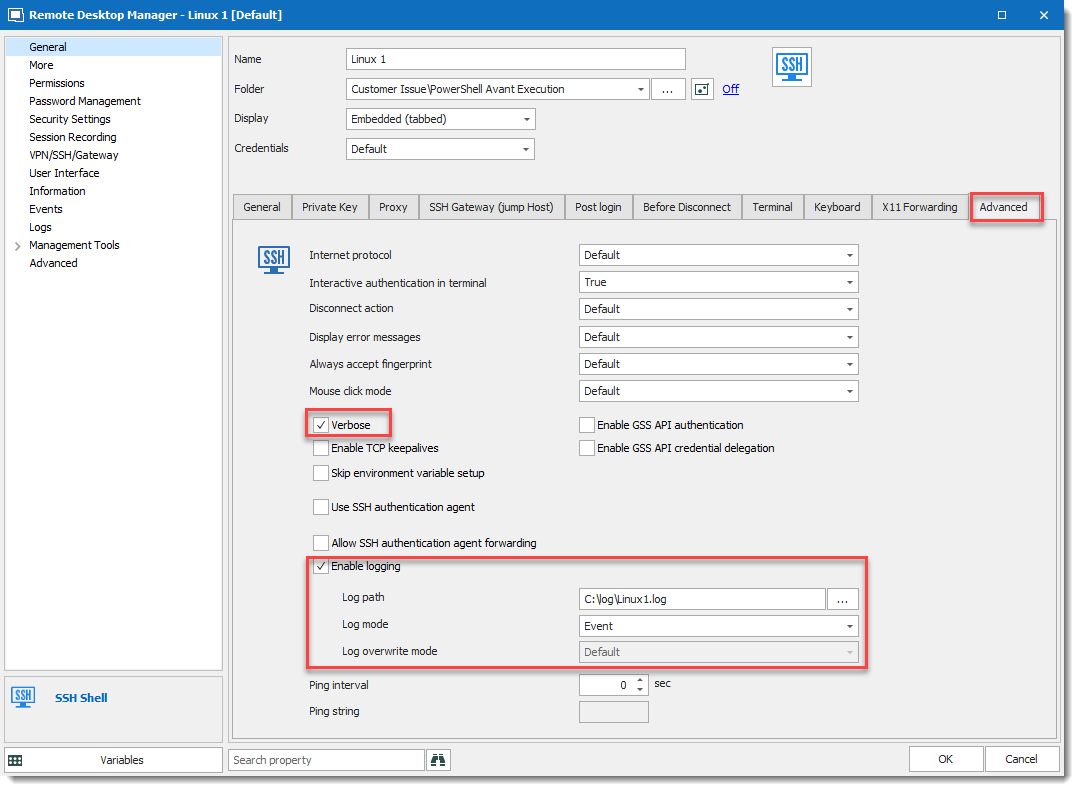
Could you go in the Properties of your SSH Shell entry under the "Advanced" tab, check the following options:
1. Check "Verbose"
2. Check "Enable Logging"
3. Use the ellipsis to select a path to create your log
4. Make sure that your "Log Mode" is set to "Event"
Once this configuration has been made, try to launch your SSH Shell entry once more and send us the log which will be created.
Please submit the error log by ticket at ticket@devolutions.net
That said, during the time that we troubleshoot this issue with you, we probably have a temporary workaround that would allow you to continue to work.
To use this workaround, please go under File -> Options -> Terminal -> Under the Advanced section, check Use Legacy Terminal.
It is important to note that using this workaround will prevent you from using the new features that will soon be available with the SSH Shell entry type.
Best regards,
David Grandolfo
Hello David
I have about 3 different places with an Advanced tab under Properties, but I don't find these options anywhere. Do you have a screenshot?
I tried the workaround and enabled the legacy mode, but I get the same error message, so I can't use it at the moment.
Best regards.
Patrick
Hello Patrick,
The logs are located here (see the image below)
If you still do not see the Advance tab, be sure you are using the entry SSH Shell.
Regards,
David Grandolfo
SSH_logs.png
Hello David
I just checked again, and we are using putty (SSH Shell Rebex) and get the error. There we have not the logging options from above.
When I open putty on its own and do the connection, everything is working. Just not from RDM anymore.
Best regards.
Hello,
Could you test with our integration of Putty which is the SSH Shell entry?
Best regards,
David Grandolfo
Hello David
I tested it with SSH Sheell entry now, and it works. (if I enter user and password manually, if I select it from the lastpass credentials, it will just open a black screen for a second and close it again.)
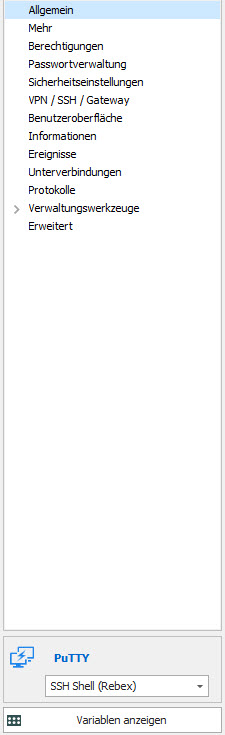
All our entries are set like this:
(Putty with SSH SHell) and were working without problems before. Would be nice, if this was working again, as it's also an official integration.
Best regards.
ssh2.jpg
Hi,
I know that we deprecate SSH Rebex a year or two ago because our SSH Shell integration offers more possibility. That said, I will look with the engineering department if we can do something or which feature are you using in the Rebex session that we can add in the SSH Shell entry?
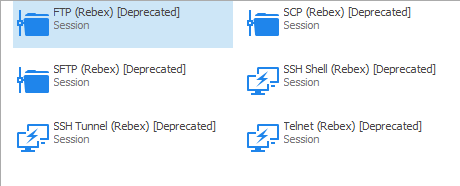
Just for information, when you create a session in RDM and search for Rebex you will see the Deprecated flag.
Regards,
David Grandolfo
rebex.png
Hi David
Ok that's new to me. :-)
Is there an easy way to change all entries from rebex to SSH Shell (as we have a lot of these connections in RDM)?
Thanks for checking with the team, if there is an easy fix, until we can change that.
Best regards.
Patrick
Hello,
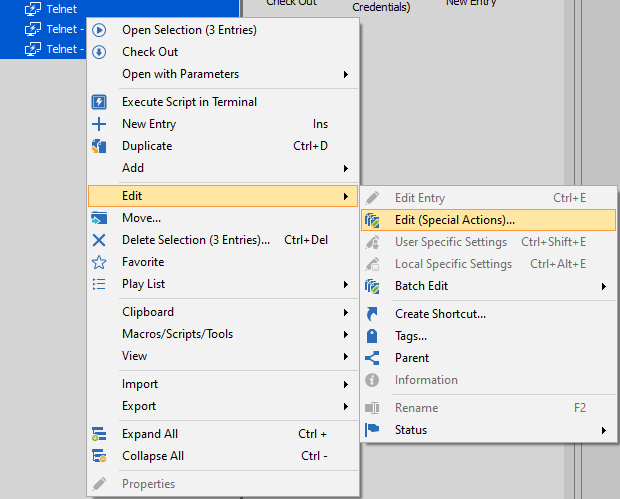
Sorry to jump in, to convert your Rebex entries into SSH Shell entries, please do the following:
1- Select your Rebex entries (I recommend testing with a few the first time just to be sure) -> Edit -> Edit (Special Actions):
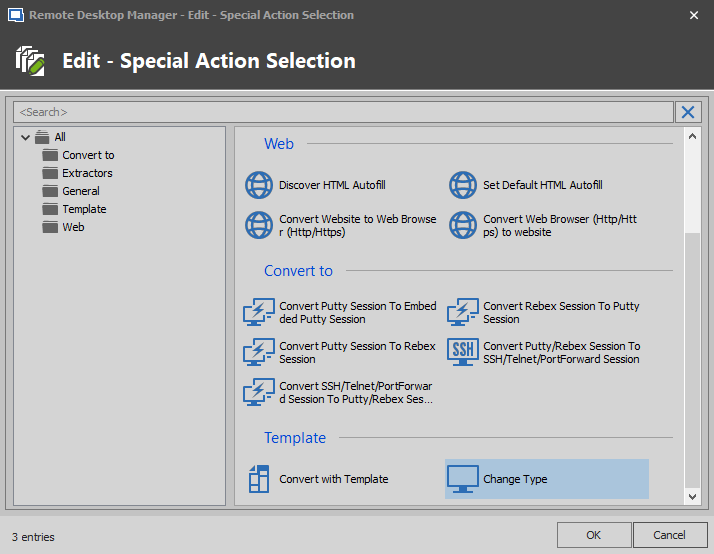
2- From the "Edit - Special Action Selection)" window , select "Change Type":
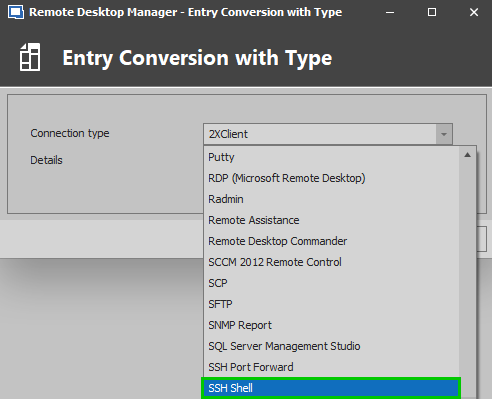
3- In the "Entry Conversion with Type" window, use the dropdown menu to select "SSH Shell":
Best regards,
James Lafleur
convert3.png
convert2.png
convert1.png
Hey James
Nothing to be sorry about! Thanks a lot! RDM is just full of helpful features, love it!
Best regards.