Embedded VNC: Unable to type special character which require pressing ALT+KEY
Embedded VNC: Unable to type special character which require pressing ALT+KEY

Hello,
using the embedded VNC viewer i'm not able to type on the remote server special charaters which require the use of the ALT key. For example in my italian keyboard if i want to type the special character @ i have to keep pressed "Alt Gr" and then press "ò":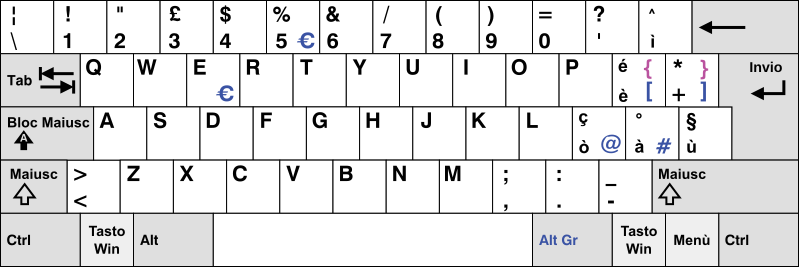
If i try to press that combination of keys using the embedded VNC viewer no character is written on the remote server.
Using the embedded VNC viewer i have this problem with different VNC servers (TigerVNC and RealVNC) and different desktop environment (LXDE and MATE).
I don't have this problem with others VNC viewer, like UltraVNC.
Regards
All Comments (13)
Hi,
Thank you for the detailed explanation.
I will look into this issue.
Regards
Jonathan Lafontaine
Hi,
I was able to reproduce and fix your issue.
The next release should let your correctly use alt-gr key combinations.
To fully support alt-gr, your VNC session should be set to apply windows key combinations on the remote computer.
To do so, in the "Advanced" tab of the VNC session properties, set "Apply Windows key combinations" to "On the remote computer".
Let me know if you have any questions or experience any other problems with the alt-gr key.
Regards
Jonathan Lafontaine
Hello,
unfortunately i still have this problem with the latest version of RDM on all my server.
In addition setting "Apply Windows key combinations" to "On the remote computer" create another problem: the right shift key is not working anymore and it can't be used for making uppercase letters. Left shift key is working correctly.
What version was RDM updated to?
Jonathan Lafontaine
2019.1.29.0
What is your local keyboard layout?
Jonathan Lafontaine
Italian QWERTY layout, like the image on the first post
I know my setup doesn't match yours completely but here's what I have:
TigerVNC server running as a service on a Windows 10 host.
Italian layout locally and remotely.
Connecting with RDM default viewer, AltGr+ò doesnt print @.
I had to restart my vnc server before I was able to make this combination. Looks like sending the wrong key combination (normal alt+ò) screwed my server.
If you have not already, could you please try to restart your vnc server and try again?
Jonathan Lafontaine
I tried to restart the server but still no luck.
I don't think it is a server problem; in my case it is not related to Tigervnc, nor to the desktop environment. I have the same exact problem with the following servers:
- Ubuntu 16.04.5 with LXDE desktop environment and TigerVNC server;
- Ubuntu 18.04.2 with MATE desktop environment and TigerVNC server;
- Raspbian April 2019 Update with PIXEL desktop environment and RealVNC server.
All the servers show the same problem with the embedded VNC viewer; other VNC viewer doesn't have this problem.
I think that embedded VNC viewer has some nasty bugs when connected to a linux machine; it would be better if you can set up a linux server to debug this problem.
Regards
I'll look into that.
Jonathan Lafontaine
Hello,
with the latest version of RDM (2022.1.27.0) i'm no more able to type on the remote server special characters which require the use of the ALT key. For example in my italian keyboard if i want to type the special character @ i have to keep pressed "Alt Gr" and then press "ò".
This problem was fixed in previous RDM release (like 2020.2.19.0).
Regards.
Hi,
I've notified the developer in charge of our VNC integration.
He will look into it.
Regards
Jonathan Lafontaine
Hello Raptor
I apologize for the regression here. ~2020.x is quite an old version, and the VNC integration has seen lots of changes and refinement over that period. It's hard to see exactly where this regressed, but in that time period there was a large update to get better international keyboard support.
The problem is: when we generate a character on the client that requires a modifier to be held, we need to release that modifier on the server before sending the keystroke. Otherwise the server interprets the input as modifier + character (in your case, "@" + [AltGr]) which is obviously not valid. Generating the correct sequence of keystrokes requires the use of heuristics and is quite tricky to get right.
I've made a fix for this issue and we'll update this post once it's released. I apologize again for the inconvenience.
Thanks and kind regards,
Richard Markievicz