After RDM update i can't copy/view username and passwords

Disabled
Hello,
I updated RDM to the latest version (2019.1.20.0 64bit) and as a normal user i can't copy/view usernames and passwords anymore.
Copying and viewing is possible for the administrator user but not for an normal user anymore.
The previous RDM version was 14.0.6.0 64 bit.
What is changed, or how can i change the permissions that normal users can view en copy the passwords ?
2019-05-15 09_33_13-Window.png
All Comments (28)
Disabled
Same problem here, after the last update users cannot view\copy passwords anymore, the option is not available anymore in RDM. Me as admin can view\copy. When I give a user admin rights the options are back.
Before this update I had an option when creating a new user to let them view\copy password, that option is gone to.
Disabled
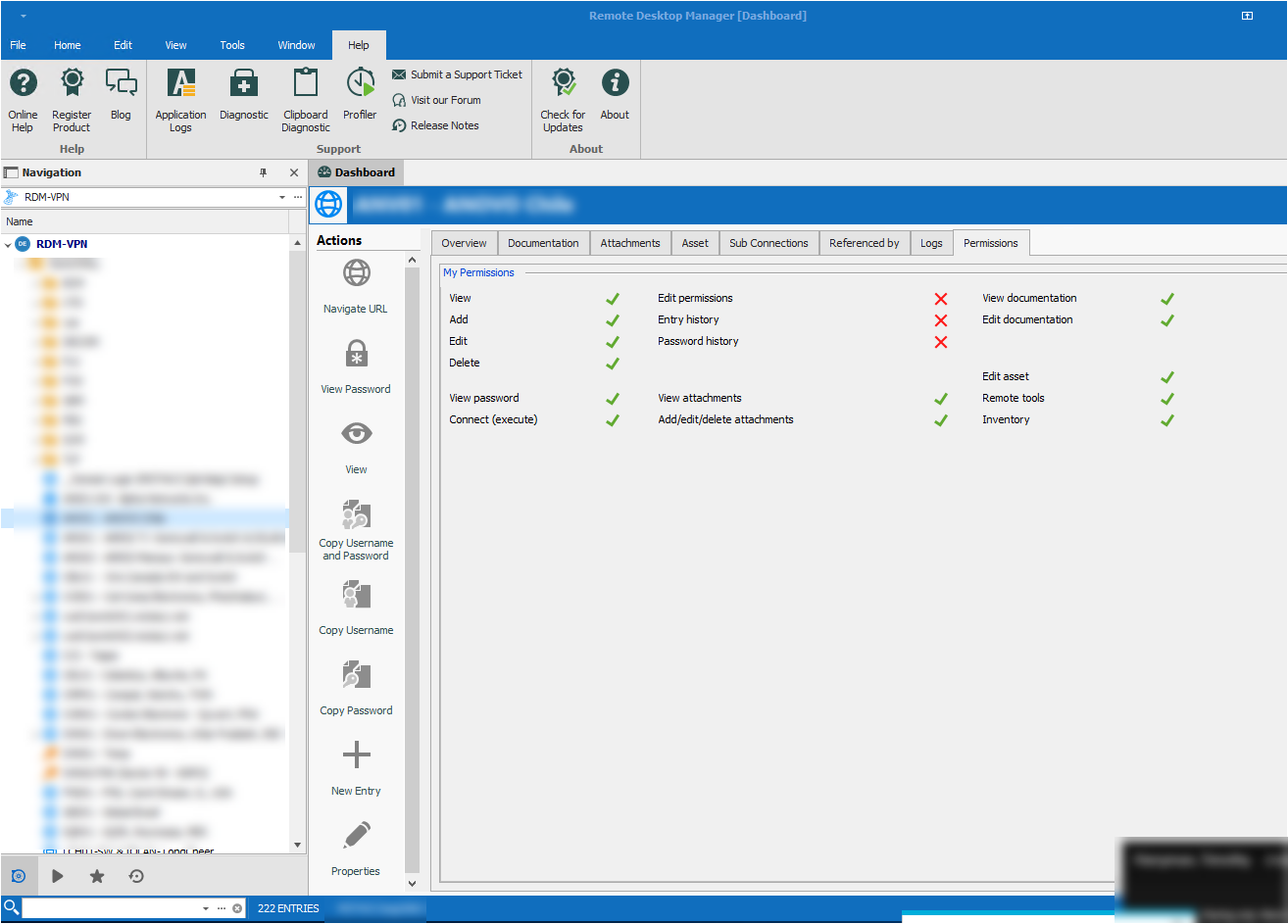
I see that the default settings for "View Password" are disabled.
How can i change this default permission ?
2019-05-15 10_03_55-Window.png
Disabled
That did the trick at ours. If you change the permission to custom you can set the view password setting
Disabled
This works alsow for us. But why did this change ?
Hello Rian,
Hello Mike,
glad you've found the solution - this setting was changed because of security purposes.
Here the associated line from the Release Notes (the whole changes can be found here)
Changed the View Password to not allowed by default for non administrator
Regards,
Min
Hi Min,
We got the same problem today morning.
On all the users we've set the setting to allow on the "show password in properties".
But it still won't show the password.
If I set the usertype as administrator, it works fine.
Thanks
Hello,
can you post a screenshot of the mentioned user setting?
If you want to allow Users or specific Roles to be able view the password from all your sessions, you must configure the View Password setting found in Root Settings => Permissions
Regards,
Min
Hi,
We haven't configured anything under there.
If I set it like you above, there is an XML error.
Sorry, that it's in german.
pic2.PNG
pic1.PNG
Hi,
don't worry about the German UI ;)
You're trying to change the setting from a 14.x client, as I can see in the screenshot. I'm asking because Rian and Mike are on 2019.1.20.
Did you updated on a client to 2019.1.20 respectively did you upgrade the database?
Regards,
Min
Hello,
Sorry to jump in, I just want to add some additional information about the latest RDM version 2019.1.20.
Thank you Min for your solution. Modifying the View Password permission works perfectly on any data sources except Devolutions Password Server (DPS) version 6.1.3. If you are using DPS, the Copy or View password will not be available. DPS version 2019.1.x is required to get that functionality working. As RDM and DPS are closely related, unfortunately the only solution for now is to uninstall RDM 2019.1.20 and install RDM 14.1.3. Here is the download link for RDM 14.1.3.
https://cdn.devolutions.net/download/Setup.RemoteDesktopManager.14.1.3.0.exe
Best regards,
Érica Poirier
Hi Min,
Thank you, with the new database it works fine.
Kind regards
Perfect ;) Thanks for your feedback!
Regards,
Min
Disabled
It has happened with me too
Hello,
@jeffreyfrancis1987 What RDM version are you using?
What data source type are you using? If it is Devolutions Password Server, what version are you using?
Have you followed the solution found on this thread?
Best regards,
Érica Poirier
After this upgrade to 2019.1.41.0 password linker in User Specific Settings..Override credentials..Privet vault on A website entry is not possible to copy/view the password any more.
Running a SQL data source.
Upgraded from 14.1.3.0
Hello,
@acetico,
This is a normal behavior as you have to configure the View Password permission to let non-administrator accounts being able to view and copy passwords. It is possible to set it at the root or folder level depending on which part of your data you want to allow users to view or copy passwords.
Please see this online help page for more information about the View Password permission.
https://helpserver.devolutions.net/securitysystem_permissions.htm
Best regards,
Érica Poirier
Is the password right set on the device and not the password?
How can I let the users view there one passwords but not those that are shared with them?
Hello,
To let users to view or copy passwords, the View Permission must be set on the Credential entry. If you want that this option can be available too on any entry that are bind to a credential, you need to also correctly set the View Permission on this entry.
Could you please send us an example of the situation where users can see one password but not those that are shared with them? If you mean that they can only use and view their own personal passwords, they can save their credentials entries in their Private Vault and use User Specific Settings to override the entry default credential settings. On the parent folder, you can set the View Permission to Never so none of the standard users can view or copy the password of any credential entries in that folder.
Best regards,
Érica Poirier
Hello,
I can't find the setting on the password in the Private Vault that allows me to copy/view the password when “use User Specific Settings to override the entry default credential”
Where is the setting on the password entry?
Hello,
The Permissions are not available on Private Vault entries as the user has full privileges on its Private Vault. So you have to set the View Permission on the shared entries.
Best regards,
Érica Poirier
Thanks.
This thread is two years old, but this issue has just popped up for me.
RDM Enterprise v 2021.1.25.0 64-bit
For one of our SQL server Data Sources, the Users that have permission to view password and execute cannot. This applies to all entries in the Data Source. Other data sources do not have this issue.
The user in question does not use the Data Source very often, but estimates that it worked as expected a a month ago. IT was updated to this version on 26-April.
Please see the attachments.

version.png
Security Permissions Root.png
Security Permissions - User View.png
Hello,
Thank you for contacting us on that matter!
Would it be possible for you to connect to this SQL Server Data Source, go under Administration -> System Settings -> Security Settings and provide me a screenshot of this section?
Best regards,
James Lafleur
Thanks for the quick reply, James. The user tried it with "Use legacy security" checked and unchecked, but it made no difference.
Hello,
What is the user type of this user?
You can validate this information by editing the user under the Administration -> Users menu.
Best regards,
Jeff Dagenais
Sorry for the time-suck.
User noted today that there was very small print on top of one of the panels that he had not put in this year's license...
Problem solved.
Hello,
Thank you for your swift reply!
We are glad to see that the problem is solved.
Best regards,
James Lafleur
After RDM update i can't copy/view username and passwords
If you update the RDM then it's a common issue that arise in many users who can’t copy/view usernames and passwords
anymore, don’t worry it’s normal. If you look closely in the full release notes under improvements, you will
see that we “changed the view password to be disabled by default for non-administrators.” As you
might expect this setting has been changed because of security purposes, but might cause and issue to
some users as a default setting have been modified. In order to allow your user to use the “Copy Password”
tool, you will need to grant them the “View Password” permission.