Per-user access report

Hi,
we are in the process of deploying RDM to departments and teams and I'm wondering if it would be possible to generate a report for a specific user to see what this user has access to. The Permissions report doesn't meet the requirement. We would need something that would analyse the user's roles to determine access and give us the detail of which permissions the user has on entries (not only view, add and delete, but also see password, etc.)
As users can change teams and departments, it will be required that access can correctly analysed so that old permissions don't remain when the user moves.
Thanks!
All Comments (8)
Hello,
Sorry for the delay of my response.
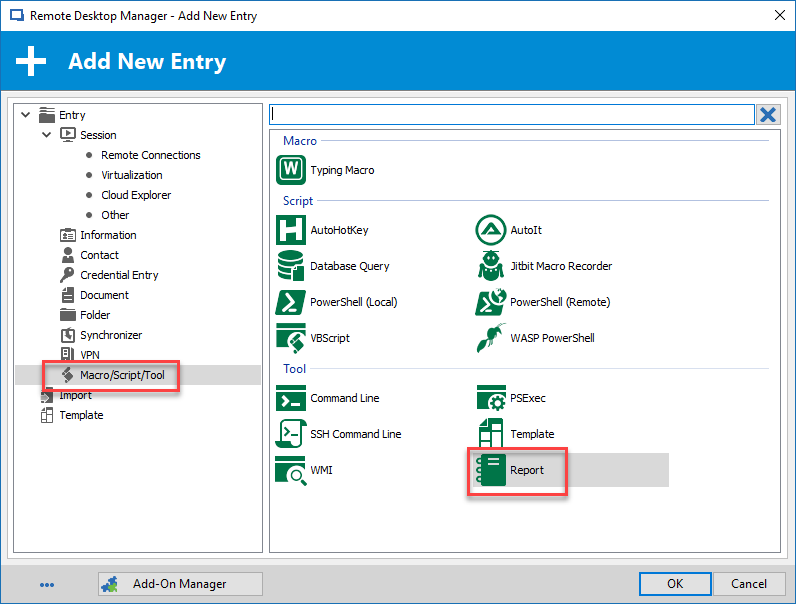
We have a new session type that should accomplish what you are looking for. In the New entry window, inside the Macro/Script/Tool section, select Report.
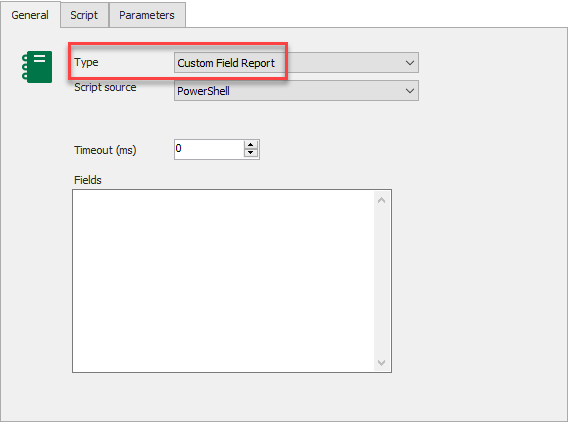
Then, in the Type section, select Custom Field Report.
You should be able to build a report with the needed information's. If you need more help, please let us know what you would like to include in this report.
Best regards,
Jeff Dagenais
2018-12-19_12-39-27.png
2018-12-19_12-38-41.png
Hi Jeff,
thank you for the info. This feature looks nice. I suppose I need to enter the field names in the Fields list ? What are/How do I determine the names of the fields I want to look up form the Permissions section of entries ?
Can you give an example ? If I wanted to create a report that lists all entries for which user xyz has View access ?
Thanks and happy New Year!
Hello,
Here is how you can use the Report entry type using Custom Field Report option.
You need to provide all column names in the Fields section. One name per line.
Then, you need to assign them in the Script section like the following sample.
Best regards,
Érica Poirier
Hi,
I tried this, but once I'm done and select Execute, nothing happens.
Thanks.
Hello,
Could you please try the following report? The Permissions Report.rdm file attached to this post contains the Report entry.
Please let me know if this one works in RDM.
Best regards,
Érica Poirier
Permissions Report.rdm
Hi Erica,
this works fine. Something was probably missing in my setup. I'll study how this one is made to see what was missing in mine.
Thanks!
Hello,
Could you please try the following report? The Permissions Report.rdm file attached to this post contains the Report entry.
Please let me know if this one works in RDM.
Best regards,
Is there any documentation on how this was generated/created?
Hello,
Sadly, there is no documentation about this type of entry other than the provided samples in the entry itself.
For the Permissions report entry I have provided in this thread, the PowerShell script was built using the entries properties. You can find multiple PowerShell sample scripts the PowerShell Repository forum section.
For that report entry, there is two different report types, Connection List or Custom Field Report.
For the Connection List, the Script tab should contain a script that will select entries based on specific conditions and will display the selected entries in the report. With that report type, you cannot customize the report and select the columns that will be displayed on the report.
With the Custom Field Report, the Fields section is the headers of the report.
Then, in the Script tab, you assign the value to the appropriate header like the following.
Let me know if you need further help on this entry type.
Best regards,
Érica Poirier