Enable CredSSP support = False (enablecredsspsupport:i:0) is ignored in Embedded (tabbed) mode
Enable CredSSP support = False (enablecredsspsupport:i:0) is ignored in Embedded (tabbed) mode
For certain servers I need to disable CredSSP Support (enablecredsspsupport:i:0 in .rdp file).
This setting works OK if I open my remote desktop display in External mode, but appears to be ignored when opening in Embedded (tabbed) display.
All Comments (25)
Hello,
In the properties of your RDP session, go in the Advanced tab and select False for CredSSP Support
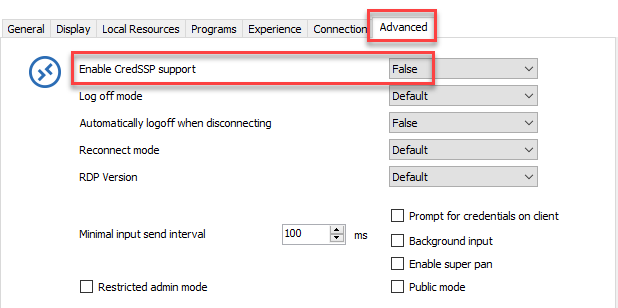
This should do the trick.
Best regards,
Jeff Dagenais
Hi, that is what I have done, but the change only applies when I open sessions in External mode and not in Tabbed.
Thanks, David.
Hello,
In embedded mode, we use the same Microsoft ActiveX that is used in Microsoft RDC Manager and in this application, I do not see any option regarding CredSSP. I would need to verify with our engineering department if it should work or not in embedded mode.
What version of RDM are you running?
Best regards,
Jeff Dagenais
Hi, I am running Windows 10.
The specific version of mstsc.exe is: 10.0.16299.461
The RDM Version is: 4.6.0.0 64-BIT (portable download, but running from C: drive - not from USB)
Could you try to uncheck the NLA (Network Level Authentication)?
Regards
David Hervieux
Great thanks for the suggestion - unchecking "Activate netowrk level authentication NLA (SingleSignOn)" on the Connection tab worked. :)

Windows10/RDM 13.6.7
A coworker of mine reported a similar problem. But David's hint doesn't work.
When connecting to a Windows Server host joined to AzureAD using an AzureAD user he needs to disable SSP Support. This works with standard mstsc when altering a .rdp file (add enablecredsspsupport:i:0) or with RDM when embedding this rdp file.
It does NOT work, when using a RDM RDP Session and setting Enable CredSSP support to FALSE. Even when unchecking "Activate network level authentication NLA (SingleSignOn)". "Open external" makes no difference.
It DOES work with RDM RDP when using a local user for this host.
@Daniel Messer,
Could you try to create a .rdp file that is working with mstsc.exe outside RDM and import it in RDM to see if it's still continue to work?
After the import, the session should open in external mode. If the connection is established properly, then, change the display setting to embedded to see if it's still connecting.
Best regards,
Jeff Dagenais