RDP connection with not working Keyboard on remote PC

Hello,
Happy new year 2018 !
I have a problem with a remote connection using RDP, when i connect using integrate tab, my keyboard is not working on the remote PC if i open the connection using "full screen " the keyboard work's. (RDM V13.0.6.0)
Strange, do you have some advice or need some traces or else?
Thanks
Regards
Olivier
All Comments (11)
Hello,
Do you encounter this issue on all your RDP sessions?
Best regards,
Jeff Dagenais
Hello,
No i some the keyboard works even if i open rdp in a tab.
Regards
Hello,
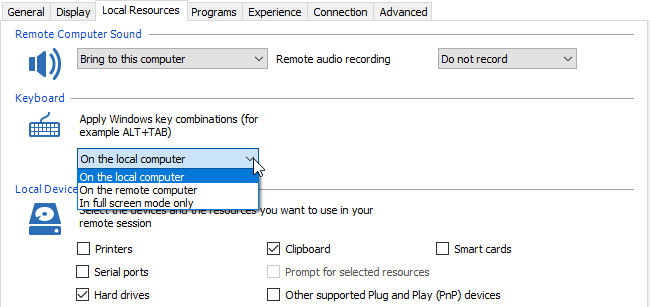
Could you try to change the keyboard combination in the Local Resources tab of the RDP entry to On the remote session and/or On the local computer to see if that help.
Best regards,
Jeff Dagenais
2018-01-09_11-51-03.png
Hello Jeff,
Sorry doesn't work but if i don't choice save the password if the database, and use the prompt who popup at the connection i have the keyboard.
Sorry changing parameters to "On the remote computer" doesn't help .
Regards
Hello,
What version of RDM are you running?
What type of data source are you using?
Best regards,
Jeff Dagenais
Jeff,
V 13.0.6.0 for RDM
Database Mariadb
Regards
Hello,
As I understand, if the password is saved in the database, the keyboard is not working. If you enter manually the password to authenticate, the keyboard is working.
If you are using the Credential Repository feature to send the credential when opening the session, does the keyboard is working?
Best regards,
Jeff Dagenais
Hello,
Could you also send us your application logs at support@devolutions.net
You will found them in the Help -> View Application Log menu.
Let me know when it's done please.
Best regards,
Jeff Dagenais
Hello Jeff,
Yes you unterstand well.
For the credential repository i test it later.
For the log menu i will sent you
Regards
Olivier
Hello Jeff,
I do a test again and works when i change the keyboard combination in the Local Resource.
There was mayce a problem yesterday when i done the test.
i tell you if i have th problem again;
thanks for the support
Regards
Hello,
Glad that is now working.
Best regards,
Jeff Dagenais