RDM Free - enable Hyper-V connection on local W10 host
RDM Free - enable Hyper-V connection on local W10 host
0 vote

Hi,
Please can you add the ability to connect to a Hyper-V host machine on the same machine as RDM (Free Edition) is running on. So allowing connection to machines that are hosted in Hyper-V, but running on a local W10 laptop. This would be preferable to using regular RDP to connect, and I'd like to connect using the Hyper-V internal connection method to the hosted machines (instead of via RDP to them).
Hope this makes sense?
Many thanks,
Greg
All Comments (15)
Hello,
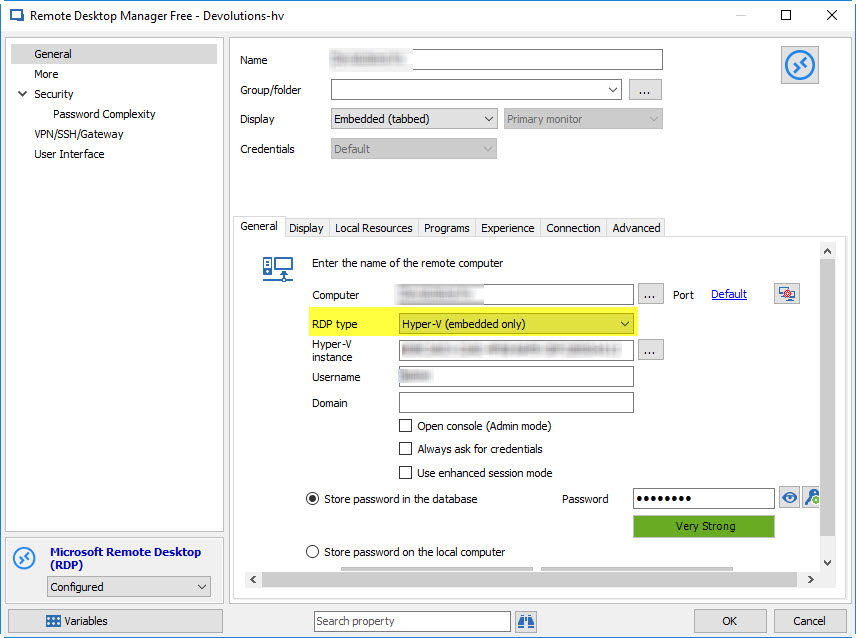
In an RDP session you can configure the entry to open a Hyper-V virtual machine directly with the following setting:
If this isn't what you're talking about, could you maybe give us an example outside of RDM?
Regards,
Hubert Mireault
2017-04-25 9-05-56 AM.jpg
Hi,
I believe that option only works when you are connecting from a remote machine (running RDM) to another computer running Hyper-V.
I'm talking about that option being enabled where RDM and Hyper-V are all running on the same (Windows 10) computer.
Thanks,
Greg
Hi,
We need more detail on how this is done with the other products like vmconnect. Perhaps you could show us the option for that. For now I have no idea what we have to do for that.
Regards
David Hervieux
I'd guess he's trying to connect to a NAT'd connection, and the name resolution is outside the NAT..
My suggestion would be to try connecting by IP address, assuming your local system has a route to get to it.. (do a route print to see it).
David F.
Hi guys,
Maybe if I explain my setup, you could understand what I mean a bit better: I built my laptop using Windows 10 and then installed the Hyper-V components on it. Then I created some VMs running inside Hyper-V on my laptop.
I know I can use RDP inside RDM to connect to the VMs running inside Hyper-V on my laptop, but the VMs are in their own private network which is not currently routed from the NIC on my laptop. I can connect to them fine using Hyper-V's VMConnect.exe - but this ends up with loads of additional Virtual Machine Connection windows open. I'd much prefer to achieve this all inside RDM, using the 'Open Embedded' option - but using a VMConnect.exe style of connection not Microsoft Remote Desktop connection (in RDM).
Is this possible with the RDM Free edition? If so how, if not - please can you work on adding this to a future release.
Many thanks,
Greg.
Could you post what configuration you need to set in vmconnect to achieve this. We both use the same ActiveX from Microsoft and I would like to know what they do to make it work.
Regards
David Hervieux
Have you tried the Use enhanced session mode by the way?
Regards
David Hervieux
Hi,
OK, just trying this again - if I run VMConnect.exe (using Run As Administrator) I can select the localhost and then I get my list of VMs that are available on the same machine. I can connect fine using that, so I'd really like to be able to do the same thing inside RDM, using the embedded tabs to keep all the VMs in one Window.
Thanks,
Greg
VMConnect.JPG
Bonjour,
Est ce que depuis, il est possible d'acceder a un hyperv installer localement ?
J'ai essayé avec "Utiliser le mode session amélioré" mais ca ne marche pas
Bonjour,
Il est maintenant possible de faire des connexions locales Hyper-V avec le contexte d'utilisateur actuel, tel qu'il est possible de le faire à partir de Hyper-V Manager + vmconnect. RDM 2021.1.27 ajoute un nouvel onglet "Hyper-V" avec une option à cocher "Connect with current user credentials". Il ne faut pas mettre de credentials dans l'onglet général, et utiliser "localhost" comme Host étant donné que tout se fait en local. Si ça fonctionne dans Hyper-V Manager, ça devrait aussi fonctionner dans RDM.
Marc-André Moreau
I have the same request.
I have created a session using the above screen shots, but I get the following:
- I cannot select a specific Hyper-v instance from my local Hyper-V host. When I click on the ... to list the instances I get: Unable to retrieve virtual machines, verify your credentials. If I enter my credentials on the General tab I get the message Unable to connect to Hyper-V host
- If I just leave the instance blank and try to use list the VMs I get the error below

Hello,
Could you send a screenshot of your session's properties? You can hide any sensitive information.
Best Regards,
Etienne Lord
Hello,
Could you send a screenshot of your session's properties? You can hide any sensitive information.
Best Regards,
I'm not @tomgibson but am having the same issue. I don't think it is the session properties at all.
If I simply run vmconnect.exe I get this message and no virtual machines listed.
So I run it as with UAC (right click or ctrl+shift+enter) I can select virtual machine and the error is gone. So I assume it is the same in the RDM (which I am not running with UAC). Haven't tried yet because not sure if anything will break (permission wise), if I run RDM with admin rights...
I assume you can do that in the code and add UAC prompt when connecting to Hyper-V VMs?
Hi,
If you open a regular PowerShell terminal (without UAC) can you call "Get-VM" successfully?
The first thing I would check is to ensure your current user is a member of the Hyper-V Administrators local group on the Hyper-V host: https://www.easytechguides.com/add-a-user-to-hyper-v-administrators-group/
As for the request to add a UAC prompt, it is unfortunately not possible as the UAC can only be used to elevate *new* processes, and since the Hyper-V RDP connection is done inside the RDM process, the only workaround would be to launch RDM as an elevated process.
Best regards,
Marc-André Moreau
Hey, thanks for looking.
No, the regular PS didn't have permissions to execute Get-VM. When run with UAC (sudo command afterwards), machines are listed without issue.
However, after adding the account to Hyper-V Administrators and restarting (logging off should be enough but I had update pending anyhow :)), Get-VM executes in PS without UAC too! And I can see the VMs listed in RDM as well. Thank you!