VMWare Console
I'm playing around with the VMWare Console session type and I'm unable to get it to work. I've made sure that I have the latest version of PowerCLI installed.
When I try to connect to a host, I get:
--------------------------------
The Server returned an error
System.Collections.Generic.List`1[System.String],
--------------------------------
Our ESXI environment is 5.1.
All Comments (15)
Hello,
It cannot be the latest, we are working on integrating that right now.
The highest we support is 5.8
We are nonetheless getting that error is some cases, but let's see if it works with 5.8 before.
Sorry about that.
Best regards,
Maurice
Any word on this? I have PowerCLI 5.8 installed and I'm getting the same error as above. Have tried to both 5.1 and 5.5 ESX environments with and without vCenter as well.
Edit: Running latest version of RDM now (12.0.2.0)
Hello Rumpler,
Could you try with the latest PowerCLI 6.3 and let us know if the problem is still there ?
Also are you connecting to an Esxi Host or through Vcenter ?
Best Regards,
David Grandolfo
I've tried with both. 6.5 is out and the latest, still want me to try with 6.3 right?
Yes please could you try with the 6.3.
Also are you connecting to an Esxi Host or through Vcenter ?
Best Regards,
David Grandolfo
I've tried with both directly to ESXi host and to vCenter. 6.3 does not work. I get the pane but it has no data in it (no VM's). No error message is given.
Could you go to the Help tab and click Profiler. On the Performance Profiling windows go to the Debug Mode tab and set the Debug Level to 2.
Let your Performance Profile open and start again your VMware Console. Do you have an error ?
If you have the Server Failed error, could you try to re-enter your user name and password please ?
Best Regards,
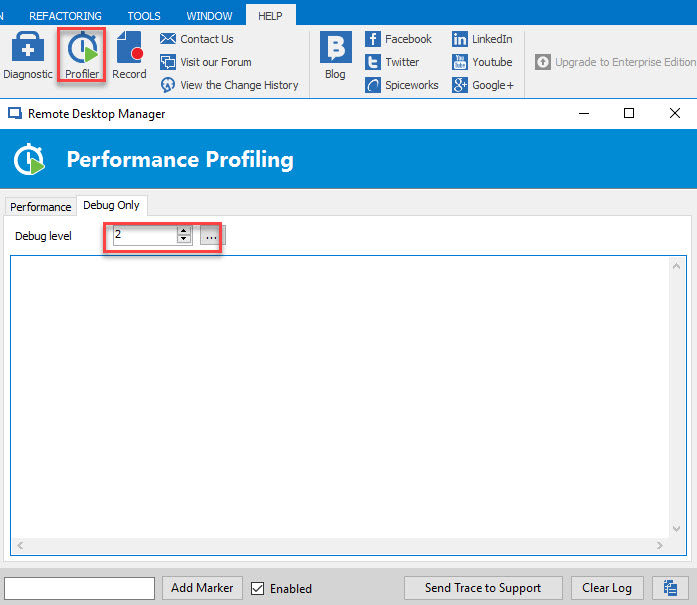
David Grandolfo
Profiler Debug Lvl 2.jpg
Ah, now I get "ERROR SILENT: Cannot bind argument to parameter 'userName' because it is an empty string."
I did enter a username as domain\user in the preceding text box, however there are no credentials stored on the actual entry itself.
Also, if I take the same credentials and put them into the actual entry, I then get a server connection failed message instead. Using the exact same credentials, credentials are tested in vSphere Client and work.
Hi,
Could you test these PowerShell script please and let me know if you have an error.
https://help.remotedesktopmanager.com/troubleshooting_vmwarepowercli.htm
Also be sure you adjust PowerCLI as the configuration ask to do:
• SetExecutionPolicy
• Set-PowerCLIConfiguration –invalidCertificateAction
Best Regards,
David Grandolfo
Aha!
The first script worked fine and returns the VM's and their moreOf ID's.
The second script:
Exception calling "AcquireCloneTicket" with "0" argument(s): "Current license or ESXi version prohibits execution of
the requested operation."
At C:\Users\user\Desktop\test2.ps1:17 char:1
+ $ticket = $sm.AcquireCloneTicket()
+ ~~~~~~~~~~~~~~~~~~~~~~~~~~~~~~~~~~
+ CategoryInfo : NotSpecified: (:) [], MethodInvocationException
+ FullyQualifiedErrorId : VimException
Yes, I'm using this unlicensed as a standalone host since it's a single lab host.
So I decided to test it against our licensed vCenter instances. The first test returns properly as it previously did. The second returns essentially nothing back to the PowerShell console.
PowerCLI C:\> C:\Users\user\Desktop\test2.ps1
cmdlet test2.ps1 at command pipeline position 1
Supply values for the following parameters:
viServer: <vCenter Server hostname>
userName: <user@domain.local>
password: <password>
morefId: vm-99429
PowerCLI C:\>
Was able to license the original test host, same result as when I hit vCenter, no errors or output returned.
Thanks for these test. If you have nothing the problem it's because the VMRC isn't install on your computer.
You can download it from here : https://my.vmware.com/web/vmware/details?downloadGroup=VMRC90&productId=491
Once that application is install, could you test back your entry ?
Best Regards,
David Grandolfo

I was able to get mine working thanks to this post. I used the GetVMs.ps1 to get the $_.Moref.Value and I put the number in for the VM ID.
Thanks!
Hello,
Yes, I have realized that this column is missing from our console, we will add this shortly.
Sorry about that
Maurice