'Load from Inventory' not working on some hosts

In one cluster I have 5 blades. All are member in the same domain (so I use inherited credentials), have identical hardware and the same OS image (so the OS should be configured identically unless there were later changes).
I have tested using new connections to make sure there's no difference in settings:
- New 'Microsoft Remote Desktop' type connection
- I've entered: General -> Name, General -> General -> Computer (FQDN)
- Tried Information -> Load inventory
- Tried 'wmic /HOST:"<FQDN>" /user:"<as inherited>" /password:"<as inherited>" bios get serialnumber
- Tried Dashboard -> Remote Management -> Remote Event
For two blades (1 and 3):
- wmic works
- Remote Event works
- inventory loads correctly
For the other three blades (2, 4 and 5):
- wmic works
- Remote Event works
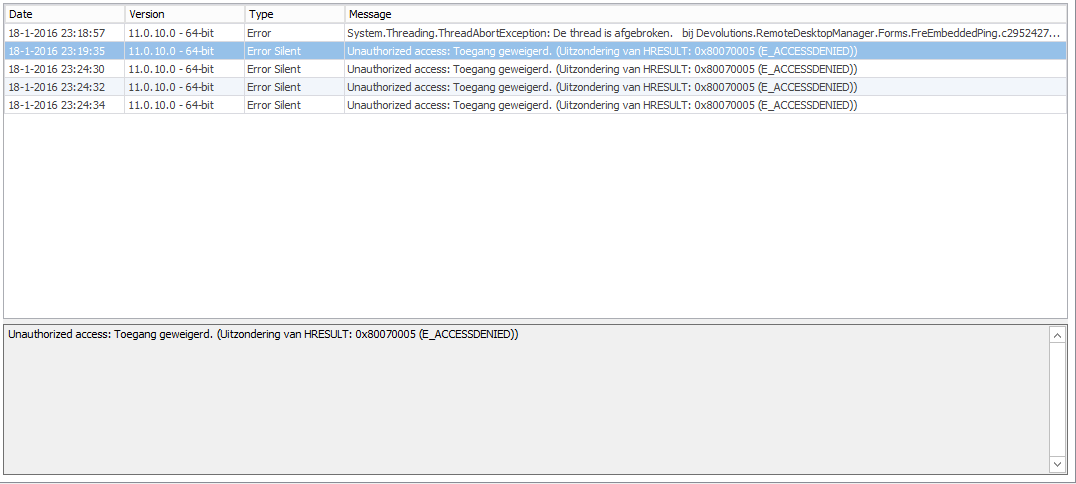
- inventory does NOT load -> 'Unable to access inventory report!' -> 'Error getting WMI scope.' -> Application log states:
Unauthorized access: Toegang geweigerd. (Uitzondering van HRESULT: 0x80070005 (E_ACCESSDENIED))
I've set my local security log to log both success and failures. I've tested my security logging by deliberately failing a runas command and that does show up so failures are being logged.
For the wmic test I see 4 'success' entries connecting to 'RPCSS/<FQDN>', 'host/<FQDN>' and '<FQDN>' (twice). For the successful inventory test I see 5 'success' entries connecting to 'RPCSS/<FQDN>' (once) and 'host/<FQDN>' (four times). For the failing inventory tests I see no entries at all (no 'success' and no 'failure' either).
Any ideas how to further troubleshoot this?
---
This post is split off from https://forum.devolutions.net/topic24441-load-from-inventory-not-working-on-hyperv-host-connection-type-error-getting-wmi-scope.aspx to avoid having two different problems on the same thread.
All Comments (8)
Ok, another strange thing.
After the above tests I used the 'Remote Event' to see if the server was logging anything useful. After using 'Remote Event', however, the 'load inventory' button starts to work and keeps working.
Well, I've got a workaround so I guess I'm happy :)
hmmm
I was about to tell you that you had tried everything as I would have done myself and that I would have to think hard for a next step...
With your workaround, it would be interesting to spy on network traffic as to what goes out when you use Remote Event, but it's more curiosity at this point I guess.
Maurice
I'm curious to see if this scenario works. Make sure to save the connection and re-open it before doing the load from inventory. Just to be sure that the credentials are persisted before invoking the load since it was a new entry.
Regards
David Hervieux
Hi David,
I'm not sure what you mean by 'this scenario'. I tried both saving first and not saving first and I got the same results ('bad' stays 'bad' and 'good' stays 'good'.
As soon as I have opened a 'Remote Event' session once, however, the same blade becomes 'good' and I haven't found a way to break that again. Closing the 'Remote Event' session or even restarting RDM doesn't help (the blade is still 'good').
Maybe I could try something like 'net use' to delete a (possibly) existing session or even reboot the computer to see if it becomes 'bad' again but I haven't tried that yet.
If you want I can retry later (after a reboot or from a different computer) to see if that makes a difference and to see if all blades start as 'bad' and with the 'Remote Event' workaround turn to 'good'?
Ok, I've tried from a different PC. I used the same connection I had used before, that worked on my own PC (after Remote Event) and was already saved.
I didn't change anything in the connection and pressed 'Load from Inventory' and get the 'Unable to access inventory report!' -> 'Error getting WMI scope.' errors again and the same Application Log error too:
Unauthorized access: Toegang geweigerd. (Uitzondering van HRESULT: 0x80070005 (E_ACCESSDENIED))
Then I opened a Remote Event on to that blade which succeeds. After that the 'Load from Inventory' call works again (and keeps working, tried it three times) even when the Remote Event is closed again.
After that I tried the next blade. Same story: before Remote Event I keep getting the errors (tried three times), after Remote Event it works (tried three times), even after restarting RDM.
It appears there's some WMI or Remote Registry connection that gets setup correctly by the Remote Event call and gets re-used by 'Load from Inventory' where 'Load from Inventory' is unable to setup that connection itself?
Could you post the full stack of the application log?
David Hervieux
I might have a fix related to the domain not used to call the inventory report. This will be in the next beta release.
Regards
David Hervieux
This is actually all that is given. For other errors I see a stack but not for this one.
E_ACCESSDENIED.png