timjacobs
Permission Set for "Edit/Save" Buttons in Manual Git Mode
Awesome, thanks! Definitely would be appreciated, and would make our non-admin user's lives a bit easier. :) We've had a bit of a "hack" work around, exposing a script that POSTs at the /api/v1/gitstatus/edit endpoint that users can run ad-hoc which kicks off edit mode, and they've bookmarked the "/admin/settings/git/commit" page for when they're done. I'll trust your judgement on which permission set is best appropriate for this. Our non-admins typically fall into roles that have the standard "Operator" type permissions, if that's any help.
Permission Set for "Edit/Save" Buttons in Manual Git Mode
We rely heavily on Git manual mode, but the Edit/Save toggle in the header bar only appears for full platform Administrators. We've tried every permission combination we could find related to Git, without success. The Edit/Save buttons simply never render for non-admin users. Is it possible to introduce a permission (or permission set) that grants Git edit/commit capability without requiring full platform Administrator rights?


Use case: As an administrator, I'd like others on my team, who are intentionally not platform admins, to be able to edit and commit changes to Git. All of our changes promote from Test to Prod via GitHub PRs, so we'd like non-admins to be able to commit in manual mode to stage their PRs.
One thing we noticed: if a non-administrator is granted the settings.git.commit/* permission, they can reach the commit page that the "Save" button navigates to (/admin/settings/git/commit) and submit changes there, but they cannot initiate Edit mode, because the Edit/Save buttons never appear for them. Could this capability be tied to (or piggybacked on) the settings.git.commit/* permission so it also surfaces the Edit/Save controls?
Create Endpoint LINQ Expression Error & Duplicate Secret Variables
Awesome news! Thanks for looking into this!
Create Endpoint LINQ Expression Error & Duplicate Secret Variables
Thanks @Adam Driscoll did you have any luck with replicating that?
Create Endpoint LINQ Expression Error & Duplicate Secret Variables
Yeah, we've moved most resources to database persistence, where supported, this is in our appsettings (per here https://docs.devolutions.net/powershell-universal/config/repository#database-resources). When I introduced these persistence changes (a while back for us), I did them one-at-a-time, and watched the respective database tables populate at startup with the correct values, and was able to subsequently stop relying on their corresponding .ps1 files, so I assumed it had been working for the most part...
"Persistence": {
"AuthenticationMethod": "Database",
"Branding": "Database",
"Role": "Database",
"Settings": "Database",
"Schedule": "Database",
"ScheduleParameter": "Database",
"Variable": "Database",
"VariableValue": "Database",
"PowerShellMiddleware": "Database",
"License": "Database"
}
Our publishedFolders.ps1 only contains one entry to pull in logos for branding:
New-PSUPublishedFolder -RequestPath "/images" -Path "C:\images" -Name "images"
I sent you a PM with a sanitized copy of our endpoints.ps1 file.
Create Endpoint LINQ Expression Error & Duplicate Secret Variables
V2026.2.2
IIS Hosting w/ MS SQL Persistence
Two rather large issues I've been seeing, the first one more recent, far more pressing.
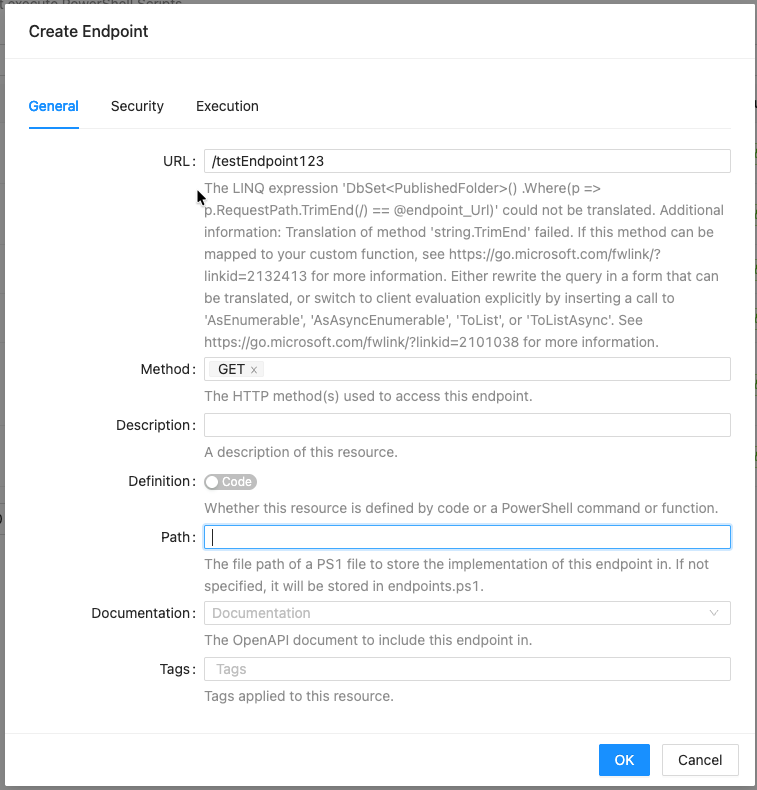
I updated our beta environment to 2026.2.2 in hopes this would be resolved, but still seeing this error whenever trying to create new endpoints, anybody else seeing this? I've noticed it in the last few versions, and hoped it would have cleared itself up by now. After this error, the page usually temporarily returns a 503 error from IIS, as the app pool tends to recycle itself after this error presents, so thinking something's crashing.
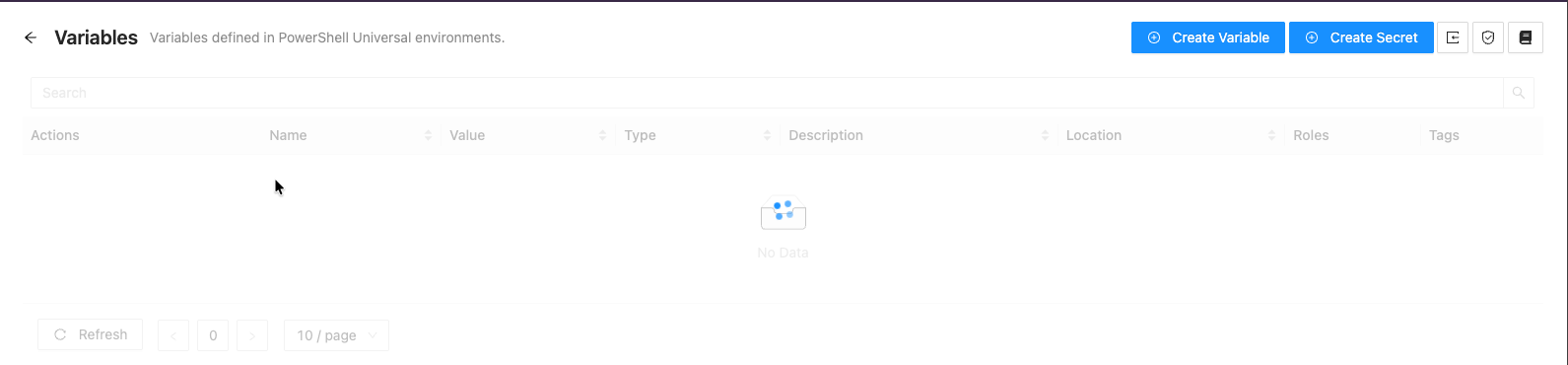
Another I've noticed is when it comes to variables, we've been seeing this for a while, just never really gotten around to bringing it up, since we have found a workaround... When we create a variable of type "secret" and store it in the Database vault, the resulting entries in the Database show a duplicated, blank entry in "Variable" table for the new variable that was just created. This results in the variables page just spinning, never loading. The only fix has been to manually remove the "blank" row in the DB, and then it starts working again, and the secret works.