
fredericmohr
Adjust Error Logging
Thank you! :)
Adjust Error Logging
Hi,
we are monitoring error logs and are seeing daily error log entries like this. They usually come in pairs as show below.
C:\ProgramData\PowerShellUniversal\Logs\System\systemLog20260810.txt:49256:2026-08-10 11:27:56.904 +02:00 [ERR][UniversalDashboard.DashboardHub] Client disconnected: Client hasn't sent a message/ping within the configured ClientTimeoutInterval.
C:\ProgramData\PowerShellUniversal\Logs\System\systemLog20260810.txt:49257:2026-08-10 11:27:56.904 +02:00 [ERR][UniversalDashboard.DashboardHub] Not removing connection in case of reconnect.
Is it possible to exclude these from the error log? It doesn't seem like an actual error to worry about but just users keeping the tab open in the background. More like informational.
Best regards
Frederic
Web requests via http proxy not working
Product: PowerShell Universal
Version: 5.5.2
I’m running PSU on Windows Server 2022 and I’m having trouble connecting to the web as we are using a web proxy in our company. I’ve managed to pin down the issue a bit but it feels very much like a hack solution and there must be a proper way to solve this. Hope someone here has the answer.
The problem
In short, without the proxy configuration, powershell and PSU can’t connect to the internet. I noticed this in the error log
[WRN][Universal.Server.Services.UpdateCheckService] Failed to check for updates.
System.Net.Http.HttpRequestException: A connection attempt failed because the connected party did not properly respond after a period of time, or established connection failed because connected host has failed to respond. (imsreleases.blob.core.windows.net:443)
 ---> System.Net.Sockets.SocketException (10060): A connection attempt failed because the connected party did not properly respond after a period of time, or established connection failed because connected host has failed to respond.
   at System.Net.Sockets.Socket.AwaitableSocketAsyncEventArgs.ThrowException(SocketError error, CancellationToken cancellationToken)
but also in the Module section, as I can’t search the PSGallery for modules (show no results).
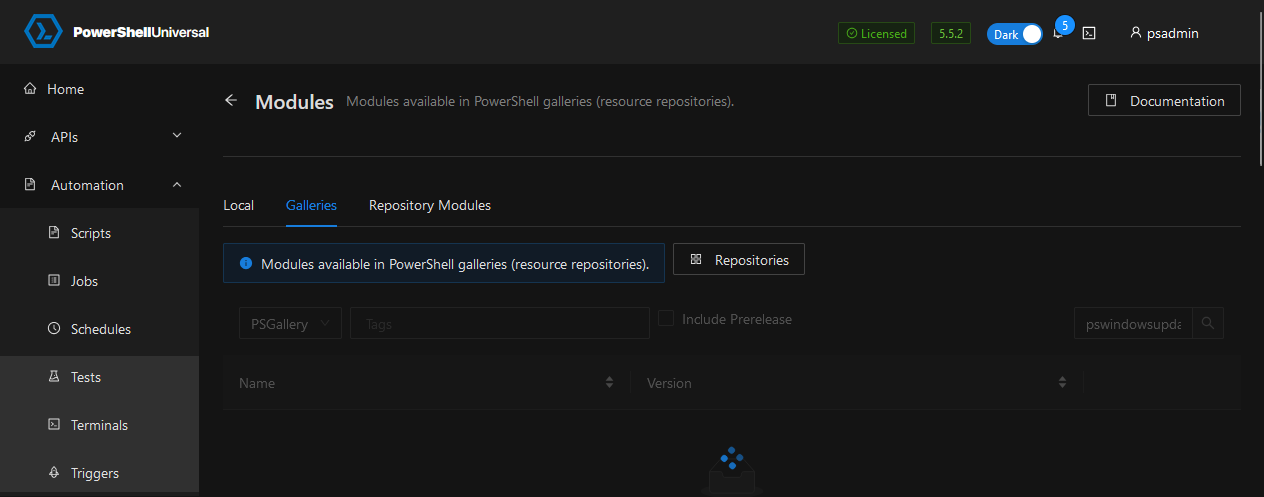
Lastly, I cannot run Invoke-WebRequests in Powershell, unless I specificy run them like this.
Invoke-WebRequest -Proxy "http://proxy:3128" "https://google.com"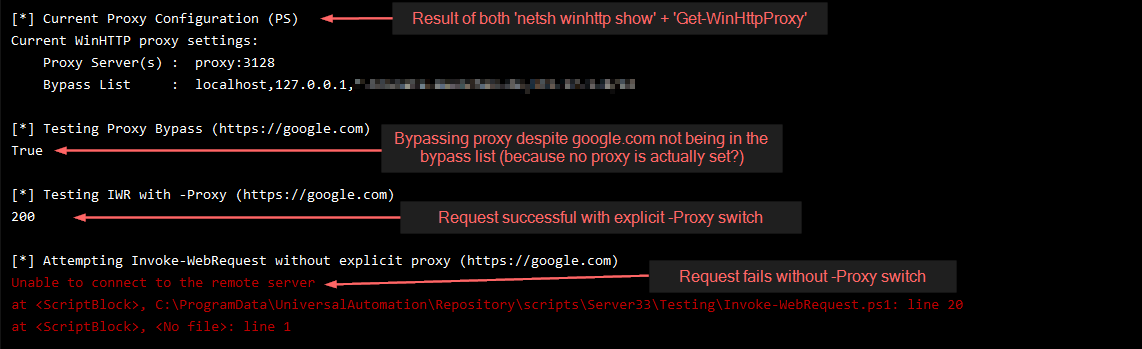
The partial solution
I come from a linux background so forgive me if I am missing something simple but setting the proxy system wide doesn’t seem to be straightforward in windows.
The following changes had no impact on the PSU service or scripts, despite multiple blogs / articles claiming otherwise.
Setting the proxy with
netsh winhttp proxy- it’s set but it doesn’t affect PSUVerifying the proxy is set with
Get-WinHttpProxy- again, it’s set but no dice.Setting global ENV vars for
http_proxy,https_proxy,no_proxyboth lower and upper case
The only thing that changed something was settting the proxy as registry settings in HKLM to make them system wide (instead of Current User, which is what happens if you use the GUI).
$proxy="HKLM:\Software\Policies\Microsoft\Windows\CurrentVersion\Internet Settings"
Set-ItemProperty -Path $proxy -Name ProxySettingsPerUser -Value 0
Set-ItemProperty -Path $proxy -Name ProxyEnable -Value 1
Set-ItemProperty -Path $proxy -Name ProxyServer -Value "http://proxy:3128"
Set-ItemProperty -Path $proxy -Name ProxyOverride -Value "localhost;127.0.0.1;*.internaldomain.tld;<local>"
Set-ItemProperty -Path $proxy -Name AutoDetect -Value 0
Get-Item $proxy


    Hive: HKEY_LOCAL_MACHINE\Software\Policies\Microsoft\Windows\CurrentVersion


Name                           Property
----                           --------
Internet Settings              CallLegacyWCMPolicies : 0
                               ProxySettingsPerUser  : 0
                               AutoDetect            : 0
                               ProxyServer           : http://proxy:3128
                               ProxyOverride         : localhost;127.0.0.1;*.internaldomain.tld;<local>
                               ProxyEnable           : 1
This had the effect, that searches in the Module section are working, meaning that the PSU service now seems to connect to the internet / PSgallery just fine.
The hack solution
The remaining issue is, that the powershell scripts are not using none of these settings for reasons I have yet to figure out.
Setting the proxy in powershel manually with the following command seems to solve the issue.
#[System.Net.Http.HttpClient]::DefaultProxy = New-Object System.Net.WebProxy('http://proxy:3128',$true,"localhost;127.0.0.1;*.internaldomain.tld;<local>")In the same way, the following command shows if the proxy is set (for powershell). Before I tried the command above, the [System.Net.Http.HttpClient]::DefaultProxy would always return nothing.
[System.Net.Http.HttpClient]::DefaultProxy
Address               : http://proxy:3128/
BypassProxyOnLocal    : True
BypassList            : {localhost;127.0.0.1;*.internaldomain.tld;<local>}
BypassArrayList       : {localhost;127.0.0.1;*.internaldomain.tld;<local>}
Credentials           :
UseDefaultCredentials : False
Adding the command above to a Environment startup script doesn’t solve the problem. For now I have to run this command in every script that connects to the internet (or use the -proxy switch for Invoke-WebRequest) which is not a real solution.
The real solution?
I’m hoping for a solution that will set the proxy system wide in a way that powershell honors it, regardless of user, environment, version or whatelse there could be.
If anyone encountered this or has an idea, I’m all ears!
Issues with gMSA and Secret Stores
To answer some of my issues.
First Issue
I was able to solve the Secret Store problem by creating the initialize.ps1 script and adding the following line.
# Secret Vaults
Register-SecretVault -Name 'PSUSecretStore' -ModuleName 'Microsoft.PowerShell.SecretStore' -DefaultVault
This not only creates the PSUSecretStore but also uses the password specified in C:\ProgramData\PowerShellUniversal\appsettings.json.
The only question left regardin this issue is, if this is the intended way. From the documentation and videos I would assume, that this should have been happening automatically without me adding the line above.
Second Issue
I switched the service account PSU is running as back to nt local\system which solved a bunch of problems.
The validation of users is now working, provided they have the right to logon to that server. Using a valid AD account that does not have the permission to logon to the server fails.
The credentials are still empty when reopening the variables which I now assume is the intended way, although very misleading.
Third Issue
As mentioned, I switched back to nt local\system and contrary to the documentation I was able to run scripts as other users using PSCredentials in secrets.
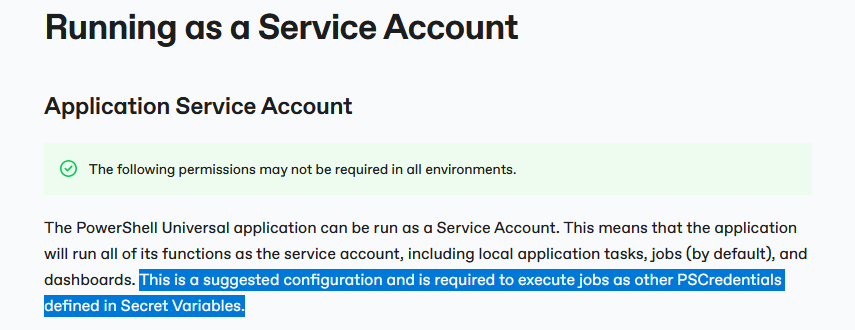
I would prefer to run the entire service as a less privileged user but I will instead use gmsa users for scripts inside PSU for now, to run them with lower privileges.
The Cannot access a disposed object. error has disappeared after switching to nt local\system-
The other error (A connection attempt failed because the connected party did not properly respond after a period of time, or established connection failed because connected host has failed to respond.) is a problem I’m still fighting that has to do with local web proxy. I’ll open another thread for this one.
Issues with gMSA and Secret Stores
Product: PowerShell Universal
Version: 5.5.2
Hi,
I am completely new to PSU and I’m having a couple of issues which seem to be connected and I can’t figure out if my installation is bugged or if I just missed something crucial. I’ll explain all issues here, let me know if I should open up seperate topics instead.
Also, sorry for the long post and please bare with me.
First issue
I didn’t have any Secret Stores except “Database” after the installation. I managed to create them through lots of research and trial&error but the variables docs mention PSUSecretStore and BuiltInLocalVault and neither exist in my installation. I also had issues setting this up since I couldn’t find a documentation on how to do so the right way. Apparently the appsettings.json example only specifies the password for PSUSecretStore which I found out through trial and error. I created a Store called SecretStore which PSU couldn’t access with the password from the config until I added a "Name":"SecretStore", line to appsettings.json.
Are the stores from the docs supposed to be there or do they have to be created?
Is the way I created them (see below) correct or am I messing things up further?
What seemed to work for me was this.
# C:\ProgramData\PowerShellUniversal\appsettings.json
{
  "Kestrel": {
    "Endpoints": {
      "HTTP": {
        "Url": "http://localhost:5000"
      }
    }
  },
  "Plugins": [
    "SQLite"
  ],
  "Data": {
    "RepositoryPath": "%ProgramData%\\UniversalAutomation\\Repository",
    "ConnectionString": "Data Source=%ProgramData%\\UniversalAutomation\\database.db"
  },
  "Mode": "Server",
  "PSUTelemetry": false,
  "Jwt": {
    "SigningKey": "Redacted",
    "Issuer": "IronmanSoftware",
    "Audience": "PowerShellUniversal"
  },
  "Secrets": {
    "SecretStore": {
      "Name": "SecretStore"
      "Password": "MySecretPass"
    }
  }
}
And executing the following commands as the PSU service user, which I found in this Blog.
Register-SecretVault -Name 'SecretStore' -ModuleName 'Microsoft.PowerShell.SecretStore'
Set-SecretStorePassword -NewPassword (ConvertTo-SecureString MySecretPass -AsPlainText -Force) -Password (ConvertTo-SecureString Password -AsPlainText -Force)
Unlock-SecretStore -Password (ConvertTo-SecureString MySecretPass -AsPlainText -Force)
I assume (now) that some issues could’ve been avoided if I named my SecretStore PSUSecretStore to begin with.
Second issue
No matter what I do, the Validate button for PSCredentials in Secret Variables always fails. I tried this with valid AD user accounts and if I use them to run scripts, they seem to work. It’s just the verification that fails.
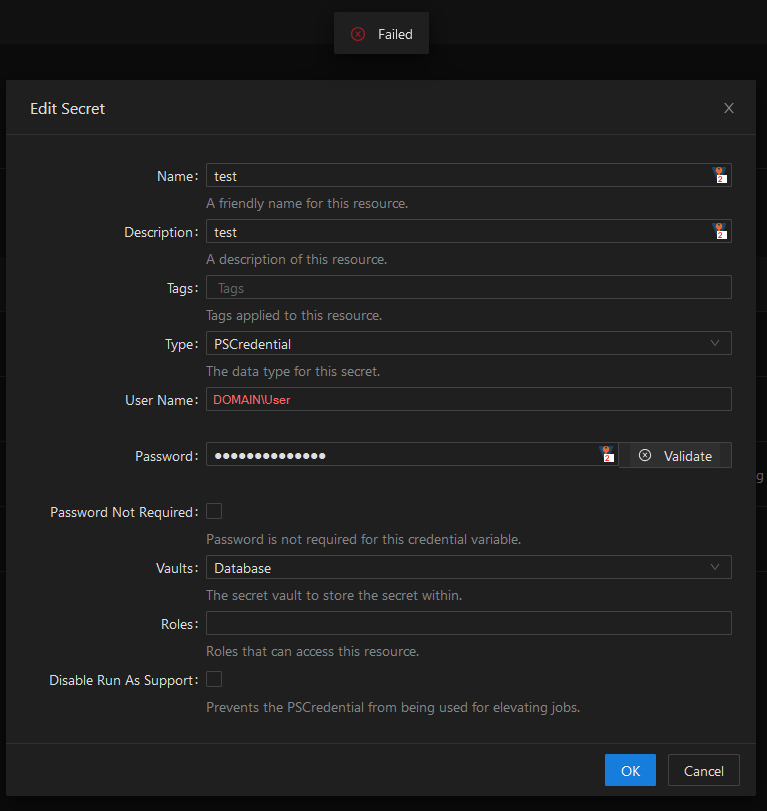
Under what circumstance is this supposed to work?
In addition, saved credentials are alway empty if I open them again.
Is this the way it is supposed to be and if so, is this documented somewhere?
Third issue
I’ve read in the docs that running as a service account (not local\system) is necessary in order to run scripts using other credentials. In this sense I setup a group managed service account (gmsa) for PSU. I followed the instructions and gave it all the necessary permissions.
I also needed to give the account read/write permissions for the C:\ProgramData\UniversalAutomation directory as the service wouldn’t start otherwise due to not being able to write to the database.
I am seeing the following errors in the logs after starting the service, which don’t seem to be present when the service is running as local\system. I’m not sure if they are connected to any of my issues though.
2025-05-16 09:48:13.274 +02:00 [ERR][Universal.Server.Services.Configuration.ConfigurationSystemWatcher] Failed to notify change
System.ObjectDisposedException: Cannot access a disposed object.
Object name: 'IServiceProvider'.
   at Microsoft.Extensions.DependencyInjection.ServiceLookup.ThrowHelper.ThrowObjectDisposedException()
   at PowerShellUniversal.Extensibility.EFTable`2.FirstOrDefaultAsync(Expression`1 predicate) in D:\a\universal\universal\src\PowerShellUniversal.Extensibility\Persistence\EFTable.cs:line 374
   at Universal.Server.Services.Configuration.ConfigurationSystemWatcher.NotifyChange(String fullPath) in D:\a\universal\universal\src\PowerShellUniversal.Configuration\ConfigurationSystemWatcher.cs:line 206
As well as this one (shows up occasionally)
2025-05-16 09:18:54.176 +02:00 [WRN][Universal.Server.Services.UpdateCheckService] Failed to check for updates.
System.Net.Http.HttpRequestException: A connection attempt failed because the connected party did not properly respond after a period of time, or established connection failed because connected host has failed to respond. (imsreleases.blob.core.windows.net:443)
 ---> System.Net.Sockets.SocketException (10060): A connection attempt failed because the connected party did not properly respond after a period of time, or established connection failed because connected host has failed to respond.
   at System.Net.Sockets.Socket.AwaitableSocketAsyncEventArgs.ThrowException(SocketError error, CancellationToken cancellationToken)
   at System.Net.Sockets.Socket.AwaitableSocketAsyncEventArgs.System.Threading.Tasks.Sources.IValueTaskSource.GetResult(Int16 token)
   at System.Net.Sockets.Socket.<ConnectAsync>g__WaitForConnectWithCancellation|285_0(AwaitableSocketAsyncEventArgs saea, ValueTask connectTask, CancellationToken cancellationToken)
   at System.Net.Http.HttpConnectionPool.ConnectToTcpHostAsync(String host, Int32 port, HttpRequestMessage initialRequest, Boolean async, CancellationToken cancellationToken)
   --- End of inner exception stack trace ---
   at System.Net.Http.HttpConnectionPool.ConnectToTcpHostAsync(String host, Int32 port, HttpRequestMessage initialRequest, Boolean async, CancellationToken cancellationToken)
   at System.Net.Http.HttpConnectionPool.ConnectAsync(HttpRequestMessage request, Boolean async, CancellationToken cancellationToken)
   at System.Net.Http.HttpConnectionPool.CreateHttp11ConnectionAsync(HttpRequestMessage request, Boolean async, CancellationToken cancellationToken)
   at System.Net.Http.HttpConnectionPool.InjectNewHttp11ConnectionAsync(QueueItem queueItem)
   at System.Threading.Tasks.TaskCompletionSourceWithCancellation`1.WaitWithCancellationAsync(CancellationToken cancellationToken)
   at System.Net.Http.HttpConnectionPool.SendWithVersionDetectionAndRetryAsync(HttpRequestMessage request, Boolean async, Boolean doRequestAuth, CancellationToken cancellationToken)
   at System.Net.Http.RedirectHandler.SendAsync(HttpRequestMessage request, Boolean async, CancellationToken cancellationToken)
   at System.Net.Http.HttpClient.GetStringAsyncCore(HttpRequestMessage request, CancellationToken cancellationToken)
   at PowerShellUniversal.HttpService.GetStringAsync(String url) in D:\a\universal\universal\src\Universal.Server\Services\HttpService.cs:line 25
   at Universal.Server.Services.UpdateCheckService.CheckForUpdates() in D:\a\universal\universal\src\Universal.Server\Services\UpdateCheckService.cs:line 49
However my real issue is this one and I can’t seem to figure out how this is supposed to work, especially since this error is in contrast to the line from the docs saying that a service account other than local\system is needed to run scripts as other users.
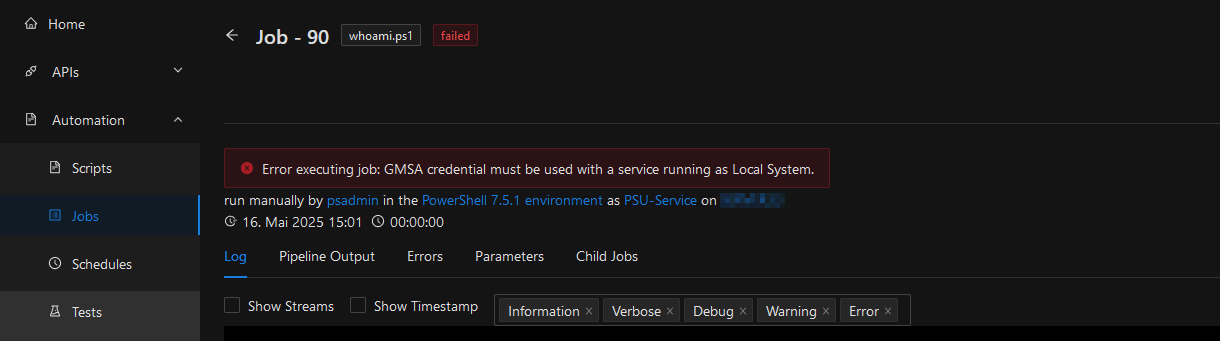
Edit: running a whoami script without “run as” shows the script running under the gmsa account used for the PSU service. Using the “run as” feature in the script config with the exact same user throws this error (same with any other gmsa user).
I hope I included all the important details and hope to get some answers from the community.