
233982
Not able to connect via RDP to Windows Server 2022 from RDM installed in Arch Linux
The version now is 2025.3.2.3 64-bit and the aforementioned issue is gone!
Thanks @Simon Duguay Létourneau !
Not able to connect via RDP to Windows Server 2022 from RDM installed in Arch Linux
@Simon Duguay Létourneau
Thanks for providing the guide!
But since it's really going to be fixed soon (I was expecting, like, week or two) and hotfix will be released really in such a short time, I will better wait and just update my existing installation and then report here on whether the hotfix helped or not.
Have a great rest of the day!
Much obliged,
Victor
Not able to connect via RDP to Windows Server 2022 from RDM installed in Arch Linux
Hello @Simon Duguay Létourneau
First of all thanks for such a fast response!
Yes, I don't use Flatpak (never used it in my life), I used yay exactly the way the official guide recommends to do.
Do you know the ballpark of when the hotfix will be released? Or, what would be a proper way for me to downgrade to the working version (while waiting for that hotfix) using yay? (Not feeling really good using flatpak just for that)
Much obliged,
Victor
Not able to connect via RDP to Windows Server 2022 from RDM installed in Arch Linux
Hello everyone! Desperately looking for help here..
So I've got a bunch of Windows Server 2019/2022 machines in my LAN.
I've also got two instances of RDM, one is on my Windows 11 PC, another is on my Arch Linux laptop.
The Windows 11 RDM connects to these Windows Server machines via RDP with 0 issues. All I had is to enter the host/username/password and all worked like a charm!
Unfortunately it's been everything but similar experience when I installed (using yay) RDM on my Arch.
The system is fully updated. RDM version is 2025.3.2.2
After creating the session entry the same way I always did, I'm getting an error:
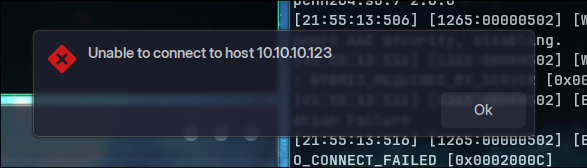
That's what the console gives me out:
~ ❯ remotedesktopmanager
[22:10:20:498] [46753:0000b6b5] [INFO][Devolutions.Rdp.Credentials] - [Parse]: parsing "A************", "" (Mstsc) => "Username: "A************" Domain: """
[22:10:20:504] [46753:0000b6b5] [WARN][com.freerdp.settings] - [freerdp_settings_print_warnings]: [experimental] enabled GlyphSupportLevel GLYPH_SUPPORT_FULL[0x00000002], expect visual artefacts!
[22:10:20:505] [46753:0000b6b5] [ERROR][com.freerdp.channels.virtual.channel] - [virtchan_virtual_channel_init_event_ex]: Unhandled event type 0
[22:10:20:505] [46753:0000b6b5] [ERROR][com.freerdp.channels.virtual.channel] - [virtchan_virtual_channel_init_event_ex]: Unhandled event type 0
[22:10:20:505] [46753:0000b6b5] [ERROR][com.freerdp.channels.virtual.channel] - [virtchan_virtual_channel_init_event_ex]: Unhandled event type 0
[22:10:20:513] [46753:0000b6b5] [INFO][com.freerdp.codec] - [openh264_load_functionpointers]: loaded libopenh264.so.7 2.6.0
[22:10:20:529] [46753:0000b6b5] [INFO][com.freerdp.codec] - [openh264_load_functionpointers]: loaded libopenh264.so.7 2.6.0
[22:10:20:533] [46753:0000b6b5] [WARN][com.freerdp.core.rdp] - [log_build_warn][0x7f5f583115e0]: *************************************************
[22:10:20:533] [46753:0000b6b5] [WARN][com.freerdp.core.rdp] - [log_build_warn][0x7f5f583115e0]: This build is using [runtime-check] build options:
[22:10:20:533] [46753:0000b6b5] [WARN][com.freerdp.core.rdp] - [log_build_warn][0x7f5f583115e0]: * 'WITH_VERBOSE_WINPR_ASSERT=ON'
[22:10:20:533] [46753:0000b6b5] [WARN][com.freerdp.core.rdp] - [log_build_warn][0x7f5f583115e0]: *
[22:10:20:533] [46753:0000b6b5] [WARN][com.freerdp.core.rdp] - [log_build_warn][0x7f5f583115e0]: [runtime-check] build options might slow down the application
[22:10:20:533] [46753:0000b6b5] [WARN][com.freerdp.core.rdp] - [log_build_warn][0x7f5f583115e0]: *************************************************
[22:10:20:533] [46753:0000b6b5] [WARN][com.freerdp.core.rdp] - [log_build_warn_cipher][0x7f5f583115e0]: *************************************************
[22:10:20:533] [46753:0000b6b5] [WARN][com.freerdp.core.rdp] - [log_build_warn_cipher][0x7f5f583115e0]: [SSL] {Cipher} build or configuration missing:
[22:10:20:533] [46753:0000b6b5] [WARN][com.freerdp.core.rdp] - [log_build_warn_cipher][0x7f5f583115e0]: * des-ede3-cbc: RDP security FIPS mode will not work
[22:10:20:534] [46753:0000b6b5] [WARN][com.freerdp.core.rdp] - [log_build_warn_cipher][0x7f5f583115e0]: *************************************************
[22:10:20:534] [46753:0000b6b5] [WARN][com.freerdp.core.nego] - [nego_enable_aad]: This build does not support AAD security, disabling.
[22:10:20:546] [46753:0000b6b5] [ERROR][com.freerdp.core] - [rdp_client_connect]: ERRCONNECT_SECURITY_NEGO_CONNECT_FAILED [0x0002000C]
[22:10:20:546] [46753:0000b6b5] [ERROR][com.freerdp.core.connection] - [rdp_client_connect]: Error: protocol security negotiation or connection failure
[22:10:20:556] [46753:0000b6b5] [INFO][Devolutions.Rdp.Credentials] - [Parse]: parsing "A************", "" (Mstsc) => "Username: "A************" Domain: """
[22:10:20:557] [46753:0000b6b5] [WARN][com.freerdp.settings] - [freerdp_settings_print_warnings]: [experimental] enabled GlyphSupportLevel GLYPH_SUPPORT_FULL[0x00000002], expect visual artefacts!
[22:10:20:557] [46753:0000b6b5] [ERROR][com.freerdp.channels.virtual.channel] - [virtchan_virtual_channel_init_event_ex]: Unhandled event type 0
[22:10:20:557] [46753:0000b6b5] [ERROR][com.freerdp.channels.virtual.channel] - [virtchan_virtual_channel_init_event_ex]: Unhandled event type 0
[22:10:20:557] [46753:0000b6b5] [ERROR][com.freerdp.channels.virtual.channel] - [virtchan_virtual_channel_init_event_ex]: Unhandled event type 0
[22:10:20:566] [46753:0000b6b5] [INFO][com.freerdp.codec] - [openh264_load_functionpointers]: loaded libopenh264.so.7 2.6.0
[22:10:20:578] [46753:0000b6b5] [INFO][com.freerdp.codec] - [openh264_load_functionpointers]: loaded libopenh264.so.7 2.6.0
[22:10:20:579] [46753:0000b6b5] [WARN][com.freerdp.core.nego] - [nego_enable_aad]: This build does not support AAD security, disabling.
[22:10:20:588] [46753:0000b6b5] [WARN][com.freerdp.core.nego] - [nego_process_negotiation_failure]: Error: HYBRID_REQUIRED_BY_SERVER [0x00000005]
[22:10:20:588] [46753:0000b6b5] [ERROR][com.freerdp.core.nego] - [nego_connect]: Protocol Security Negotiation Failure
[22:10:20:588] [46753:0000b6b5] [ERROR][com.freerdp.core] - [rdp_client_connect]: ERRCONNECT_SECURITY_NEGO_CONNECT_FAILED [0x0002000C]
[22:10:20:588] [46753:0000b6b5] [ERROR][com.freerdp.core.connection] - [rdp_client_connect]: Error: protocol security negotiation or connection failure
Not sure if that's helpful, but I've also made TLS Diagnostics and here are results:

What I've tried so far:
Switching back and forth every possible checkbox/option in the RDP session settings as well as global RDP settings in RDM.
On a Windows Server machine itself I tried removing NLA (network level authentication) requirement.
I tried exporting my working sessions from Windows 11 RDM and importing them to Linux instance. The behaviour is the same.
At the same time on the same Linux machine, running 'xfreerdp3 /v:10.10.10.123 /u:Administrator /d:. /p:'mycoolpassword' /sec:nla /cert:ignore '/auth-pkg-list:!kerberos' lets me connect successfully (this was suggested when I tried troubleshooting with AI)
Also, installing remmina and connecting through it works like a charm. But I'm so used to use RDM in Windows, I want it also to be running in Linux.
If anyone can provide any useful info, I'd greatly appreciate that! If you need any additional logs/info, I'll happily provide that.
Thanks in advance!
Victor