bvervoort
option to enforce browser extansion autofill option
A Devolutions server-side option to enforce the browser extension compare type to a specific value. This setting is located on a website entry in RDM → Properties → General → Browser Extension tab. This one is less of a security-focused request and more about functionality. Our users gave feedback that the best compare type in their experience is “Compare regex with URL domain.” Currently, this cannot be enforced.
option to enforce clipboard settings
A Devolutions server-side option to enforce the setting Workspace app → Settings → Security and Privacy → Clipboard. The default setting is to never remove sensitive data from the clipboard. As a business application, this would be a good standard to have enabled and to be able to enforce on users. As a security-focused application, this should at least be enabled by default and preferably also be enforceable.
Devolutions Password Manager crashes(closes when i use quick access
Hi Dany,
I just updated my client this morning and the issue seems to be resolved. Thanks so much!
Devolutions Password Manager crashes(closes when i use quick access
Hi Dany,
Thank you for the respone. Is there anything I can do to help with this investigation? What is the expected duration of such an investigation?
Devolutions Password Manager crashes(closes when i use quick access
as the title states when I press the hotkey for quick access workspace freezes and then closes itself. this only happens on version 2025.2.6. searching within workspace itself works fine.
Devolutions Password Manager quick access copy and paste is greyed out
Hi, I have updated this morning and it seems to work again. Thanks so much for the quick responeses and fix.
Devolutions Password Manager quick access copy and paste is greyed out
Hi,
they are only greyed out in the Quick Access. Within the application itself I can copy everything.
Devolutions Password Manager quick access copy and paste is greyed out
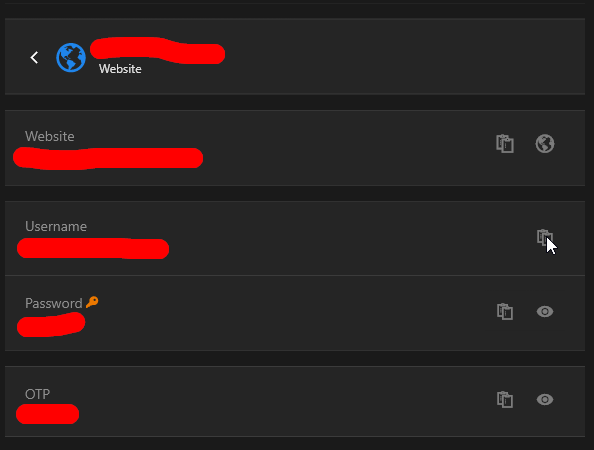
Since about two weeks I am not able to use copy option from quick access anymore. If I search for an item using quick access and select an entry the copy buttons for all fields are greyed out. Beforehand I was able to use the copy function without issue. As far as I can see I dont see any setting for this within the workspace application or within the permissions of our devolutions server.
Below an example, as you can see the buttons are greyed out and do nothing when you press them.
Does anyone know how to fix this?