
erik1
Manifest v3 implementation - "Basic" authentication / Autofill for Popup Credential Prompts:
I did not know there was a hidden quick menu like this.
This looks like a great feature to quickly open entries.This all makes sense now!
Can i suggest adding a two separate buttons for auto-fill of username and one for the password?
Manifest v3 implementation - "Basic" authentication / Autofill for Popup Credential Prompts:
I think this is added last month or last year. I am not able to find it in the client although there are some settings in the workspace for this. I think the used words
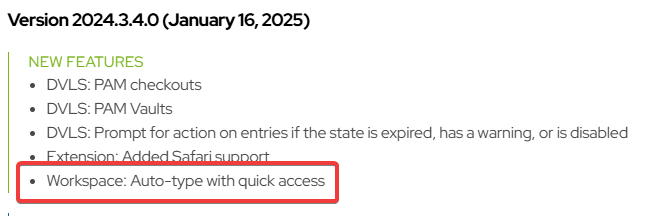
Release notes - Devolutions Workspace
There is also som info on the roadmap page:
Devolutions' 2025 roadmap - Devolutions Blog
In the settings we have the following options. I have no clue how to trigger the autotyping. These settings are in the docs.
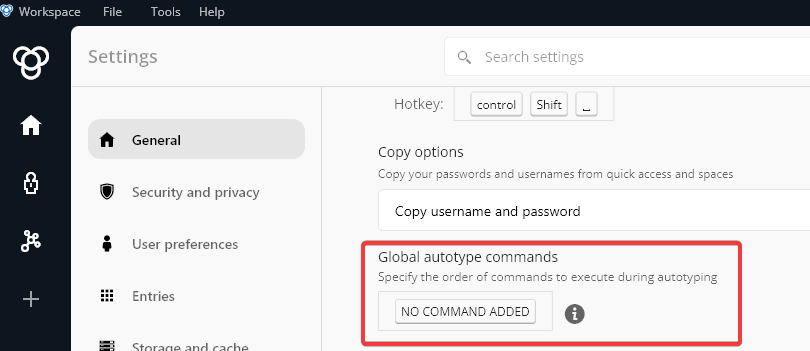
Maybe someone of Devolutions can help us?
Auto-Type like KeePass
Hi Sabastian,
We are indeed using the Workspace desktop application (2024.1.7).
Auto-Type like KeePass
Is there any update on this?
I was looking at kpr security autofill for apps wich has exactly this function.
Auto-Type like KeePass
Windows 10 and 11 block copy and paste when in a UAC credential screen. This is not an issue of the remote control software. It is also not possible to paste passwords to the Windows logon screen.
A way to run an keyboard emulation to fill credentials would be awesome!
To overcome issues with entering passwords in remote sessions or the VMware console.
When you copy passwords to end clients, the password will be in the clipboard memory and users can see the password.
Devolutions Cloud improvements
With the following issues i mean the Edge browser plugin:
Bug: The web client session is active for multiple weeks and does not require MFA (Using Edge)
WebLogin: Assign new password to custom default folder instead of root
WebLogin: Adding and editing in a pop-up instead of new
When opening the vault in the web browser it self via https://*.devolutions.app i get an MFA request.
Thnx for the time
Regards,
Erik
Devolutions Cloud improvements
Our team is using Password hub for a month now. We like it so far. There are still a few things I would like for improvement.
We use DPH for management of our client system passwords in the Windows app and some suppliers via the browser plugin.
Here are some bullet points our users would like in DPH.
Must haves
Bug: When Enforce 2-step verification upon unlocking is on, and inactivity time-out is on you have to enter password and OTP two times
Bug: The web client session is active for multiple weeks and does not require MFA (Using Edge)
Important: Wipe password from memory after X seconds
An extended lock-out policy for the Windows client and browser
Lock database when computer is locked.
Unlock only with MFA or password after locking computer.
re-authenticate PW + MFA after long period (like 8 hours)
re-authenticate PW + MFA after computer (re) start or sleep
When using Filter and selecting a entry or folder. On erase of the filter the selected entry or folder is deselected and you are back in the root. This makes searching for neighbour entries imposiible.
When using the search option, selecting an folder does not always work
Nice to have
Auto-type functionality (KeePass CTRL+V and sequence editing)
Windows Global shortcuts (CTRL+ALT+ K to get password manager on top)
In app shortcuts (copy username, password, url or description, start new search)
Promote certain Entry types. Or open General Entry category instead of all view.
Also nice
Change width of the three the columns, make entry list wider
Move the passwords to an seperate column like Windows Explorer or KeePass
Make keyboard arrow support better. The arrows work. it is just not clear what is selected
Creation of new entry types with specific fields, multiple encrypted fields, and icons.
Disable entry types (Disable store of OTP)
WebLogin: Assign new password to custom default folder instead of root
WebLogin: Adding and editing in a pop-up instead of new Page
PasshPhrase possibility
When creating a new entry. On copy password nothing is copied and field is blank. Fill with generated password at default.
I know it is a lot. Just hoping Password Hub will evolve to the best password management tool there is.
Regards,
Erik