
derek06
Kubernetes Deployment Documentation
Just curious if there was any movement on this? Would be great to have this deployment as an option.
Thanks
Kubernetes Deployment Documentation
Hello Derek,
Glad to hear the deployment worked! Could you clarify which AD authentication method you're using: LDAP or Kerberos/NTLM?
LDAP-based authentication is supported cross-platform so it should be working. Windows-native auth (Kerberos/NTLM) however is not supported in Linux environments, as it requires Windows-specific infrastructure.
Best regards,
@Richard Boisvert
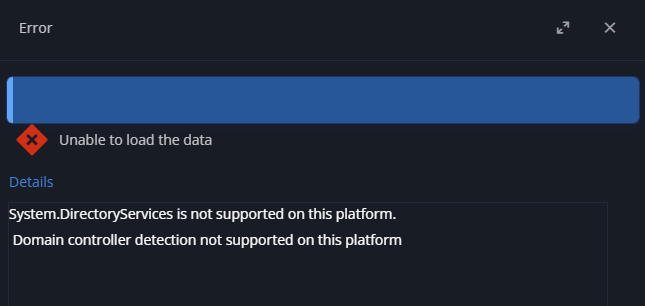
I'm trying to work with regular LDAPS based authentication, not Domain Single Sign-On. It seems the issue is specifically with LDAPS. With LDAPS enabled, the configuration screen will show the error message below when clicking on the 'Advanced settings' button:
Ignoring the error and clicking on the 'Browse domain containers' button on the next screen, I see this error message:
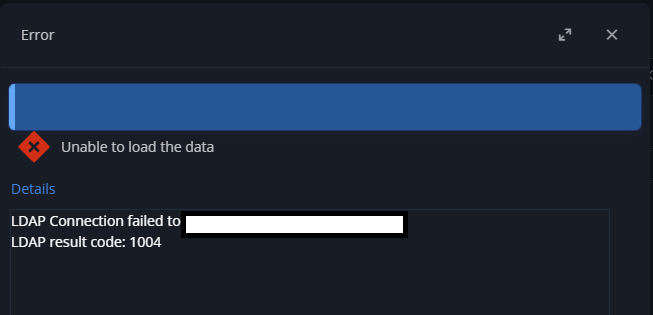
Unfortunately, I cannot test with regular LDAP auth as it is disabled in our AD environment. My guess is its a cert issue as our AD certs are not signed by a well-known CA.
Kubernetes Deployment Documentation
I got the deployment stood up, however ran into one issue. It seems AD Domain auth is not supported when running the application on a container. I have two questions regarding that:
Would there be plans to support AD Domain auth on a docker/kubernetes deployment?
Would the linux deployment have this same limitation?
Thanks
Kubernetes Deployment Documentation
This looks great and I am looking forward to testing it out. We currently do use an Ingress (AviLB, specifically), so we would either deploy that separately or modify the chart, but that hopefully won't be a big deal. My only other question at this time would be if this could support running multiple replicas. My initial thought is 'no', but thought I would ask anyway.
Thanks
Kubernetes Deployment Documentation
Now that there is a docker deployment for the Devolutions Server, it would be great if there was documentation provided on how to deploy the container in a kubernetes deployment (and even providing a Helm chart would be great). This would help my team as we are wanting to put the Devolutions Server in kubernetes, however there is uneasiness about there being no official documentation on achieving this, thus there are questions regarding vendor support.
Thanks
Unable to log in after update (2022.1.12 to 2022.2.9)
Hello,
We have been trying to update our instance of Devolutions Server for a while now and we are getting an issue where we cannot log in every time we attempt the update. We have gone so far as to setup a brand new server with the 2022.1.12 on it and then update it, but am still seeing a few issues. Neither AD or Azure AD accounts can login.
We get this error message when attempting to log in:

Looking at the logs, we see this error message every time a login attempt is made:
NullReferenceException - Object reference not set to an instance of an object.

   at Devolutions.Server.Managers.AuthenticationProvider.SkipAuthentication(LoginContext loginContext)
   at Devolutions.Server.Managers.AuthenticationProvider.DoAuthenticateUser(LoginContext loginData, String username, String password)
   at Devolutions.Server.Managers.AuthenticationProvider.AuthenticateUser(LoginContext loginData, String userName, String password)
   at Devolutions.Server.Managers.AuthenticationProvider.ValidateUser(LoginContext loginData, String userName, String password, LoginAttemptEntity loginAttempt)
   at Devolutions.Server.Controllers.APIControllers.V2.BackendApiController.DoLogin(ISessionContext context, ParsedLoginParameter loginParameter, LoginContext& loginData)
We are also seeing the following error when the scheduler attempts to cache Azure AD:
InvalidOperationException - There is an error in XML document (2, 2).

   at System.Xml.Serialization.XmlSerializer.Deserialize(XmlReader xmlReader, String encodingStyle, XmlDeserializationEvents events)
   at Devolutions.RemoteDesktopManager.Managers.SerializationManager.LoadObjectFromString[T](String str, Boolean createAnInstanceIfNotExists)
   at Devolutions.Server.ServerCacheManager.ParseExternalUserId(ServerUserType userType, DataRow row)
   at Devolutions.Server.ServerCacheManager.ParseUserSecurityEntity[T](DataRow row, DataSourceSettings dataSourceSettings)
   at Devolutions.Server.ServerCacheManager.GetUsersFromDB[T](Int32 userType, Nullable`1 userId)

------------------------------------------

InvalidOperationException - <ADUserId xmlns=''> was not expected.

   at Microsoft.Xml.Serialization.GeneratedAssembly.XmlSerializationReaderAzureADUserId.Read6_AzureADUserId()
Any help would be appreciated with getting this resolved. We do have both database backups and snapshots of the server prior to running the update and can revert if needed.
Integrated login no longer working after upgrade
Yes, 'Windows Authentication' is what I was referring to. Sorry, it up with something else.
After some additional work, 'Windows Authentication' started to work seemingly out of nowhere. We rebooted the server a few times prior, but no configuration change was made prior. However, there do seem to be some latent issues that are plaguing some of our users. Would I be able to upload a diagnostics report so somebody could check for issues?
Thanks
Integrated login no longer working after upgrade
I am seeing the following message in the logs when using windows integrating logging:
ProcessDomainUserInfo using windowsAuthentication - Enter
Integrated login no longer working after upgrade
Hello,
I recently upgrade to the latest Password Server and the integrated login setting is no longer working. Logging in with username/password works without issue. I was able to upgrade our test instance without issue, however the production instance did not work. I have verified:
IIS app pool is using the proper service account for the 'Identity'
The account being used for the upgrade is a member of the db_owner group on the SQL server
The service account used has the db_datareader permissions on the SQL server
Any help would be appreciated.
Thanks
Documentation of the SDK
Is there a chance that saving passwords via the SDK will be fixed in the next release? We are trying to work this into out automation processes and would much prefer to use the python SDK instead of the powershell cmdlets.
Error
I was not the one that ran the import, but the most recent import was about 2600 records. The person that did it said they first imported the entries to a local data source and then attempted to move them over to the password server, however kept on receiving a time out error. This actually resulted in the entire server going non-responsive for a period of time while the import was 'running' and resulting in a timeout. I don't recall seeing any unique IDs in any error messages, however the import did have invalid metadata that I corrected after the fact.
Error
Seems my browser ate some of my replies.
To the question of the security provider. We are using the Default option under 'Security Provider'. This was not changed upon installation.
We did notice some import issues while trying to import from external data sources. We receiving time out errors whenever we tried to import. Looking at the logs, we saw quite a few auth errors. This was resolved by unchecking the 'Enable domain cache' feature. After unchecking that, all of our imports started to work without issue. Unfortunately, we are still seeing the 'Failed to deserialize connection' error messages. We are getting spammed with thousands of these messages when they occur. I believe the idea that they are only occurring when a new user logs in is still holding true.
Thanks
Error
Both DPS and RDM are new installations, so everything should be the latest version.
DPS - 6.1.3.0
RDM - 14.1.3.0
Thanks
Error
This did not resolve the issue. It seems the errors are only showing up when somebody logs into the website for the first time (not sure if the same happens using RDM yet). We are currently using AD users and groups to manage access. Users are set to be created upon first login and we have setup windows authentication. We use AD groups to manage access to the different repositories.
Thanks
Error
I did see some invalid metadata and ran optimize operation. Those entries no longer show as invalid, so hopefully this has resolved the issue.
I will report back if we continue to see this issue.
Thanks
Error
Thanks for the response.
First, I would like to apologize for the post subject. I was distracted while submitting this and just forgot to finish typing out a relevant subject.
I have uploaded the diagnostics report and referenced this forum post in the report.
The database diagnostics show all green checkmarks, so all looks well there. I'm not sure if it is related, but the 'Deserialization' tab is completely empty.
Thanks
Error
Hello,
We are in the process of deploying password server, but we are currently encountering some issues. Specifically, we are receiving the below error message when some users log into the WebUI.
The following error was received by XXXX at 3/15/2019 8:50:32 AM
Error:
InvalidOperationException - Failed to deserialize connection, connectionData is empty at Devolutions.Server.ConnectionManager.DeserializeConnection(ConnectionInfoEntity connectionInfo) --- SessionManagement
Source:
Devolutions.Server.Common
The user does not see an error message in the Web UI, however some actions do not seem to work (such as setting a password). When the issue occurs, we are receiving thousands of emails with the above error message. A similar error message is also being logged in the Event Viewer on the server. What can we do to resolve this issue?
Thanks