DPM Firefox Plugin "InternalError: too much recursion"

Hello,
Lately I've started having issues with Password Managers Firefox plugin, where entries simply will not paste into login fields no matter what, and when clicking details on the entry in the plugin, an error pops up:
InternalError: too much recursion
Component stack:
u1@moz-extension://bd7fe712-9656-4b52-9d90-3b3042bdb9a0/chunks/dwwJUXeg.js:42:53645
div@unknown:0:0
SZ@moz-extension://bd7fe712-9656-4b52-9d90-3b3042bdb9a0/chunks/dwwJUXeg.js:39:60926
div@unknown:0:0
xZ@moz-extension://bd7fe712-9656-4b52-9d90-3b3042bdb9a0/chunks/dwwJUXeg.js:39:60838
p1<@moz-extension://bd7fe712-9656-4b52-9d90-3b3042bdb9a0/chunks/dwwJUXeg.js:42:62210
u@moz-extension://bd7fe712-9656-4b52-9d90-3b3042bdb9a0/chunks/DCWHtfRT.js:1:7203
En@moz-extension://bd7fe712-9656-4b52-9d90-3b3042bdb9a0/chunks/CYvaFWAw.js:11:4227
Gn@moz-extension://bd7fe712-9656-4b52-9d90-3b3042bdb9a0/chunks/CYvaFWAw.js:11:9564
Suspense@unknown:0:0
Wn@moz-extension://bd7fe712-9656-4b52-9d90-3b3042bdb9a0/chunks/CYvaFWAw.js:11:8676
Vn@moz-extension://bd7fe712-9656-4b52-9d90-3b3042bdb9a0/chunks/CYvaFWAw.js:11:7476
F8@moz-extension://bd7fe712-9656-4b52-9d90-3b3042bdb9a0/chunks/dwwJUXeg.js:42:206267
div@unknown:0:0
C@moz-extension://bd7fe712-9656-4b52-9d90-3b3042bdb9a0/chunks/aHHKxgJ9.js:1:3157
div@unknown:0:0
M@moz-extension://bd7fe712-9656-4b52-9d90-3b3042bdb9a0/entries/popup/index.js:2:1595
m@moz-extension://bd7fe712-9656-4b52-9d90-3b3042bdb9a0/chunks/aHHKxgJ9.js:1:316
Or@moz-extension://bd7fe712-9656-4b52-9d90-3b3042bdb9a0/chunks/CT7V-LcK.js:1:55500
C@moz-extension://bd7fe712-9656-4b52-9d90-3b3042bdb9a0/chunks/CT7V-LcK.js:1:13160
be@moz-extension://bd7fe712-9656-4b52-9d90-3b3042bdb9a0/chunks/CEfphdzN.js:1:1857
we@moz-extension://bd7fe712-9656-4b52-9d90-3b3042bdb9a0/chunks/CEfphdzN.js:1:2850
er@moz-extension://bd7fe712-9656-4b52-9d90-3b3042bdb9a0/chunks/CEfphdzN.js:28:40129
or@moz-extension://bd7fe712-9656-4b52-9d90-3b3042bdb9a0/chunks/CEfphdzN.js:28:40839
ie@moz-extension://bd7fe712-9656-4b52-9d90-3b3042bdb9a0/chunks/4wW85Sq2.js:1:1115
N@moz-extension://bd7fe712-9656-4b52-9d90-3b3042bdb9a0/chunks/4wW85Sq2.js:1:1348
pa@moz-extension://bd7fe712-9656-4b52-9d90-3b3042bdb9a0/chunks/CYvaFWAw.js:11:50861
@moz-extension://bd7fe712-9656-4b52-9d90-3b3042bdb9a0/chunks/CYvaFWAw.js:11:49685
$i@moz-extension://bd7fe712-9656-4b52-9d90-3b3042bdb9a0/chunks/CYvaFWAw.js:11:48105
Xi@moz-extension://bd7fe712-9656-4b52-9d90-3b3042bdb9a0/chunks/CYvaFWAw.js:11:47815
Yi@moz-extension://bd7fe712-9656-4b52-9d90-3b3042bdb9a0/chunks/CYvaFWAw.js:11:47706
Ki@moz-extension://bd7fe712-9656-4b52-9d90-3b3042bdb9a0/chunks/CYvaFWAw.js:11:45029
Or@moz-extension://bd7fe712-9656-4b52-9d90-3b3042bdb9a0/chunks/CT7V-LcK.js:1:55500
C@moz-extension://bd7fe712-9656-4b52-9d90-3b3042bdb9a0/chunks/CT7V-LcK.js:1:13160
be@moz-extension://bd7fe712-9656-4b52-9d90-3b3042bdb9a0/chunks/CEfphdzN.js:1:1857
we@moz-extension://bd7fe712-9656-4b52-9d90-3b3042bdb9a0/chunks/CEfphdzN.js:1:2850
er@moz-extension://bd7fe712-9656-4b52-9d90-3b3042bdb9a0/chunks/CEfphdzN.js:28:40129
or@moz-extension://bd7fe712-9656-4b52-9d90-3b3042bdb9a0/chunks/CEfphdzN.js:28:40839
he@moz-extension://bd7fe712-9656-4b52-9d90-3b3042bdb9a0/chunks/CEfphdzN.js:1:1418
Na@moz-extension://bd7fe712-9656-4b52-9d90-3b3042bdb9a0/chunks/CEfphdzN.js:116:18955
Ai@moz-extension://bd7fe712-9656-4b52-9d90-3b3042bdb9a0/chunks/CYvaFWAw.js:11:38134
ha@moz-extension://bd7fe712-9656-4b52-9d90-3b3042bdb9a0/chunks/CYvaFWAw.js:11:51530
D@moz-extension://bd7fe712-9656-4b52-9d90-3b3042bdb9a0/entries/popup/index.js:2:479
N@unknown:0:0
ja@moz-extension://bd7fe712-9656-4b52-9d90-3b3042bdb9a0/chunks/CYvaFWAw.js:11:57645
Ie@moz-extension://bd7fe712-9656-4b52-9d90-3b3042bdb9a0/chunks/DCWHtfRT.js:5:503
I tried remaking the entry, updating the plugin, and checked that DPM didn't have any updates waiting.
This has happened with 3 entries now.
Firefox: 153.7.0esr (64-bit)
Plugin: 2026.3.8.13
DPM: 2026.3.5 build 2
All Comments (1)
Hello,
We have investigated and have found one possible cause for your issue.
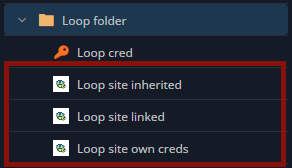
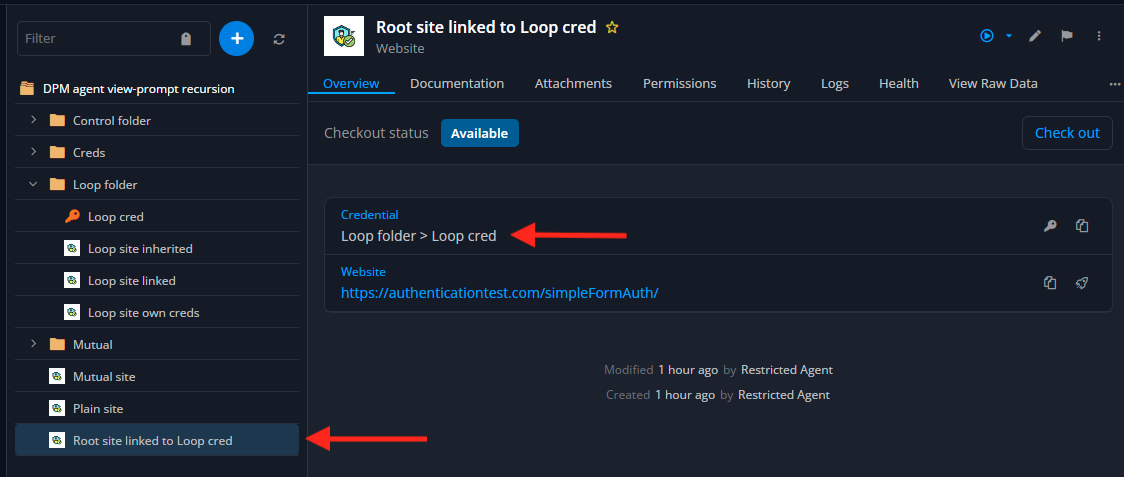
If you have a folder that has a linked credential that is in the same folder, when a website is placed in the folder or when a website is linked to the folder's credential it will crash on the overview and also not fill the website.
We have a fix made that will be in the next version, for now i would recommend looking at your entry setup that crashes and see if you have a similar setup. If you do, moving the linked credential outside the folder to anywhere else should fix the issue temporarily before the fix is deployed.
Here are screenshots describing the setup i am talking about:
Core setup:
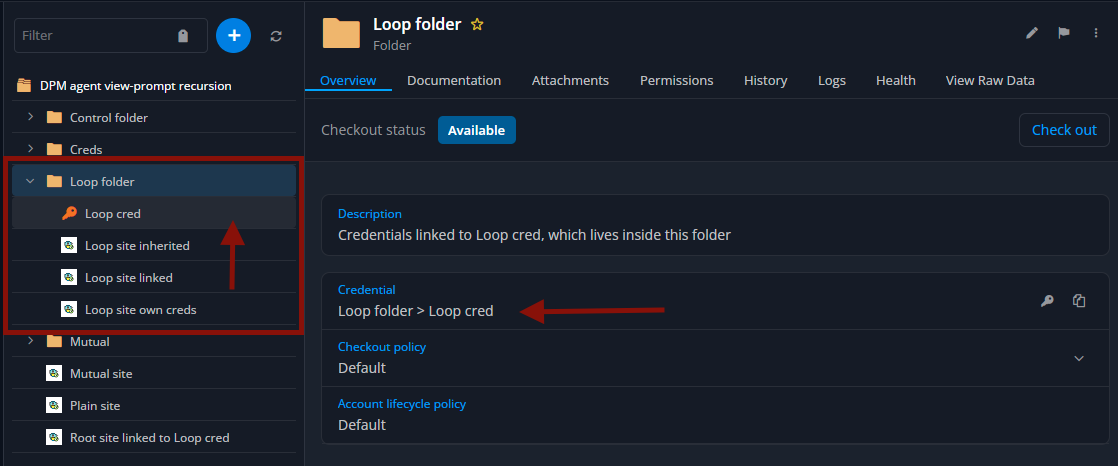
with this, any entry in the folder no matter the credential type will crash:
And entries that are linked to the folder's credential (Loop cred in this case) will also crash even if they are not in the folder:
If your entry setup does not contain this, please let us know and describe your entry setup so we can investigate further.
Best regards,
Samuel