RDP Certificate issues

Hi,
is there a way to ignore certificate Problems when connecting to a RD Gateway?
[13:58:34:917] [19058:19060] [WARN][com.freerdp.crypto] - Certificate verification failure 'self-signed certificate (18)' at stack position 0
[13:58:34:917] [19058:19060] [WARN][com.freerdp.crypto] - CN = *******************************
[13:58:34:917] [19058:19060] [ERROR][com.freerdp.crypto] - certificate not trusted, aborting.
[13:58:34:917] [19058:19060] [ERROR][com.freerdp.core] - rdg_tls_connect:freerdp_set_last_error_ex ERRCONNECT_TLS_CONNECT_FAILED [0x00020008]
Cannot find an option in RDP Settings.
Thanks,
juergen
All Comments (10)
Hello
Just to clarify something, are you launching an embedded RDP session, or using RDM to open xfreerdp externally?
Thanks and kind regards,
Richard Markievicz
Hi Richard,
I think freerdp is the default backend for RDP Connections here (Linux Mint).
To be more detailed: I imported a working (works at least with thincast rdp client) .rdp file into RDM and tried to connect, so I assume the answer is embedded?
The Log Snipplet is from debug mode (https://forum.devolutions.net/topics/56190/swapped-from-windows-to-linux-rdm-is-failing-rdp-wrd-gateway-based-jum).
thanks juergen
Hi Juergen
Just to clarify one thing; when you imported your .rdp file you should have two options: "import RDP content" and "Link to the RDP file". Do you know which one you chose?
Another way to know, if you don't remember; in the dashboard view of your session does it have the "External" banner?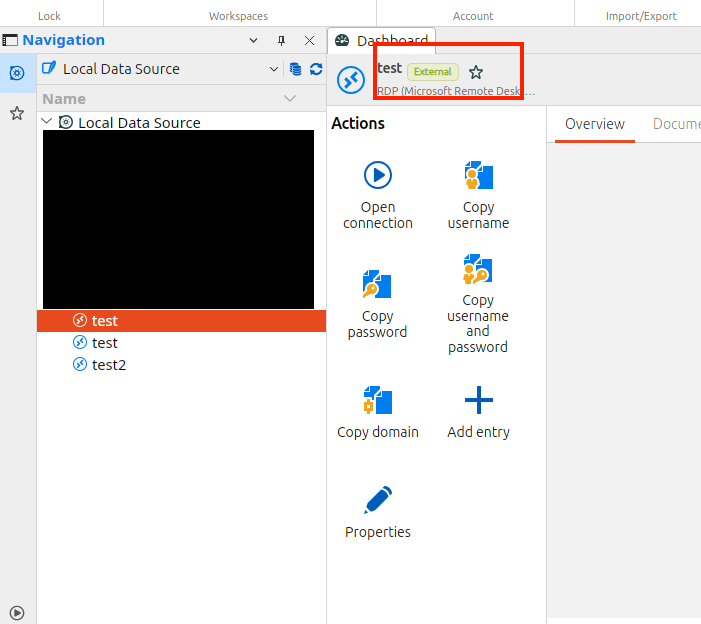
Thanks and kind regards,
Richard Markievicz
Screenshot 2026-10-28 at 10.36.31.png
I choose "import RDP content" and ther is no "external" badge.
thanks,
juergen
Hi Juergen
Thank you. I hope I don't appear difficult; what I infer from your log is that RDM is trying to launch the connection in xfreerdp externally, instead of as an embedded tab inside RDM. I can see a scenario where the connection will fail with an untrusted gateway cert in this mode but this should be working well with the embedded RDP and I think the key is to understand why the connection is not being launching inside RDM.
Would you mind to export the entry from RDM and send it to me? Right-click, Export > Export as RDM. Make sure you uncheck the box to "Include Credentials". The file that it creates is XML so you can also feel free to anonymize anything else you don't want me to see (like server addresses). Then you can send it to me by PM here on the forum.
Please, let me know if something isn't clear and thank you for your patience
Kind regards,
Richard Markievicz
Hi Juergen
Thank you. I hope I don't appear difficult; what I infer from your log is that RDM is trying to launch the connection in xfreerdp externally, instead of as an embedded tab inside RDM. I can see a scenario where the connection will fail with an untrusted gateway cert in this mode but this should be working well with the embedded RDP and I think the key is to understand why the connection is not being launching inside RDM.
Would you mind to export the entry from RDM and send it to me? Right-click, Export > Export as RDM. Make sure you uncheck the box to "Include Credentials". The file that it creates is XML so you can also feel free to anonymize anything else you don't want me to see (like server addresses). Then you can send it to me by PM here on the forum.
Please, let me know if something isn't clear and thank you for your patience
Kind regards,
Hi Juergen
One more thing to check, if you don't mind. In File > Settings > Entry Types > Sessions > Remote Desktop (RDP) > Display, what do you have configured for "Display"?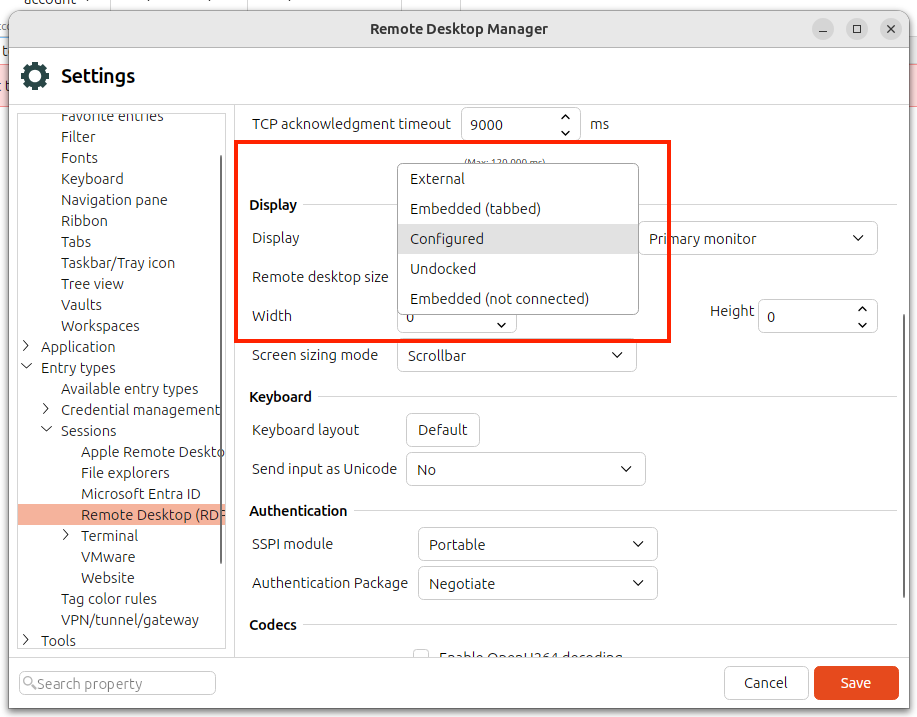
Thanks and kind regards,
Richard Markievicz
Screenshot 2026-10-28 at 12.11.07.png
Hi Richard,
the setting was "external". so I change to "configured" and received a different error Message for the Connection: "Unable to connect".
So I turned the debug log on again and discovered I had a DNS failure for the RDS Server the Session wants to connect to.
Edited my hosts file accordingly an voila, it works!
Thanks for the useful hints, great support!
Best regards,
juergen
Hi
Excellent, I'm glad it works for you!
I think the original issue using the "External" mode is possible to fix (I believe it's possible to modify the arguments for the external process), but I don't think that's what you wanted really. If it does come up that you want to run this connection from RDM using xfreerdp rather than embedded, please let me know.
And don't hesitate with other questions or comments
Kind regards,
Richard Markievicz
Hi Richard,
a follow up to this Topic:
I always found it handy to switch between RDP Fullscreen and the local desktop with alt-strg-enter keys. This is not possible any more and I didn't find any other quick solution.
I can leave fullscreen by the title bar but not enter back any more.
Any hints?
thanks, juergen