Swapped from Windows to Linux RDM is failing RDP w/RD Gateway based Jumpbox
Swapped from Windows to Linux RDM is failing RDP w/RD Gateway based Jumpbox

I swapped from a Windows based work laptop to a Linux based one finally. Tried to do the whole export/import configuration side of things and that failed due to the Microsoft RD Gateway being used inherently on the Windows side and not be a supported function, naturally, on the Linux side.
I tested with xfreerdp3 in CLI and found that in order to have the whole Windows Jumpbox (RD Gateway) AND Windows endpoint RDP to work I have to have these flags in the xfreerdp3 command and I cannot figure out how to get it to work on the Devolutions RDM side of things.
"/auth-pkg-list:\!u2u /cert:ignore"
Tried searching and even using AI to figure this out, but apparently the Linux distro for this is pretty minimal at best on the documentation availability that AI can reach, so not very helpful unfortunately other than figuring out the root case.
Any advice to resolve this?
I tried recreating the jumpboxes as specific IsJumpbox =$true but that didn't work. I then also tried the RD Gateway tab and enabled/disabled a ton of settings and that was a no go. I was going to try using an external client (xfreerdp3) in the global settings, but I can't seem to find all the variables appropriate for seeding in the gateway specific items for some reason.
Looking for any advice to get me moving in the right direction here so I can continue using Devolutions RDM, please. Thanks.
All Comments (10)
Hello
I think the best thing to do, is get it worked with the embedded RDP in RDM; and then if you want to use xfreerdp3 in external mode, you'll know you have the good settings and it's just a case of mapping them to the CLI.
I'm afraid I'm not sure what you mean by
I tried recreating the jumpboxes as specific IsJumpbox =$true but that didn't work
However, I was using an RD Gateway connection from RDM Linux just the other day and found it to work well - except for one issue with Kerberos authentication, which I am in the process of fixing. So maybe you are hitting something like that, or maybe you just need a settings tweak. I'm not sure why you would've needed to disable U2U or the certificate prompts in xfreerdp.
My suggestion is to start with something like this:
- In the RDP session
- configure the hostname, username, password in the "General" tab.
- clear out any VPN you have in the VPN/Tunnel/Gateway section (set "Not enabled")
- in the "Gateway" tab
- Set "Use these RD Gateway Server settings"
- Server name = Gateway host name
- Logon method = "Ask for Password (NTLM)"
- And then either
- Check "Use my RD Gateway credentials for the remote computer". Note the naming here follows Microsoft, but it's actually inverted. It means "use the credentials for the RDP server for the Gateway", i.e. use what you configured in the first step
- Press "Credentials" and enter the Gateway username, domain (if needed) and password. Make sure it's set to "Store password in the database", that should be the only option.
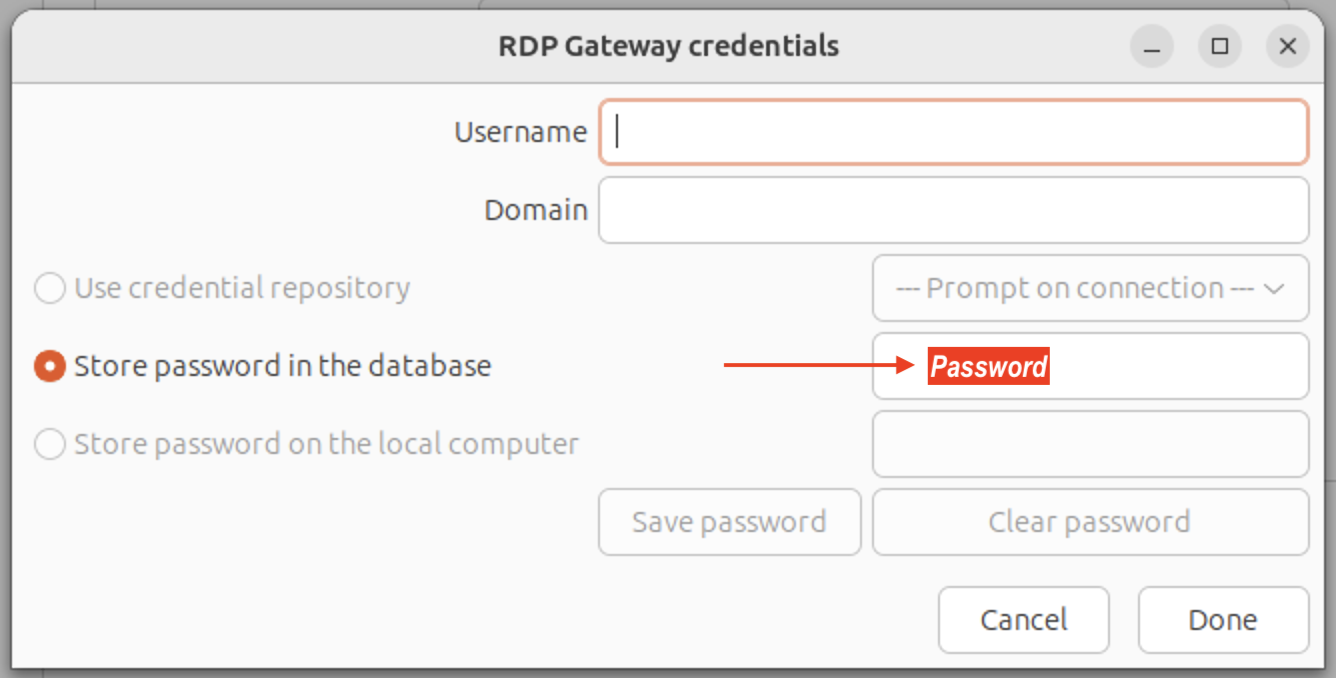
Now try the connection. If it works, great; but my guess is you tried all of this already and it didn't work, but we need to understand why.
So, close RDM; then switch to your terminal and set the environment variable WLOG_LEVEL to "Debug", then relaunch RDM from the same terminal. You might consider redirecting stdout and stderr to a file at the same time. Something like this:
export WLOG_LEVEL=DEBUG
remotedesktopmanager > ~/Desktop/rdm-rdp.txt 2>&1
RDM will launch; try your connection again and you should have a log file on the configured path. Please zip it and send it to me by PM here on the forum.
I hope it's clear, but if you have any questions or problems please don't hesitate to reach out
Kind regards,
Richard Markievicz
Screenshot 2026-09-15 at 20.51.36.png
Hey, Richard. Thanks for the recommendation, but I think I found the issue and it may be just the way we have things configured right now and the Windows Devolutions RDM setup can auto-negotiate properly with this configuration whereas the Linux distro cannot.
The endpoints require Kerberos authentication but the jumpbox requires NTLM authentication. This is because our RD Gateways sit behind a VIP and the VIPs endpoint FQDN doesn't have an SPN in AD, therefore a Kerberos authentication cannot occur against it.
If I select Negotiate or NTLM then it authenticates to the Windows-based jumpbox properly but doesn't "re-negotiate" to Kerberos for the Windows RDP endpoint as NTLM is disabled on them. If I select kerberos in the authentication tab then it doesn't even get passed the jumpbox because the jumpbox requires NTLM. I can RDP into the jumpboxes directly via NTLM and then do MSTSC internally from them out to the endpoint, but that's obviously not optimal. I cannot RDP directly into any of the endpoints because Jumpboxes are required for us, naturally.
So, as it stands right now the ignore cert piece wasn't actually needed. it's strictly the "/auth-pkg-list:!u2u" piece that does what the Windows side does inherently via the actual Jumpbox configuration versus the RD Gateway configuration that Linux leverages.
Hope this helps to navigate down a potential solution in the Devolutions RDM Linux distro. Let me know if there's something I can do on my end to test further, please.
Hello
Thanks, your reply is very helpful.
So; we know this works with vanilla xfreerdp3 and with Microsoft's client which points the finger at our SSP. mstsc uses Microsoft's SSP obviously, xfreerdp3 uses MIT Kerberos; however RDM can't link MIT Kerberos. We use our own cross-platform SSP instead.
Excluding u2u is irrelevant in the case of RDM, because we don't support U2U, it's always excluded.
I don't currently have an environment that matches yours (Gateway supports only NTLM, hosts require Kerberos) and it will take me a bit of time to set something up. It's actually possible your issue is already fixed as we've had a number of Kerberos-related fixed in recent versions of our SSP, but it might be that RDM Linux is lagging behind on those dependencies. Without more information I just don't know.
You could really help me drive this quicker if I can get both the FreeRDP and SSP logs from you.
- Close RDM completely
- Switch to your terminal and setup the following environment variables. Feel free to adjust the log paths, etc.
export SSPI_LOG_PATH="~/Desktop/sspi.log"
export SSPI_LOG_LEVEL=debug
export WLOG_LEVEL=DEBUG
export WLOG_APPENDER=CONSOLE
export WLOG_PREFIX="[%lv:%mn] [%fl|%fn|%ln] - "
- Then launch RDM from the same terminal and redirect output. If RDM is in your PATH it's as simple as
remotedesktopmanager 2>&1 | tee "~/Desktop/freerdp.log"
- In the RDP session options, in the "Authentication" tab
- Ensure that the SSPI Module is set to "Portable"
- Then, try the connection with the three different approaches
- "Authentication Package" set to "NTLM"
- "Authentication Package" set to "Kerberos"
- "Authentication Package" set to "Negotiate"
Finally, zip and send me the sspi.log and freerdp.log by private message (the logs will contain topology metadata like usernames, server addresses; don't post it publicly, but be assured that the files don't contain secrets or passwords).
Please let me know if you're able to do that or if you have some questions. Otherwise I will investigate independently, but it will be longer to understand the issue.
Thanks and kind regards,
Richard Markievicz
Richard,
Thanks for the detailed explanation and the logging setup — that helped a lot. Logs attached in a DM (freerdp.log and sspi.log, captured with SSPI Module set to Portable, tested across Negotiate/NTLM/Kerberos and NLA on/off).
A few findings from going through them:
The root cause isn't U2U-specific as you stated — your own Portable SSP hits it independently. In sspi.log:
Kerberos authentication failed with UnknownCredentials: server not found in Kerberos database error, attempting NTLM fallback.
This is the identical "server not found in Kerberos database" error we already isolated using xfreerdp3 with MIT Kerberos. In our environment, the RD Gateway sits behind a NetScaler VIP, and Kerberos ticket requests for that VIP hostname specifically don't resolve — while our target/endpoint servers require Kerberos and reject NTLM by policy. This is a completely standard, common topology for load-balanced RD Gateway deployments (Kerberos can be finicky behind a VIP for well-understood reasons), and it's exactly the scenario your client needs to be resilient to.
Critically: our Windows client (mstsc) handles this exact topology successfully today, through the same gateway. So this isn't a case where the environment is unsupportable — it's specifically that RDM's negotiation doesn't handle it the way Microsoft's own SSPI does.
Your fallback logic works, but it isn't scoped per-hop, and that's the actual bug. Every attempt that successfully falls back to NTLM for the gateway (RDG_OUT_DATA authorization result: HTTP_STATUS_SWITCH_PROTOCOLS [101] in freerdp.log) goes on to fail at the target with ERRCONNECT_ACCOUNT_RESTRICTION, because it looks like the NTLM fallback decision from the gateway hop carries through to the target's own NLA instead of attempting a fresh, independent Kerberos negotiation there. We confirmed via raw xfreerdp3 (MIT Kerberos, /auth-pkg-list:!u2u) that when each hop is allowed to pick its own mechanism independently, the gateway falls back to NTLM while the target still succeeds via Kerberos — so the two mechanisms coexist fine when negotiated per-hop, which is exactly what mstsc already does and what we'd need RDM to do as well.
One smaller note: the "SSPI Module: System" attempts in these logs failed outright at the gateway with no NTLM fallback ever appearing (ERRCONNECT_SECURITY_NEGO_CONNECT_FAILED, no RDG_OUT_DATA success) — worth a look on your end, though secondary to the main issue above.
Given mstsc already handles this correctly, this seems like the right thing to prioritize fixing on RDM's Portable SSP side so Linux users get the same behavior Windows users already have. Happy to run more tests or provide anything else that would help.
Thanks again for digging into this.
Filip
Hello
This is great, thank you. The analysis you posted is a little off, I guess it came from an LLM and no problem there, but I'll clear two things up; first, the "System" SSP module is freerdp's own, which in our case is not built against MIT Kerberos. So any scenario in which you expect to use Kerberos will not work with that setting. It must be "Portable". Second, each hop is already negotiated independently; nothing from the Gateway's NTLM handshake carries over to the endpoint, and it's the client, not the Gateway, that talks Kerberos to the final server.
Technical Detail
I'll write out the technical detail here, in case you're interested; if not feel free to skip to the next section of my response
Yes the VIP has no SPN, so Kerberos can't be used and we fallback to NTLM. When the Gateway accepts the credentials, it signals success by upgrading the connection to websockets, and that response carries no final authentication token. But our SSP is waiting for one, for downgrade protection. Understand that when the client and server are negotiating, an attacker in the middle could strip the stronger options out of the offer and force both sides to agree on a weaker offering (NTLM instead of Kerberos). SPNEGO defends against this by having each side sign the list of mechanisms it offered and exchanging those signatures at the end. If the signature doesn't match, the negotiation was tampered with and the handshake is rejected.
We perform that check: we send the signature, then wait for the server's before completing the handshake. Over an RD Gateway that final message never arrives - the upgrade itself is the success signal - so we are waiting for something that cannot arrive.
That's why it works with xfreerdp3, because they behave differently. When they fallback to NTLM, they drop SPNEGO entirely and talk plain NTLM. With no negotiation wrapper there's no downgrade protection and nothing to wait for. The problem is: freerdp is driving the SSP logic; so it works with their SSP implementation but not another one. You'd notice the same problem if you used FreeRDP on Windows (where it uses Windows SSP, not MIT).
The fix is to keep the connection alive when the final message is absent rather than treat it as a failure. It's safe in this case because the Gateway channel is already protected by TLS and the security context used is discarded after authentication and not used further for signing or encrypting. The HTTP response is the result.
Resolution
Ironically, this is an issue that I fixed in the upstream FreeRDP project yesterday. I've already pulled the change into our builds and I'll work on getting RDM Linux updated with that. I'll link the ticket here so you can know when the fixed version is available. However, the connection as we see it today is dying at the Gateway and while I expect Kerberos to the endpoint to work once the Gateway hop completes, we will need to verify that. I will hope at that stage, if there is a problem talking Kerberos to the endpoint that it's just a matter of configuration, but just so you know a little more fine tuning might be needed at that point.
Please, let me know if something isn't clear or you have any questions; and thank you for your patience
Kind regards,
Richard Markievicz
Spot on, Richard. That last response was an LLM analyzing the logs and it mixed a little of my own internal testing into the mix, but I didn't catch that during my review of it.
Glad to hear it's already in the works on being resolved. Looking forward to getting the hopefully fixed for me version installed.
Is this a fix I can manually get configured locally myself or is this something I have to wait for an update?
Thanks for all your help and insight with this. Really appreciate the detail.
Richard, FYI, I decided since the fix is already known what to do to just go back to a clean slate, so my RDM install is sitting here back at factory settings ready to go for whenever the fix is ready to go. Have a good one.
Hello
I've put the fix in the next RDM Linux release which should be 2026.3.1. I don't have a timeline for that but I don't expect it to be very long. 2026.3.0 was just released and usually there are further releases quickly as we address issues that came up in the major version upgrade.
Like I said, I hope it will "just work" at that point but at the very least I expect the Gateway leg to complete successfully. If you still can't actually make the connection once you've got the version, please can you repeat the logging exercise from above. Kerberos can be tricky in terms of configuration (DNS to the KDC, krb5.conf, etc) and we might need to tweak something extra on your setup.
Unfortunately I can't ship you a patch outside the release cycle because our build of FreeRDP is custom to the product, and it needs to be ABI compatible with the RDM version.
Thanks a lot for your patience and please let me know if you have any questions or comments
Kind regards,
Richard Markievicz
@Richard Markiewicz I just wanted to follow-up with you on this. I noticed that 2026.3.1.1 was released, so I upgraded and it all works perfectly, now! Feel free to mark this as resolved.
Thanks for getting this into the next update; appreciate it! Stay blessed.
Hello,
Thank you for your feedback. I am now closing this case.
If you would like to open a new case with us, please send an email to service@devolutions.net
Want to get even more out of your Devolutions products? Explore our free Masterclasses and unlock advanced workflows at your own pace.
Best regards,
Samuel Dery