OpenTelemetry plugin

The official docs are incomplete — see below. Working config:
environment:
  Plugins__1: PowerShellUniversal.Plugins.OpenTelemetry
  OpenTelemetry__Otlp__Endpoint: "http://prometheus:9090/api/v1/otlp/v1/metrics"
  OTEL_EXPORTER_OTLP_PROTOCOL: "HttpProtobuf"
  OTEL_EXPORTER_OTLP_ENDPOINT: "http://prometheus:9090/api/v1/otlp/v1/metrics"
Gotcha 1 — plugin identifier must be fully qualified
Unlike Plugins__0: PostgreSQL / SQL, the OpenTelemetry plugin's docs page names its Identifier as PowerShellUniversal.Plugins.OpenTelemetry. That full string is what belongs in the Plugins array. Using the short form OpenTelemetry (the natural guess given the other plugins' convention) silently does nothing — no log line, no error, no export attempt. The only way to notice is that Prometheus's own prometheus_http_requests_total{handler="/api/v1/otlp/v1/metrics"} counter never increments.
Gotcha 2 — export protocol defaults to gRPC
The plugin uses the standard .NET OtlpExporterOptions, which defaults to gRPC. Prometheus's OTLP receiver speaks HTTP/protobuf, not gRPC, so the mismatch causes the exporter to fail silently — OTel SDK export failures log via its own internal event source, not the application's regular ILogger, so nothing shows up in docker logs.
Fix by setting OTEL_EXPORTER_OTLP_PROTOCOL. The plugin reads this flat env var directly and binds it to the C# OtlpExportProtocol enum — so it needs the C# member name, not the OTel-spec string:
- ✅ HttpProtobuf
- ❌ http/protobuf — this is the value used in virtually every other OTel doc/example, and it crashes PSU at startup with: System.FormatException: http/protobuf is not a valid value for OtlpExportProtocol. [...] FTL Fatal error starting PowerShell Universal.
All Comments (5)
Hello @alexrgreenwood
Thank you for the detailed report and for documenting the working configuration.
I reviewed the current PowerShell Universal OpenTelemetry documentation. The fully qualified plugin identifier, PowerShellUniversal.Plugins.OpenTelemetry, is documented, but the OTLP protocol configuration and the required value are not currently covered.
Your second finding is particularly useful. The OpenTelemetry specification documents http/protobuf as the standard value for OTEL_EXPORTER_OTLP_PROTOCOL, while you are reporting that PowerShell Universal accepts HttpProtobuf and that using http/protobuf results in a System.FormatException during startup.
I would like to validate this behavior against the same PowerShell Universal version before classifying it as a product issue.
Could you please confirm:
• Your exact PowerShell Universal version and build.
• Whether this is running in Docker or another hosting configuration.
• Whether the System.FormatException occurs consistently each time PSU starts with OTEL_EXPORTER_OTLP_PROTOCOL=http/protobuf.
Once we have the version information, we can reproduce the configuration under comparable conditions and separate any documentation changes from potential plugin behavior that requires further review.
References:
https://docs.devolutions.net/powershell-universal/platform/plugins/opentelemetry
https://opentelemetry.io/docs/specs/otel/protocol/exporter/
Best regards,
Ruben Tapia
Thanks for looking into this. Here's the requested detail: (from my buddy Claude)
also can provide grafana config (for your docs/examples) that claude got working , as i suspect that is what most humans would want to get set up (if they were using the endpoints bit) 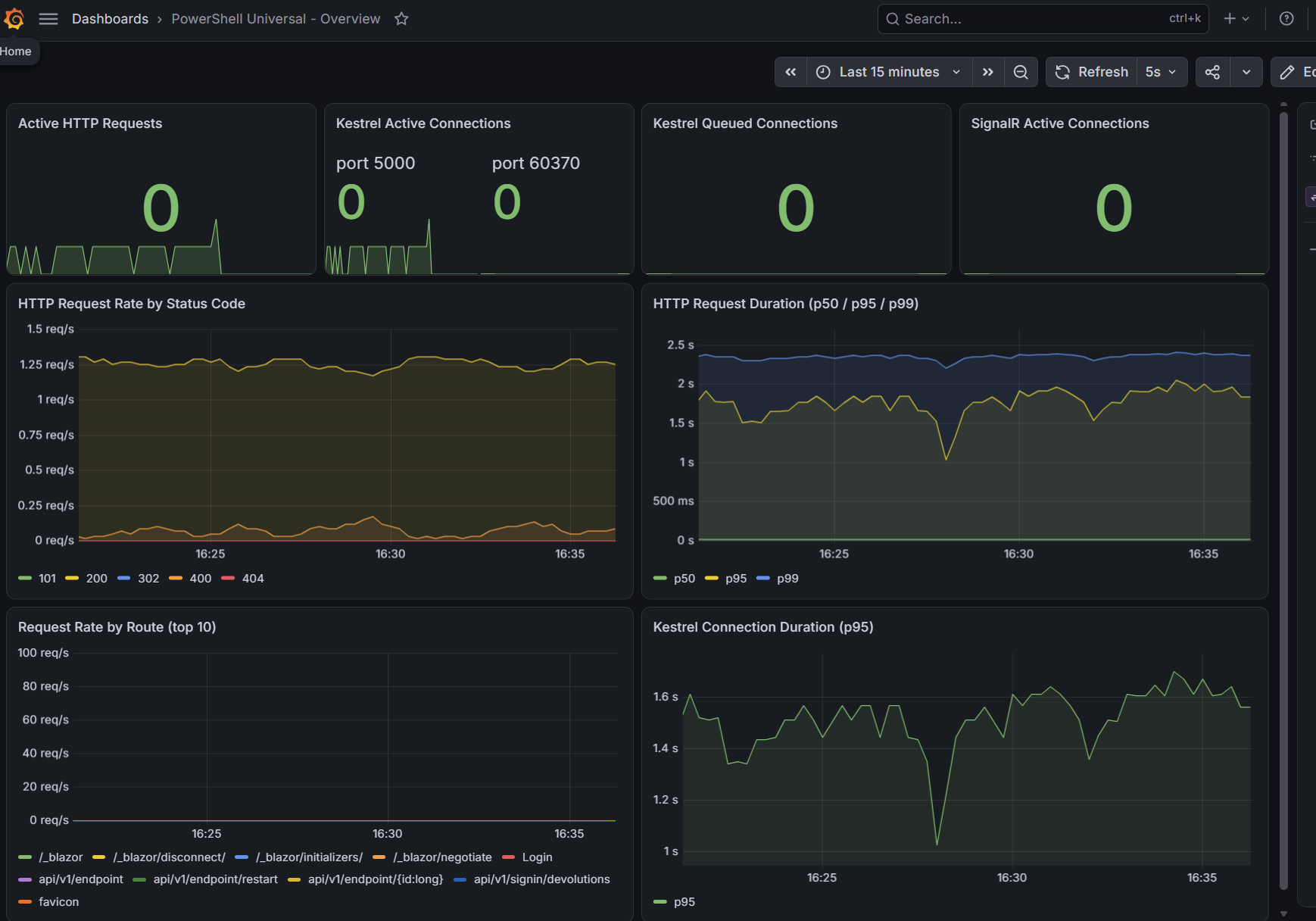
Version / build: PowerShell Universal 2026.2.5, running from the devolutions/powershell-universal:latest Docker image (digest sha256:b2f305e047111b567066912e48b4fbc620570269fcdfc3bcd30d905e7c331584).
Hosting: Docker Compose, official image, on Ubuntu 26.04.1 LTS (Docker CE, not Windows/IIS). Backed by an external PostgreSQL 16 container rather than the default embedded store, if that's relevant — the OpenTelemetry plugin was configured alongside the PostgreSQL plugin (Plugins__0=PostgreSQL, Plugins__1=PowerShellUniversal.Plugins.OpenTelemetry).
Reproducibility: Yes, 100% consistent. To make sure I wasn't reporting a one-off, I just reproduced it twice more in an isolated throwaway container (same image, same Postgres connection, network-joined to the existing stack) with only OTEL_EXPORTER_OTLP_PROTOCOL=http/protobuf set — both attempts failed identically and immediately on startup:
System.InvalidOperationException: Failed to convert configuration value 'http/protobuf' at 'OTEL_EXPORTER_OTLP_PROTOCOL' to type 'OpenTelemetry.Exporter.OtlpExportProtocol'.
 ---> System.FormatException: http/protobuf is not a valid value for OtlpExportProtocol.
 ---> System.ArgumentException: Requested value 'http/protobuf' was not found.
   at Microsoft.Extensions.Configuration.ConfigurationBinder.TryConvertValue(...)
   at PowerShellUniversal.Plugin.OpenTelemetry.ServiceConfigFeature.<>c__DisplayClass0_1.<AddServices>b__2(OtlpExporterOptions exporterOptions, MetricReaderOptions metricReaderOptions) in .../PowerShellUniversal.Plugin.OpenTelemetry/ServiceConfigFeature.cs:line 25
[...]
[FTL] Fatal error starting PowerShell Universal.
Using OTEL_EXPORTER_OTLP_PROTOCOL=HttpProtobuf (the C# enum member name) instead starts cleanly and exports metrics correctly to our Prometheus OTLP receiver.
For context on why this surfaced: http/protobuf is the value the OpenTelemetry spec itself defines for this setting (https://opentelemetry.io/docs/specs/otel/protocol/exporter/), and it's what every other OTel SDK/example uses. It looks like ServiceConfigFeature.cs is binding the raw env var straight through ConfigurationBinder to the OtlpExportProtocol enum rather than mapping the spec string to it first — so anyone following standard OTel conventions for this variable will hit a hard startup crash rather than a config error or fallback.
Separately, and maybe useful for the docs update: the current OpenTelemetry plugin page (https://docs.devolutions.net/powershell-universal/platform/plugins/opentelemetry) doesn't mention OTEL_EXPORTER_OTLP_PROTOCOL at all, and doesn't call out that the Plugins array entry needs the fully-qualified PowerShellUniversal.Plugins.OpenTelemetry identifier rather than a short name like the SQL/PostgreSQL plugins use — using the short form silently no-ops with no error or log output. Happy to share the full docker-compose config if useful for repro on your end.
1e90eb3f-9304-4a60-9ed2-96d29bd734c6.png
Hello @alexrgreenwood
Thank you for providing the additional details and for confirming the behavior in a clean container.
Based on the information and stack trace you shared, we have enough detail to proceed with an internal reproduction using PowerShell Universal 2026.2.5 and the reported OTLP protocol values.
We will validate the startup behavior with both http/protobuf and HttpProtobuf and then escalate the findings internally for further review.
Thank you as well for providing the working Grafana configuration and the additional context around the plugin identifier. That information is useful for separating the protocol behavior from the documentation aspect of the report.
Best regards,
Ruben Tapia
Hello @alexrgreenwood
Thank you again for the detailed information and for taking the time to validate the behavior on your side.
We have now completed our internal reproduction using PowerShell Universal 2026.2.5 and were able to reproduce the startup failure with:
OTEL_EXPORTER_OTLP_PROTOCOL=http/protobuf
We also confirmed that changing only the protocol value to:
OTEL_EXPORTER_OTLP_PROTOCOL=HttpProtobuf
allows PowerShell Universal to start successfully.
Based on the repeatable results and the evidence collected, we will proceed with an internal escalation for Development review.
Thank you again for the quality of the information you provided. It significantly helped us isolate and validate the behavior.
Best regards,
Ruben Tapia
Hello @alexrgreenwood
We do not have a new update from Development yet regarding this case.
I will follow up internally again to keep the review moving and will share any new information as soon as we receive it.
Thank you for your patience.
Best regards,
Ruben Tapia