Active Directory Interactive (with MFA support) users can not login in 2026.3.3 after Upgrade from 2026.2.18
Active Directory Interactive (with MFA support) users can not login in 2026.3.3 after Upgrade from 2026.2.18

Hi,
We made a database copy Azure SQL database from our 2026.2.18.0 RDM version and did a fresh/new install with the Beta 2026.3.3 on a client. Setup the workspace settings to this database and logged in with de SQL admin user account.
The upgrade process was completed, the (SQL) account was able to log in, and the vault(s) were available.
If we now log in with the usual user account(s), Login mode = Active directory Interactive (with MFA support) in this 2026.3.3 Client version we get an error. Same error when testing this Workspace in the setting, see screenshot below: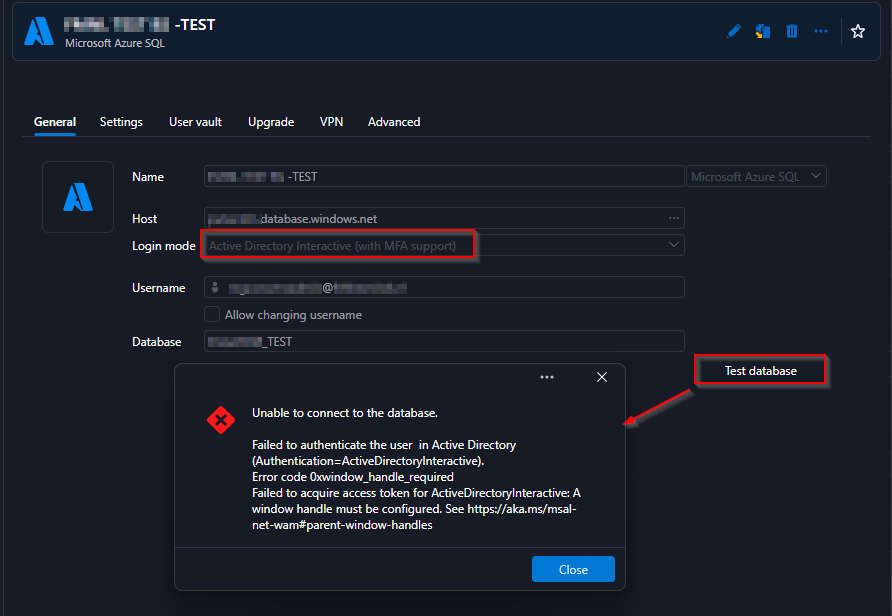
If I log in now using the same account via a current client version (2026.2.18) to this 2026.3.3 test data source, this error does not occur, and we can simply use and work with this 2026.3.3 test database.
Can you provide support with this, or is there a specific reason why we are encountering this error logging in to RDM when upgrading to this beta version for this type of account(s)?
Regards, Marcel
ef151e3a-75fe-4c4d-b79d-6c676d4994aa.png
All Comments (4)
Hello,
We are able to reproduce the issue and a ticket has been sent to the Engineering Team.
Best regards,
Antoine Mauger
Thanks for the feedback and I'll wait when additional information becomes available here.
Regards, Marcel
Hello,
Thank you for being so patient!
I'm pleased to inform you that a new version of RDM (2026.3.5.0) has been released, featuring the fix for your issue.
Latest Version: Download RDM
Please let us know if this works or if you encounter any issues.
Best regards,
Maxim Robert
Thanks for the information Maxim, authentication is indeed working normally again.