Database retention policies don't work

Hi!
We configured database retention to delete logs older than 1 year, but the logs still stay in the database. It has been like this through multiple DVLS updates with no change. We are currently on 2026.1.24.0. For some tables, we have entries from 2019.
I have not clicked "Clean up now" yet, because I want to verify it works automatically.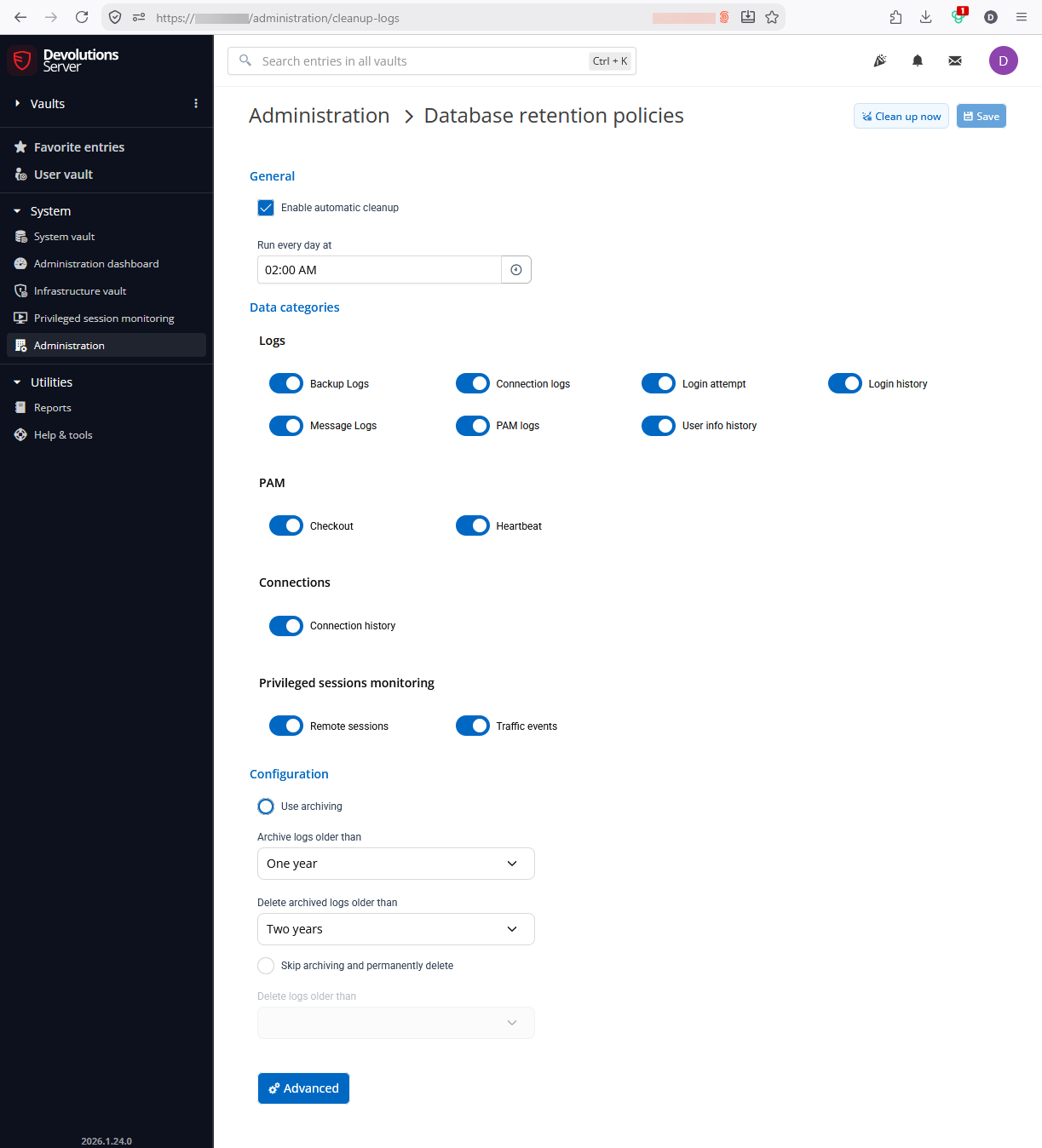
I checked some of the "_Archive" tables, and none of them contain any entries.
Scheduler service is installed and running. Automatic backups work.
How to troubleshoot further?
Thank you!
Best regards, Daniel
e260a8a3-8638-4aba-b0fc-69924bdc848a.png
All Comments (30)
Hello,
Could you please verify in the server logs in DVLS to see if you might have some logs related to the failure of the cleanup?
The scheduler might be unable to delete or archive the logs because there might be too many for the first run.
Would it be possible to run a Disk usage by top table report in SSMS and share it with us through email at service@devolutions.net?
Best regards,
Hi!
I couldn't find anything in the logs. But I noticed the "Scheduler log path" is empty in the logging settings. Should there be a path configured (or used) by default? I don't recall we ever changed this.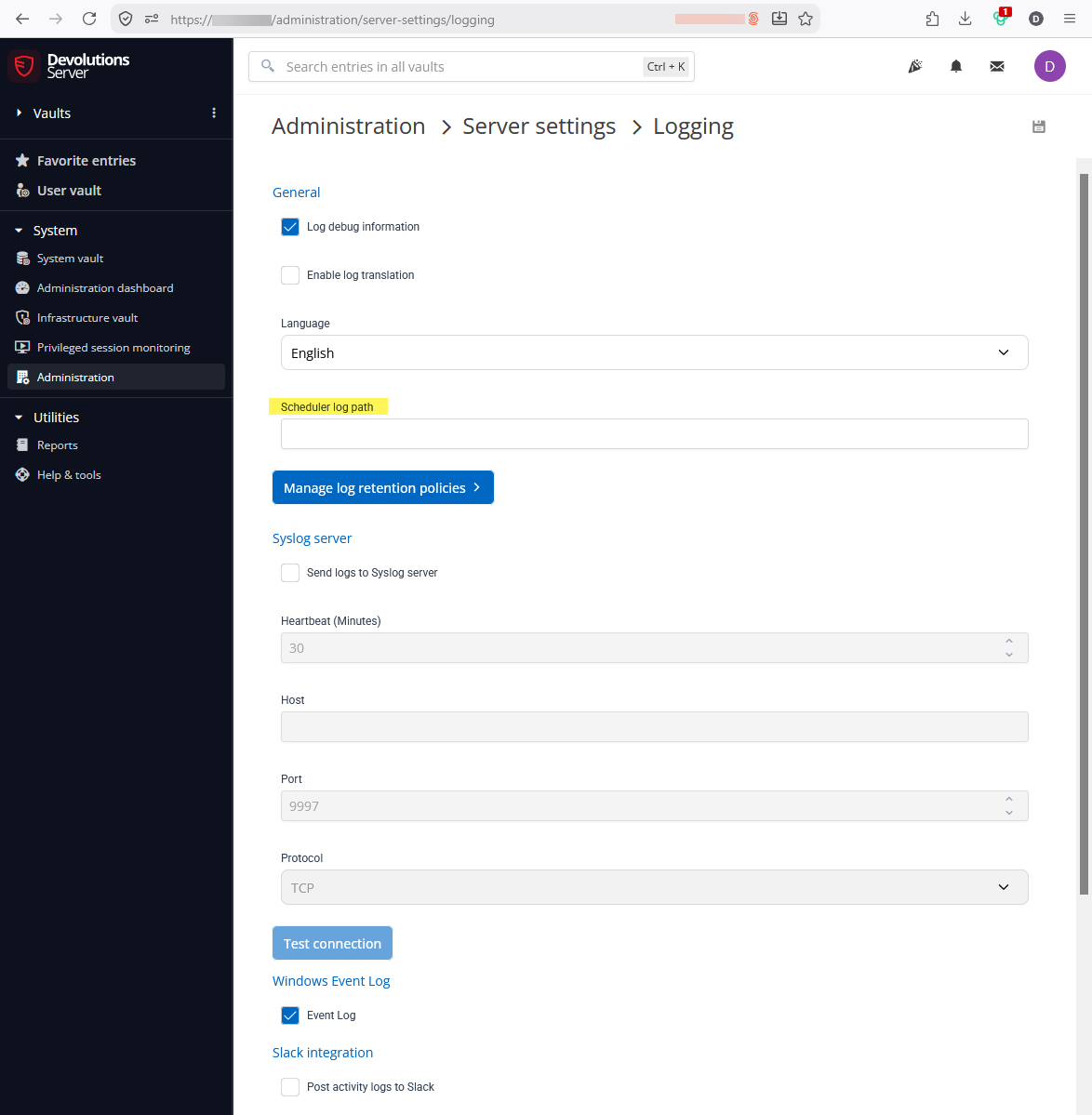
I ran the report, I'll just share the top tables here:
Table             Record count
----------------- ------------
LogMessage_Old    763182
ConnectionLog     693600
ConnectionHistory 89717
LogMessage        47431
LoginHistory      17385
Connections       10654
LoginAttempt      9263
BackupLog         1995
...
c67bca15-8469-4b32-9b34-7e0108ebe415.png
I found log files in the scheduler's service account "%LocalAppData%\Temp" directory.
They contain entries like the following, but nothing that looks like an error
2026-08-19 10:29:20.502 +02:00 [DBG] Devolutions.Server.Service.Tasks.DatabaseCleanupStartStopTask.DoWork started
2026-08-19 10:29:20.503 +02:00 [DBG] Devolutions.Server.Service.Tasks.DatabaseCleanupStartStopTask.DoWork completed in 1 ms
Hello,
Thank you for the confirmation.
You do not have to need to configure the scheduler log path unless you are actively troubleshooting the scheduler service.
I think it is highly possible that the scheduler service in failing to run the cleanup because some tables are a bit too big. We would recommend cleaning up the tables manually first.
I will send you a direct message with a SQL query to do a first manual cleanup of the logs, and then the scheduler should be able to run it automatically afterwards.
Best regards,
Hi William!
I ran the manual cleanup for a longer retention period (2 years archive, 3 years delete instead of 1 year archive, 2 years delete)
The script you sent me had a problem though: It adds the retention time rather than subtracting it from the current date, so it would move/delete all the logs, not just old logs.
-- Define variables for retention periods
DECLARE @NumberOfMonthToArchive INT = 12
DECLARE @NumberOfYearToDelete INT = 10
DECLARE @ArchiveBefore DATETIME = DATEADD(MONTH, @NumberOfMonthToArchive, GETDATE());
DECLARE @DeleteBefore DATETIME = DATEADD(YEAR, @NumberOfYearToDelete, GETDATE());

-- For testing
SELECT @ArchiveBefore, @DeleteBefore

-- Output (executed on 2026-08-20):
-- 2036-08-20 09:45:53.923
-- 2027-08-20 09:45:53.923
I fixed the script before running it by adding minus signs
I also ran this query to get an overview before and after the manual cleanup:
Before: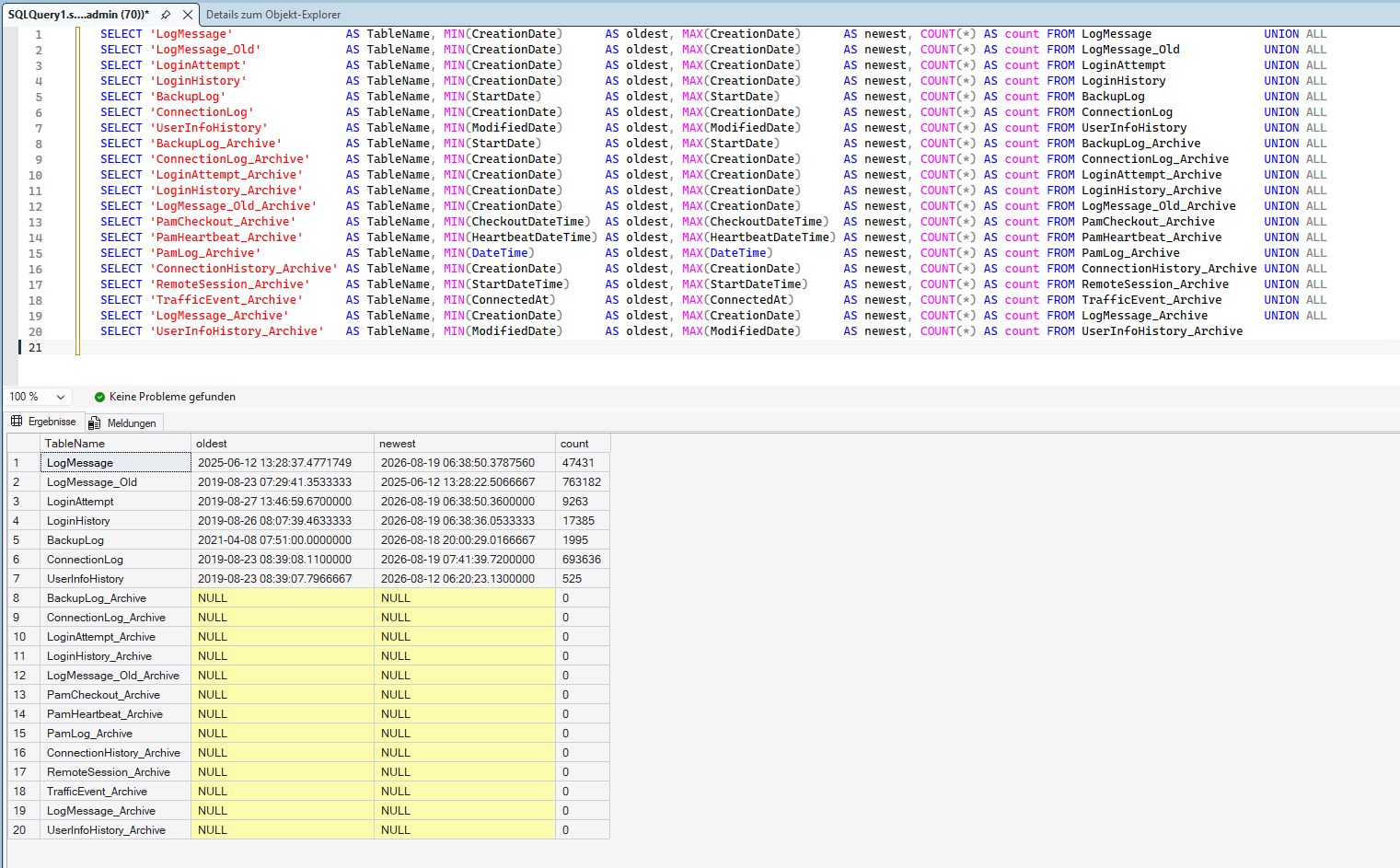
After: 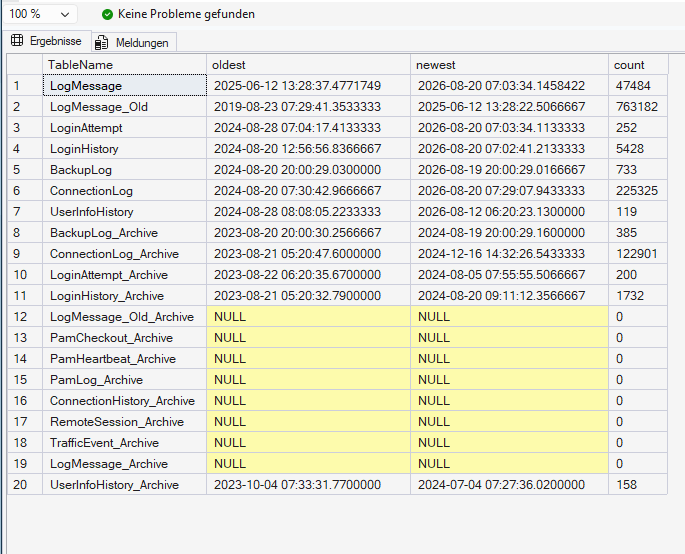
I will wait some time and check if the automatic cleanup works now.
Do you think I should also manually clean up the LogMessage_Old table? It has the most (and oldest) records here.
There's also the ConnectionHistory table, which I forgot to include in the overview query. It also has over 89k entries, and should be included in the cleanup according to the settings GUI.
Thank you!
Best regards,
Daniel
8a6ab679-55cd-4a4d-b7f0-90b93e467db7.png
be16dfaa-8c83-451a-a563-a0843115d903.png
Hello,
Sorry about the issue with the script. Yes, I would suggest cleaning any table that has an _Archive version. My script was done some time ago and new tables were added to logs so it is possible that some might be missing from my original script. I will look at cleaning it up.
Best regards,
Thank you!
I have built a list of database table names based off the existing _Archive tables and the Log categories listed in the settings UI:
Logs
	Backup Logs
		BackupLog
		BackupLog_Archive

	Connection logs
		ConnectionLog
		ConnectionLog_Archive

	Login attempt
		LoginAttempt
		LoginAttempt_Archive

	Login history
		LoginHistory
		LoginHistory_Archive

	Message Logs (Log messages?)
		LogMessage
		LogMessage_Archive
		LogMessage_Old
		LogMessage_Old_Archive

	PAM logs
		PamLog
		PamLog_Archive

	User info history
		UserInfoHistory
		UserInfoHistory_Archive

PAM
	Checkout
		PamCheckout
		PamCheckout_Archive

	Heartbeat
		PamHeartbeat
		PamHeartbeat_Archive

Connections
	Connection history
		ConnectionHistory
		ConnectionHistory_Archive

Privileged sessions monitoring
	Remote sessions
		RemoteSession
		RemoteSession_Archive

	Traffic events
		TrafficEvent
		TrafficEvent_Archive
But with some tables (most importantly ConnectionHistory) I'm not sure which field to use to compare the "DeleteBefore" timestamps
Currently I'm looking at the following fields, but I'm not sure they are the correct ones:
BackupLog.StartDate, BackupLog_Archive.StartDate, ConnectionLog.CreationDate, ConnectionLog_Archive.CreationDate, LoginAttempt.CreationDate, LoginAttempt_Archive.CreationDate, LoginHistory.CreationDate, LoginHistory_Archive.CreationDate, LogMessage.CreationDate, LogMessage_Archive.CreationDate, LogMessage_Old.CreationDate, LogMessage_Old_Archive.CreationDate, PamLog.DateTime, PamLog_Archive.DateTime, UserInfoHistory.ModifiedDate, UserInfoHistory_Archive.ModifiedDate, PamCheckout.CheckoutDateTime, PamCheckout_Archive.CheckoutDateTime, PamHeartbeat.HeartbeatDateTime, PamHeartbeat_Archive.HeartbeatDateTime, ConnectionHistory.ModifiedDate, ConnectionHistory_Archive.ModifiedDate, RemoteSession.StartDateTime, RemoteSession_Archive.StartDateTime, TrafficEvent.ConnectedAt, TrafficEvent_Archive.ConnectedAt
These tables have multiple datetime fields for example:
- BackupLog.StartDate, BackupLog.EndDate
- ConnectionHistory.ModifiedDate, ConnectionHistory.CreationDate,
- TrafficEvent.ConnectedAt, TrafficEvent.DisconnectedAt, TrafficEvent.CreatedAt
By the way, I think "Message Logs" should be changed to "Log messages" in the UI
Here's an overview of our log table usage currently: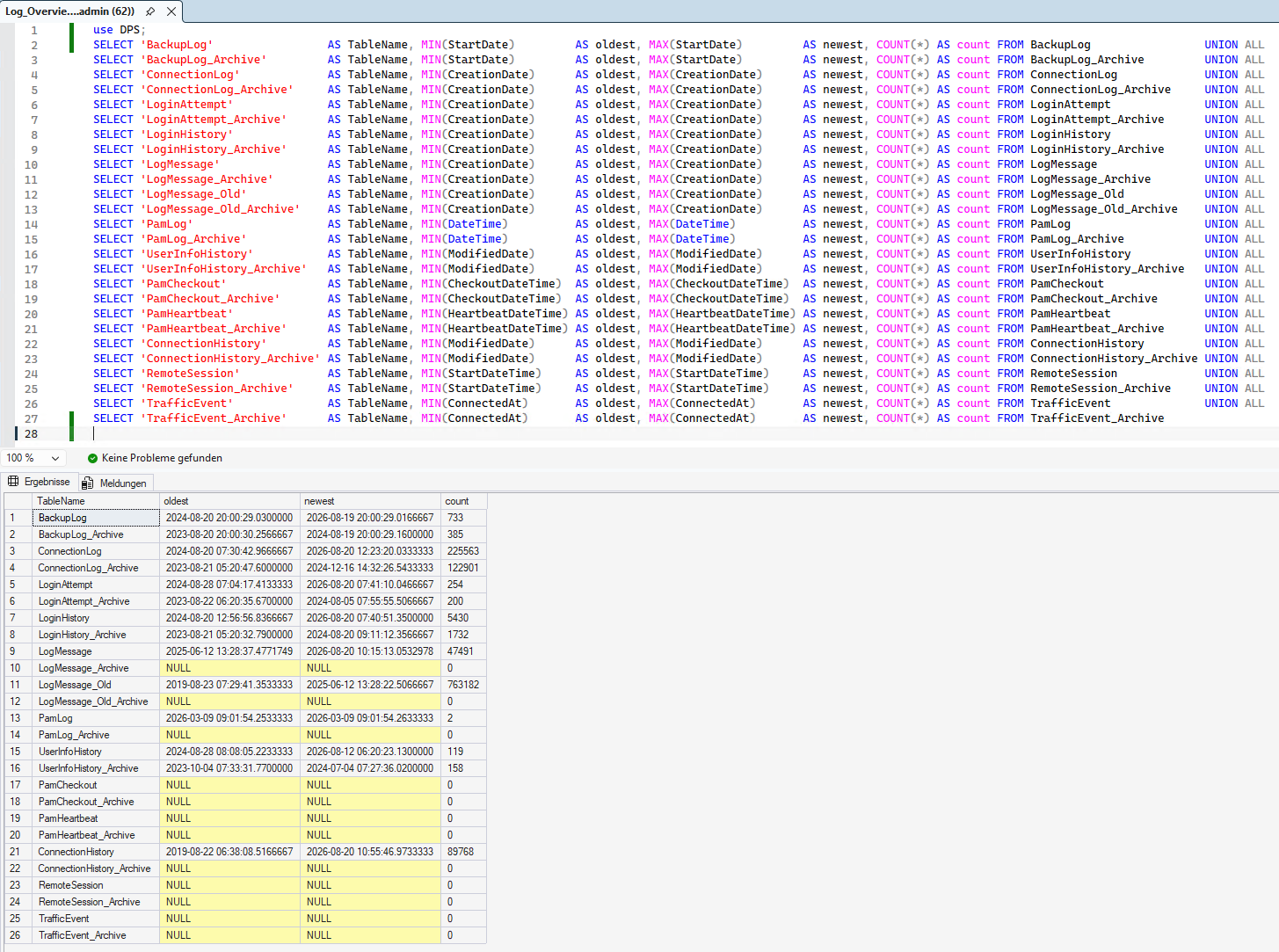
Best regards,
Daniel
7430b1e4-de14-45f1-9f64-89799eb92689.png
Hello,
I sent you a revised script with everything needed to run a test and the full cleanup.
Please let me know if this new version helps.
Best regards,
It worked!
Your new script's output from Step 2:
ARCHIVE LogMessage -> LogMessage_Archive : 0 rows moved
PURGE   LogMessage_Archive : 0 rows deleted (older than 36 months)
ARCHIVE LogMessage_Old -> LogMessage_Old_Archive : 696062 rows moved
PURGE   LogMessage_Old_Archive : 654813 rows deleted (older than 36 months)
ARCHIVE BackupLog -> BackupLog_Archive : 0 rows moved
PURGE   BackupLog_Archive : 0 rows deleted (older than 36 months)
ARCHIVE ConnectionLog -> ConnectionLog_Archive : 222 rows moved
PURGE   ConnectionLog_Archive : 0 rows deleted (older than 36 months)
ARCHIVE ConnectionHistory -> ConnectionHistory_Archive : 81781 rows moved
PURGE   ConnectionHistory_Archive : 76883 rows deleted (older than 36 months)
ARCHIVE LoginAttempt -> LoginAttempt_Archive : 0 rows moved
PURGE   LoginAttempt_Archive : 0 rows deleted (older than 36 months)
ARCHIVE LoginHistory -> LoginHistory_Archive : 1 rows moved
PURGE   LoginHistory_Archive : 0 rows deleted (older than 36 months)
ARCHIVE UserInfoHistory -> UserInfoHistory_Archive : 0 rows moved
PURGE   UserInfoHistory_Archive : 0 rows deleted (older than 36 months)
ARCHIVE PamLog -> PamLog_Archive : 0 rows moved
PURGE   PamLog_Archive : 0 rows deleted (older than 36 months)
ARCHIVE PamHeartbeat -> PamHeartbeat_Archive : 0 rows moved
PURGE   PamHeartbeat_Archive : 0 rows deleted (older than 36 months)
Archive + purge done.
It ran for about 6 minutes.
Here's my summary after the manual cleanup: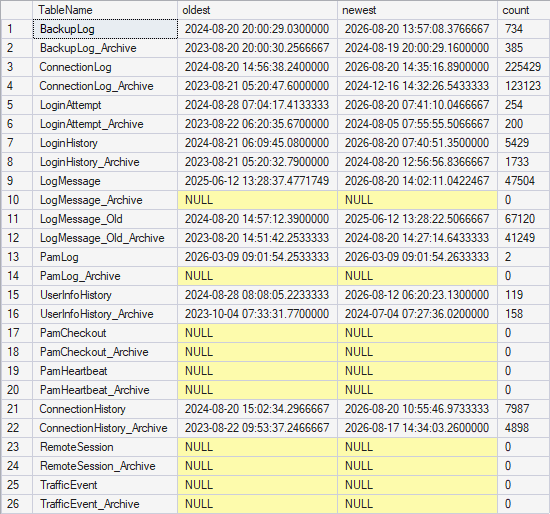
Entries older than 2 years were moved to _Archive tables, Entries older than 3 years were permanently deleted.
I'll check tomorrow if the automatic cleanup works now.
Thank you!
f7a314a8-4ac7-4dc3-b82e-6985ceb981ab.png
Hello,
Thank you for the confirmation.
For the Archived logs, I would suggest archiving earlier than 2 years. Archived logs are still accessible but they will only be loaded when required instead of being loaded when you open a vault.
When you open a vault, you are loading the entries and all logs attached to these entries that are not archived. By archiving these logs (let's say older than 1 month as an example), we can accelerate the process of opening vaults. Then when you open the log tab on an entry and select a filter that contains logs older than 1 month, then archived logs will be loaded for that specific entry only.
Best regards,
OK, good to know! Thank you!
btw I also completed Step 3 from the script (Shrinkfile + Index rebuild)
Hello,
Thank you for the confirmation.
Now we just need to keep an eye out to see if the automatic cleanup runs normally. I would suggest capturing the number of rows in the Archived tables and see if the number changes in a couple of days.
Best regards,
Hi!
I checked the logs but they still were not moved/deleted automatically.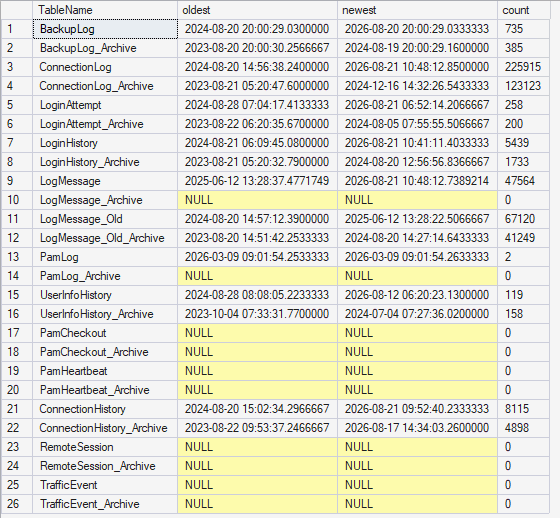
How to troubleshoot further?
Thank you!
Best regards,
Daniel
b67f30d7-c4eb-4373-82c9-82138036fa4e.png
Hello,
Thank you for checking this. Would it be possible to configure a log path for the scheduler under? Administration > Server Settings > Logging and also enable the Log debug information (note that this setting should only be enabled temporarily as it can create numerous logs in the DB).
Then wait for the automatic cleanup to run and retrieve the Scheduler logs as well as the Server logs (Data source logs if you are on an older version of DVLS) from the reports tab of Devolutions Server. The Log debug information allows us to log more information for troubleshooting, so the error messages from the Server logs (Data source logs) might change or you might have more information available there.
Once you have those files you can either send them through a ZIP file in direct messages from the forum or email them at service@devolutions.net with FO-55873 in the subject of your email.
Best regards,
Hi!
Debug logging was already enabled, and I found the Scheduler logs in a temp directory last time. They didn't contain any errors regarding log cleanup.
I changed the Scheduler log path and will send you the Scheduler + Server logs tomorrow! (still called "Data source logs", because we're on DVLS 2026.1.24.0)
As a side note, there's also the "User behavior analytics" log, which contains an entry because I mixed up my TOTP accounts once and entered the wrong code 6 times a couple of years ago :)
I acknowledged the event, but I couldn't find a way to delete it. Maybe this should be included in the log cleanup as well? The tables are UserBehaviorAnalyticsNotification and UserBehaviorAnalyticsNotificationAcknowledger.
Thank you!
Hello,
Thank you for the confirmation. I verified and there is no way of deleting them from the Devolutions Server interface. It might be possible to remove them from the DB but I would need to confirm with our development team first. I will let you know once I have a concrete answer.
Best regards,
Hello,
Our development team confirmed that it is safe to delete the records from the UserBehaviorAnalyticsNotification and UserBehaviorAnalyticsNotificationAcknowledger tables.
Because these are a lot more sensitive, we are not including them into the automatic cleanup.
Best regards,
Hi William!
I sent the log files through DM, but I couldn't find any messages regarding Log Cleanup in there.
The old log entries are still in the database: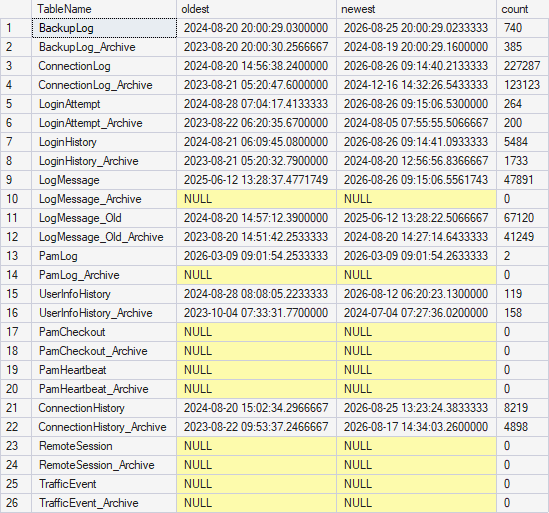
I also deleted the User Behavior Analytics entries successfully!
Thank you!
b0a60cd6-6dbc-46bd-94de-3f07a04caa11.png
Hi Daniel,
Thanks for sending the scheduler and server logs, and for all the legwork on this one — catching the sign error in the script, building out the full table list, and posting the before/after overviews made this much easier to reason about.
I went through both service logs covering a full day, including the 02:00 window, and here's what stands out. The scheduler's cleanup controller (DatabaseCleanupStartStopTask) is firing on schedule every 30 seconds, but it completes in about a millisecond every time and never actually launches the cleanup worker that does the archiving and deleting — not even at 02:00. There are also no errors anywhere in the logs. So I want to walk back my earlier suggestion that this was the tables being too large to process on the first run: with the worker never starting at all, and no error to show for it, size isn't what's blocking this. The scheduled job simply isn't being triggered. Now that you've trimmed the tables, that also means an automatic run should only ever touch a handful of rows and finish in seconds, which makes the next few checks quick.
Could you try these, in order:
- Go ahead and click "Clean up now" once. You were holding off to verify the automatic path, which was the right instinct, but at this point it's our most useful test — with the tables trimmed it'll finish almost instantly, and it tells us whether the in-product cleanup engine works when triggered directly (versus the SQL path you ran manually).
- Re-arm the schedule: toggle "Enable automatic cleanup" off, Save, then back on, and Save again. This forces the controller to see a configuration change.
- Restart the Devolutions Scheduler service.
- Let it sit past the next 02:00, then pull the scheduler log for that window and look for any DatabaseCleanup entry that is not the StartStopTask — that would be the actual worker running. Its presence or absence is the deciding piece.
One more thing that'll help us read the result cleanly: could you confirm from your overview query that there are currently rows older than your archive threshold (one year)? That way, if the automatic run reports nothing moved, we can tell whether it genuinely failed to fire versus there simply being nothing eligible yet.
If "Clean up now" works but the 02:00 run still won't launch the worker after the re-save and service restart, that points to something on the product side rather than your configuration, and I'll take it to our team with your logs attached.
Best regards,
Hi William!
I clicked "Clean up now" and the progress indicator keeps spinning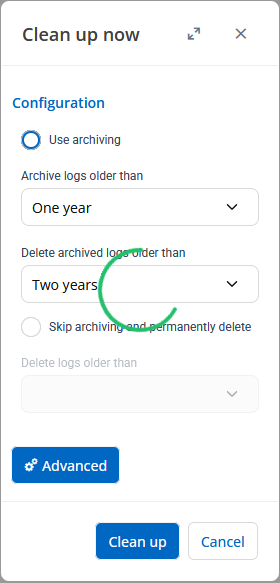
I checked the DVLS logs (through Windows Event Log) and found some issues.
Get-WinEvent -FilterHashtable @{LogName='Application';ProviderName='DVLS'} -MaxEvents 4000 | select TimeCreated,@{L='MessageSL'; E={$_.Message -replace '\r?\n',' '}} | sort TimeCreated | Export-Csv -Encoding Unicode .\Desktop\LogMessages_2026-08-27.csv
The Log is attached. I removed repeating messages after the first table being processed and any messages that are not relevant here.
The log basically repeats like this for every table it tries to clean up. For each table, it tries to run a query like
DELETE TOP(500) FROM [dbo].[BackupLog] OUTPUT DELETED.* INTO [dbo].[BackupLog_Archive] WHERE [StartDate] < '2025-08-27 00:00:00.000';
But then it logs two errors:
NeedBackOff check failed (Error 300): Die VIEW SERVER STATE-Berechtigung wurde für das server-Objekt, master-Datenbank, verweigert. Der Benutzer hat nicht die Berechtigung, um diese Aktion auszuführen.. Skipping server busy detection.
The German error message says that the user (scheduler service account?) does not have permission to VIEW SERVER STATE. Maybe that's not included in the "Apply least permission" script? But I don't think that is a fatal error, it continues to execute the query anyway, but then there's this error:
Failed with SQL_ERROR_242 (Error 242): Bei der Konvertierung eines varchar-Datentyps in einen datetime-Datentyp liegt der Wert außerhalb des gültigen Bereichs. Die Anweisung wurde beendet.
That says that the datetime string "2025-08-27 00:00:00.000" could not be converted into a datetime type.
I tested the date format conversion in SSMS, and got the same error
SELECT CAST ('2026-07-27 00:00:00.000' AS datetime)

-----------------------
Meldung 242, Ebene 16, Status 3, Zeile 5
Bei der Konvertierung eines varchar-Datentyps in einen datetime-Datentyp liegt der Wert außerhalb des gültigen Bereichs.
When I use ISO 8601 (with a 'T' between date and time) it works:
SELECT CAST ('2026-07-27T00:00:00.000' AS datetime)

-----------------------
2026-07-27 00:00:00.000
Here's the format in my SSMS session. I'm logged in with an admin account, not with the scheduler service account, but all the logins have the default language set to German.
DBCC USEROPTIONS;

Set Option                   Value
---------------------------- ---------------------
textsize                     2147483647
language                     Deutsch
dateformat                   dmy
datefirst                    1
lock_timeout                 -1
quoted_identifier            SET
arithabort                   SET
ansi_null_dflt_on            SET
ansi_warnings                SET
ansi_padding                 SET
ansi_nulls                   SET
concat_null_yields_null      SET
isolation level              read committed

(13 Betroffene Zeilen)

Die DBCC-Ausführung wurde abgeschlossen. Falls DBCC Fehlermeldungen ausgegeben hat, wenden Sie sich an den Systemadministrator.
So I think the cleanup task needs to use ISO 8601 date format or set a different locale before running the queries. We could also try changing defaults in the SQL Server instance, the login or the database, if that's possible.
I still don't understand why we didn't see these errors without a manual run, but at least now we have something to chew on :)
Thank you!
Best regards,
Daniel
d8e23310-df0f-48b4-965b-9e441b41b32a.png
LogMessages_2026-08-27_filtered.zip
By the way, I had some trouble posting my last reply here. Whenever the text includes CAST ('...') but without the space before the parentheses I get an error when posting the reply here in the forum.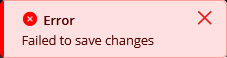
f8303eef-0a47-4f6e-b85d-86dc8387052c.png
Hi Daniel,
This is excellent detective work — you've essentially found the root cause, and it's on our side, not your configuration.
You're right about the date format. The cleanup builds its archive/delete statements with a datetime literal like '2025-08-27 00:00:00.000', and because every SQL login on your instance defaults to German (dateformat dmy), SQL Server can't convert that string and terminates the statement with error 242 before any rows are touched. Your SSMS test proves it cleanly: the space-separated form fails under German, while the ISO 8601 form with the T works. That's why nothing was ever archived or deleted, regardless of how large or small the tables were — each table's statement was aborting on the date conversion every time.
To your question about why this never showed up before: those SQL errors are written to the Windows Application Event Log under the DVLS source, which is a different place from the server logs and scheduler traces we'd been looking at. So the nightly automatic runs were most likely failing exactly the same way all along — we just weren't looking at that log. If you want to confirm it, check whether those error-242 entries in the Application log go back before today's "Clean up now" click; I'd expect they do.
For an immediate workaround while we get the product fixed, you can set the default language of the SQL logins DVLS uses to English, which makes that date literal parse correctly. I'd suggest verifying it in your own session first, the same way you tested the failure:
SET LANGUAGE us_english;
SELECT CAST ('2026-07-27 00:00:00.000' AS datetime);
If that returns a valid datetime, then applying it to the logins is the fix:
ALTER LOGIN [your_scheduler_sql_login] WITH DEFAULT_LANGUAGE = us_english;
ALTER LOGIN [your_dvls_app_sql_login]  WITH DEFAULT_LANGUAGE = us_english;
The setting only takes effect on new connections, so restart the Devolutions Scheduler service (and recycle the DVLS app pool) afterward, then try "Clean up now" again. The automatic run should then work at 02:00 as well. Both the scheduled job and "Clean up now" need this, which is why I've included both the scheduler login and the app login.
Separately, you also spotted the "VIEW SERVER STATE denied" line. That one isn't fatal — it only disables a "don't run while the server is busy" safety check, so the cleanup proceeds without it. If you'd like that check to work you can grant VIEW SERVER STATE to the login, but it isn't required for cleanup to function. I'm flagging it to our team along with the date-format issue.
I'm writing this up for our developers now as a product bug, since the cleanup should be using a culture-independent date format rather than depending on the login's language. Thanks again — the SSMS repro you did makes this very easy to hand off.
Best regards,
Hi William!
Thanks for confirming the issue and passing it on :)
Regarding the logs:
those SQL errors are written to the Windows Application Event Log under the DVLS source, which is a different place from the server logs and scheduler traces we'd been looking at. So the nightly automatic runs were most likely failing exactly the same way all along — we just weren't looking at that log. If you want to confirm it, check whether those error-242 entries in the Application log go back before today's "Clean up now" click; I'd expect they do.
We enabled logging to Windows Event Log in addition to the normal logging the the database LogMessage table. So they both contain the same messages. Before I clicked "Clean up now" today, there were no errors in either of the log locations.
I verified the date format works after setting the language with SET LANGUAGE, then changed the default language of the relevant SQL server logins, and also granted VIEW SERVER STATE to those logins.
USE DVLS
ALTER LOGIN [***\dvls.sched] WITH DEFAULT_LANGUAGE = us_english;
ALTER LOGIN [***\dvls.web] WITH DEFAULT_LANGUAGE = us_english;
ALTER LOGIN [***\dvls.admin] WITH DEFAULT_LANGUAGE = us_english;

USE master;
GRANT VIEW SERVER STATE TO [***\dvls.sched];
GRANT VIEW SERVER STATE TO [***\dvls.web];
I restarted the Scheduler service and IIS application pool, and clicked "Clean up now" again. So far it's looking very good!
PS C:\Users\dvls.mgmt> Get-WinEvent -FilterHashtable @{LogName='Application';ProviderName='DVLS';StartTime='2026-08-27 16:50:00'} | select TimeCreated,@{L='MessageSL'; E={$_.Message -replace '\r?\n',' '}} | where MessageSL -match '^.{8}-.{4}-.{4}-.{4}-.{12} - ' | sort TimeCreated | ft

TimeCreated         MessageSL
-----------         ---------
27.08.2026 16:58:22 1719f90e-b390-43c8-b44d-ed378276b84f - Start => Running Archive query: DELETE TOP(500) FROM [dbo].[BackupLog] OUTPUT DELETED.* INTO [dbo].[BackupLog_Archive] WHERE [StartDate] < '2025-08-27 00:00:00.000';
27.08.2026 16:58:22 1719f90e-b390-43c8-b44d-ed378276b84f - End of loop 1 <= affected rows 373. total: 373. loop time: 13 ms
27.08.2026 16:58:22 1719f90e-b390-43c8-b44d-ed378276b84f - End <= affected rows 373. 30 ms (Sleep 0 ms)
27.08.2026 16:58:22 33b1b4b2-1ab4-4126-a4f6-2deff40aef50 - Start => Running Archive query: DELETE TOP(500) FROM [dbo].[BackupLog_Archive] WHERE [StartDate] < '2024-08-27 00:00:00.000'
27.08.2026 16:58:22 33b1b4b2-1ab4-4126-a4f6-2deff40aef50 - End of loop 1 <= affected rows 392. total: 392. loop time: 5 ms
27.08.2026 16:58:22 33b1b4b2-1ab4-4126-a4f6-2deff40aef50 - End <= affected rows 392. 10 ms (Sleep 0 ms)
27.08.2026 16:58:22 4f0aedd2-ed5e-458b-9902-ea8c618f1cf6 - Start => Running Archive query: DELETE TOP(500) FROM [dbo].[ConnectionLog] OUTPUT DELETED.* INTO [dbo].[ConnectionLog_Archive] WHERE [CreationDate] < '2025-08-27 00:00:00.000';
27.08.2026 16:58:23 4f0aedd2-ed5e-458b-9902-ea8c618f1cf6 - End of loop 1 <= affected rows 500. total: 500. loop time: 63 ms
27.08.2026 16:58:38 4f0aedd2-ed5e-458b-9902-ea8c618f1cf6 - End of loop 2 <= affected rows 500. total: 1000. loop time: 54 ms
27.08.2026 16:58:53 4f0aedd2-ed5e-458b-9902-ea8c618f1cf6 - End of loop 3 <= affected rows 500. total: 1500. loop time: 42 ms
27.08.2026 16:59:08 4f0aedd2-ed5e-458b-9902-ea8c618f1cf6 - End of loop 4 <= affected rows 500. total: 2000. loop time: 45 ms
27.08.2026 16:59:23 4f0aedd2-ed5e-458b-9902-ea8c618f1cf6 - End of loop 5 <= affected rows 500. total: 2500. loop time: 42 ms
27.08.2026 16:59:38 4f0aedd2-ed5e-458b-9902-ea8c618f1cf6 - End of loop 6 <= affected rows 500. total: 3000. loop time: 44 ms
27.08.2026 16:59:53 4f0aedd2-ed5e-458b-9902-ea8c618f1cf6 - End of loop 7 <= affected rows 500. total: 3500. loop time: 41 ms
27.08.2026 17:00:08 4f0aedd2-ed5e-458b-9902-ea8c618f1cf6 - End of loop 8 <= affected rows 500. total: 4000. loop time: 57 ms
27.08.2026 17:00:23 4f0aedd2-ed5e-458b-9902-ea8c618f1cf6 - End of loop 9 <= affected rows 500. total: 4500. loop time: 48 ms
27.08.2026 17:00:38 4f0aedd2-ed5e-458b-9902-ea8c618f1cf6 - End of loop 10 <= affected rows 500. total: 5000. loop time: 42 ms
27.08.2026 17:00:53 4f0aedd2-ed5e-458b-9902-ea8c618f1cf6 - End of loop 11 <= affected rows 500. total: 5500. loop time: 51 ms
27.08.2026 17:01:08 4f0aedd2-ed5e-458b-9902-ea8c618f1cf6 - End of loop 12 <= affected rows 500. total: 6000. loop time: 45 ms
27.08.2026 17:01:23 4f0aedd2-ed5e-458b-9902-ea8c618f1cf6 - End of loop 13 <= affected rows 500. total: 6500. loop time: 49 ms
27.08.2026 17:01:38 4f0aedd2-ed5e-458b-9902-ea8c618f1cf6 - End of loop 14 <= affected rows 500. total: 7000. loop time: 45 ms
27.08.2026 17:01:53 4f0aedd2-ed5e-458b-9902-ea8c618f1cf6 - End of loop 15 <= affected rows 500. total: 7500. loop time: 49 ms
27.08.2026 17:02:08 4f0aedd2-ed5e-458b-9902-ea8c618f1cf6 - End of loop 16 <= affected rows 500. total: 8000. loop time: 40 ms
27.08.2026 17:02:23 4f0aedd2-ed5e-458b-9902-ea8c618f1cf6 - End of loop 17 <= affected rows 500. total: 8500. loop time: 41 ms
27.08.2026 17:02:38 4f0aedd2-ed5e-458b-9902-ea8c618f1cf6 - End of loop 18 <= affected rows 500. total: 9000. loop time: 41 ms
27.08.2026 17:02:53 4f0aedd2-ed5e-458b-9902-ea8c618f1cf6 - End of loop 19 <= affected rows 500. total: 9500. loop time: 45 ms
27.08.2026 17:03:08 4f0aedd2-ed5e-458b-9902-ea8c618f1cf6 - End of loop 20 <= affected rows 500. total: 10000. loop time: 49 ms
27.08.2026 17:03:24 4f0aedd2-ed5e-458b-9902-ea8c618f1cf6 - End of loop 21 <= affected rows 500. total: 10500. loop time: 45 ms
27.08.2026 17:03:39 4f0aedd2-ed5e-458b-9902-ea8c618f1cf6 - End of loop 22 <= affected rows 500. total: 11000. loop time: 43 ms
27.08.2026 17:03:54 4f0aedd2-ed5e-458b-9902-ea8c618f1cf6 - End of loop 23 <= affected rows 500. total: 11500. loop time: 52 ms
27.08.2026 17:04:09 4f0aedd2-ed5e-458b-9902-ea8c618f1cf6 - End of loop 24 <= affected rows 500. total: 12000. loop time: 41 ms
27.08.2026 17:04:24 4f0aedd2-ed5e-458b-9902-ea8c618f1cf6 - End of loop 25 <= affected rows 500. total: 12500. loop time: 44 ms
27.08.2026 17:04:39 4f0aedd2-ed5e-458b-9902-ea8c618f1cf6 - End of loop 26 <= affected rows 500. total: 13000. loop time: 68 ms
27.08.2026 17:04:54 4f0aedd2-ed5e-458b-9902-ea8c618f1cf6 - End of loop 27 <= affected rows 500. total: 13500. loop time: 41 ms
27.08.2026 17:05:09 4f0aedd2-ed5e-458b-9902-ea8c618f1cf6 - End of loop 28 <= affected rows 500. total: 14000. loop time: 38 ms
27.08.2026 17:05:24 4f0aedd2-ed5e-458b-9902-ea8c618f1cf6 - End of loop 29 <= affected rows 500. total: 14500. loop time: 47 ms
27.08.2026 17:05:39 4f0aedd2-ed5e-458b-9902-ea8c618f1cf6 - End of loop 30 <= affected rows 500. total: 15000. loop time: 56 ms
27.08.2026 17:05:54 4f0aedd2-ed5e-458b-9902-ea8c618f1cf6 - End of loop 31 <= affected rows 500. total: 15500. loop time: 38 ms
27.08.2026 17:06:09 4f0aedd2-ed5e-458b-9902-ea8c618f1cf6 - End of loop 32 <= affected rows 500. total: 16000. loop time: 45 ms
27.08.2026 17:06:24 4f0aedd2-ed5e-458b-9902-ea8c618f1cf6 - End of loop 33 <= affected rows 500. total: 16500. loop time: 40 ms
27.08.2026 17:06:39 4f0aedd2-ed5e-458b-9902-ea8c618f1cf6 - End of loop 34 <= affected rows 500. total: 17000. loop time: 40 ms
27.08.2026 17:06:54 4f0aedd2-ed5e-458b-9902-ea8c618f1cf6 - End of loop 35 <= affected rows 500. total: 17500. loop time: 37 ms
27.08.2026 17:07:09 4f0aedd2-ed5e-458b-9902-ea8c618f1cf6 - End of loop 36 <= affected rows 500. total: 18000. loop time: 31 ms
Thank you so much for helping with this issue and providing the workaround! Glad I could help fixing it for future versions!
Best regards,
Daniel
Also, I'll check tomorrow if it runs automatically now too, and I'll adjust the retention time to optimize data source loading in RDM like you mentioned earlier.
Thanks again!
Hello,
Thank you for the confirmation. Our development team are already working on a fix for this issue that will be made available in a 2026.2 revision. I will let you know as soon as we have a specific version for the fix.
Again thank you for your time spent on troubleshooting this!
Best regards,
Hi! The manual cleanup finished successfully, but the automatic cleanup still did not run. I'll send you the logs in a DM again.
Also the tables LogMessage_Old and LogMessage_Old_Archive were not included in the cleanup, they were in your manual cleanup script though. They don't receive any new entries anyways, so can I just clear them manually?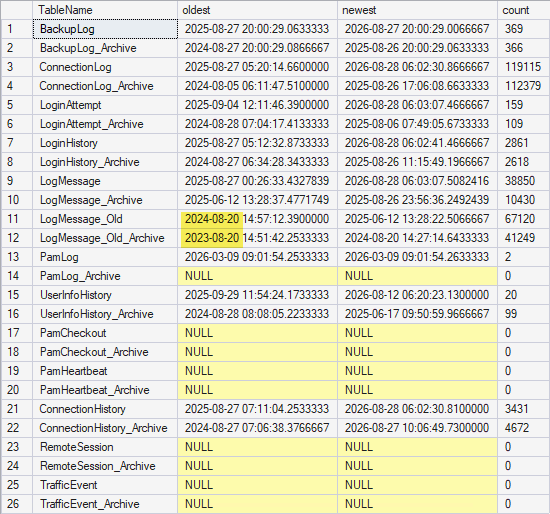
Thanks!
Daniel
208ddb65-03f0-4111-ab5e-f94a9889268d.png
Hi!
For testing, I changed the log retention settings (time from 02:00 to 10:30 and archive age from 1 year to 6 months), and now it did run automatically!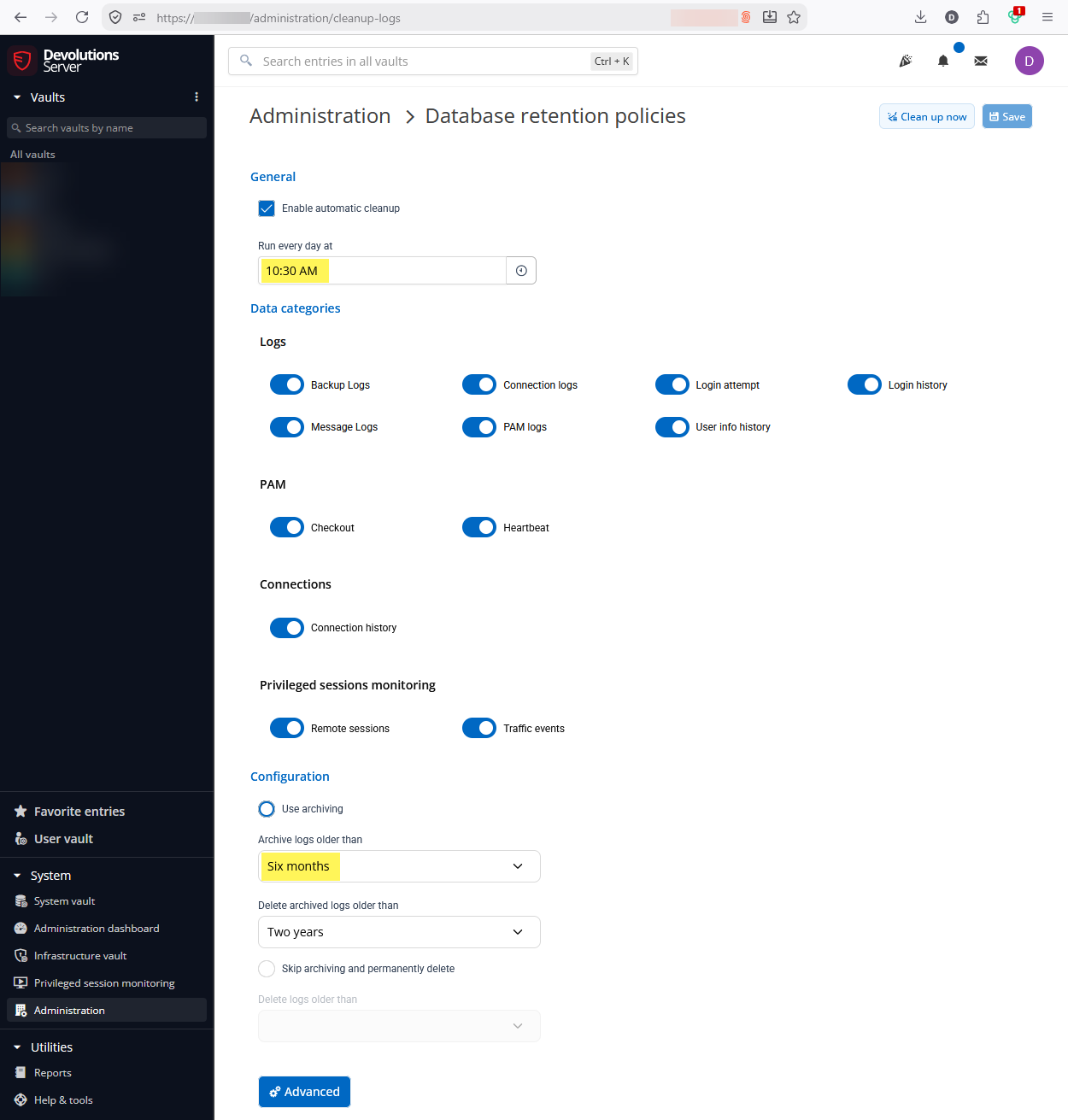
But, it didn't actually keep 6 months, it archived everything.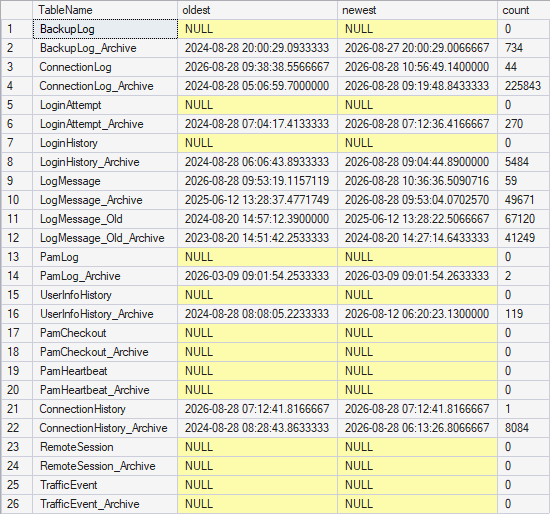
Here's some of the queries that were executed, extracted from the log:
DELETE TOP(500) FROM [dbo].[BackupLog] OUTPUT DELETED.* INTO [dbo].[BackupLog_Archive] WHERE [StartDate] >= '2024-08-28 00:00:00.000' AND [StartDate] < '2028-08-29 00:00:00.000'
DELETE TOP(500) FROM [dbo].[ConnectionLog] OUTPUT DELETED.* INTO [dbo].[ConnectionLog_Archive] WHERE [CreationDate] >= '2024-08-28 00:00:00.000' AND [CreationDate] < '2028-08-29 00:00:00.000'
DELETE TOP(500) FROM [dbo].[LoginAttempt] OUTPUT DELETED.* INTO [dbo].[LoginAttempt_Archive] WHERE [CreationDate] >= '2024-08-28 00:00:00.000' AND [CreationDate] < '2028-08-29 00:00:00.000'
DELETE TOP(500) FROM [dbo].[LoginHistory] OUTPUT DELETED.* INTO [dbo].[LoginHistory_Archive] WHERE [CreationDate] >= '2024-08-28 00:00:00.000' AND [CreationDate] < '2028-08-29 00:00:00.000'
DELETE TOP(500) FROM [dbo].[LogMessage] OUTPUT DELETED.* INTO [dbo].[LogMessage_Archive] WHERE [CreationDate] >= '2024-08-28 00:00:00.000' AND [CreationDate] < '2028-08-29 00:00:00.000'
DELETE TOP(500) FROM [dbo].[PamCheckout] OUTPUT DELETED.* INTO [dbo].[PamCheckout_Archive] WHERE [CheckinDateTime] >= '2024-08-28 00:00:00.000' AND [CheckinDateTime] < '2028-08-29 00:00:00.000'
You can see it moved everything older than 2028-08-29 into the archive, even though I set it to keep the last 6 months. So there's something wring with the date calculation here too. It added 2 years instead of subtracting 6 months. There's also the ">= 2024-08-28" condition for some reason.
I'll undo my settings changes for now.
Best regards,
Daniel
d0bfd03c-f94d-4a05-a46d-5a1e7e3a59bf.png
6dac2807-2369-4303-b570-1fce718e04f5.png
c44f1321-b3bb-4069-b55d-df157257c295.png
Hi Daniel,
Great catch, and thanks for pulling the exact queries — that pins it down. You're right that the date math is wrong: the scheduled run built the archive window with the upper bound as roughly today plus two years (< 2028-08-29) instead of today minus six months, so it swept in everything rather than only rows older than your six-month setting. That's the same add-instead-of-subtract error, now on the product's automatic path — interestingly, the manual "Clean up now" computes the cut-off correctly, so the two paths differ. I've added this to the report going to our developers alongside the date-format issue. Reverting your settings for now is the right move.
On LogMessage_Old and LogMessage_Old_Archive: yes, you can clear those manually. They're legacy tables that no longer receive entries and aren't part of the retention feature's managed set (that's why they were skipped), so they won't be touched automatically. I'd just take a quick database backup first, then clear them.
Best regards,
Hello,
Thank you for being so patient!
I am pleased to inform you that the issue has been resolved in the latest stable Devolutions server version (2026.2.17.0):
https://docs.devolutions.net/server/getting-started/installation/upgrade-server
We also recommend that you first perform the update in a staging/test environment:
https://docs.devolutions.net/server/kb/how-to-articles/create-server-staging-instance
We also offer free upgrade sessions, during which we will update your Devolutions Server instance together. If you are interested in this, please send an email to service@devolutions.net
If the problem persists after the update, please let us know so we can inform our development team.
Best regards,
Maxim Robert
Hi!
I wanted to test it on DVLS 2026.2.18.0, but the cleanup job doesn't seem to run automatically anymore since the last server reboot on 2026-09-15. I have daily log entries of the cleanup job up to that date, but nothing after. I'm not aware of any changes we made at that time, except Windows updates and a reboot. The scheduler services are running (it affects both production and staging instances).
Debug logging is still enabled, and I see entries like this in the Scheduler log files:
"Devolutions.Server.Service.Tasks.DatabaseCleanupStartStopTask.DoWork completed in 1 ms"
But there's nothing regarding cleanup in the LogMessage table or the Windows event log. There are entries regarding backup though, so the scheduler logs something, just not the cleanup task.
After I set a new cleanup schedule time and restarted the service, it ran automatically again and did the cleanup correctly.
I don't know how to reproduce the issue now, but I though I'd let you know. I'll report back if it happens again.
Thank you!