VSCode updates are slow since upgrading to 2026.2.2

Ever since our latest upgrade to PowerShell Universal (PSU), anytime we modify something in VSCode, it's taking a noticeably long time to save/write those changes to PSU.
We see a spinning wheel at the bottom and it takes anywhere from 5-20 seconds to actually make the change.
Is there a configuration we can change to make this instantaneous like it was before or is this just the new way of saving with the upgrade VSCode extension + PSU?
267d40fe-89c8-469a-b0b9-e70fca029acd.png
All Comments (10)
@davestephenson It shouldn't take that long but we'd likely need to do some additional diagnosis into what may be causing that. The difference between the old extension (really, the old server), was that changes to the remote file system would update the file and would not wait for any configuration to take place. This lead to race conditions where edits were made but not necessarily accepted by the server.
The new editing endpoints now accept the change and then run through the configuration system to reload the resource you are editing. I often do see a noticeable lag in my lab that wasn't there in v5 but it's typically less than a second.
What would be helpful to know is if this happens with every file you attempt to edit. Some general size information about your environment (number of scripts, endpoints, or apps) would be good. Server system logs would also be helpful to see if we can pinpoint configuration file reloads that may be happening unnecessarily.
Adam Driscoll
PowerShell Expert and Software Architect at Devolutions
Thanks, @Adam Driscoll !
Yes, it appears to happen anytime I go to save any file in VSCode.
It doesn't seem to matter if it's a Script/Module or a Big/Little change.
I'm happy to provide whatever information about our environment that I can.
However, I'm relatively new to the PowerShell Universal world.
Do you have a KB or instruction that can help me find the information you're needing?
For the size of your environment, if you could just go to the home page of the PSU admin console there is a chart with a breakdown of the resource types and counts. Just a screenshot of that would be good.
As for the log, if you could go to Platform \ Logging and then click Log Files and download the log files from there. If you'd rather not share them on this public forum, you can email them to service@devolutions.net and we can get those linked to this forum post internally.
You can also find the log files on the server at %ProgramData%\PowerShellUniversal\Logs\System
Adam Driscoll
PowerShell Expert and Software Architect at Devolutions
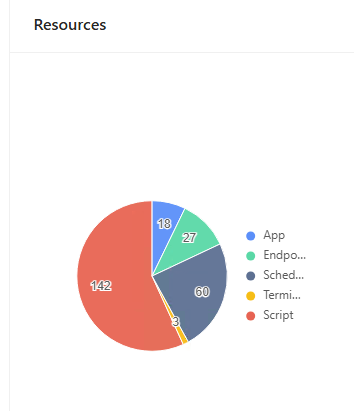 Scripts: 142
Schedules: 50
Endpoints: 27
Apps: 18
Terminals: 3
I couldn't find the log files in ProgramData path, I found some in ..Logs\PowerShellHost
For the past two weeks or so, they all look similar to this:
FileName:
host-5828-134309547103450186.txt
Contents:
2026-08-11 16:45:10.443 -04:00 [ERR] PSUModulePath not set
Are those the correct log files or are you looking for something else?
f4543cd0-7901-4a23-bc0d-5636b6c90da1.png
The system logs would likely be what we need since they will include the resource reload sections. The logs could be in:
%ProgramData%\PowerShellUniversal\systemLog<date>.txt
You can check in Help -> Support Tools -> Configuration or Environment Variables to see the configured SystemLogPath value to see where it would write the logs.
Adam Driscoll
PowerShell Expert and Software Architect at Devolutions
Thanks, Adam!
I think we have something misconfigured because we don't have any systemLog<Date>.txt files since 2024.
But, I didn't see any configuration to change that.
All we have is this:
SystemLogLevel=Error (JsonConfigurationProvider for 'appsettings.json' (Optional))
SystemLogPath=%ProgramData%\PowerShellUniversal\ (JsonConfigurationProvider for 'appsettings.json' (Optional))
I did find logs that are just log<date>.txt that I think are what you're needing and just emailed those in for the last few days.
Thank you! Received!
Adam Driscoll
PowerShell Expert and Software Architect at Devolutions
@davestephenson Just wanted to update to say that we did find an issue with saving via API that VS Code uses. It was causing the configuration system to reload all folder and script information on every save. The more scripts and folders and environment had, the slower it would get. We have a fix that will reduce the save time down below the 1 second mark with many resources configured. This fix will be in the upcoming 2026.3.0 release.
Adam Driscoll
PowerShell Expert and Software Architect at Devolutions
That's great news. Thanks, Adam!
Out of curiosity, do you know when that v2026.3.0 release is tentatively scheduled to be released?
@davestephenson We're shooting for early September.
Adam Driscoll
PowerShell Expert and Software Architect at Devolutions