Configurable MCP Server Connection Name in VS Code
1 vote

Problem
When adding a PSU MCP server in VS Code, the connection can be configured either by manually adding /api/v1/mcp to the mcp.json configuration or by using the extension's server connection feature, which automatically appends the endpoint.
In both cases, the resulting MCP server connection is automatically named Universal.Server. As a consequence, multiple PSU MCP server connections appear with the same name, making it impossible to distinguish between them in the VS Code UI.
Expected Behavior
The displayed MCP server name should be configurable or automatically derived from the target server information.
Possible approaches:
- Allow specifying a custom display name in the mcp.json configuration.
- Use the server hostname as the default connection name.
- Fall back to the current Universal.Server name only when no custom name or hostname is available.
Current Behavior
All PSU MCP server connections are displayed as Universal.Server, regardless of the configured endpoint or host.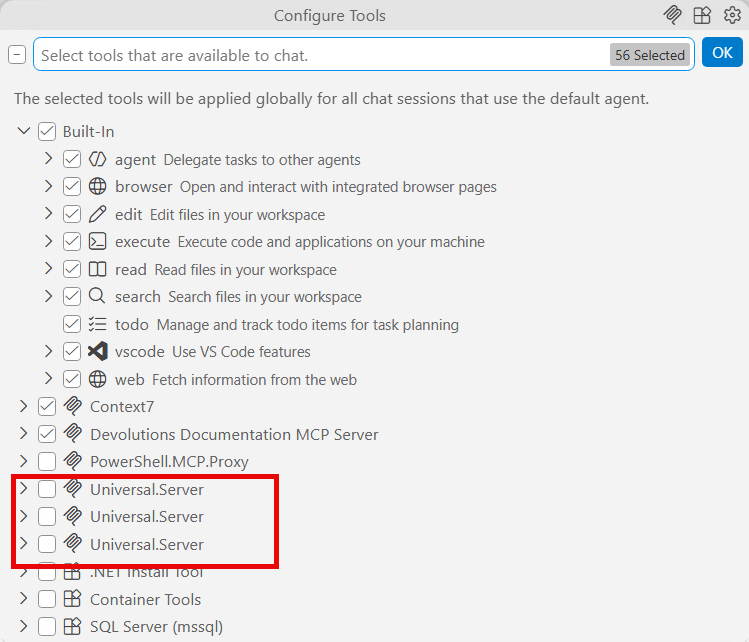
Impact
Users managing multiple PSU MCP server instances cannot easily identify which connection belongs to which environment (e.g. Development, Test, Production) or host, increasing the risk of connecting to the wrong server.
Benefits
- Easier management of multiple MCP server connections
- Better usability and visibility within VS Code
- Reduced risk of connecting to the wrong environment
- Consistent behavior with other tools that support custom connection names
9bc8a6a3-01b8-4c07-9c16-7c30a50a1004.png