Environment start scripts

After upgrading PowerShell Universal from 2026.1.7.0 to 2026.2.1.0, the functions used by our endpoints and apps are no longer being recognized.
For some context, the environments used by our endpoints and apps are configured to run a script at runspace startup that dot-sources all of our functions. This setup has worked correctly in all previous versions, but it stopped working immediately after the upgrade.
Has anyone else experienced the same issue or found a workaround?
All Comments (17)
Hello,
Thank you for your feedback.
I moved your thread to the PowerShell Universal Support section.
Do you get any specific errors related to this scenario?
Best regards,
Érica Poirier
Not really.
The errors I get are related to function not being recognised, standard Powershell error message.
@tcheguri84 Could you please share your current environments.ps1 file in your .universal folder? I'd like to try to reproduce your issue in my environment.
Adam Driscoll
PowerShell Expert and Software Architect at Devolutions
Sure...
Publish-RSQLFunctions.ps1
Get-ChildItem -Path 'C:\ProgramData\UniversalAutomation\Repository\.universal\functions' -Exclude $MyInvocation.MyCommand.Name,'Add-RSQLEndpoints.ps1' -Recurse | Where-Object { $_.Extension -eq '.ps1' } | ForEach-Object {
    . ($_.FullName)
}
Environments.ps1
New-PSUEnvironment -Name "Agent" -Path "Universal.Agent" -Variables @('*')
New-PSUEnvironment -Name "Integrated" -Path "Universal.Server" -Modules @('ActiveDirectory', 'dbatools', 'RaboSQL') -Variables @('*') -PersistentRunspace -StartupScript @('C:\ProgramData\UniversalAutomation\Repository\.universal\functions\Publish-RSQLFunctions.ps1')
New-PSUEnvironment -Name "Windows PowerShell 5.1" -Path "C:\WINDOWS\System32\WindowsPowerShell\v1.0\powershell.exe" -Modules @('ActiveDirectory', 'dbatools', 'RaboSQL') -Variables @('*') -PersistentRunspace -StartupScript @('C:\ProgramData\UniversalAutomation\Repository\.universal\functions\Publish-RSQLFunctions.ps1')
New-PSUEnvironment -Name "Windows PowerShell 7" -Path "C:\Program Files\PowerShell\7\pwsh.exe" -Modules @('ActiveDirectory', 'dbatools', 'RaboSQL') -Variables @('*') -PersistentRunspace -StartupScript @('C:\ProgramData\UniversalAutomation\Repository\.universal\functions\Publish-RSQLFunctions.ps1')@tcheguri84 Thank you. I'll let you know once we have a fix or a workaround.
Adam Driscoll
PowerShell Expert and Software Architect at Devolutions
Ok. Thank you
@Adam Driscoll did you have the time to test it? Thanks
@tcheguri84 Yes, I did and was able to reproduce this problem. We have a fix already merged and it will be in 2026.2.2. That will be out this week.
Adam Driscoll
PowerShell Expert and Software Architect at Devolutions
@tcheguri84 Yes, I did and was able to reproduce this problem. We have a fix already merged and it will be in 2026.2.2. That will be out this week.
@Adam Driscoll
Great news, thank you again.
@Adam Driscoll after the upgrade to the latest version I am getting this:
HTTP Error 500.32 - Failed to load .NET Core host
Common solutions to this issue:
The app was likely published for a different bitness than w3wp.exe/iisexpress.exe is running as.
Troubleshooting steps:
- Check the system event log for error messages
- Enable logging the application process' stdout messages
- Attach a debugger to the application process and inspect
For more guidance on diagnosing and handling these errors, visit Troubleshoot ASP.NET Core on Azure App Service and IIS.
I am running PSU on IIS 10. Could you please help?
I found my mistake. Nevermind. Thanks
@Adam Driscoll I have completed the upgrade however the issue remains. This is an App page.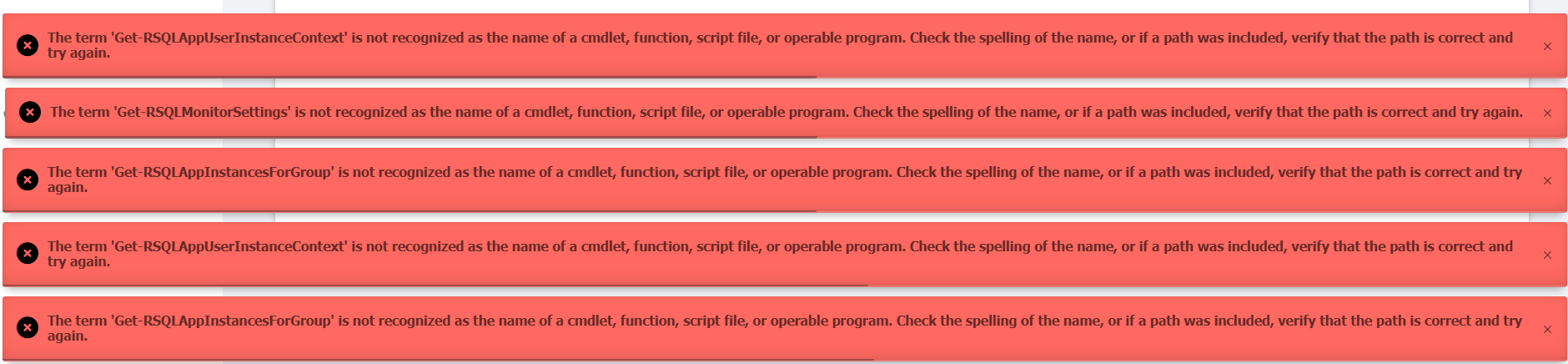
e8b71ae8-26c7-4483-a1bf-61df9282c692.png
I am also getting this error on 2026.2.2.0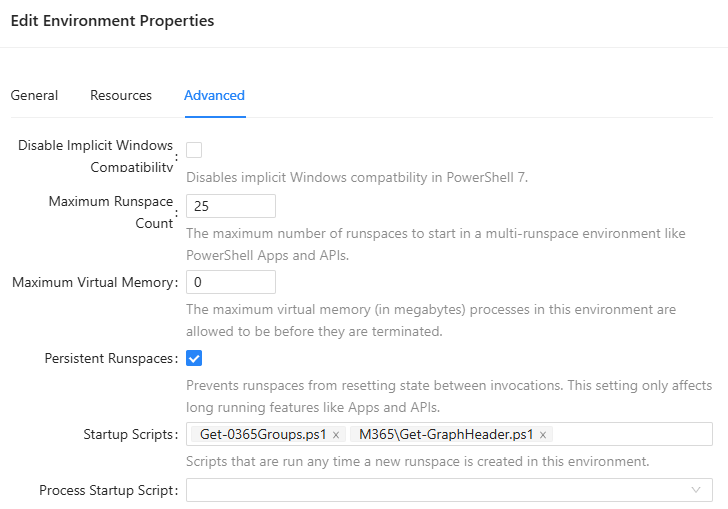
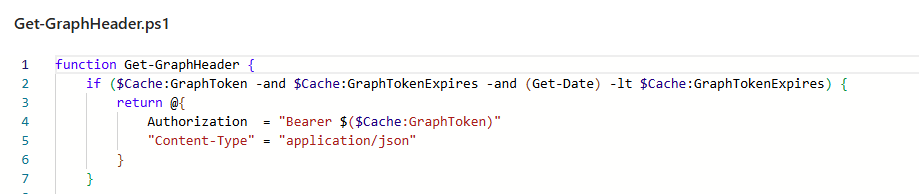

698e9c0e-96a4-4d85-9f20-d8c45ff664c4.png
a0bdc6da-e907-41f3-a479-01f17846597d.png
c646461c-a23b-449e-9a96-b89c31ded09a.png
@malcolmradelet @tcheguri84 I'm sorry to hear that. I've reactivated the issue and we will take another look. I'll post an update if we need more information.
Adam Driscoll
PowerShell Expert and Software Architect at Devolutions
Hello,
Thank you for being so patient.
The fix has been implemented in the latest PowerShell Universal 2026.2.3.0 version.
Let us know if that works as expected.
Thank you for your collaboration.
Best regards,
Érica Poirier
Hello,
I've updated from 2026.1.2 to 2026.2.5 and it seems like this issue still exists.
New-PSUEnvironment -Name "Dedicated - App - Server Management" -Modules @('CustomModule1','CustomModule2','CustomModule3') -Variables @('*') -PersistentRunspace -StartupScript @('Dashboards\Server Management\Includes\Base.ps1') -Description "PS Environment for the Server Management environment." -Type "WindowsPowerShell" New-PSUApp -Name "Server Management" -FilePath "Dashboards\Server Management\Dashboard.ps1" -BaseUrl "/" -Environment "Dedicated - App - Server Management" -Authenticated -SessionTimeout 120 -IdleTimeout 60 -AutoDeploy -Description "Hosting Services and Automation Dashboard"
Upon loading a page from this App, it complains about missing functions that are loaded either directly as part of Base.ps1 or as other dot sourced files, example:
. '.\Includes\Base.ps1'
. '.\Includes\Dashboards\Debugging.ps1'
These dot sourced imports work fine in 2026.1.2 and I don't see any notes about there being significant changes to how these should work, so I'd assume they should still work?
I'll note that it seems that it doesn't even run the first few lines of `Dashboards\Server Management\Includes\Base.ps1` as that should start a transcription, which I'm not seeing done either.
Hello @SunnyJ,
Thank you for your feedback.
Another ticket has been submitted to our development team. A fix has been made internally, and it will be available in our next 2026.3 release.
Thank you for being so patient.
Best regards,
Érica Poirier