when starting powershelluniversal version fromZIP, first-run page stay black
when starting powershelluniversal version fromZIP, first-run page stay black

Hello
due to certain security restriction i had some issues starting powershell universal as a service (service cannot access easily internet). while i'm working on a POC, i tried to execute as zip/portable version, where i have a better control to the proxy access.
unfortunatelly, each time i start Start-Process .\Universal\Universal.Server.exe, when i connect to the web page First-run , it start black, nothing appear
http://localhost:5000/first-run
in the console the last lines are 404 with Blazor
[18:27:50 INF] Microsoft.AspNetCore.Hosting.Diagnostics Request finished HTTP/1.1 GET http://localhost:5000/first-run - 200 null text/html; charset=utf-8 1455.5383ms
[18:27:51 INF] Microsoft.AspNetCore.Hosting.Diagnostics Request finished HTTP/1.1 GET http://localhost:5000/_framework/blazor.server.js?v=2026.2.0 - 404 0 null 365.1191ms
[18:27:51 INF] Microsoft.AspNetCore.Hosting.Diagnostics Request reached the end of the middleware pipeline without being handled by application code. Request path: GET http://localhost:5000/_framework/blazor.server.js, Response status code: 404
any suggestion?
All Comments (5)
Hello
due to certain security restriction i had some issues starting powershell universal as a service (service cannot access easily internet). while i'm working on a POC, i tried to execute as zip/portable version, where i have a better control to the proxy access.
unfortunatelly, each time i start Start-Process .\Universal\Universal.Server.exe, when i connect to the web page First-run , it start black, nothing appear
http://localhost:5000/first-run
in the console the last lines are 404 with Blazor
[18:27:50 INF] Microsoft.AspNetCore.Hosting.Diagnostics Request finished HTTP/1.1 GET http://localhost:5000/first-run - 200 null text/html; charset=utf-8 1455.5383ms
[18:27:51 INF] Microsoft.AspNetCore.Hosting.Diagnostics Request finished HTTP/1.1 GET http://localhost:5000/_framework/blazor.server.js?v=2026.2.0 - 404 0 null 365.1191ms
[18:27:51 INF] Microsoft.AspNetCore.Hosting.Diagnostics Request reached the end of the middleware pipeline without being handled by application code. Request path: GET http://localhost:5000/_framework/blazor.server.js, Response status code: 404
any suggestion?
@gabrielguardiola
Hi Gabriel,
Thank you for the details.
Since `/first-run` returns 200 but `/_framework/blazor.server.js?v=2026.2.0` returns 404, it looks like the server is starting, but the UI is not able to load one of the required Blazor static files. I would first check the ZIP extraction and the working directory used to start PSU.
Could you please try the following?
```powershell
# From the folder where the ZIP was extracted
Get-ChildItem .\Universal -Recurse | Unblock-File
Set-Location .\Universal
.\Universal.Server.exe
```
Then browse to:
```text
http://localhost:5000
```
instead of going directly to `/first-run`.
If the page still stays black, could you share the following?
* The exact ZIP file name downloaded
* The OS version
* The full path where the ZIP was extracted
* Whether this path is local, network-based, or security-controlled
* Browser DevTools Console and Network errors
* The full startup log from `Universal.Server.exe`
For reference, the ZIP install flow mentions extracting the ZIP, unblocking the files, and executing `Universal.Server.exe`. The hosting documentation also notes that when hosting manually, `Universal.Server.exe` should be run from the binary directory.
https://docs.powershelluniversal.com/getting-started
https://docs.powershelluniversal.com/config/hosting
Best regards,
Ruben Tapia
Hello
due to certain security restriction i had some issues starting powershell universal as a service (service cannot access easily internet). while i'm working on a POC, i tried to execute as zip/portable version, where i have a better control to the proxy access.
unfortunatelly, each time i start Start-Process .\Universal\Universal.Server.exe, when i connect to the web page First-run , it start black, nothing appear
http://localhost:5000/first-run
in the console the last lines are 404 with Blazor
[18:27:50 INF] Microsoft.AspNetCore.Hosting.Diagnostics Request finished HTTP/1.1 GET http://localhost:5000/first-run - 200 null text/html; charset=utf-8 1455.5383ms
[18:27:51 INF] Microsoft.AspNetCore.Hosting.Diagnostics Request finished HTTP/1.1 GET http://localhost:5000/_framework/blazor.server.js?v=2026.2.0 - 404 0 null 365.1191ms
[18:27:51 INF] Microsoft.AspNetCore.Hosting.Diagnostics Request reached the end of the middleware pipeline without being handled by application code. Request path: GET http://localhost:5000/_framework/blazor.server.js, Response status code: 404
any suggestion?
@gabrielguardiola
Hi Gabriel,
Thank you for the details.
Since `/first-run` returns 200 but `/_framework/blazor.server.js?v=2026.2.0` returns 404, it looks like the server is starting, but the UI is not able to load one of the required Blazor static files. I would first check the ZIP extraction and the working directory used to start PSU.
Could you please try the following?
```powershell
# From the folder where the ZIP was extracted
Get-ChildItem .\Universal -Recurse | Unblock-File
Set-Location .\Universal
.\Universal.Server.exe
```
Then browse to:
```text
http://localhost:5000
```
instead of going directly to `/first-run`.
If the page still stays black, could you share the following?
* The exact ZIP file name downloaded
* The OS version
* The full path where the ZIP was extracted
* Whether this path is local, network-based, or security-controlled
* Browser DevTools Console and Network errors
* The full startup log from `Universal.Server.exe`
For reference, the ZIP install flow mentions extracting the ZIP, unblocking the files, and executing `Universal.Server.exe`. The hosting documentation also notes that when hosting manually, `Universal.Server.exe` should be run from the binary directory.
https://docs.powershelluniversal.com/getting-started
https://docs.powershelluniversal.com/config/hosting
Best regards,
Ruben Tapia
@rubentapia
hello Ruben
well i missed "`Universal.Server.exe` should be run from the binary directory." :( all the rest was good. after starting the binary from the binary directoy it start all correctly.
thanks a lot.
one last question, is there in the download page a manifest file with the hash of the zip/msi ?
- i had some issue with our proxy, it would have helped me to compare the hash file after download
thanks and great software!
@gabrielguardiola The Devolutions Download Center has a SHA256 link at the bottom of the modal where you can find the hashes. 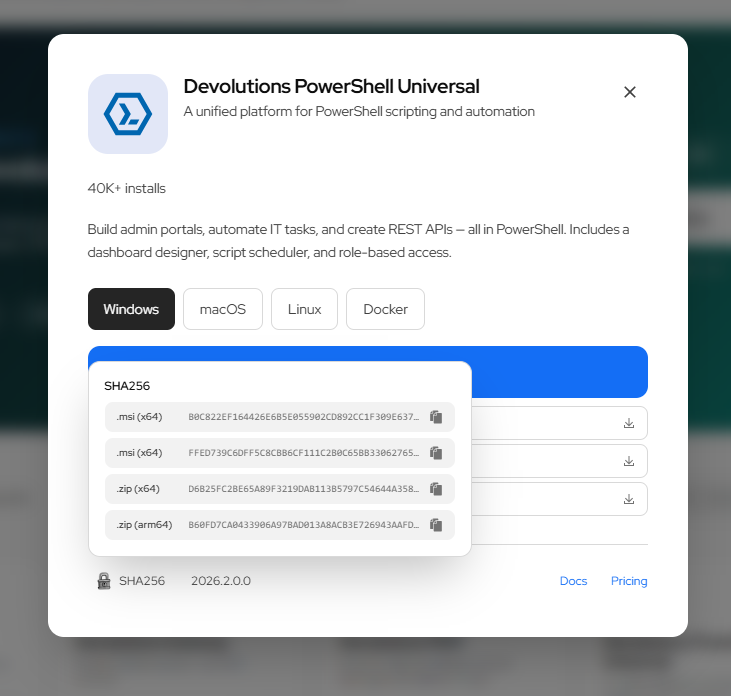
Download Devolutions PowerShell Universal | Devolutions
Adam Driscoll
PowerShell Expert and Software Architect at Devolutions
cdf302db-bfe4-43f8-b6a3-dee0597284c9.png
@gabrielguardiola The Devolutions Download Center has a SHA256 link at the bottom of the modal where you can find the hashes.
Download Devolutions PowerShell Universal | Devolutions
@Adam Driscoll
..... :/ ok i don't remind downloading that via this modal, so i redownloaded via the modal to compare with the one i have, identical hash.
but anyway thanks a lot