New-UDEditor - how is it really intended to work?

Hi there,
I wanted to use New-UDEditor in an PSU App. Unfortunately, the documentation is a little...well..."underdefined" and the forum doesn't contain any entry on this component.
New-UDEditor -Id "txtOoOMessage" -Format html -Data $oooMessageDataDefault -OnChange {
  $oooMessageData = $Body
  Show-UDToast -Message $oooMessageData -Persist # works
}
New-UDButton -Id "btnConfirmOoOMessage" -Text "Confirm" -OnClick {
  $OffboardingRequestObject.oooMessage = $oooMessageData # does not work
  Write-Host "`$OffboardingRequestObject.oooMessage: $($OffboardingRequestObject.oooMessage)"
  Write-Host "`$EventData.Context.txtOoOMessage: $($EventData.Context.txtOoOMessage)"
  Write-Host "`$EventData.Context.txtOoOMessage.oooMessageData: $($EventData.Context.txtOoOMessage.oooMessageData)"
  Write-Host "`$EventData.Context.txtOoOMessage.Body: $($EventData.Context.txtOoOMessage.Body)"
  Write-Host "`$EventData.Context.txtOoOMessage.Value: $($EventData.Context.txtOoOMessage.Value)"
  Write-Host "Get-UDElement txtOoOMessage.value: $((Get-UDElement -Id "txtOoOMessage").value)"
}
I could find out that within the Editor component, there is a $Body var defined. However, it doesn't seem to be available outside of the Editor itself, e.g. in a Confirm-Button that is using that Body var to set it into another variable.
All debugging outputs remain empty:
[6/7/2026 11:56:27 AM] [Information] [App-NTT User Management] Get-UDElement txtOoOMessage.value:
[6/7/2026 11:56:27 AM] [Information] [App-NTT User Management] $EventData.Context.txtOoOMessage.Value:
[6/7/2026 11:56:27 AM] [Information] [App-NTT User Management] $EventData.Context.txtOoOMessage.Body:
[6/7/2026 11:56:27 AM] [Information] [App-NTT User Management] $EventData.Context.txtOoOMessage.oooMessageData:
[6/7/2026 11:56:27 AM] [Information] [App-NTT User Management] $EventData.Context.txtOoOMessage:
[6/7/2026 11:56:27 AM] [Information] [App-NTT User Management] $OffboardingRequestObject.oooMessage:
On top of that I wanted to hand in a default text via $oooMessageDataDefault but there is nothing said except that this shall be a Hashtable type, but nothing about its design, as I assume this requires some defined keys?
I tried
$oooMessageDataDefault = @{
  Body = "Default Text"
}
but without any success.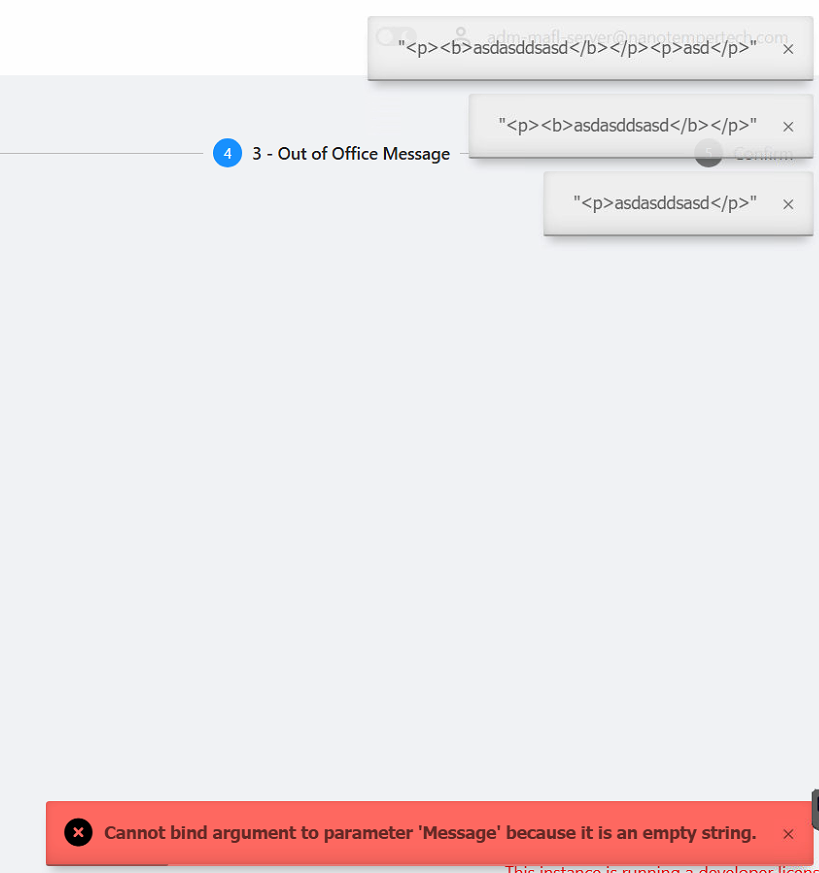
Some P.S. after playing around with debugger I got it at least working if having an object always updated with -OnChange (although this is a little overload as asked above)
New-UDEditor -Id "txtOoOMessage" -Format html -Data $oooMessageDataDefault -OnChange {
   $OffboardingRequestObject.oooMessage = $Body
   Show-UDToast -Message $OffboardingRequestObject.oooMessage -Persistent
}
New-UDButton -Id "btnConfirmOoOMessage" -Text "Confirm" -OnClick {
   Write-Host "`$OffboardingRequestObject.oooMessage: $($OffboardingRequestObject.oooMessage)"
   Show-UDToast -Message $OffboardingRequestObject.oooMessage
}
This lead to some changed processing as I am using this editor in a UDStepper and wanted to have it "Next" > "Back" compatible, taking the generated $Body string again.
$oooMessageDataDefault = @{
   Body = "Default Text"
}
$OffboardingRequestObject.oooMessage = $oooMessageDataDefault
New-UDStep -Label "3 - Out of Office Message" -OnLoad {
   New-UDEditor -Id "txtOoOMessage" -Format html -Data $OffboardingRequestObject.oooMessage -OnChange {
      $OffboardingRequestObject.oooMessage = $Body
   }
   New-UDButton -Id "btnConfirmOoOMessage" -Text "Confirm" -OnClick {
      Show-UDToast -Message $OffboardingRequestObject.oooMessage -Persistent
      Write-Host "`$OffboardingRequestObject.oooMessage: $($OffboardingRequestObject.oooMessage)"
   }
}
Different to Select / Text components it seems that I cannot use Get-UDElement with the editor and have -Value option like this: -Value $EventData.Context.txtUserSelect
So my idea was to have $Body put on every change into my persistent $OffboardingRequestObject which is filled in the beginning with the default text. This now creates the conflict as -Data expects hashtable, and the $Body output in my $OffboardingRequestObject is a string...
My questions about the editor are:
- How does the -Data hashtable needs to be designed?
- How is it supposed to catch the data from the editor - and hopefully without -OnChange, as this creates quite a lot of load which is unnecessary with a confirm / save button.
Thanks a lot!
b7f6d51a-3c26-44e0-899a-d7fc94e58a33.png
All Comments (4)
New-UDEditor - how is it really intended to work?
@blindzero
1. How to format the -Data hashtable
Even if you specify -Format html to receive HTML output, the underlying Editor.JS React component *always* expects its input data to be in the native Editor.JS JSON block format.
To set default text, your hashtable must map to that block structure. For example, to create a default paragraph, your hashtable should look like this:$oooMessageDataDefault = @{ blocks = @( @{ type = "paragraph" data = @{ text = "Default Text" } } )}New-UDEditor -Id "txtOoOMessage" -Format html -Data $oooMessageDataDefault
2. How to get data out without -OnChange
Currently, you cannot. I have raised a bug report for this here. For now, your only recourse is to continue with your present workaround. I also drafted a documentation update request for this scenario.
Hi @DataTraveler
thanks a lot for your answer.
I somewhat didn't managed to get this running. There is at least no error, but also the Default Text Input is not working:
New-UDStep -Label "3 - Out of Office Message" -OnLoad {

  $oooMessageDataDefault = @{
    blocks  = @(
      @{
        id   = "block1"
        type = "paragraph"
        data = @{
            text = "Dear Sender,"
        }
      },
      @{
        id   = "block2"
        type = "paragraph"
        data = @{
            text = "{{firstname}} {{lastname}} is not working with us anymore."
        }
      }
    )
  }

  # If used, it breaks because it seems not to be able to handle real Json yet?
  # $oooMessageDataDefaultJson = $oooMessageDataDefault | ConvertTo-Json -Depth 10

  $oooMessageData = @{}
  # checking if value was already set - if so we take it into the editor as we assume the step was already passed and maybe "back" step used.
  if ($OffboardingRequestObject.oooMessage) {
      $oooMessageData = $OffboardingRequestObject.oooMessage.clone()
  } # if it is empty its the first time we hit this step
  else {
      $oooMessageData = $oooMessageDataDefault.clone()
  }
  New-UDEditor -Id "txtOoOMessage" -Format html -Data $oooMessageData -OnChange {
      $OffboardingRequestObject.oooMessage = $Body
  }

}
Especially on the existing issue it seems that there is no way to support such an editor in an UDStepper being capable to deal with Next and Back, right?
- There is no different InputObject (for a default or already stored text) and OutputObject
- Especially if HTML is used, even if with
-OnChange $Output = $Bodywill store HTML - but InputObject always requires JSON input :-( - If I change to -Format JSON the output can't be used anymore by following mail sending processes requiring HTML.
Even with my example above I would have assumed
- Hitting the Step the first time should result in empty $OffboardingRequestObject.oooMessage (initialized outside)
- Default kicks in and sends JSON-String into $oooMessageData, used by editor component. --> showing default (isn't working)
- a.t.m. with -OnChange as soon as something is changed, the pure HTML will be stored into $OffboardingRequestObject.oooMessage (o.k. breaking "Back" button in next step, but that's another story).
Asking other way around: I would like to have a RTE editor that produces HTML output so I can use this for HTML mail sending... AFAIU this will not be possible due to Input / Output format mismatch issue, even if accepting -OnChange in general?
Does anybody sees any other way to implement something like that?
Thanks,
Matthias
Hey Matthias,
I reproduced what you reported in PSU 2026.2.0.
tl;dr version
Your concern about Back navigation is real, but the hard boundary is specifically the moment when the HTML output is fed 🍝 back into -Data. That part is not stepper-safe. JSON state plus late HTML conversion is the validated workaround 👍
Long verbose version 🗣
What I can confirm:
- New-UDEditor -Data does work inside New-UDStep -OnLoad when the input is still a proper Editor.JS hashtable.
- -Format html also works on the first pass when the input is still that same hashtable.
- The failure happens on re-entry after -OnChange has already stored HTML. At that point, the stored value is a System.String, but -Data still expects a Hashtable.
The exact runtime error was:Cannot process argument transformation on parameter 'Data'. Cannot convert the "<p>Dear Sender,</p><p>{{firstname}} {{lastname}} is not working with us anymore.</p>" value of type "System.String" to type "System.Collections.Hashtable"
For a Stepper with Back navigation, the stable pattern is:
- Keep the editor state in Editor.JS JSON during the workflow
- Cast that JSON back to a hashtable before passing it to -Data
- Convert to HTML only at the end, for example right before sending the email
This is the validated pattern:$oooMessageDataDefault = @{ blocks = @( @{ type = 'paragraph' data = @{ text = 'Dear Sender,' } }, @{ type = 'paragraph' data = @{ text = '{{firstname}} {{lastname}} is not working with us anymore.' } } )}if (-not $OffboardingRequestObject.oooMessageJson) { $OffboardingRequestObject.oooMessageJson = $oooMessageDataDefault | ConvertTo-Json -Depth 10 -Compress}$oooMessageData = $OffboardingRequestObject.oooMessageJson | ConvertFrom-Json -AsHashtableNew-UDEditor -Id 'txtOoOMessage' -Format json -Data $oooMessageData -OnChange { $OffboardingRequestObject.oooMessageJson = $Body}
Since your mail process requires HTML, the recommended workaround would be to keep the editor state in JSON throughout the Stepper and then convert it only when you hand it over to the mail process. A simple PowerShell mapper is enough for common paragraph, header, and list blocks:function Convert-EditorJsToHtml { param([string]$JsonPayload) $EditorObj = $JsonPayload | ConvertFrom-Json $HtmlElements = foreach ($Block in $EditorObj.blocks) { switch ($Block.type) { 'paragraph' { "<p>$($Block.data.text)</p>" } 'header' { "<h$($Block.data.level)>$($Block.data.text)</h$($Block.data.level)>" } 'list' { $tag = if ($Block.data.style -eq 'ordered') { 'ol' } else { 'ul' } $items = ($Block.data.items | ForEach-Object { "<li>$_</li>" }) -join '' "<$tag>$items</$tag>" } default { "<div>$($Block.data.text)</div>" } } } return $HtmlElements -join "`n"}# Later, in your email sending logic:$EmailBodyHtml = Convert-EditorJsToHtml -JsonPayload $OffboardingRequestObject.oooMessageJson
If your default text is still not appearing on the very first pass, there may be an additional state or scoping issue in the surrounding app, separate from the validated HTML re-entry limitation.
Please, let us know how you fare
I forgot to mention that I submitted a documentation update around this 👍
I also meant to include a screenshot 📸 of the sample HTML I produced using the provided workaround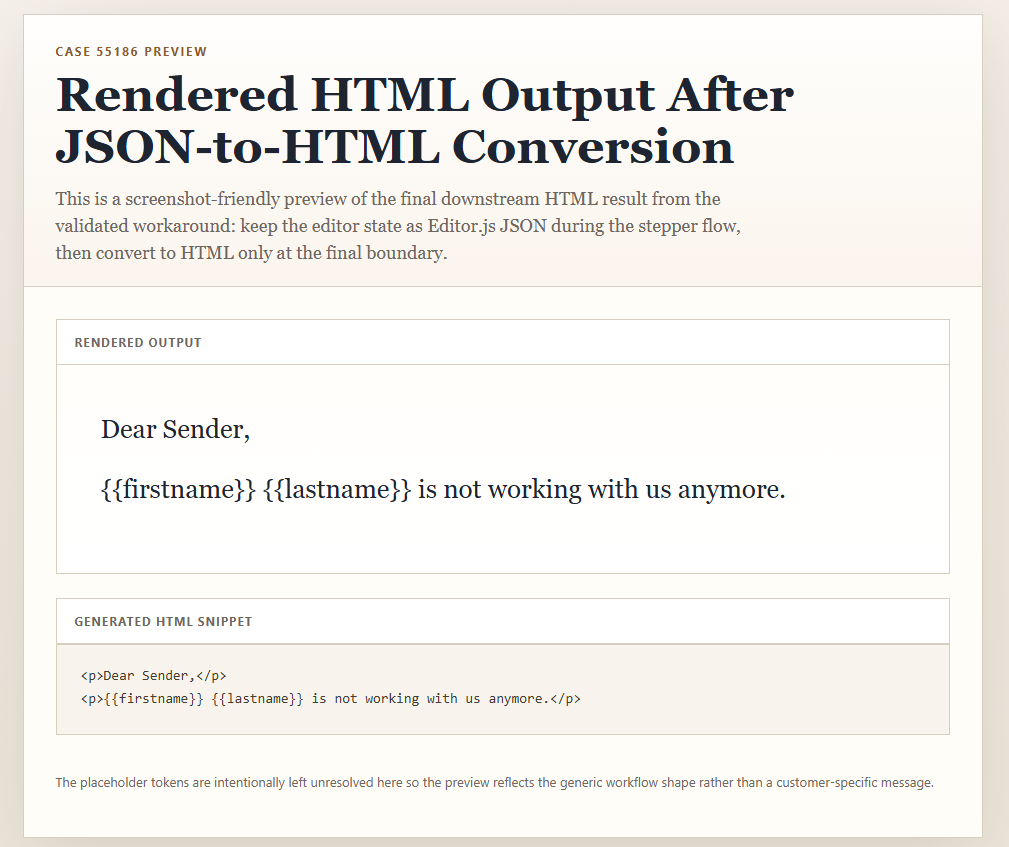
Edit 1: Added screenshot
7a12a2cb-e957-486c-927e-9f5602dfb64a.png