Improve DVLS server Microsoft authentication
Hello.
I have a suggestion to improve the MS authentication configuration documentation.
Configure Microsoft authentication with Entra ID - Devolutions Documentation
First, I would avoid jumping around between Entra ID and DVLS Server Administration.
I would show how to completely configure the application registration and then copy / paste most values from its overview.
This is obviously different for the secret for the secret configuration.
Secondly, I would show a complete example of how to configure an app registration with application permissions and one for delegated rights permissions. This because it's always tricky to follow a guide which has exceptions and small additions to avoid missing an important setting.
Thirdly, I would advise to show all app permissions required for both application permissions and delegated rights permissions:
- Configure DVLS with application permissions
- delegated rights for :
- openid
- profile
- offline_access
- application permissions for :
- user.read
- user.read.all
- group.read.all
- delegated rights for :
- Configure DVLS with delegated rights permissions
- openid
- profile
- offline_access
- user.read
- user.read.all
- group.read.all
Last, please add additional required settings like the token "ID tokens (used for implicit and hybrid flows)" required for the application permission authentication mode.
Thank you.
Marcel
Devolutions Server, RDM and GW admin.
Recommended Answer
Hello Marcel,
Thank you for the 2026.2.7.0 redirect URI list, that detail closes the gap we left in the article.
I have confirmed the three URIs you provided are the correct ones for Delegated permissions.
While we are at it, I want to clarify one point so that future readers do not over-configure their Entra app.
The three URIs are required only when you choose Delegated permissions, because the Connect to Microsoft button runs its own OAuth flow on top of the regular user sign-in.
The Application permissions mode (the recommended default) uses the client credentials grant and never hits the connect or connect-callback endpoints, so a single redirect URI (the external-provider-response one) is enough in that case.
The revised KB will split step 7 into the two cases, so this is no longer ambiguous.
On a related note, we are looking into surfacing the exact redirect URIs directly in the DVLS administration UI with copy buttons.
That way, readers will not have to discover them through a doc, and the displayed values will always match the running build.
Thanks again for the thorough testing and the screenshots. This kind of feedback is exactly what makes the documentation better for everyone configuring Microsoft authentication with DVLS.
Best regards,
Patrick Ouimet
All Comments (10)

Hello Marcel,
Thank you for your feedback. This is a great suggestion and we will look into it to see if we can make the page easier to follow.
Regards,
Émile Simard
Technical writer
Hello again Marcel,
We've updated our documentation based on your suggestion.
Regards,
Émile Simard
Technical writer
Hello @Emile Simard
Thank you for the update, which looks promising.
A few notes from my side.
Step 8 here is not very clear to me: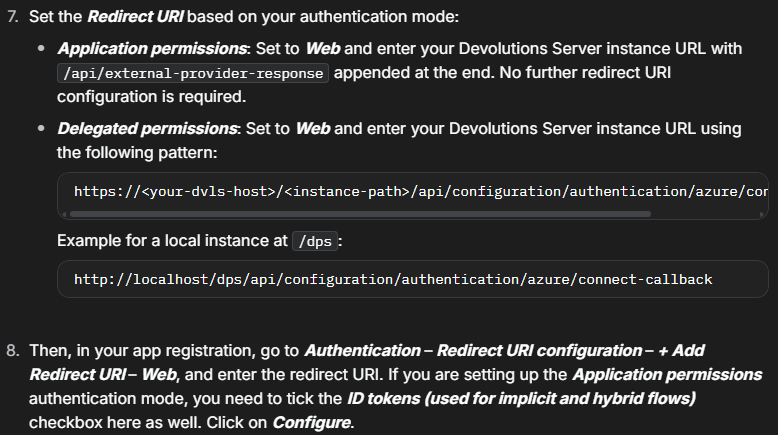 Is it to be repeated ? If so, in which case ? If not maybe it needs cleanup.
I think for Delegated rights, we need two different redirect URI's but I might be wrong.
This is not quite correct. If you do not add it here, the first user logging in will be required to do the Admin Consent.
I would rather add those manually, admin consent them and be done with it.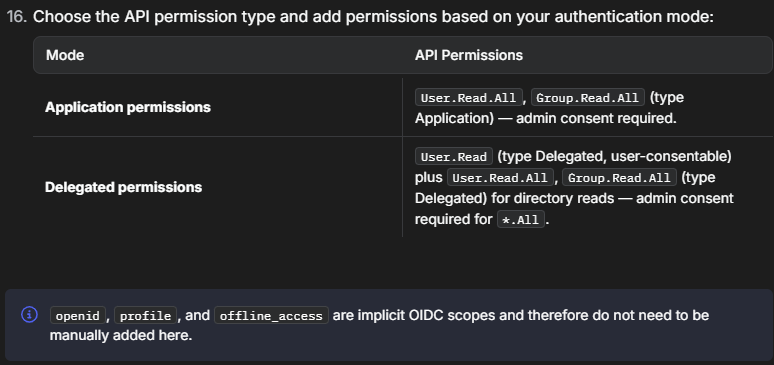
Instead of repeating 3 times "For Delegated permissions" I would add sub-steps for these 3 items and name the main step something like "For delegated permissions only do the following".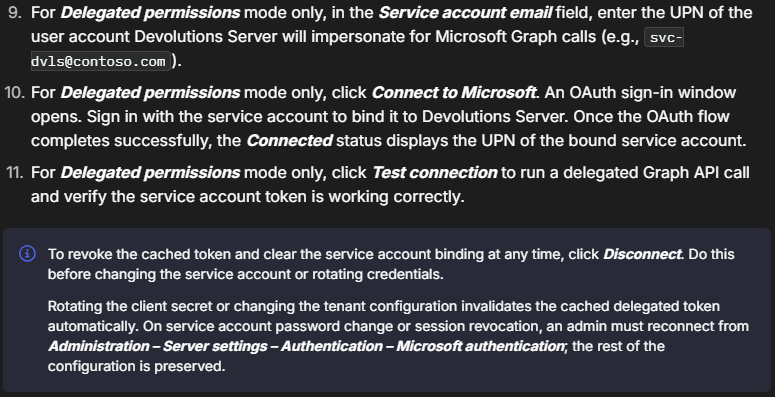
Thank you and best regards.
Marcel
Devolutions Server, RDM and GW admin.
41bd36dc-2d6f-4e96-8550-997578887f01.png
45e675c2-88b1-441d-9071-68e410db0cfd.png
64c3f4dc-a771-4667-bfa2-6ba51f2cbc53.png
Hi Marcel,
I have made the changes you requested. There was indeed a redundancy in step #8, as there is no need to input the redirect URI again, only the "ID tokens (used for implicit and hybrid flows)" checkbox is required for the application permissions configuration. I moved this instruction to step #7 instead, as it makes more sense.
For the "openid", "profile", and "offline_access" permissions, although they do not require admin consent by default, I have modified the box below step #15 for your use case. Thanks for bringing this to our attention, it may help others.
Regards,
Émile Simard
Technical writer
Thanks @Emile Simard !
Let's see once we manage a successful delegated rights version if we need to URI's or not.
PS: For now, I can connect it, but not login to DVLS with it.
Marcel
Devolutions Server, RDM and GW admin.
Hello @Emile Simard
Tested: it needs both redirect URI's to work.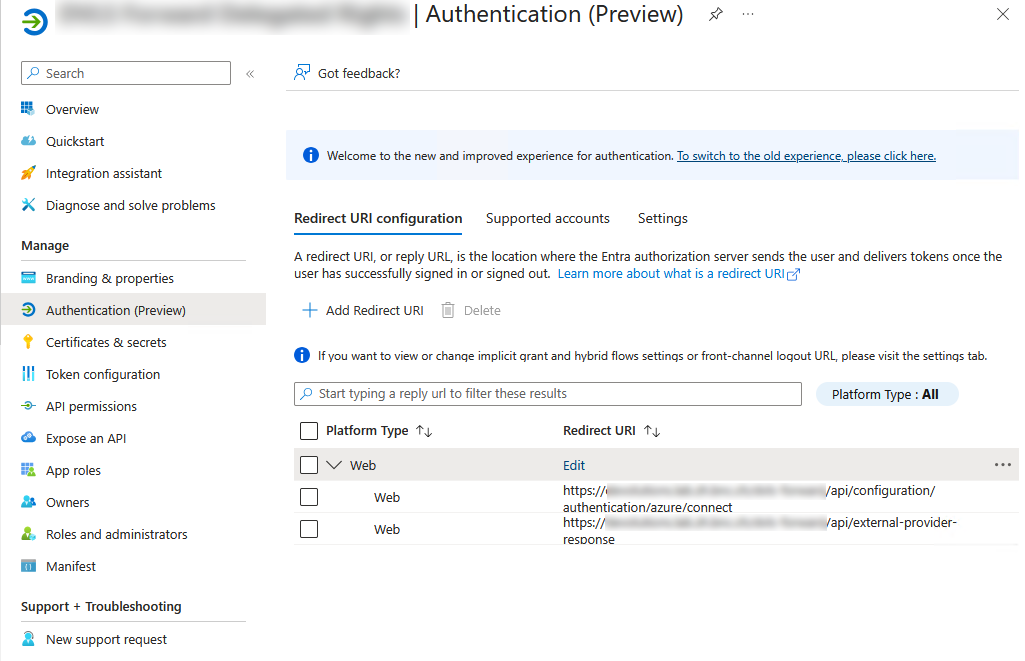
Otherwise I get this kind of response.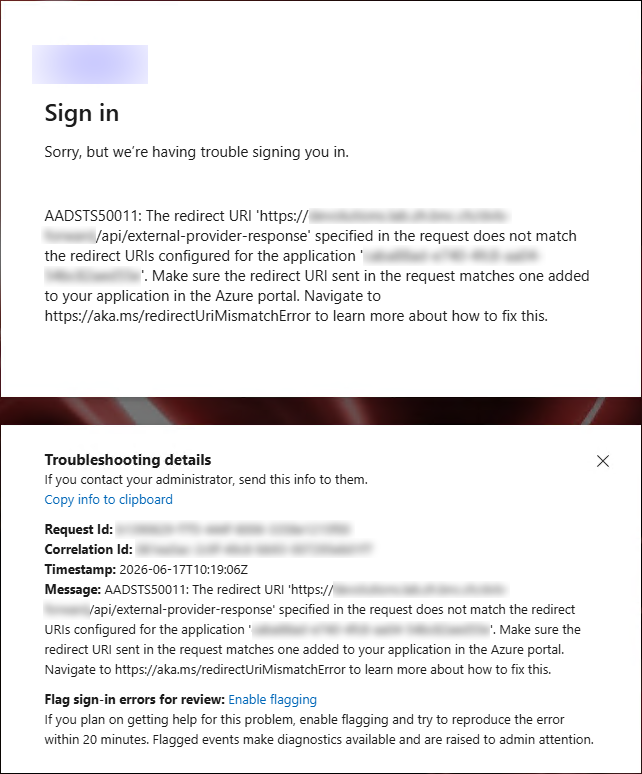
Cheers.
Marcel
Devolutions Server, RDM and GW admin.
05548f70-290f-4af3-bffb-762866cb7d4f.png
d8b8773d-3675-4cdf-94f2-c0c4181197a6.png
Hi Marcel,
Thank you for the thorough testing and the screenshots — they were very helpful in pinpointing the issue.
You're right that the Delegated permissions configuration, as currently documented, does not work on its own. We've reviewed the configuration and confirmed that your setup with both redirect URIs registered is the working one, so you can keep your environment as is.
We are updating the KB article to correct the redirect URI listed for Delegated permissions, so future readers will get a single, correct value the first time around and won't have to discover this through trial and error.
Émile will follow up once the article is updated.
Thanks again for taking the time to report this — it benefits everyone configuring Microsoft authentication with DVLS.
Best regards,
Patrick Ouimet
Hello Marcel,
The article has been updated.
Thanks again for your input,
Émile Simard
Technical writer
Hello @Patrick Ouimet and @Emile Simard.
Thanks for your messages.
Please be aware that we need 3 URI's for it to work in 2026.2.7.0.
- User authentication: https://<dvlsfqdn>/dvls /api/external-provider-response
- Connection with service account: https://<dvlsfqdn>/dvls /api/configuration/authentication/azure/connect
- Connection with service account: https://<dvlsfqdn>/dvls/api/configuration/authentication/azure/connect-callback
Best regards.
Devolutions Server, RDM and GW admin.
Hello Marcel,
Thank you for the 2026.2.7.0 redirect URI list, that detail closes the gap we left in the article.
I have confirmed the three URIs you provided are the correct ones for Delegated permissions.
While we are at it, I want to clarify one point so that future readers do not over-configure their Entra app.
The three URIs are required only when you choose Delegated permissions, because the Connect to Microsoft button runs its own OAuth flow on top of the regular user sign-in.
The Application permissions mode (the recommended default) uses the client credentials grant and never hits the connect or connect-callback endpoints, so a single redirect URI (the external-provider-response one) is enough in that case.
The revised KB will split step 7 into the two cases, so this is no longer ambiguous.
On a related note, we are looking into surfacing the exact redirect URIs directly in the DVLS administration UI with copy buttons.
That way, readers will not have to discover them through a doc, and the displayed values will always match the running build.
Thanks again for the thorough testing and the screenshots. This kind of feedback is exactly what makes the documentation better for everyone configuring Microsoft authentication with DVLS.
Best regards,
Patrick Ouimet