Matching URL's to Entries

I have been trying to figure out how to do something for a few days now, and am finally at a give-up stage and need help.
I have two websites that have almost the same URL's:
https://{sitename1}/diags
https://{sitename2}/diags
In this screenshot, you can see when I go to sitename1, is pops up 4th on the list: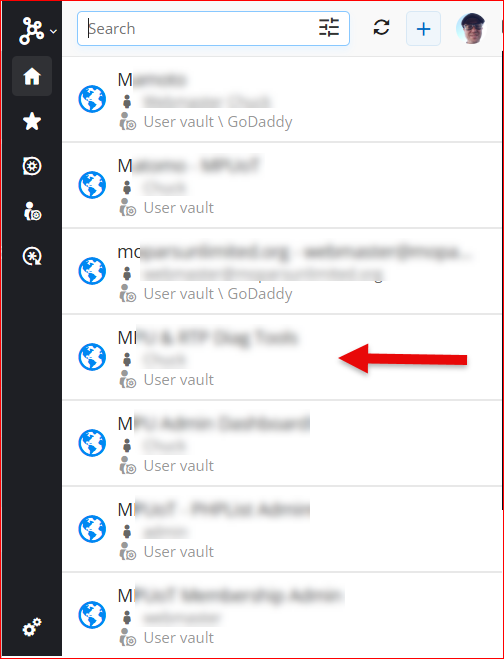
However, when I go to sitename2, it pops up 1st on the list: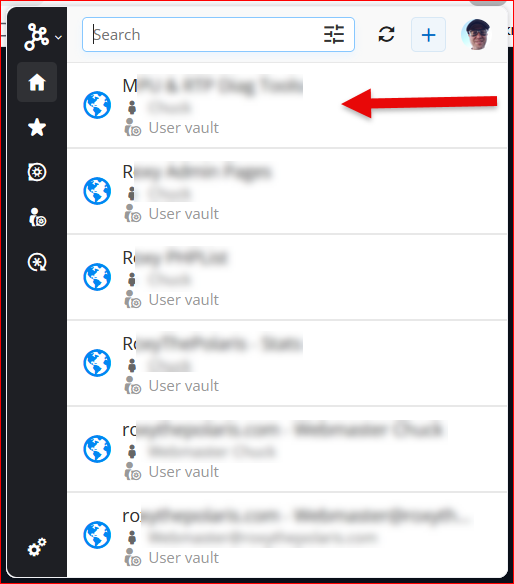
This is how I have sitename2 setup in the extension: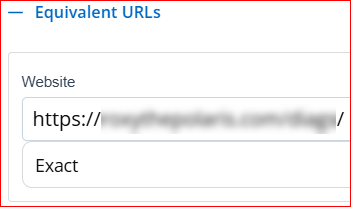
This is how I have the browser extension last configured: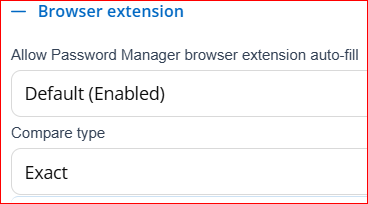
This is how I have workspace configured: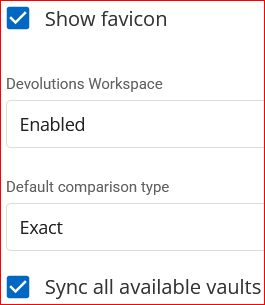
What my overall preference would be, is when I go to a URL that I have saved in my PM, if it finds a saved entry that matches the URL 1:1, it should appear at the top of the list (as seen for sitename2).
What am I doing wrong?
Thank you!
--- Chuck
Overgaard, AZ (-7 MST / Zulu Year-Round)
RDM Version: 2026.3.16.0 64-Bit - Free
92592b75-81e9-4511-bef7-e84215af508f.png
ff6b1f8d-16d8-42ef-850c-e03a4e2c2f96.png
d1f85c47-1cc4-4ec0-9236-d5a9b37493f3.png
64ccba7e-c46c-4f2a-984e-328f029eb0a2.png
cac3feed-24a3-4cdd-a5ce-02854dd89ef8.png
All Comments (6)
Hi,
The matching list is always sorted alphabetically. It does not prioritize entries based on the matching type. (https://docs.devolutions.net/password-manager/kb/browser-extension-knowledge-base/urls-comparing-types/)
When an entry matches, it will appear in the list in alphabetical order alongside the other matching entries matched by URLs and equivalent URLs.
From what I understand, you would like the list to be sorted by priority based on how closely the URL in the current tab matches 1:1 the URL, or equivalent URL, of an entry. Is that correct?
Best regards,
Olivier Désalliers
Hi,
The matching list is always sorted alphabetically. It does not prioritize entries based on the matching type. (https://docs.devolutions.net/password-manager/kb/browser-extension-knowledge-base/urls-comparing-types/)
When an entry matches, it will appear in the list in alphabetical order alongside the other matching entries matched by URLs and equivalent URLs.
From what I understand, you would like the list to be sorted by priority based on how closely the URL in the current tab matches 1:1 the URL, or equivalent URL, of an entry. Is that correct?
Best regards,
@Olivier Desalliers
That is correct, sir.
I believe that should be a user configurable option in this case. Either "alphabetical (default)" or "Best Match" for example in the main extension, and workspace.
Especially when there are URL's that have a plethora of the same 1st name. Something like {sitemame1} - Analytics may actually not be the correct credentials for {sitename1} - Stats, which is the page I am actually on.
Therefore, if something like "1:1", or "Exact" (since it's already in the software), would be very beneficial to not just me, but I'm sure hundreds of others as well, so we can go back to naming our credentials what they are for, and not having to do something like ".a-{sitename1} - ....", etc. now knowing how they are sorted.
Thanks!
--- Chuck
Overgaard, AZ (-7 MST / Zulu Year-Round)
RDM Version: 2026.3.16.0 64-Bit - Free
Hi,
We will open a ticket to analyze possible ways to add more sorting options for the Matching list.
In the meantime, a workaround would be to configure each website using Exact only. However, this may not be possible in your case if you need to rely on other matching types.
Thank you for your suggestion.
Best regards,
Olivier Désalliers
Hi,
We will open a ticket to analyze possible ways to add more sorting options for the Matching list.
In the meantime, a workaround would be to configure each website using Exact only. However, this may not be possible in your case if you need to rely on other matching types.
Thank you for your suggestion.
Best regards,
@Olivier Desalliers
I *do* have them set to *exact* (as you can see in the screenshots I provided).
However, it sounds like the alphabetical order is overriding no matter what I put in there.
--- Chuck
Overgaard, AZ (-7 MST / Zulu Year-Round)
RDM Version: 2026.3.16.0 64-Bit - Free
Hi,
What I meant is that, for example, if I have the following URL in one entry:
https://forum.devolutions.net/product/cloud
and this URL in another entry:
https://forum.devolutions.net/product/server
If my current tab is:
https://forum.devolutions.net/product/cloud
I will not see the second entry with https://forum.devolutions.net/product/server unless https://forum.devolutions.net/product/cloud is added as an equivalent URL in that second entry.
In your case, are https://{sitename1}/diags and https://{sitename2}/diags configured in the same entry as equivalent URLs?
In my own example, I would have two separate entries: one for https://{sitename1}/diags and one for https://{sitename2}/diags. However, I understand that this may not be possible in your configuration.
Best regards,
Olivier Désalliers
Hi,
What I meant is that, for example, if I have the following URL in one entry:
https://forum.devolutions.net/product/cloud
and this URL in another entry:
https://forum.devolutions.net/product/server
If my current tab is:
https://forum.devolutions.net/product/cloud
I will not see the second entry with https://forum.devolutions.net/product/server unless https://forum.devolutions.net/product/cloud is added as an equivalent URL in that second entry.
In your case, are https://{sitename1}/diags and https://{sitename2}/diags configured in the same entry as equivalent URLs?
In my own example, I would have two separate entries: one for https://{sitename1}/diags and one for https://{sitename2}/diags. However, I understand that this may not be possible in your configuration.
Best regards,
@Olivier Desalliers
I can do separate entries, that's not a problem. I just had them combined since they use the same username and password across both those domains.
I will go ahead and create separate entries and mark it *exact*. It would be nice, after y'all get done with the ticket, if the new update doesn't show anything not matching "exact" for that specific URL, that would be fabulous! Then if multiple stuff need to be shown, the default action, other than "exact", can be used.
--- Chuck
Overgaard, AZ (-7 MST / Zulu Year-Round)
RDM Version: 2026.3.16.0 64-Bit - Free