New-UDSelect text is missing from the text box

Product: PowerShell Universal
Version: 2026.1.6
After upgrading from 5.2.1 to 2026.1.6, I'm having an issue with New-UDSelect. The default value, nor a selected value, show in the text box anymore. When clicking the dropdown, the options are there but when clicking one it does not show the value in the text box. However, on the backend the selection is good. Clicking submit on the form passes validation and the ticket that is opened has the correct value listed. It's a front end issue, where the user cannot see any value in the box; whether it's the default value or a selected value.
Seems to be related to https://forum.devolutions.net/topics/54901/bug-new-udselectgroup
I found that if I remove my theme, the issue goes away.
My theme is Material Ui based, so I commented out all the Mui overrides from the theme file then added them back in one at a time. I found the one that is having trouble is MuiListItemText.
When you click the dropdown box to see the selections, I have the background set to a dark shade of gray and when hovering it changes to a lighter shade of gray. For contrast, I have the text color set to white "#ffffff" in MuiListItemText. When you click the dropdown box you can read the text as it's white. Normally, the text in the New-UDSelect text box remains as default, black. It's been working this way for 5 years, but now that I've upgraded to 2026.1.6 it seems the text in New-UDSelect box and the text of the selections are treated as the same color as what's in MuiListItemText. If I set MuiListItemText to a different color, I can see the default and selected values in the box, but it makes the text in the dropdown selections funky. So, it seems the text of the New-UDSelect value box and the text of the dropdown items used to be different, but now they're being seen as the same???
This is how it has been looking for the past 5 years. White text in the dropdown selections using MuiListItemText, and default/black text in the text box.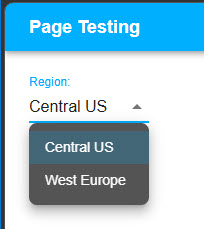
How it looks after upgrading to 2026.1.6. Notice you can't see anything in the text box.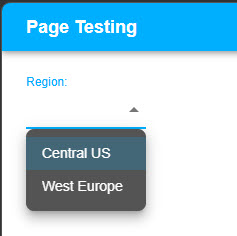
How it looks if I change MuiListItemText to a different color, like black.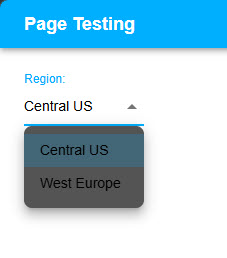
How it looks if I remove theming.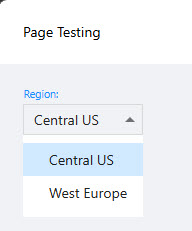
Code for the New-UDSelect
$theme = Import-PowerShellDataFile '<Full path to theme file>.psd1'

New-UDDashboard -Title 'Page Testing' -Content {
    New-UDSelect -Id 'select_region' -Label 'Region:' -Option {
        New-UDSelectOption -Name 'Central US' -Value 'centralus'
        New-UDSelectOption -Name 'West Europe' -Value 'westeurope'
    } -DefaultValue 'centralus'
} -Theme $theme
Code in my theme.psd1 file, from the overrides section.
overrides = @{
    MuiListItemText = @{
        primary = @{
          color = '#ffffff'
          fontSize = 14
          fontWeight = 500
		}
	}# MuiListItemText
}# Overrides
Unfortunately, I learned what I needed to know about Mui 5 years ago; just enough to get this theme created. I haven't worked with it since, so I can't take the troubleshooting any further.
Seems this may be an issue with PSU, where the MuiListItemText is now being applied to both locations?
For now I can change MuiListItemText color to black, as a work around. Would this be fixed in a future PSU update, or do I need to somehow put something else in my theme file, in my Mui overrides, to have the text be different colors between the dropdown selections and the text box text?
Thanks,
Rob
Black color - work around.jpg
After Update.jpg
Theme Removed.jpg
Normal.jpg
All Comments (5)
@djmentat Can you share the whole theme? I'm using your snippet but I see this. It makes sense to me because setting the text to white is setting it white in the select portion as well as the drop down. 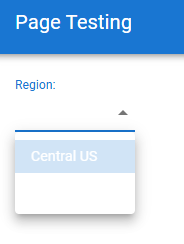
Setting to black looks like this. Though, I think this is just the default setting. 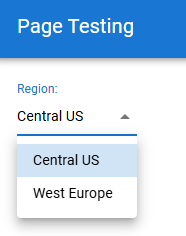
Adam Driscoll
PowerShell Expert and Developer at Devolutions
0ecd0275-7ab0-40e8-a241-8c1e714e9b2d.png
f8961c41-2424-483a-bb46-7318d0968fb3.png
@djmentat Can you share the whole theme? I'm using your snippet but I see this. It makes sense to me because setting the text to white is setting it white in the select portion as well as the drop down.
Setting to black looks like this. Though, I think this is just the default setting.
@Adam Driscoll
Hey Adam,
I've sent the full theme file to you via DM.
Thanks for looking into this, and let me know if you need anything else.
BR,
Rob
@djmentat Thanks!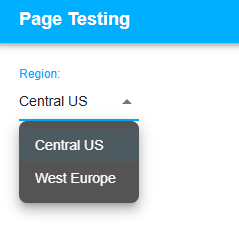
I was able to just comment out the MuiListItemText color all together and it seems to work. It's white in the drop down and black in the Select.
    MuiListItemText = @{
        primary = @{
          fontSize = 14
          fontWeight = 500
			}
		}# MuiListItemText
Adam Driscoll
PowerShell Expert and Developer at Devolutions
59ba287f-017a-4965-a8ed-ab1ee6830e28.png
@djmentat Thanks!
I was able to just comment out the MuiListItemText color all together and it seems to work. It's white in the drop down and black in the Select.
MuiListItemText = @{
primary = @{
fontSize = 14
fontWeight = 500
}
}# MuiListItemText
@Adam Driscoll
Hey Adam,
I was getting excited. I applied the change, saw the same thing as in your screenshot, and was thinking Yes! However, I found other issues with doing this, and my Yes changed to Nooooo...LOL. The test page I'm using here is a single page app, but all my real apps are multi page apps, which use side navigation. Once I backed out to the real apps I noticed the text in the side nav and the text in the username drop-down that has options for Admin Console, Restart, and Sign Out had all been impacted. All of these, and probably more are using MuiListItemText, so if I change it to black or remove the color, it has widespread impact.
How they look in 5.5.5.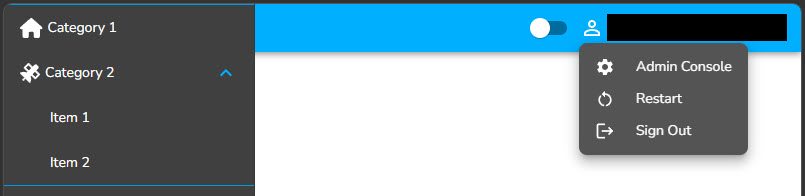
How they look in 2026.1.6, after either changing the MuiListItemText color to black or removing the color.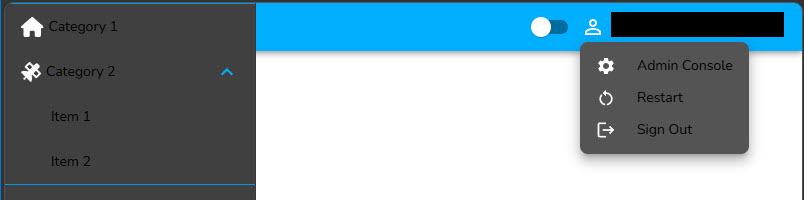
I started inspecting the browser elements, and I'm pretty sure I figured out the issue. In 5.5.5 the select text value is controlled by MuiSelect. When I define MuiListItemText as white and do not set anything for MuiSelect, we get white everywhere we need it and the select text value stays black (default). To test this in 5.5.5 I set MuiSelect-Select color to Red. The select text value updated to Red and everything that was white stayed white.
What I added to my theme in 5.5.5 to change only the color of the select text value, while having MuiListItemText as white.
    MuiListItemText = @{
        primary = @{
          color = '#ffffff'
          fontSize = 14
          fontWeight = 500
			}
		}# MuiListItemText

    MuiSelect = @{
        select = @{
          color = '#e41414 '
          fontSize = 14
          fontWeight = 500
			}
		}# MuiSelect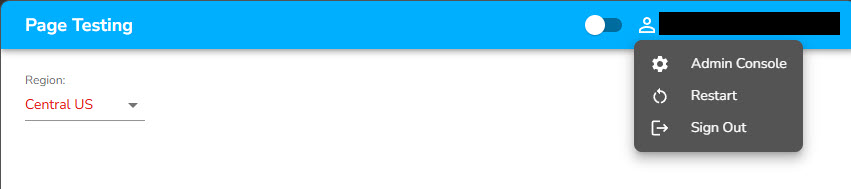
When I made this change in 2026.1.6, nothing changed b/c the select text value is now controlled by MuiListItemText instead of MuiSelect.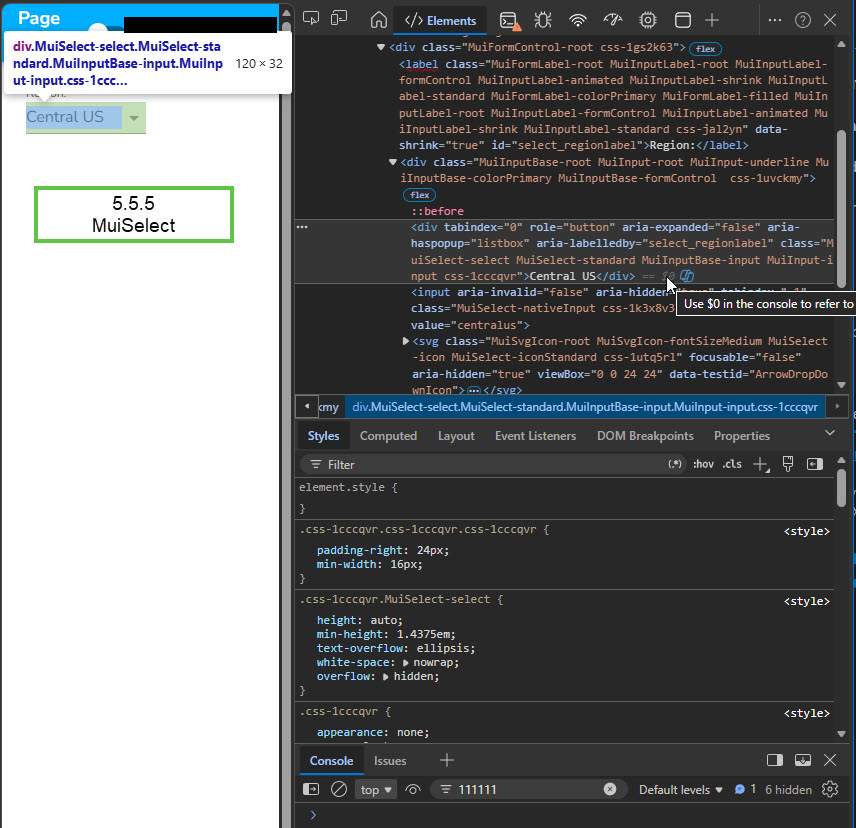
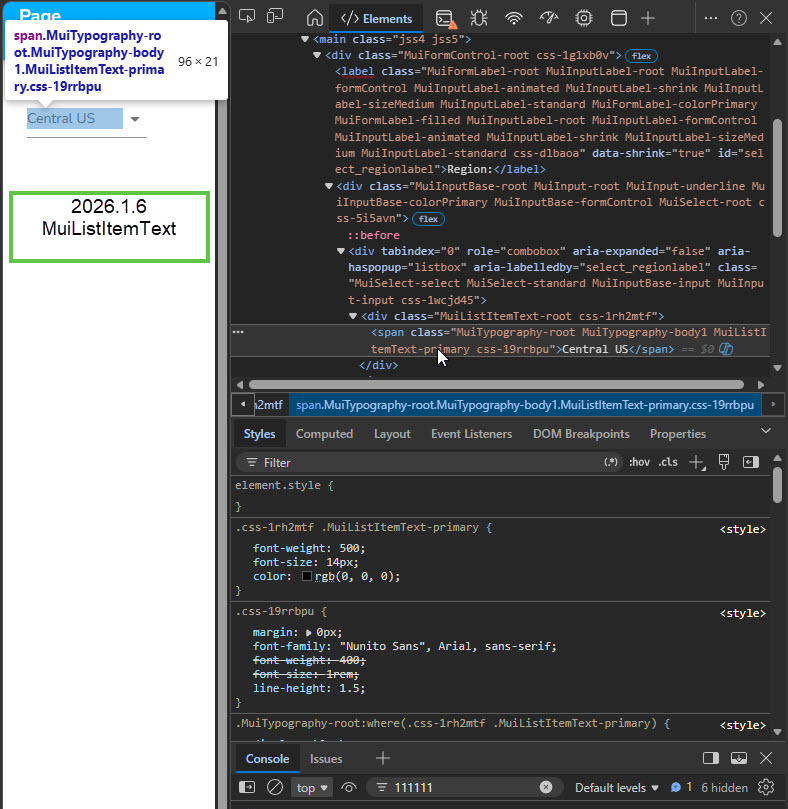
It seems that 5.5.5, and previous versions since it's been working for 5 years, have the select text value as MuiSelect. The new version of 2026.1.6 changed this and have the select text value sharing MuiListItemText. Since it's now sharing MuiListItemText it's no longer visible when MuiListItemText is set to white and I can't change that color without widespread impact. Seems this may not be something that can be fixed or worked around using Mui overrides?
Thanks,
Rob
5_5_5.jpg
2026.jpg
Select as Red.jpg
Updated.jpg
Original.jpg
@djmentat Thanks for the additional info. I knew it couldn't be that easy ;) I will see if I can figure out what changed between these two versions. I'm unaware of any major framework changes so it's likely a small change to the select control. Either way, I should be able to provide a MUI theme override to achieve what you're looking for.
Adam Driscoll
PowerShell Expert and Developer at Devolutions