Improve DVLS update installation workflow
3 votes

Hi!
When installing DVLS updates there's two small things I noticed
1. When the update is installed and the scheduler service is stopped, admin users immediately receive alert notifocations (emails) with "Scheduler - Offline" and "Scheduler - No standby scheduler available". Could you add a delay to these alerts? Usually the scheduler will be up again within a few minutes during a update or a system reboot. I think the alert should only be triggered if the scheduler is unavailable for an extended period, like an hour for example.
2. I think the order of operations during the update installation process is wrong: Right now the application is stopped before the files are downloaded and extracted. Depending on bandwidth this could take some time. The files could be downloaded and extracted before the application is stopped, to reduce downtime. This would also improve error handling when the download fails for some reason.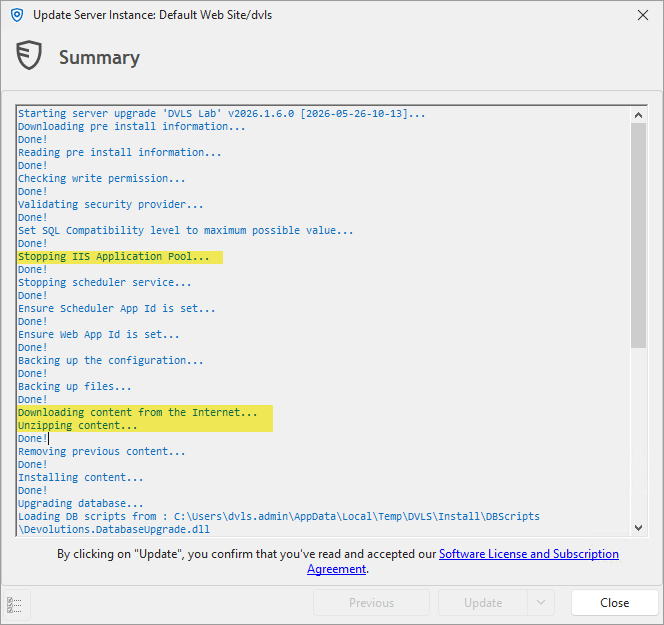
Thank you!
Best regards,
Daniel
6f05acf7-3c86-4e12-a8b7-c24737828015.png
All Comments (2)
Hi,
Yes, both of these requests make sense and are valid improvements.
We should not be sending notifications during the update process, and reducing the downtime associated with updates is also a good idea that could improve the overall experience.
I'll create a ticket to track these enhancements and will update this thread once changes are available.
Thank you
Marc-Andre Bouchard
Hi!
I'm currently troubleshooting a scheduler issue and had to restart and re-install the scheduler service a few times, and every admin got spammed with "Scheduler - Offline" emails.
Just wanted to know if this request is still in the pipeline :)
Also I was wondering if there's a way to globally (I know it can be done by each user for themself) disable those messages temporarily before an update or other work that requires a scheduler service restart?
Thanks!